
DOS in Virtualbox

darkhorse

New member
Power User
Local time
11:49 AM
Messages
514
Location
Denmark
Hi.
I have installed Virtualbox in my Windows 7 32bit Ultimate system.


DOS works here.

I have shared a folder on my w7u machine.

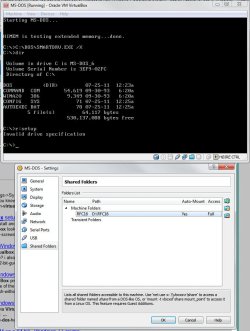
How do I start up a dos program in that folder, or better to say, how do I get the folder visible in DOS, to be able to run it ?.

Attached shows the set up here
 

Attachments
  • dos.jpg
    dos.jpg
    79 KB · Views: 361

My Computer

Computer type
PC/Desktop
Computer Manufacturer/Model Number
Homemade
OS
Windows 7 Ultimate
CPU
E7300
Motherboard
ASUS P5Q DeLuxe
Memory
4g
Graphics Card(s)
NVIDIA GeForce 7300 LE
Sound Card
N/A
Monitor(s) Displays
Acer
Screen Resolution
1600x1200
Hard Drives
Samsung HD503HI ATA Device
PSU
Seasonic
Case
ATX
Cooling
FAN
Keyboard
Logitech
Mouse
HP
Internet Speed
20/2
Antivirus
MSE
Browser
IE9, Chrome, Firefox
Dos creates a virtual drive, so first you want to mount your actual drive

For example: (your folder will most definitely be in a different location)

MOUNT C C:\Users\jonnie23\Desktop\shared_folder
The directory "C:\Users\jonnie23\Desktop\shared_folder" is the only part that will be different then yours.
From there you should see the folder directory and the list of programs you can run
 
Last edited:

My Computer

Computer Manufacturer/Model Number
Custom Rig
OS
Primary HDD boot Win 7 Ultimate x64, on partition Ubuntu 11.04
CPU
iNTEL Core i7 2600K LGA 1155 @3.8GHz Unlocked
Motherboard
Gigabyte GA-Z68MA-D2H-B3 LGA 1155 Z68 mATX Intel Motherboard
Memory
4 x 4GB Patriot High Latency RAM Modules
Graphics Card(s)
NVIDIA GeForce GTX 550Ti Superclocked 1024MB GDDR5 FTW Ed.
Sound Card
Intergrated RealTek HD
Monitor(s) Displays
25 in LCD TV. I use it as display monitor :D
Screen Resolution
1024x768
Hard Drives
Western Digital 2 TB Sata 3.0 @ 5600 RPM
PSU
Cooler Master GX Series 750W ATX Power Supply
Case
Logisis Mini mATx Tower. Red front w/ contrasting blue LEDs
Cooling
1 side fan, 1 rear :P
Keyboard
PS2 Wired Compaq keyboard ^^;
Mouse
Older model Wireless Kensington
Internet Speed
12MBPS
Other Info
Intel Virtualization Technology; Intel Turbo Boost 2.0 Technology; Enhanced Intel SpeedStep Technology; Execute Disable Bit; Intel 64 Architecture; Intel Hyper-Threading Technology; Intel Smart Cache, Intel HD Graphics 3000; Unlocked;
Thanks for the reply. It tells, that MOUNT is not a valid command
 

My Computer

Computer type
PC/Desktop
Computer Manufacturer/Model Number
Homemade
OS
Windows 7 Ultimate
CPU
E7300
Motherboard
ASUS P5Q DeLuxe
Memory
4g
Graphics Card(s)
NVIDIA GeForce 7300 LE
Sound Card
N/A
Monitor(s) Displays
Acer
Screen Resolution
1600x1200
Hard Drives
Samsung HD503HI ATA Device
PSU
Seasonic
Case
ATX
Cooling
FAN
Keyboard
Logitech
Mouse
HP
Internet Speed
20/2
Antivirus
MSE
Browser
IE9, Chrome, Firefox
What the Hell? I have version 0.72, it shouldn't be much different than the latest version.

Wai t a minute. Duh, I'm friggin stupid. Sorry about that ^^;
I thought you were using DOSBox. The name is so similar
I personally use VirtualPC and know of some people out there who use DOSBox

Sorry for the confusion

Edit: It seems that Virtualbox emulates DOS to a far better degree, down to the actual booting sequence.
I'm also having trouble accessing shared folders

Hmm, have you tried accessing it through the network (TCP/IP) or tried shared network drive.
This is the first lead http://www.bytetips.com/dos-commands-tcpip-netbios/ (Agh!! the ads!)
I'm actually not familiar with netbios but I know that all PCs have the TCP protocol (IPv4 or IPv6 on some machines) enabled and its over the network

EDIT (and also):
I tried tweaking some settings,
Start > Searchbox "view network connections"
And then enabling VirtualBox Bridged Network Driver
I get stuck with it because on the dropdown menu I can't choose anything except "Not selected" which is of course blank

Try using this as reference its more detailed
http://www.sysprobs.com/virtualbox-network-host-windows-7
 
Last edited:

My Computer

Computer Manufacturer/Model Number
Custom Rig
OS
Primary HDD boot Win 7 Ultimate x64, on partition Ubuntu 11.04
CPU
iNTEL Core i7 2600K LGA 1155 @3.8GHz Unlocked
Motherboard
Gigabyte GA-Z68MA-D2H-B3 LGA 1155 Z68 mATX Intel Motherboard
Memory
4 x 4GB Patriot High Latency RAM Modules
Graphics Card(s)
NVIDIA GeForce GTX 550Ti Superclocked 1024MB GDDR5 FTW Ed.
Sound Card
Intergrated RealTek HD
Monitor(s) Displays
25 in LCD TV. I use it as display monitor :D
Screen Resolution
1024x768
Hard Drives
Western Digital 2 TB Sata 3.0 @ 5600 RPM
PSU
Cooler Master GX Series 750W ATX Power Supply
Case
Logisis Mini mATx Tower. Red front w/ contrasting blue LEDs
Cooling
1 side fan, 1 rear :P
Keyboard
PS2 Wired Compaq keyboard ^^;
Mouse
Older model Wireless Kensington
Internet Speed
12MBPS
Other Info
Intel Virtualization Technology; Intel Turbo Boost 2.0 Technology; Enhanced Intel SpeedStep Technology; Execute Disable Bit; Intel 64 Architecture; Intel Hyper-Threading Technology; Intel Smart Cache, Intel HD Graphics 3000; Unlocked;
Hi guys i have been trying to get dos to run on v box but i cant find where you get ms dos.

I would prefer dos version 7 or 6 but will settle for 5

I believe that ms dos is freeware now and ok to download so would you know where i could get it?

Thanks
 

My Computer

Computer type
PC/Desktop
Computer Manufacturer/Model Number
self build
OS
7 home premium 64 bit
CPU
AMD Phenom II X6 1055T
Motherboard
Asus M4A785TD-M EVO
Memory
DDR3 1333 6144 MBytes each modual 2048 mb
Graphics Card(s)
Power Color ATI R9 270x bluescreen edition
Sound Card
s/pdif part of my motherboard
Monitor(s) Displays
It is a 42" lcd tv :D
Screen Resolution
1920 X 1080
Hard Drives
Samsung 120gb SSD (EVO 840)
Hitachi 500gb 3gb\s sata hard drive, slow boring but gets the job done
PSU
Orion 585w psu Model# HP585D (updated to EVGA 600W)
Case
A shoebox
Cooling
Box fan....
Keyboard
I telepathically convay what I want said.
Mouse
Cat
Internet Speed
Loading...
Antivirus
A facial mask
Browser
Firefail, Internet Exploder
Other Info
I love my gaming rig, FreeCell and Solitaire never looked so good.
What the Hell? I have version 0.72, it shouldn't be much different than the latest version.

Wai t a minute. Duh, I'm friggin stupid. Sorry about that ^^;
I thought you were using DOSBox. The name is so similar
I personally use VirtualPC and know of some people out there who use DOSBox

Sorry for the confusion

Edit: It seems that Virtualbox emulates DOS to a far better degree, down to the actual booting sequence.
I'm also having trouble accessing shared folders

Hmm, have you tried accessing it through the network (TCP/IP) or tried shared network drive.
This is the first lead DOS commands TCP/IP & NetBIOS (Agh!! the ads!)
I'm actually not familiar with netbios but I know that all PCs have the TCP protocol (IPv4 or IPv6 on some machines) enabled and its over the network

EDIT (and also):
I tried tweaking some settings,
Start > Searchbox "view network connections"
And then enabling VirtualBox Bridged Network Driver
I get stuck with it because on the dropdown menu I can't choose anything except "Not selected" which is of course blank

Try using this as reference its more detailed
VirtualBox Network with Host Windows 7

Actually, for most games dosbox is better. Keep in mind that Dosbox is a full PC emulator with builtin DOS while virtualbox is a virtual machine. Among other things, Virtualbox lacks good sound card support in DOS (no soundblaster, no adlib, no GUS, no disney sound source), will likely not work with games that use dirty tricks like 32 bit real mode (which relies on a bug in the x86 CPU to work), and does not let you control how fast it runs so many games will either be too fast to be playable or even crash. Oh, and it will not let you configure EMS and XMS memory separately which some games need.
 

My Computer

OS
Windows 7 Ultimate x32
Back
Top