
DOS Screen on startup

rsmith0399

New member
Local time
7:00 PM
Messages
3
Location
Edmond, OK
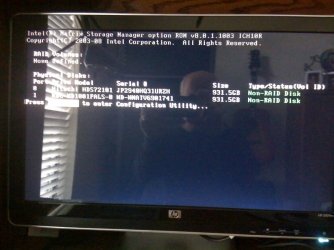
I added a second hard drive to my system this week. Now when I boot I get a dos screen for a couple of seconds that displays a Storage Manager message. It discplay information about my old drive and my new drive and says they are both non-Raid disks.

After the display, everything starts and runs as it should. This is an HPE-180t running Windows 7 64 bit.

Thanks!
 

Attachments
  • photo.jpg
    photo.jpg
    56.8 KB · Views: 9

My Computer

OS
windows 7
so, what is your question?

No, you can't turn it off to my knowledge, nor do you want to as you may want to get to that screen if you ever decide to use raid.

it is part of the Motherboard and BIOS. Your Mobo has built-in RAID controller.

You can ignore it.
 

My Computer

Computer Manufacturer/Model Number
Self Built
OS
Win 7 Ultimate 32bit
CPU
C2D E6600 2.4Ghz
Motherboard
Intel D965WH
Memory
4G Kingston KHX5400D2
Graphics Card(s)
EVGA GTX 570 HD SC (012-P3-1573-KR)
Sound Card
On-Board
Monitor(s) Displays
Samsung 226BW
Screen Resolution
1680 x 1050
Hard Drives
2 x 250 Seagate Barracuda
2 x 500 Seagate Barracuda (Raid1)
PSU
Corsair TX750W
Case
In-Win C589
Cooling
Stock Intel Cooling
Back
Top