
DotNET GUI Distorted (text and graphics)

Apoco

New member
Local time
1:09 AM
Messages
3
For around three weeks now I have had issues with all dotNET applications. I have uninstalled - reinstalled. I have run repair. I have uninstalled - restarted - reinstalled - restarted. I have uninstalled - run the dotnet cleanup utility provided by Microsoft (about 30 times at once), restarted - reinstalled - restarted. The error still exists.

At this point, I am at a loss. I have tried googling about 30 different variations of "dotnet graphic distortion" and have not found anything helpful. You guys are my last hope before I resort to reformating :\

I am using Windows 7 x64, all updates installed.
 

Attachments
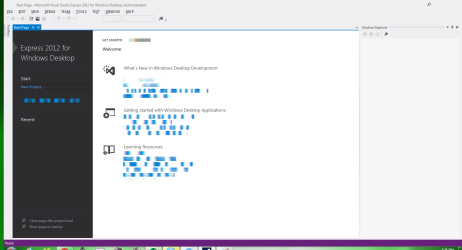
  • dotnetissue.png
    dotnetissue.png
    34.9 KB · Views: 20

My Computer

OS
Windows 7 x64
Welcome to Seven Forums Apoco. You tried this .NET Framework cleanup tool, correct?

Updated versions of .NET Framework cleanup and verification tools that work with the .NET Framework 4 - Aaron Stebner's WebLog - Site Home - MSDN Blogs

Do you have System Restore Point from before this problem began?

http://www.sevenforums.com/tutorials/700-system-restore.html

That may be the easiest fix. If not, it would be worthwhile to run the System File Checker

http://www.sevenforums.com/tutorials/1538-sfc-scannow-command-system-file-checker.html

A Guy
 

My Computer

Computer type
PC/Desktop
OS
Windows 10 Home x64
CPU
INTEL Core i5-750 Quad-Core 3.37GHz
Motherboard
ASUS P7P55D
Memory
HyperX Fury Black Series 8GB (2 x 4GB) 1866Mhz
Graphics Card(s)
EVGA GeForce GTX 750 Superclocked 1GB 128-Bit GDDR5
Monitor(s) Displays
LG 32MA68HY 32" IPS
Screen Resolution
1920 x 1080
Hard Drives
Samsung 840 Evo 120GB, SEAGATE 500GB Barracuda® 7200.12, SATA 3 Gb/s, 7200 RPM, 16MB cache
PSU
ANTEC TruePower New TP-550, 80 PLUS, 550W
Case
ANTEC Three Hundred Illusion
Cooling
COOLER MASTER Hyper 212 Plus, 4 x 120mm 1 x 140mm Noctua's
Internet Speed
85 + Mbps
Antivirus
Avast
Browser
Vivaldi
Yes - that is the one I used. I do not have a valid system restore. Here are the sfc and verify logs. I greatly appreciate your help.
 

Attachments

My Computer

OS
Windows 7 x64
I wouldn't know how to interpret the verify text I'm afraid. And if the SFC found errors that could not be fixed? Then step three for creating the details only text would be better. Did SFC find errors it could not correct? A Guy
 

My Computer

Computer type
PC/Desktop
OS
Windows 10 Home x64
CPU
INTEL Core i5-750 Quad-Core 3.37GHz
Motherboard
ASUS P7P55D
Memory
HyperX Fury Black Series 8GB (2 x 4GB) 1866Mhz
Graphics Card(s)
EVGA GeForce GTX 750 Superclocked 1GB 128-Bit GDDR5
Monitor(s) Displays
LG 32MA68HY 32" IPS
Screen Resolution
1920 x 1080
Hard Drives
Samsung 840 Evo 120GB, SEAGATE 500GB Barracuda® 7200.12, SATA 3 Gb/s, 7200 RPM, 16MB cache
PSU
ANTEC TruePower New TP-550, 80 PLUS, 550W
Case
ANTEC Three Hundred Illusion
Cooling
COOLER MASTER Hyper 212 Plus, 4 x 120mm 1 x 140mm Noctua's
Internet Speed
85 + Mbps
Antivirus
Avast
Browser
Vivaldi
Yes it found errors that could not be fixed. Please note I am using a custom version of Win7 Pro - from Rocker's Team. When I originally ran the scan files - it 'repaired' my custom login screen.
 
Last edited:

My Computer

OS
Windows 7 x64
Back
Top