
Dotted Border Help

DQScott95

New member
Local time
12:37 AM
Messages
46
i am really annoyed with this and i want to know how to remove the annoying dotted border that appears around desktop icons sometimes i cant seem to find a way to get rid of it
 

My Computer

Computer Manufacturer/Model Number
Acer Aspire 5738Z-4333
OS
Windows 7 Ultimate x64
CPU
Intel Pentium T4400 @ 2.20GHz
Motherboard
Acer JV50 (U2E1)
Memory
4.0GB Dual-Channel DDR3 @ 398MHz
Graphics Card(s)
Mobile Mobile Intel(R) 4 Series Express Chipset Family
Sound Card
Intel(R)/Realtek High Definition Audio HDMI
Screen Resolution
1366x768
Hard Drives
488GB Western Digital WDC WD5000BEVT-22ZAT0 (IDE)
Mouse
Synaptics PS/2 Port TouchPad/ HP lasersmart optical mouse
Other Info
Dual booting with Windows 7 Ultimate & Ubuntu 10.04
Click on the Desktop, hit Tab.
 

My Computer

Computer type
PC/Desktop
Computer Manufacturer/Model Number
Alienware Aurora ALX R4
OS
Windows 10 Pro (x64)
CPU
Intel Core i7-3930K (3.2GHz - 4.5GHz)
Motherboard
Alienware Aurora-R4 x79
Memory
4x Samsung 4GB PC3-12800 DDR3 (16GB 1600MHz)
Graphics Card(s)
Nvidia Geforce GTX 690
Sound Card
SteelSeries Siberia Elite
Monitor(s) Displays
Dell UltraSharp U3011
Screen Resolution
2560x1600
Hard Drives
Samsung 850 Pro 256 GB, Seagate 1TB Desktop Hybrid HDD, 2x Western Digital 4TB Green HDD
PSU
875W Some Dell PSU <.<
Case
Alienware Aurora ALX
Cooling
Custom Liquid Cooling (EK CPU & GPU blocks) dual EK 480RAD
Keyboard
Logitech G710+ Mechanical
Mouse
Logitech G700s
Internet Speed
Verizon Fios (50 mbps average)
Other Info
Server: Intel NUC D54250WYK: i5-4250U, 16GB, 256 GB mSATA, Windows Server 2012 R2
i am really annoyed with this and i want to know how to remove the annoying dotted border that appears around desktop icons sometimes i cant seem to find a way to get rid of it

Can you take and post a screenshot showing this dotted border? I just want to confirm which it is, because the "border" is one of 2 things:
  1. It is the keyboard indicator, and shows on which icon any keyboard operations will be executed, such as pressing the <ENTER> or <CONTEXT_MENU> keys.
  2. You have set your desktop to disply Large Icons, and the program file for an icon that shows the border does not have an icon larger than 32x32 pixels, and Windows is just highlighting this so that you don't get confused as to why there is such a large "empty space" on the sides of the icon compared to others.
 

My Computer

Computer type
PC/Desktop
Computer Manufacturer/Model Number
Virtual Machine
OS
Windows 7 Professional 32-bit SP1
CPU
AMD A4/A6
Motherboard
Intel Corporation 440BX Desktop Reference Platform
Memory
3.00GB EDO
Graphics Card(s)
VMware SVGA 3D
Sound Card
High Definition Audio Device
Monitor(s) Displays
Generic Non-PnP Monitor on VMware SVGA 3D
Screen Resolution
1440x900
Hard Drives
1 x 60GB VMware Virtual SATA Hard Drive ATA Device
Antivirus
Kaspersky Total Security

My Computer

Computer type
Laptop
Computer Manufacturer/Model Number
HP EliteBook 8530w Mobile Workstation
OS
Windows 7 Ultimate x64 (XP, 98SE, 95, 3.11, DOS 7.10 on VM) + Ubuntu 10.04 LTS Lucid Lynx
CPU
Intel Core 2 Duo Processor P8600 (2.40 GHz, 3 MB L2 cache)
Motherboard
Mobile Intel PM45 Express Chipset ICH9M-Enhanced
Memory
4GB 800 MHz DDR2 SDRAM
Graphics Card(s)
ATI Mobility FireGL V5700 with 256 MB
Sound Card
SoundMAX Integrated Digital HD Audio
Monitor(s) Displays
15.4-inch WXGA anti-glare (1280 x 800 resolution)
Screen Resolution
1280 x 800
Hard Drives
500GB + 1TB
Mouse
Synaptics PS/2 Port Touchpad, USB Mouse
Internet Speed
4 Mbps
Antivirus
MSE
Browser
Firefox, Chrome, IE
Other Info
Authentec AES2810 Fingerprint Reader
Update video driver?
 

My Computer

Computer Manufacturer/Model Number
Home Grown
OS
Windows 7 Ultimate (64)
CPU
i7-2600K
Motherboard
Asus P8P67-M Pro
Memory
G.SKILL Ripjaws X Series 8GB (2 x 4GB)
Graphics Card(s)
ATI 5750
Sound Card
On-Board
Monitor(s) Displays
LG W2486L
Screen Resolution
1920X1080
Hard Drives
Intel X-25M 80 Gig SSD | Intel X-25M 160 Gig SSD | WD Black 500MB - External eSata
PSU
Zalman ZM770-XT 770 Watts
Case
Antec 180 mini
Cooling
Cooler Master V8
Internet Speed
15MB - Cable
Other Info
Sissy OC - 4.6 @ 1.3175 24/7 | 18' Idle - 55' Load

My Computer

Computer type
PC/Desktop
Computer Manufacturer/Model Number
Systems by SmartEyeball
OS
8 Pro x64
CPU
i7 3770K 4.6GHz
Motherboard
ASUS P8Z77 WS
Memory
16GB G.Skill Trident X 2666mhz
Graphics Card(s)
x2 EVGA 780 Ti Superclocked SLI
Sound Card
SB X-FI Surround 5.1 PRO USB / ATH-AD900 Headphones
Monitor(s) Displays
x3 Dell U2410 / 58" Samsung
Screen Resolution
5760*1200/ 1920*1200
Hard Drives
2x Intel 520 240GB (RAID 0) * 2x WD Caviar Blacks 2TB (RAID 0) * 2TB WD Caviar Black * Sony Optirac DVD
PSU
Silverstone Strider Evolution 1200W
Case
Thermaltake Level 10 GT Snow Edition
Cooling
Noctua NH-D14
Keyboard
Topre Realforce // Ducky Shine MX Black // Filco Ninja TKL
Mouse
Thermaltake Theron (Highly Recommended) + Razer Imperator
Antivirus
MSE
Browser
IE, FF, WaterFox
Other Info
GT Extreme V2 Sim Racing Cockpit + 40" LCD and K/B Mouse stand ▼
Fanatec CSR Elite Wheel + Clubsport V1 Pedals + CSR shifter/7G-H ▼Saitek X52 Pro ▼ TrackIR 5 Pro
Buttkicker v2 Seat Rumbler with Dedicated 5.1 and Sub Woofer attached to frame ▼
=
Bloody Big Grin
How do i take a screenshot so i can show you guys

It only happens sometimes but i have to restart my comuter to make it go away when it does happen
 

My Computer

Computer Manufacturer/Model Number
Acer Aspire 5738Z-4333
OS
Windows 7 Ultimate x64
CPU
Intel Pentium T4400 @ 2.20GHz
Motherboard
Acer JV50 (U2E1)
Memory
4.0GB Dual-Channel DDR3 @ 398MHz
Graphics Card(s)
Mobile Mobile Intel(R) 4 Series Express Chipset Family
Sound Card
Intel(R)/Realtek High Definition Audio HDMI
Screen Resolution
1366x768
Hard Drives
488GB Western Digital WDC WD5000BEVT-22ZAT0 (IDE)
Mouse
Synaptics PS/2 Port TouchPad/ HP lasersmart optical mouse
Other Info
Dual booting with Windows 7 Ultimate & Ubuntu 10.04
Start :ar: snippin tool

or Print scrn key & paste it in microsoft paint :)
 

My Computer

Computer type
PC/Desktop
Computer Manufacturer/Model Number
Built them myself, Science Experiments !
OS
Win7 Enterprise, Win7 x86 (Ult 7600), Win7 x64 Ult 7600, TechNet RTM on AMD x64 (2.8Ghz)
CPU
AMD fx8350 4ghz, AMD-32 2400mhz, AMD-64 3200mhz, AMDx64 2.8G
Motherboard
SIS 755, ECS-K8M890M-M (Ult 7600), GigaByte & others
Memory
2gb, 4gb on the Ult 7600, 4gb on Technet RTM, 32gb on FX8350
Graphics Card(s)
Draw my own Graphics, several nVidia cards
Sound Card
on motherboard
Monitor(s) Displays
19" flat scr, 28" I-Inc widescr,22" Emprex Widescr, 23" Acer
Screen Resolution
1280 x 1024, 1440 x 900, 1920 x 1080
Hard Drives
6 pata Ide HD's & 2 Sata HD's
added 80gb external on Ult 7600 computer,
numerous extra 1tb, 2TB, 3Tb SATA HD's
A collection of ext HD Docks w/ HDs
PSU
430w, 550w, 600w, 700, 800, etc
Case
All Generic Full Towers
Cooling
Open Air & a few fans, some w/ colored LEDs
Keyboard
Compaq & Dell recycled from GoodWill
Mouse
Made in China Optical Wired Mouse
Internet Speed
Fast Cable InterNet
Antivirus
AVG Free on 24 different Desktops, NO Problems!
Browser
IE 8 is preferred, but use FireFox sometimes
Other Info
Linksys Routers, switches, & Hubs
Too Many USB Flash Drives to count, Biggest is 64GB !
Eight computers in my home network.
Sixteen computers at my business network.
Linked via TeamViewer !
Lots of old used spare computer parts everywhere!
Ooooooh i forgot about the PRTSC button haha thank you next time it happens i will post a screenshot

Also this is totally unrelated to the topic but every once in awhile my screen will get all screwy its wierd any idea what thats about i cant take a screenshot cause when i do it shows that nothings wrong so i think it might be my actual screen
 
Last edited:

My Computer

Computer Manufacturer/Model Number
Acer Aspire 5738Z-4333
OS
Windows 7 Ultimate x64
CPU
Intel Pentium T4400 @ 2.20GHz
Motherboard
Acer JV50 (U2E1)
Memory
4.0GB Dual-Channel DDR3 @ 398MHz
Graphics Card(s)
Mobile Mobile Intel(R) 4 Series Express Chipset Family
Sound Card
Intel(R)/Realtek High Definition Audio HDMI
Screen Resolution
1366x768
Hard Drives
488GB Western Digital WDC WD5000BEVT-22ZAT0 (IDE)
Mouse
Synaptics PS/2 Port TouchPad/ HP lasersmart optical mouse
Other Info
Dual booting with Windows 7 Ultimate & Ubuntu 10.04
I dont speak frenc....Ok i got a pic how do i post it???
 

My Computer

Computer Manufacturer/Model Number
Acer Aspire 5738Z-4333
OS
Windows 7 Ultimate x64
CPU
Intel Pentium T4400 @ 2.20GHz
Motherboard
Acer JV50 (U2E1)
Memory
4.0GB Dual-Channel DDR3 @ 398MHz
Graphics Card(s)
Mobile Mobile Intel(R) 4 Series Express Chipset Family
Sound Card
Intel(R)/Realtek High Definition Audio HDMI
Screen Resolution
1366x768
Hard Drives
488GB Western Digital WDC WD5000BEVT-22ZAT0 (IDE)
Mouse
Synaptics PS/2 Port TouchPad/ HP lasersmart optical mouse
Other Info
Dual booting with Windows 7 Ultimate & Ubuntu 10.04

Attachments

  • Untitled.png
    Untitled.png
    402.5 KB · Views: 478

My Computer

Computer Manufacturer/Model Number
Acer Aspire 5738Z-4333
OS
Windows 7 Ultimate x64
CPU
Intel Pentium T4400 @ 2.20GHz
Motherboard
Acer JV50 (U2E1)
Memory
4.0GB Dual-Channel DDR3 @ 398MHz
Graphics Card(s)
Mobile Mobile Intel(R) 4 Series Express Chipset Family
Sound Card
Intel(R)/Realtek High Definition Audio HDMI
Screen Resolution
1366x768
Hard Drives
488GB Western Digital WDC WD5000BEVT-22ZAT0 (IDE)
Mouse
Synaptics PS/2 Port TouchPad/ HP lasersmart optical mouse
Other Info
Dual booting with Windows 7 Ultimate & Ubuntu 10.04

My Computer

Computer type
PC/Desktop
Computer Manufacturer/Model Number
Alienware Aurora ALX R4
OS
Windows 10 Pro (x64)
CPU
Intel Core i7-3930K (3.2GHz - 4.5GHz)
Motherboard
Alienware Aurora-R4 x79
Memory
4x Samsung 4GB PC3-12800 DDR3 (16GB 1600MHz)
Graphics Card(s)
Nvidia Geforce GTX 690
Sound Card
SteelSeries Siberia Elite
Monitor(s) Displays
Dell UltraSharp U3011
Screen Resolution
2560x1600
Hard Drives
Samsung 850 Pro 256 GB, Seagate 1TB Desktop Hybrid HDD, 2x Western Digital 4TB Green HDD
PSU
875W Some Dell PSU <.<
Case
Alienware Aurora ALX
Cooling
Custom Liquid Cooling (EK CPU & GPU blocks) dual EK 480RAD
Keyboard
Logitech G710+ Mechanical
Mouse
Logitech G700s
Internet Speed
Verizon Fios (50 mbps average)
Other Info
Server: Intel NUC D54250WYK: i5-4250U, 16GB, 256 GB mSATA, Windows Server 2012 R2

My Computer

Computer Manufacturer/Model Number
Acer Aspire 5738Z-4333
OS
Windows 7 Ultimate x64
CPU
Intel Pentium T4400 @ 2.20GHz
Motherboard
Acer JV50 (U2E1)
Memory
4.0GB Dual-Channel DDR3 @ 398MHz
Graphics Card(s)
Mobile Mobile Intel(R) 4 Series Express Chipset Family
Sound Card
Intel(R)/Realtek High Definition Audio HDMI
Screen Resolution
1366x768
Hard Drives
488GB Western Digital WDC WD5000BEVT-22ZAT0 (IDE)
Mouse
Synaptics PS/2 Port TouchPad/ HP lasersmart optical mouse
Other Info
Dual booting with Windows 7 Ultimate & Ubuntu 10.04
I think that it just shows the last icons that was selected,

what happens after you right click on the desktop & choose Refresh ?
 

My Computer

Computer type
PC/Desktop
Computer Manufacturer/Model Number
Built them myself, Science Experiments !
OS
Win7 Enterprise, Win7 x86 (Ult 7600), Win7 x64 Ult 7600, TechNet RTM on AMD x64 (2.8Ghz)
CPU
AMD fx8350 4ghz, AMD-32 2400mhz, AMD-64 3200mhz, AMDx64 2.8G
Motherboard
SIS 755, ECS-K8M890M-M (Ult 7600), GigaByte & others
Memory
2gb, 4gb on the Ult 7600, 4gb on Technet RTM, 32gb on FX8350
Graphics Card(s)
Draw my own Graphics, several nVidia cards
Sound Card
on motherboard
Monitor(s) Displays
19" flat scr, 28" I-Inc widescr,22" Emprex Widescr, 23" Acer
Screen Resolution
1280 x 1024, 1440 x 900, 1920 x 1080
Hard Drives
6 pata Ide HD's & 2 Sata HD's
added 80gb external on Ult 7600 computer,
numerous extra 1tb, 2TB, 3Tb SATA HD's
A collection of ext HD Docks w/ HDs
PSU
430w, 550w, 600w, 700, 800, etc
Case
All Generic Full Towers
Cooling
Open Air & a few fans, some w/ colored LEDs
Keyboard
Compaq & Dell recycled from GoodWill
Mouse
Made in China Optical Wired Mouse
Internet Speed
Fast Cable InterNet
Antivirus
AVG Free on 24 different Desktops, NO Problems!
Browser
IE 8 is preferred, but use FireFox sometimes
Other Info
Linksys Routers, switches, & Hubs
Too Many USB Flash Drives to count, Biggest is 64GB !
Eight computers in my home network.
Sixteen computers at my business network.
Linked via TeamViewer !
Lots of old used spare computer parts everywhere!
I think that it just shows the last icons that was selected,

what happens after you right click on the desktop & choose Refresh ?
He will get the same thing until he reboots. It's a bug in Win 7. It's suppose to be showing the translucent rectangle selection instead of the old dotted border. You can hit refresh for the translucent selection to temporarily show again but once the desktop gets focus again by mouse clicking the desktop background, the dotted border will be back.
 

My Computer

Computer Manufacturer/Model Number
Averatec 6130HS-20
OS
Windows 7 Professional 32-bit (6.1, Build 7600)
CPU
Intel(R) Pentium(R) 4 3.00 GHz HT
Memory
2.0 GB
Graphics Card(s)
ATI Mobility Radeon 9600 64MB
Sound Card
Realtek AC'97 Audio
Screen Resolution
1280 x 800
Hard Drives
Seagate 96023A 60GB 7200RPM -
Seagate FreeAgentDesktop 250GB
Cooling
20 Inch Box Fan
Mouse
Targus PAWM10 Wireless Optical Laptop Mouse

My Computer

Computer Manufacturer/Model Number
Acer Aspire 5738Z-4333
OS
Windows 7 Ultimate x64
CPU
Intel Pentium T4400 @ 2.20GHz
Motherboard
Acer JV50 (U2E1)
Memory
4.0GB Dual-Channel DDR3 @ 398MHz
Graphics Card(s)
Mobile Mobile Intel(R) 4 Series Express Chipset Family
Sound Card
Intel(R)/Realtek High Definition Audio HDMI
Screen Resolution
1366x768
Hard Drives
488GB Western Digital WDC WD5000BEVT-22ZAT0 (IDE)
Mouse
Synaptics PS/2 Port TouchPad/ HP lasersmart optical mouse
Other Info
Dual booting with Windows 7 Ultimate & Ubuntu 10.04
Nevermind its back OMG i need a perm solution to this
 

My Computer

Computer Manufacturer/Model Number
Acer Aspire 5738Z-4333
OS
Windows 7 Ultimate x64
CPU
Intel Pentium T4400 @ 2.20GHz
Motherboard
Acer JV50 (U2E1)
Memory
4.0GB Dual-Channel DDR3 @ 398MHz
Graphics Card(s)
Mobile Mobile Intel(R) 4 Series Express Chipset Family
Sound Card
Intel(R)/Realtek High Definition Audio HDMI
Screen Resolution
1366x768
Hard Drives
488GB Western Digital WDC WD5000BEVT-22ZAT0 (IDE)
Mouse
Synaptics PS/2 Port TouchPad/ HP lasersmart optical mouse
Other Info
Dual booting with Windows 7 Ultimate & Ubuntu 10.04
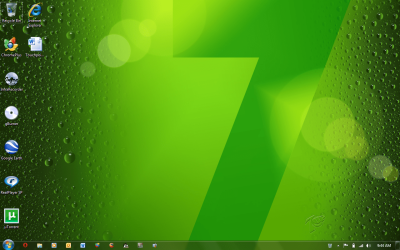
There is no way to disable the dotted border around icons. It is not a bug.
Its inbuilt and that's the way it is and its been there since Windows 95. Its just that people don't notice it much.
 

My Computer

Computer type
Laptop
Computer Manufacturer/Model Number
HP EliteBook 8530w Mobile Workstation
OS
Windows 7 Ultimate x64 (XP, 98SE, 95, 3.11, DOS 7.10 on VM) + Ubuntu 10.04 LTS Lucid Lynx
CPU
Intel Core 2 Duo Processor P8600 (2.40 GHz, 3 MB L2 cache)
Motherboard
Mobile Intel PM45 Express Chipset ICH9M-Enhanced
Memory
4GB 800 MHz DDR2 SDRAM
Graphics Card(s)
ATI Mobility FireGL V5700 with 256 MB
Sound Card
SoundMAX Integrated Digital HD Audio
Monitor(s) Displays
15.4-inch WXGA anti-glare (1280 x 800 resolution)
Screen Resolution
1280 x 800
Hard Drives
500GB + 1TB
Mouse
Synaptics PS/2 Port Touchpad, USB Mouse
Internet Speed
4 Mbps
Antivirus
MSE
Browser
Firefox, Chrome, IE
Other Info
Authentec AES2810 Fingerprint Reader
I know very well that its not a bug but i dont like it and i want it to go away
 

My Computer

Computer Manufacturer/Model Number
Acer Aspire 5738Z-4333
OS
Windows 7 Ultimate x64
CPU
Intel Pentium T4400 @ 2.20GHz
Motherboard
Acer JV50 (U2E1)
Memory
4.0GB Dual-Channel DDR3 @ 398MHz
Graphics Card(s)
Mobile Mobile Intel(R) 4 Series Express Chipset Family
Sound Card
Intel(R)/Realtek High Definition Audio HDMI
Screen Resolution
1366x768
Hard Drives
488GB Western Digital WDC WD5000BEVT-22ZAT0 (IDE)
Mouse
Synaptics PS/2 Port TouchPad/ HP lasersmart optical mouse
Other Info
Dual booting with Windows 7 Ultimate & Ubuntu 10.04
Back
Top