Dotted Border Help

Then I guess we'll all have to petition Microsoft to remove it :)
 

My Computer

Computer type
Laptop
Computer Manufacturer/Model Number
HP EliteBook 8530w Mobile Workstation
OS
Windows 7 Ultimate x64 (XP, 98SE, 95, 3.11, DOS 7.10 on VM) + Ubuntu 10.04 LTS Lucid Lynx
CPU
Intel Core 2 Duo Processor P8600 (2.40 GHz, 3 MB L2 cache)
Motherboard
Mobile Intel PM45 Express Chipset ICH9M-Enhanced
Memory
4GB 800 MHz DDR2 SDRAM
Graphics Card(s)
ATI Mobility FireGL V5700 with 256 MB
Sound Card
SoundMAX Integrated Digital HD Audio
Monitor(s) Displays
15.4-inch WXGA anti-glare (1280 x 800 resolution)
Screen Resolution
1280 x 800
Hard Drives
500GB + 1TB
Mouse
Synaptics PS/2 Port Touchpad, USB Mouse
Internet Speed
4 Mbps
Antivirus
MSE
Browser
Firefox, Chrome, IE
Other Info
Authentec AES2810 Fingerprint Reader
There is no way to disable the dotted border around icons. It is not a bug.
Sorry guys, I'm pretty sure this has been reported as a bug. In Win 7, it's suppose to be showing a translucent rectangular highlight of the icon, not a dotted border as in the days of 95, 98 etc. Something triggers it every now and then to revert back to the dotted border which is the bug. A reboot will get it back to the proper highlight until it happens again.
 

My Computer

Computer Manufacturer/Model Number
Averatec 6130HS-20
OS
Windows 7 Professional 32-bit (6.1, Build 7600)
CPU
Intel(R) Pentium(R) 4 3.00 GHz HT
Memory
2.0 GB
Graphics Card(s)
ATI Mobility Radeon 9600 64MB
Sound Card
Realtek AC'97 Audio
Screen Resolution
1280 x 800
Hard Drives
Seagate 96023A 60GB 7200RPM -
Seagate FreeAgentDesktop 250GB
Cooling
20 Inch Box Fan
Mouse
Targus PAWM10 Wireless Optical Laptop Mouse
Well i doubt its a bug and if it is i want them to release a patch to fix it
 

My Computer

Computer Manufacturer/Model Number
Acer Aspire 5738Z-4333
OS
Windows 7 Ultimate x64
CPU
Intel Pentium T4400 @ 2.20GHz
Motherboard
Acer JV50 (U2E1)
Memory
4.0GB Dual-Channel DDR3 @ 398MHz
Graphics Card(s)
Mobile Mobile Intel(R) 4 Series Express Chipset Family
Sound Card
Intel(R)/Realtek High Definition Audio HDMI
Screen Resolution
1366x768
Hard Drives
488GB Western Digital WDC WD5000BEVT-22ZAT0 (IDE)
Mouse
Synaptics PS/2 Port TouchPad/ HP lasersmart optical mouse
Other Info
Dual booting with Windows 7 Ultimate & Ubuntu 10.04
The solution is very simple. You go into "Control Panel", then "Ease of access centre" (or "Center" as Americans prefer to misspell it...) Anyway... Click on "Make the keyboard easier to use" and then UNTICK the option "Underline keyboard shortcuts and access keys". Yes I know what your thinking: "No THAT's not what I'm talking about..." And yes, it is... try it... Then refresh your desktop a couple of times with F5.

No more nasty dotted borders. Just the nice clean Aero style one.

And the rest of you... Windows 7 professionals?... Phffff.....
 

My Computer

OS
Windows 7

My Computer

Computer type
PC/Desktop
OS
Microsoft Windows 7 Home Premium 64-bit 7601 Multiprocessor Free Service Pack 1
CPU
Intel(R) Core(TM) i7-3770 CPU @ 3.40GHz
Motherboard
ASUSTeK COMPUTER INC. P8H77-M
Memory
8.00 GB
Graphics Card(s)
Intel(R) HD Graphics 4000
Sound Card
On Board
Monitor(s) Displays
Dell 24"
Screen Resolution
1920 x 1080
Hard Drives
(1) INTEL SSDSC2CT180A3 ATA Device (2) ST500DM002-1BD142 ATA Device (3) WDC WD3200AAKS-75L9A0 ATA Device (4) Generic- Compact Flash USB Device (5) Generic- MS/MS-Pro USB Device (6) Generic- SD/MMC USB Device (7) Generic- SM/xD-Picture USB
PSU
500w Corsair
Case
Cooler Master
Cooling
3 Fans
Keyboard
Logitech MK300
Mouse
Logitech WOM
Internet Speed
75Mb
Antivirus
Norton 360
Browser
Firefox, Opera, IE
Yes I was only kidding, I've needed this site more than once. But that WAS an easy one, lol. (and I did sign up JUST to help the guy).
 

My Computer

OS
Windows 7

My Computer

Computer Manufacturer/Model Number
Homebrew
OS
XP Pro SP3 X86 / Win7 Pro X86
CPU
Amd 64 x2 4200 (2.4ghz)
Motherboard
Asus M2N-MX SE Plus
Memory
Kingston DDR2 800 2gb
Graphics Card(s)
Nvidia GF-8400
Sound Card
Realtek on Motherboard
Monitor(s) Displays
Acer x-193bw
Screen Resolution
1440 x 900
Hard Drives
Western Digital 500g
PSU
350watt In-Win
Case
In-Win
Cooling
Air
Keyboard
yes
Mouse
yes
Internet Speed
5mpbs
Other Info
Also ASRock ION 330 as HTPC (on XP).
Acer Aspire as GP netbook (on XP).
Not on Windows 7 Aero theme they're not. They're replaced with the Aero style "clean", "lined" border. Not a Windows 3.1 dotted border, lol. It looks silly having the nice translucent filled box around an icon and then a dotted rectangle inside that as well. They have no place in Windows 7. They shouldn't be activated and they're not when Windows 7 is first installed. I don't know what activates these, probably pen tablet settings or messing around with the mouse or accessibility options. I only know about this because I work for Careers Advice as I.T Support and have set up computers for disabled users and noticed it was a useless ugly option. It's not even useful for disabled people.

Here's what your missing:
f_12c33ivd2m_6fed648.png


Looks a bit better than your box (don't you think?).
 

My Computer

OS
Windows 7
Not on Windows 7 Aero theme they're not. They're replaced with the Aero style "clean", "lined" border. Not a Windows 3.1 dotted border, lol.

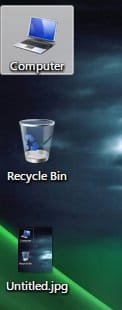
I agree and that is the total mis-understanding of this dotted border situation. Alot of users are using classic style or Vista Basic which I think do use the old style dotted box focus rectangle. When said users on non Aero theme see dotted box described as being a bug/problem, they naturally assume that the dotted box is a normal theme element and it isn't for someone using the Aero theme. Your screenshot shows the normal focus rectangle for the Aero theme. A certain combination of keystrokes/refreshes etc.. will revert an Aero theme temporarily back to the old dotted focus rectangle. I can easily reproduce this, I have a desktop context menu command of Select All. I can run Select All to select all the icons/folders on my desktop and after all are selected, I can click anywhere on the desktop and get the bugged dotted rectangle.

Untitled.jpg

Refresh, as some suggest, will not make it go away. Up until now, Re-boot is the only way. I said up until now because MoRbIdBoY's way of curing it may work, I haven't tried it.

And again, below is the normal focus rectangle for Aero theme users which is not a dotted border focus rectangle

Untitled2.jpg

I know that windows UI uses dotted focus rectangles in other areas but not on the Desktop running Aero theme.
 
Last edited:

My Computer

Computer Manufacturer/Model Number
Averatec 6130HS-20
OS
Windows 7 Professional 32-bit (6.1, Build 7600)
CPU
Intel(R) Pentium(R) 4 3.00 GHz HT
Memory
2.0 GB
Graphics Card(s)
ATI Mobility Radeon 9600 64MB
Sound Card
Realtek AC'97 Audio
Screen Resolution
1280 x 800
Hard Drives
Seagate 96023A 60GB 7200RPM -
Seagate FreeAgentDesktop 250GB
Cooling
20 Inch Box Fan
Mouse
Targus PAWM10 Wireless Optical Laptop Mouse
Not on Windows 7 Aero theme they're not. They're replaced with the Aero style "clean", "lined" border. Not a Windows 3.1 dotted border, lol.

I agree and that is the total mis-understanding of this dotted border situation. Alot of users are using classic style or Vista Basic which I think do use the old style dotted box focus rectangle. When said users on non Aero theme see dotted box described as being a bug/problem, they naturally assume that the dotted box is a normal theme element and it isn't for someone using the Aero theme. Your screenshot shows the normal focus rectangle for the Aero theme. A certain combination of keystrokes/refreshes etc.. will revert an Aero theme temporarily back to the old dotted focus rectangle. I can easily reproduce this, I have a desktop context menu command of Select All. I can run Select All to select all the icons/folders on my desktop and after all are selected, I can click anywhere on the desktop and get the bugged dotted rectangle.

View attachment 66860

Refresh, as some suggest, will not make it go away. Up until now, Re-boot is the only way. I said up until now because MoRbIdBoY's way of curing it may work, I haven't tried it.

And again, below is the normal focus rectangle for Aero theme users which is not a dotted border focus rectangle

View attachment 66861


Ok... I see where this is going left on us...

There are two focus mechanisms at work ... Mouse (the nice milky square) and Keyboard (the dreaded dotted rectangle).... Simply pointing your mouse at the icon gets you the square. HOWEVER... when you click on the open desktop and type anything on the keyboard it gains keyboard focus as well... now you get the dotted square.

This is NOT a bug... it is telling you what's going to happen if you hit Enter on your keyboard...This is visual feedback to the user and it is --like I said before-- a helpful and essential part of using your computer.

Really... you do realize that you can run windows without a mouse... don't you?
 

My Computer

Computer Manufacturer/Model Number
Homebrew
OS
XP Pro SP3 X86 / Win7 Pro X86
CPU
Amd 64 x2 4200 (2.4ghz)
Motherboard
Asus M2N-MX SE Plus
Memory
Kingston DDR2 800 2gb
Graphics Card(s)
Nvidia GF-8400
Sound Card
Realtek on Motherboard
Monitor(s) Displays
Acer x-193bw
Screen Resolution
1440 x 900
Hard Drives
Western Digital 500g
PSU
350watt In-Win
Case
In-Win
Cooling
Air
Keyboard
yes
Mouse
yes
Internet Speed
5mpbs
Other Info
Also ASRock ION 330 as HTPC (on XP).
Acer Aspire as GP netbook (on XP).
Ok... I see where this is going left on us...

There are two focus mechanisms at work ... Mouse (the nice milky square) and Keyboard (the dreaded dotted rectangle).... Simply pointing your mouse at the icon gets you the square. HOWEVER... when you click on the open desktop and type anything on the keyboard it gains keyboard focus as well... now you get the dotted square.

This is NOT a bug... it is telling you what's going to happen if you hit Enter on your keyboard...This is visual feedback to the user and it is --like I said before-- a helpful and essential part of using your computer.

Really... you do realize that you can run windows without a mouse... don't you?

Lol, here we go splitting mouse hairs. I can only speak for me and my setup,
1) I'm aware of the two focus features
2)Yes I know that windows can be run without a mouse

Here is what I'm saying is the bug, when the desktop once again gains focus(milky square) by mouse clicking, the keyboard should lose it's focus(dotted square). It doesn't at least not for me. The focus is now become the dotted square all the time even with the mouse. For me, it remains that way until re-boot.
 

My Computer

Computer Manufacturer/Model Number
Averatec 6130HS-20
OS
Windows 7 Professional 32-bit (6.1, Build 7600)
CPU
Intel(R) Pentium(R) 4 3.00 GHz HT
Memory
2.0 GB
Graphics Card(s)
ATI Mobility Radeon 9600 64MB
Sound Card
Realtek AC'97 Audio
Screen Resolution
1280 x 800
Hard Drives
Seagate 96023A 60GB 7200RPM -
Seagate FreeAgentDesktop 250GB
Cooling
20 Inch Box Fan
Mouse
Targus PAWM10 Wireless Optical Laptop Mouse
Ok... I see where this is going left on us...

There are two focus mechanisms at work ... Mouse (the nice milky square) and Keyboard (the dreaded dotted rectangle).... Simply pointing your mouse at the icon gets you the square. HOWEVER... when you click on the open desktop and type anything on the keyboard it gains keyboard focus as well... now you get the dotted square.

This is NOT a bug... it is telling you what's going to happen if you hit Enter on your keyboard...This is visual feedback to the user and it is --like I said before-- a helpful and essential part of using your computer.

Really... you do realize that you can run windows without a mouse... don't you?

Lol, here we go splitting mouse hairs. I can only speak for me and my setup,
1) I'm aware of the two focus features
2)Yes I know that windows can be run without a mouse

Here is what I'm saying is the bug, when the desktop once again gains focus(milky square) by mouse clicking, the keyboard should lose it's focus(dotted square). It doesn't at least not for me. The focus is now become the dotted square all the time even with the mouse. For me, it remains that way until re-boot.

On Mine it's until I select something else... for example when I click on the editor window to type here the dotted box on the desktop disappears... because keyboard focus is now on the caret.

The dotted box is telling you what the keyboard will do.
The milky square is telling you what the mouse will do.

I'm sorry but I just don't see how this is a problem... :confused:

Anyway... it's of no import to me...
I'll let you continue without further comments from the peanut gallery...
 

My Computer

Computer Manufacturer/Model Number
Homebrew
OS
XP Pro SP3 X86 / Win7 Pro X86
CPU
Amd 64 x2 4200 (2.4ghz)
Motherboard
Asus M2N-MX SE Plus
Memory
Kingston DDR2 800 2gb
Graphics Card(s)
Nvidia GF-8400
Sound Card
Realtek on Motherboard
Monitor(s) Displays
Acer x-193bw
Screen Resolution
1440 x 900
Hard Drives
Western Digital 500g
PSU
350watt In-Win
Case
In-Win
Cooling
Air
Keyboard
yes
Mouse
yes
Internet Speed
5mpbs
Other Info
Also ASRock ION 330 as HTPC (on XP).
Acer Aspire as GP netbook (on XP).
Ok... I see where this is going left on us...

There are two focus mechanisms at work ... Mouse (the nice milky square) and Keyboard (the dreaded dotted rectangle).... Simply pointing your mouse at the icon gets you the square. HOWEVER... when you click on the open desktop and type anything on the keyboard it gains keyboard focus as well... now you get the dotted square.

This is NOT a bug... it is telling you what's going to happen if you hit Enter on your keyboard...This is visual feedback to the user and it is --like I said before-- a helpful and essential part of using your computer.

Really... you do realize that you can run windows without a mouse... don't you?

Lol, here we go splitting mouse hairs. I can only speak for me and my setup,
1) I'm aware of the two focus features
2)Yes I know that windows can be run without a mouse

Here is what I'm saying is the bug, when the desktop once again gains focus(milky square) by mouse clicking, the keyboard should lose it's focus(dotted square). It doesn't at least not for me. The focus is now become the dotted square all the time even with the mouse. For me, it remains that way until re-boot.

On Mine it's until I select something else... for example when I click on the editor window to type here the dotted box on the desktop disappears... because keyboard focus is now on the caret.

The dotted box is telling you what the keyboard will do.
The milky square is telling you what the mouse will do.

I'm sorry but I just don't see how this is a problem... :confused:

Anyway... it's of no import to me...
I'll let you continue without further comments from the peanut gallery...

Didn't you read this?
Here is what I'm saying is the bug, when the desktop once again gains focus(milky square) by mouse clicking, the keyboard should lose it's focus(dotted square). It doesn't at least not for me. The focus is now become the dotted square all the time even with the mouse. For me, it remains that way until re-boot.

In other words, the mouse has re-gained focus therefore it should now be showing the milky square rectangle not the dotted box. The first time the keyboard gains focus by typing, the dotted box chimes in and rightly so. I have no problem with that, it's SOP. Next I begin doing the clicking thing on the desktop/opened folder, where ever with the mouse. The mouse now has control and the focus rectangle should be reverting back to the translucent rectangle(milky square) when mouse hovering any icon on the desktop. It does not do that and remains as a dotted box in the place of translucent rectangle. It will remain this way until a re-boot.
 

My Computer

Computer Manufacturer/Model Number
Averatec 6130HS-20
OS
Windows 7 Professional 32-bit (6.1, Build 7600)
CPU
Intel(R) Pentium(R) 4 3.00 GHz HT
Memory
2.0 GB
Graphics Card(s)
ATI Mobility Radeon 9600 64MB
Sound Card
Realtek AC'97 Audio
Screen Resolution
1280 x 800
Hard Drives
Seagate 96023A 60GB 7200RPM -
Seagate FreeAgentDesktop 250GB
Cooling
20 Inch Box Fan
Mouse
Targus PAWM10 Wireless Optical Laptop Mouse
Yes, but the Aero box works fine with the keyboard AND the mouse. I think what people are saying is:

A) Why am I stuck with it ALL of the time (I covered that with that setting. That will remove it. It will re-appear when you press a key as you mentioned - but then changing focus will, more importantly, make it DISAPPEAR!, lol).

B) Why does it appear at all. It's stupid. The keyboard is no different "selection" wise from the mouse. It serves ABSOLUTELY NO PURPOSE changing the style of the box. Why? just to tell the user they're using the keyboard instead of the mouse! Mmm... The Aero box works fine. It would work fine for the keyboard as well.

Personally, I think it's just an(other) really bad omission on Microsoft part. (Like the simple keyboard short-cut that's missing for the explorer Navigation pane!). Maybe they should get actual computer users to try Windows before its released, rather than my grandmother. They'd get better feedback.

Anyway, it was only ten years since their last decent O/S (which was XP), what do you expect in 10 years. (Although I must admit, I was surprised to actually LOOSE features from the old Windows XP Explorer like those important short-cut keys and independent folder views for every folder!) Funny, Apple don't seem to have these design flaws and they bang out a new operating system every six months.

I guess you pay your money, you makes yer choice.
 

My Computer

OS
Windows 7
Yes, but the Aero box works fine with the keyboard AND the mouse. I think what people are saying is:

A) Why am I stuck with it ALL of the time (I covered that with that setting. That will remove it. It will re-appear when you press a key as you mentioned - but then changing focus will, more importantly, make it DISAPPEAR!, lol).

B) Why does it appear at all. It's stupid. The keyboard is no different "selection" wise from the mouse. It serves ABSOLUTELY NO PURPOSE changing the style of the box. Why? just to tell the user they're using the keyboard instead of the mouse! Mmm... The Aero box works fine. It would work fine for the keyboard as well.

Personally, I think it's just an(other) really bad omission on Microsoft part. (Like the simple keyboard short-cut that's missing for the explorer Navigation pane!). Maybe they should get actual computer users to try Windows before its released, rather than my grandmother. They'd get better feedback.

Anyway, it was only ten years since their last decent O/S (which was XP), what do you expect in 10 years. (Although I must admit, I was surprised to actually LOOSE features from the old Windows XP Explorer like those important short-cut keys and independent folder views for every folder!) Funny, Apple don't seem to have these design flaws and they bang out a new operating system every six months.

I guess you pay your money, you makes yer choice.

Excellent post MoRbIdBoY. I hope people will pay attention to your part A), especially this part "DISAPPEAR!". I guess I didn't do decent job in trying to explain the Disappear part. For me, when it gets activated, it stays activated as a dotted box(mouse hover, mouse click, desktop click etc.) until the next re-boot. The translucent focus is gone and replaced with the dotted box until next re-boot. It appears that those who defend the dotted box have never had this to happen to them and I guess that it seems as though I'm making it up.
 

My Computer

Computer Manufacturer/Model Number
Averatec 6130HS-20
OS
Windows 7 Professional 32-bit (6.1, Build 7600)
CPU
Intel(R) Pentium(R) 4 3.00 GHz HT
Memory
2.0 GB
Graphics Card(s)
ATI Mobility Radeon 9600 64MB
Sound Card
Realtek AC'97 Audio
Screen Resolution
1280 x 800
Hard Drives
Seagate 96023A 60GB 7200RPM -
Seagate FreeAgentDesktop 250GB
Cooling
20 Inch Box Fan
Mouse
Targus PAWM10 Wireless Optical Laptop Mouse

My Computer

Computer type
PC/Desktop
Computer Manufacturer/Model Number
Self Built
OS
Win 10 Pro x64
CPU
Intel I5-2500K @3.3GHz
Motherboard
Asrock P67 Extreme4
Memory
16GB G.Skill Ripjaws X (4x4GB)
Graphics Card(s)
EVGA GeForce 750 Ti SC 2GB
Sound Card
ASUS Xonar DG 5.1 Channels 24-bit 96KHz PCI Interface Sound
Monitor(s) Displays
auria eq2367
Screen Resolution
1920 x 1080
Hard Drives
250GB Samsung 850 EVO SSD
1TB WD Blue
1TB Hitachi
PSU
SeaSonic X 650W 80 Plus Gold
Case
Corsair Obsidian 750D
Cooling
Corsair H60, Three 140mm case fans
Keyboard
Logitech Wireless Keyboard K520
Mouse
Logitech Wireless Mouse M310
Internet Speed
Wave Broadband ~ 100 dn 5 up
Antivirus
Windows Defender, Malwarebytes Premium
Browser
Edge, IE11, Chrome
Other Info
Laptop specs: HP g7-1365dx /
CPU: AMD A6-3420M APU with Radeon(tm) HD Graphics /
RAM: Crucial 8Gb (2x4Gb) /
SSD: Crucial M4-CT128M4SSD2 ATA Device/ FW 000F /
GFX: AMD Radeon HD 6520G /
OS: Windows 10 Pro x64
Haven't any of you guys searched Google for a fix?
The internet is a wonderful thing you know.
No, it is not a bug, it is inbuilt into the OS, but at the link derekimo kindly provided it explains how to get rid of it.
 

My Computer

Computer type
PC/Desktop
Computer Manufacturer/Model Number
The Dominator?
OS
Windows Seven Ultimate
CPU
AMD Piledriver FX 8320 @ 3.5GHz
Motherboard
ASUS M5A97 EVO R2.0
Memory
Crucial Ballistix 8GB 1600 MHz DDR3
Graphics Card(s)
ASUS GeForce GTX 970 Strix Edition @ 1.114 GHz
Sound Card
Integrated
Monitor(s) Displays
LG 23EA63V 23" IPS 1080p Monitor
Screen Resolution
1920x1080
Hard Drives
Samsung SSD 840 EVO 120 GB
1x WD GreenPower 500GB 7200RPM
1 External HDD 1TB
PSU
Corsair CX500
Case
Zalman Z9 Plus
Cooling
CPU - Corsair Hydro H80i, Case - 3x Aerocool Shark Edition
Keyboard
Xenta Backlit Keyboard (Not very good!)
Mouse
Logitech G400
Internet Speed
Download: 7 mb/s Upload: 0.76 mb/s
Antivirus
Microsoft Security Essentials
Browser
Google Chrome
Other Info
Overclockers UK Desk Pad 89 x 45 cm
1200x730x600mm Desk
Using Virtual Audio Cable to split stereo sound into Audio Technica ATH-M50 headphones and Logitech X-530 speakers.
Haven't any of you guys searched Google for a fix?
The internet is a wonderful thing you know.
No, it is not a bug, it is inbuilt into the OS, but at the link derekimo kindly provided it explains how to get rid of it.
Lol, Which is it, a bug or not a bug? You state that it's not a bug but the link you linked to that's linked to another link states this "or the way it appears and disappears randomly is simply a bug".

I think everyone's in agreement about the two different types of focus for icons on the desktop. What some of us are trying to get across to the unbelieving is that when the icon or desktop regains control by use of the mouse, the dotted border should revert back to the themed focus rectangle and it doesn't do this for some. It will remain a dotted border for the duration of one's session.
 

My Computer

Computer Manufacturer/Model Number
Averatec 6130HS-20
OS
Windows 7 Professional 32-bit (6.1, Build 7600)
CPU
Intel(R) Pentium(R) 4 3.00 GHz HT
Memory
2.0 GB
Graphics Card(s)
ATI Mobility Radeon 9600 64MB
Sound Card
Realtek AC'97 Audio
Screen Resolution
1280 x 800
Hard Drives
Seagate 96023A 60GB 7200RPM -
Seagate FreeAgentDesktop 250GB
Cooling
20 Inch Box Fan
Mouse
Targus PAWM10 Wireless Optical Laptop Mouse
I think everyone's in agreement about the two different types of focus for icons on the desktop. What some of us are trying to get across to the unbelieving is that when the icon or desktop regains control by use of the mouse, the dotted border should revert back to the themed focus rectangle and it doesn't do this for some. It will remain a dotted border for the duration of one's session.

Holy crap... I still can't believe this is an issue at all...

That dotted focus rectangle is telling you which icon has keyboard focus. If you press an arrow key it WILL turn back into the fancy white square you want on the next icon over. In order to know if you need the up down left or right arrow to move focus, you have to know where the focus IS in the first place and that is what the dotted square is telling you.

The white rectangle follows the mouse, not the keyboard. Set your system to single click launches and you will very rapidly find out how important this distinction is.

If you run a program or do anything that takes keyboard focus off the desktop the dotted square will vanish... this is not random, it is merely following the keyboard focus.

Not only is this not a bug... As I've said before this is user feedback and it's an important part of running windows.

That this debate has been going on for months is astunding... Given all the REAL problems on this Forum it strikes me as beyond trivial.
 

My Computer

Computer Manufacturer/Model Number
Homebrew
OS
XP Pro SP3 X86 / Win7 Pro X86
CPU
Amd 64 x2 4200 (2.4ghz)
Motherboard
Asus M2N-MX SE Plus
Memory
Kingston DDR2 800 2gb
Graphics Card(s)
Nvidia GF-8400
Sound Card
Realtek on Motherboard
Monitor(s) Displays
Acer x-193bw
Screen Resolution
1440 x 900
Hard Drives
Western Digital 500g
PSU
350watt In-Win
Case
In-Win
Cooling
Air
Keyboard
yes
Mouse
yes
Internet Speed
5mpbs
Other Info
Also ASRock ION 330 as HTPC (on XP).
Acer Aspire as GP netbook (on XP).
Haven't any of you guys searched Google for a fix?
The internet is a wonderful thing you know.
No, it is not a bug, it is inbuilt into the OS, but at the link derekimo kindly provided it explains how to get rid of it.
Lol, Which is it, a bug or not a bug? You state that it's not a bug but the link you linked to that's linked to another link states this "or the way it appears and disappears randomly is simply a bug".

I think everyone's in agreement about the two different types of focus for icons on the desktop. What some of us are trying to get across to the unbelieving is that when the icon or desktop regains control by use of the mouse, the dotted border should revert back to the themed focus rectangle and it doesn't do this for some. It will remain a dotted border for the duration of one's session.

Not a bug, I didn't post "or the way it appears and disappears randomly is simply a bug". But the matter is that has it worked?
 

My Computer

Computer type
PC/Desktop
Computer Manufacturer/Model Number
The Dominator?
OS
Windows Seven Ultimate
CPU
AMD Piledriver FX 8320 @ 3.5GHz
Motherboard
ASUS M5A97 EVO R2.0
Memory
Crucial Ballistix 8GB 1600 MHz DDR3
Graphics Card(s)
ASUS GeForce GTX 970 Strix Edition @ 1.114 GHz
Sound Card
Integrated
Monitor(s) Displays
LG 23EA63V 23" IPS 1080p Monitor
Screen Resolution
1920x1080
Hard Drives
Samsung SSD 840 EVO 120 GB
1x WD GreenPower 500GB 7200RPM
1 External HDD 1TB
PSU
Corsair CX500
Case
Zalman Z9 Plus
Cooling
CPU - Corsair Hydro H80i, Case - 3x Aerocool Shark Edition
Keyboard
Xenta Backlit Keyboard (Not very good!)
Mouse
Logitech G400
Internet Speed
Download: 7 mb/s Upload: 0.76 mb/s
Antivirus
Microsoft Security Essentials
Browser
Google Chrome
Other Info
Overclockers UK Desk Pad 89 x 45 cm
1200x730x600mm Desk
Using Virtual Audio Cable to split stereo sound into Audio Technica ATH-M50 headphones and Logitech X-530 speakers.
Back
Top