double click problem

jo79519

New member
Local time
12:46 AM
Messages
2
Hey guys,

I have a problem with windows 7. When I am trying to open folders and files and i dobbleclick at normal speed then it just open the rename mode insted of opening the folder/file. When I am pushing 3 times then it opens and sometimes if I dobbleclick slowly it also opens.

Where can I change this? I don't know if it's a driver problem or what? maybe you can help me.

I run windows 7 32 bit at a Lenovo R61 8918-DEG

Best regards,

//Jesper


I forgot to write that I already have updated the driver to the newest version from lenovo
 
Last edited by a moderator:

My Computer

Computer Manufacturer/Model Number
Lenovo R61-8918-DEG
OS
windows 7
Hi Jo, welcome to the Seven Forums.

When you single click an item (file or folder) which already is selected, Windows 7 thinks it as a rename command and lets you edit the name. This means that you are doing you double click too slowly, Windows thinks it as two single clicks: first one to choose an item, second one to rename.

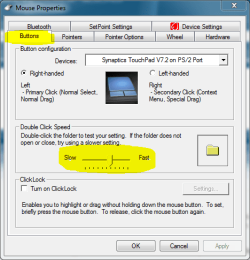
You can adjust the double click speed. Open Control Panel > Mouse, choose the Buttons tab and change the speed. Next to the speed slider is a folder symbol for you to test the speed.

Good luck.

Kari

mouse_speed.PNG
 

My Computer

Computer type
Laptop
Computer Manufacturer/Model Number
HP ENVY 17-1150eg
OS
Windows 10 Pro x64 EN-GB
CPU
1.6 GHz Intel Core i7-720QM Processor
Memory
6 GB
Graphics Card(s)
ATI Mobility Radeon HD 5850 Graphics
Sound Card
Beats sound system with integrated subwoofer
Monitor(s) Displays
17" laptop display, 22" LED and 32" Full HD TV through HDMI
Screen Resolution
1600*900 (1), 1920*1080 (2&3)
Hard Drives
Internal: 2 x 500 GB SATA Hard Disk Drive 7200 rpm
External: 2TB for backups, 3TB USB3 network drive for media
Cooling
As Envy runs a bit warm, I have it on a Cooler Master pad
Keyboard
Logitech diNovo Media Desktop Laser (bluetooth)
Mouse
Logitech Performance Mouse MX
Internet Speed
50/10 Mbps VDSL
Antivirus
Windows Defender 4.3.9431.0
Browser
Maxthon 3.5.2., IE11
Hey guys,

I have a problem with windows 7. When I am trying to open folders and files and i dobbleclick at normal speed then it just open the rename mode insted of opening the folder/file. When I am pushing 3 times then it opens and sometimes if I dobbleclick slowly it also opens.

Where can I change this? I don't know if it's a driver problem or what? maybe you can help me.

I run windows 7 32 bit at a Lenovo R61 8918-DEG

Best regards,

//Jesper


I forgot to write that I already have updated the driver to the newest version from lenovo

You can adjust the click speed in Control Panel, Mouse.
 

My Computer

Computer Manufacturer/Model Number
Custom
OS
Windows 7 Ultimate RTM (Technet)
CPU
3.00 gigahertz Intel Core2 Duo E8400
Motherboard
ASUSTeK Computer INC. P5K/EPU Rev 1.xx
Memory
4GB
Graphics Card(s)
ATI Radeon X1950 Pro
Sound Card
Built in HD Audio
Monitor(s) Displays
22" Gateway LCD
Screen Resolution
1920 x 1200
Hard Drives
ST3160023A [Hard drive] (160.04 GB) -- drive 0, rev 8.01, ST3500630AS [Hard drive] (500.11 GB) -- drive 2, rev 3.AAK
ST3500630AS [Hard drive] (500.11 GB) -- drive 1, rev 3.AAK
Keyboard
Logitech G11
Mouse
Microsoft Wireless Laser Mouse 5000
Internet Speed
13.44 Mbps
And if that doesn't work?

I see what you mean but when I dobbleclick I either need to do it really quickly or very slowly. there is nothing in between. that is no matte what step I put the mentioned dobble click speed.
 

My Computer

Computer Manufacturer/Model Number
Lenovo R61-8918-DEG
OS
windows 7
If you look in folder options, you can select to double click or single click to open certain items. Maybe you have that selected and your are actually tripple clicking when you think you are double clicking.
 

My Computer

Computer Manufacturer/Model Number
Homebuilt
OS
Windows 7 x64
CPU
i7-2600K
Motherboard
Asus P8Z77-v Pro
Memory
8 G
Graphics Card(s)
GTX 480
Sound Card
Onboard
Monitor(s) Displays
LG W2753V
Screen Resolution
1920x1080
Hard Drives
Crucial M4 128 G SSD
I have the same bug,

Sometimes when I select a first folder and wait for ten seconds then select a second folder, the second one will open while I'm in "double-click mode" for opening folders.
Then the bug disappears.
Sometimes the bug is persistent till I close the explorer window that is malfunctioning.

Regards,
Zarkod
 

My Computer

Computer type
PC/Desktop
OS
Windows 7 Pro x64 SP1
may be this is a problem with your mouse, simply try changing it
 

My Computer

Computer type
Laptop
Computer Manufacturer/Model Number
Dell
OS
Window 7
CPU
Dell
Back
Top