
Double instances of apps in startup

arpharazon

New member
Local time
1:12 AM
Messages
21
Hi all. I just did a reinstall in Win7x64 on an older laptop (Dell Latitude E6540).
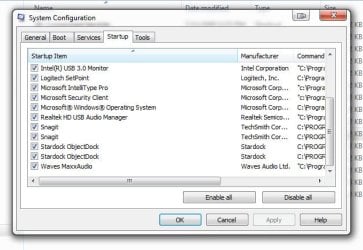
I am running into issues of 2 instances of some couple apps in the Processes list, and they are also in the list of Startup apps under System Configuration twice, but not showing up twice in the Startup folder under All Programs. There is only one instance of the Startup folder under All Users. The apps are Stardock ObjectDock & Snagit 12.
If I unclick either option in SysConfig>Startup, the apps do not load at all and disappear from the Start folder, but then only appear once in SysConfig/Startup until I re-check them and restart. Then they're back twice.
I have uninstalled & reinstalled both apps to no avail. I have seen references to a Registry key pointing to the wrong location for "Common Startup" in Shell Folders & User Shell Folders, but that doesn't seem to be the cause here.

Any ideas what's happening?
 

Attachments
  • Win7 Double Startup 2022-07-07_11-49-07.jpg
    Win7 Double Startup 2022-07-07_11-49-07.jpg
    45.9 KB · Views: 4
  • Win7 Double Startup 2022-07-07_11-50-31.jpg
    Win7 Double Startup 2022-07-07_11-50-31.jpg
    38.3 KB · Views: 3

My Computer My Computer

At a glance

XPx64 Pro & Win7x64 Ultimate
OS
XPx64 Pro & Win7x64 Ultimate
I have the same with Kirby Alarm that I placed a link on startup folder. Both lines has same path under msconfig.
I didn't find a explanation.

You can place the path on the register (Computer\HKEY_CURRENT_USER\Software\Microsoft\Windows\CurrentVersion\Run) or under task scheduler.
 

My Computers My Computers

  • At a glance

    Windows 7 HP 64i5 6600K - 800MHz to 4200MHz4+4G GSkill DDR4 3000IG - Intel 530
    Computer type
    PC/Desktop
    Computer Manufacturer/Model Number
    custom build
    OS
    Windows 7 HP 64
    CPU
    i5 6600K - 800MHz to 4200MHz
    Motherboard
    GA-Z170-HD3P
    Memory
    4+4G GSkill DDR4 3000
    Graphics Card(s)
    IG - Intel 530
    Monitor(s) Displays
    Samsung 226BW
    Screen Resolution
    1680x1050
    Hard Drives
    (1) -1 SM951 – 128GB M.2 AHCI PCIe SSD drive for Windows 7 and Lubuntu
    (2) -1 WD SATA 3 - 1T for Data
    (3) -1 WD SATA 3 - 1T for backup
    PSU
    Thermaltake 450W TR2 gold
    Keyboard
    Old and good Chicony mechanical keyboard
    Mouse
    Logitech mX performance - 9 buttons (had to disable some)
    Internet Speed
    500Mb/s
    Browser
    Firefox 64
    Other Info
    TinyWall firewall
  • At a glance

    Windows 7 Proi7-4500U 800MHz to 3.0GHz(4+4)G DDR3 1600IG intel 4400 + NVIDIA GeForce GT 745M
    Computer type
    Laptop
    System Manufacturer/Model Number
    Asus Q550LF
    OS
    Windows 7 Pro
    CPU
    i7-4500U 800MHz to 3.0GHz
    Motherboard
    Asus Q550LF
    Memory
    (4+4)G DDR3 1600
    Graphics Card(s)
    IG intel 4400 + NVIDIA GeForce GT 745M
    Sound Card
    Realtek
    Monitor(s) Displays
    LG Display LP156WF4-SPH1
    Screen Resolution
    1920 x 1080
    Hard Drives
    BX500 120G SSD for Windows and programs +
    1T HDD for data
    Internet Speed
    500 Mb/s
    Browser
    Firefox
    Other Info
    TinyWall firewall
I have the same with Kirby Alarm that I placed a link on startup folder. Both lines has same path under msconfig.
I didn't find a explanation.

You can place the path on the register (Computer\HKEY_CURRENT_USER\Software\Microsoft\Windows\CurrentVersion\Run) or under task scheduler.
Since the OP, I re-reinstalled Windows 7 (because of other issues with that install) and ObjectDock (and Dell Display Manager) is doing it again. Literally 2 instances of the app overlaid at the top of my screen. And again, only in the Startup folder once, but in SysConfig/Startup twice.

This has never happened in all the previous installations of Win7, and there were a LOT of those.

Windows never ceases to amaze in how many ways it can screw up a simple installation.
 

My Computer My Computer

At a glance

XPx64 Pro & Win7x64 Ultimate
OS
XPx64 Pro & Win7x64 Ultimate
Back
Top