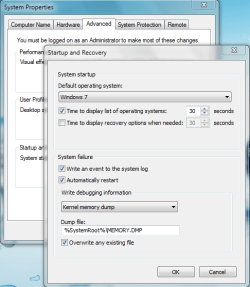
Double windows 7 in startup black screen

petrovlis

New member
Local time
3:48 PM
Messages
1
I installed W7 Ult 32 bit some weeks ago on Drive C: and since then I got upon starting a clack screen with :

Windows 7
Windows 7

after xx seconds it goes on with the, I presume, the first one.
i think it might come from a previous trial,not
activiated W7 version, or some unfinished W7 installation.
I do not see any windows.old somewhere..

How to get rid of this,it delays my startup.???

I made a W7 backup just for security on Drive D:
Thanks for help,
William R.
 

My Computer My Computer

Computer Manufacturer/Model Number
HP
OS
Windows 7 Ultimate 32 bit
CPU
Pentium 4
have you tried here?
 

Attachments

  • Capture.PNG
    Capture.PNG
    26.1 KB · Views: 28

My Computer My Computer

Computer Manufacturer/Model Number
HP dv6519tx
OS
Windows 7 Ultimate x64
CPU
1.80 GHz Intel Core 2 Duo processor T7100
Memory
3 gig ddr2
Graphics Card(s)
NVIDIA GeForce 8400M GS
Sound Card
Realtek High Definition Audio
Monitor(s) Displays
15.4” WXGA High Definition BrightView Widescreen
Screen Resolution
1280 x 800
Hard Drives
Hitachi 320 GB (5400 rpm)
PSU
90 W AC Power Adapter
Cooling
Kitchen plate under the lappy
Keyboard
101 key compatible
Mouse
Touch Pad with On/Off button and dedicated vertical Scroll
Internet Speed
Three Wireless internet prepaid using E160G USB dongle
Setting the timeout to zero doesn't get rid of the Dual Boot. You need to use EasyBCD 2.0 to edit Boot Menu and delete the stray Win7 bcd listing.

Have you checked Disk Mgmt to make sure there isn't a second install? Post back a screenshot if you want.
 
Go with GregRocker Easy BCD has helped me alot to get rid of old unwanted entries in the boot loader. Just make sure u have the install disk to do a start up repair in case its the wrong one.
 

My Computer My Computer

Computer type
PC/Desktop
OS
Windows 7 Ultimate x64
CPU
i7 4770
Motherboard
MSI Z87 Mpower
Memory
16GB corsair vengenance
Graphics Card(s)
Palit GT640
Sound Card
MOTU Ultralite mk3 hybrid
Monitor(s) Displays
AOC
Screen Resolution
1024x768
Hard Drives
1) 1tb
PSU
850w
Keyboard
Microsoft Fingerprint Keyboard
Internet Speed
10MBs
Other Info
COMPTIA A+ Certified
You can use EasyBCD( the latest version is EasyBCD 2.0.2) to delete the empty "Window 7" entry. If there isn't this in EasyBCD, i think you should reinstall Windows 7(i think you should format the partition you install).Or if you only want to skip Windows Boot Manager,you could choose Edit Boot Menu in EasyBCD and tick in box Skip the boot menu, save and restart, it'll OK.
 

My Computer My Computer

Computer Manufacturer/Model Number
Sony Vaio
OS
Windows 7 Ultimate x64
CPU
Intel Cỏe 2 Duo Processor P8700
Memory
4GB
Hard Drives
320GB
Back
Top