Solved Downgrade DirectX?

TManTM

New member
Member
Local time
8:37 AM
Messages
47
Location
Londesboro, Ontario
I recently got BF3 and I installed it on my laptop. On my laptop, I tried to run BF3 through Battle Log and came across this error.

DirectX device creation error

Failed creating D3D device of at least version 10.0 on adapter "Intel (R) HD Graphics" with driver "Unknown". Error is DXGI_ERROR_UNSUPPORTED ("Unsupported").

This is typically caused by not having the minimum required DirectX support in the GPU.
For NVIDIA GPUs, DirectX 10.0 support is required.
For AMD and GPUs from other vendors, DirectX 10.1 support is required.

I checked DXDIAG, I have DirectX 11, my GPU supports DirectX 10.0.
I have done my research and found that DirectX 11 should act like 10.0 but
I still get this error when I try and play BF3.

So my question is, is there anyway to downgrade DirectX 11 to 10 safely unlike DirectX Eradicator.
 

My Computer

Computer Manufacturer/Model Number
Gigabyte
OS
Windows 7 Ultimate x64
CPU
AMD Phenom II x6 1045T 2.7 Ghz
Motherboard
Gigabyte GA-M68MT-S2
Memory
8GB XMS3 Corsair DDR3/1333 Mhz
Graphics Card(s)
AMD XFX Radeon 6790
Sound Card
Realtek
Monitor(s) Displays
HPvs17 , HP w1707
Hard Drives
1.5 Tb Seagate SATA HDD
PSU
550w Ultra Lifetime Warranty
Case
Cooler Master
Cooling
3 140mm Fans, 3 120mm Fans
Keyboard
Logitech MK320
Mouse
Logitech MK320
Internet Speed
Slow As Shit

My Computer

Computer type
PC/Desktop
Computer Manufacturer/Model Number
Gateway DX4831-01e (Mid-Tower Desktop)
OS
Originally Win 7 Hm Prem x64 Ver 6.1.7600 Build 7601-SP1 | Upgraded to Windows 10 December 14, 2019
CPU
Intel i3 530 2.93GHz, 2933MHz 2 Cores 4 Logical Processors
Motherboard
Gateway H57M01 133 megahertz
Memory
6GB of 1,333MHz DDR3 SDRAM
Graphics Card(s)
32MB Intel Graphics Media Accelerator HD IGChip
Sound Card
Realtek High Definition Audio
Monitor(s) Displays
Gateway HX2000 20inch TFT active matrix TN
Screen Resolution
1600 x 900 x 59 hertz
Hard Drives
WDC WD10EADS-00M2B0 [HDD] (1000.20 GB) -- drive 0,
HL-DT-ST DVDRAM GH41N [CD-ROM dr]
Four card readers, and Four USB 2.0
PSU
300watts.
Case
Mid-Tower Desktop
Cooling
Stock from Gateway
Keyboard
Natural Ergonomic Keyboard 4000, see Other Info
Mouse
Orig. Gateway wore out now using Insignia USB wired optical
Internet Speed
Vz FIOS 10ms png 57.64Mbps down 65.53Mbps up Speedtest.org
Antivirus
Zamana Anti-logger with Anti-malware, MSE, Windows Firewall,
Browser
IE11.0.9600.19399-Upd ver11.0.135, Firefox 68.0.1 x64
Other Info
System Specs by Belarc.

BIOS: American Megatrends Inc. P01-A0 11/17/2009

Replaced the MS 'Natural' Standard PS/2 Enhanced 101-102 Keyboard with a new Natural Ergonomic Keyboard 4000 on August 1st 2014.

Canon Pixma MG3222 Printer.

Updated to IE11 on 12102015 | Fios Quantum Router g1100

Additional AV: SpywareBlaster, manual Mbam, SAS
So do you suggest I try and open it with Game Booster?
 

My Computer

Computer Manufacturer/Model Number
Gigabyte
OS
Windows 7 Ultimate x64
CPU
AMD Phenom II x6 1045T 2.7 Ghz
Motherboard
Gigabyte GA-M68MT-S2
Memory
8GB XMS3 Corsair DDR3/1333 Mhz
Graphics Card(s)
AMD XFX Radeon 6790
Sound Card
Realtek
Monitor(s) Displays
HPvs17 , HP w1707
Hard Drives
1.5 Tb Seagate SATA HDD
PSU
550w Ultra Lifetime Warranty
Case
Cooler Master
Cooling
3 140mm Fans, 3 120mm Fans
Keyboard
Logitech MK320
Mouse
Logitech MK320
Internet Speed
Slow As Shit
There is a problem with doing Game Booster with BF3. Game Booster will shut off because BF3 is on Battle Log. There is also no manual boost button. Only a boost to scan your computer.
 

My Computer

Computer Manufacturer/Model Number
Gigabyte
OS
Windows 7 Ultimate x64
CPU
AMD Phenom II x6 1045T 2.7 Ghz
Motherboard
Gigabyte GA-M68MT-S2
Memory
8GB XMS3 Corsair DDR3/1333 Mhz
Graphics Card(s)
AMD XFX Radeon 6790
Sound Card
Realtek
Monitor(s) Displays
HPvs17 , HP w1707
Hard Drives
1.5 Tb Seagate SATA HDD
PSU
550w Ultra Lifetime Warranty
Case
Cooler Master
Cooling
3 140mm Fans, 3 120mm Fans
Keyboard
Logitech MK320
Mouse
Logitech MK320
Internet Speed
Slow As Shit
First thing I would check is if you have the latest Graphics drivers.
What's the brand and model of the laptop?
 

My Computer

Computer Manufacturer/Model Number
Self built
OS
Windows 7 Ultimate x64
CPU
Intel Pentium Dual Core E5200 2.5GHz (3.77GHz OC)
Motherboard
Asus P5Q-E
Memory
Corsair 4GB DDR2 (4x1GB CM2X1024-6400C4)
Graphics Card(s)
Palit GeForce GTS 250 (1024MB)
Sound Card
On Board (ADI AD2000B 8ch HD)
Monitor(s) Displays
Samsung 32in LCD TV
Screen Resolution
1360x768
Hard Drives
2 x 1TB Samsung 103SJ (Raid0)
2 x External 500GB Samsung 502IJ (NexStar 3 HD Enclosures)
PSU
550W Antec Neo HE 550
Case
Antec P180
Cooling
Xigmatex Red Scorpion CPU Cooler. 3x120mm Fans
Keyboard
Logitech MX5000 Laser (Combo)
Mouse
Logitech MX5000 Laser (Combo)
Internet Speed
ADSL2+ (avg 10 Mbps Down, 0.80 Mbps up)
Other Info
Gigabyte GN-WP01GS 54g Wireless Lan Card
I have an Acer Aspire 5742-7342 or 5742-G . I have already checked and my Intel HD Graphics are correctly updated. But inn DXDIAG it says Intel HD Graphics only supports DirectX 10, somehow I have DirectX 11.
 

My Computer

Computer Manufacturer/Model Number
Gigabyte
OS
Windows 7 Ultimate x64
CPU
AMD Phenom II x6 1045T 2.7 Ghz
Motherboard
Gigabyte GA-M68MT-S2
Memory
8GB XMS3 Corsair DDR3/1333 Mhz
Graphics Card(s)
AMD XFX Radeon 6790
Sound Card
Realtek
Monitor(s) Displays
HPvs17 , HP w1707
Hard Drives
1.5 Tb Seagate SATA HDD
PSU
550w Ultra Lifetime Warranty
Case
Cooler Master
Cooling
3 140mm Fans, 3 120mm Fans
Keyboard
Logitech MK320
Mouse
Logitech MK320
Internet Speed
Slow As Shit

My Computer

Computer type
PC/Desktop
Computer Manufacturer/Model Number
Alienware Aurora ALX R4
OS
Windows 10 Pro (x64)
CPU
Intel Core i7-3930K (3.2GHz - 4.5GHz)
Motherboard
Alienware Aurora-R4 x79
Memory
4x Samsung 4GB PC3-12800 DDR3 (16GB 1600MHz)
Graphics Card(s)
Nvidia Geforce GTX 690
Sound Card
SteelSeries Siberia Elite
Monitor(s) Displays
Dell UltraSharp U3011
Screen Resolution
2560x1600
Hard Drives
Samsung 850 Pro 256 GB, Seagate 1TB Desktop Hybrid HDD, 2x Western Digital 4TB Green HDD
PSU
875W Some Dell PSU <.<
Case
Alienware Aurora ALX
Cooling
Custom Liquid Cooling (EK CPU & GPU blocks) dual EK 480RAD
Keyboard
Logitech G710+ Mechanical
Mouse
Logitech G700s
Internet Speed
Verizon Fios (50 mbps average)
Other Info
Server: Intel NUC D54250WYK: i5-4250U, 16GB, 256 GB mSATA, Windows Server 2012 R2
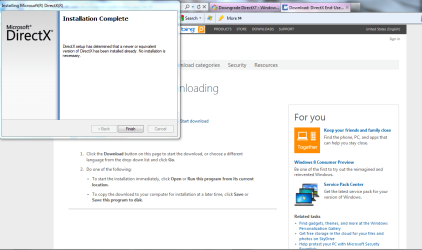
Here is what happens. I have tried this before.
 

Attachments

  • Capture.PNG
    Capture.PNG
    44.8 KB · Views: 385

My Computer

Computer Manufacturer/Model Number
Gigabyte
OS
Windows 7 Ultimate x64
CPU
AMD Phenom II x6 1045T 2.7 Ghz
Motherboard
Gigabyte GA-M68MT-S2
Memory
8GB XMS3 Corsair DDR3/1333 Mhz
Graphics Card(s)
AMD XFX Radeon 6790
Sound Card
Realtek
Monitor(s) Displays
HPvs17 , HP w1707
Hard Drives
1.5 Tb Seagate SATA HDD
PSU
550w Ultra Lifetime Warranty
Case
Cooler Master
Cooling
3 140mm Fans, 3 120mm Fans
Keyboard
Logitech MK320
Mouse
Logitech MK320
Internet Speed
Slow As Shit
Then BF3 just does not like your graphics card and most likely will not work under any condition.
 

My Computer

Computer type
PC/Desktop
Computer Manufacturer/Model Number
Alienware Aurora ALX R4
OS
Windows 10 Pro (x64)
CPU
Intel Core i7-3930K (3.2GHz - 4.5GHz)
Motherboard
Alienware Aurora-R4 x79
Memory
4x Samsung 4GB PC3-12800 DDR3 (16GB 1600MHz)
Graphics Card(s)
Nvidia Geforce GTX 690
Sound Card
SteelSeries Siberia Elite
Monitor(s) Displays
Dell UltraSharp U3011
Screen Resolution
2560x1600
Hard Drives
Samsung 850 Pro 256 GB, Seagate 1TB Desktop Hybrid HDD, 2x Western Digital 4TB Green HDD
PSU
875W Some Dell PSU <.<
Case
Alienware Aurora ALX
Cooling
Custom Liquid Cooling (EK CPU & GPU blocks) dual EK 480RAD
Keyboard
Logitech G710+ Mechanical
Mouse
Logitech G700s
Internet Speed
Verizon Fios (50 mbps average)
Other Info
Server: Intel NUC D54250WYK: i5-4250U, 16GB, 256 GB mSATA, Windows Server 2012 R2
Wait, Wait, Wait. First of all, my graphics card is a really sucky, Intel HD Graphics (built-in) with 128 mb. I know it sucks. Today I am going home to my desktop, if I transfer the Origin Games folder, will BF3 work on my Desktop. My GPU supports DirectX 11 on my desktop. Should I just wait?
 

My Computer

Computer Manufacturer/Model Number
Gigabyte
OS
Windows 7 Ultimate x64
CPU
AMD Phenom II x6 1045T 2.7 Ghz
Motherboard
Gigabyte GA-M68MT-S2
Memory
8GB XMS3 Corsair DDR3/1333 Mhz
Graphics Card(s)
AMD XFX Radeon 6790
Sound Card
Realtek
Monitor(s) Displays
HPvs17 , HP w1707
Hard Drives
1.5 Tb Seagate SATA HDD
PSU
550w Ultra Lifetime Warranty
Case
Cooler Master
Cooling
3 140mm Fans, 3 120mm Fans
Keyboard
Logitech MK320
Mouse
Logitech MK320
Internet Speed
Slow As Shit
I don't see why it wouldn't work on your desktop...
 

My Computer

Computer type
PC/Desktop
Computer Manufacturer/Model Number
Alienware Aurora ALX R4
OS
Windows 10 Pro (x64)
CPU
Intel Core i7-3930K (3.2GHz - 4.5GHz)
Motherboard
Alienware Aurora-R4 x79
Memory
4x Samsung 4GB PC3-12800 DDR3 (16GB 1600MHz)
Graphics Card(s)
Nvidia Geforce GTX 690
Sound Card
SteelSeries Siberia Elite
Monitor(s) Displays
Dell UltraSharp U3011
Screen Resolution
2560x1600
Hard Drives
Samsung 850 Pro 256 GB, Seagate 1TB Desktop Hybrid HDD, 2x Western Digital 4TB Green HDD
PSU
875W Some Dell PSU <.<
Case
Alienware Aurora ALX
Cooling
Custom Liquid Cooling (EK CPU & GPU blocks) dual EK 480RAD
Keyboard
Logitech G710+ Mechanical
Mouse
Logitech G700s
Internet Speed
Verizon Fios (50 mbps average)
Other Info
Server: Intel NUC D54250WYK: i5-4250U, 16GB, 256 GB mSATA, Windows Server 2012 R2
'Kay, guess I will just wait untill tonight. It is weird though, you think DirectX would be smart enough to be able to downgrade.
 

My Computer

Computer Manufacturer/Model Number
Gigabyte
OS
Windows 7 Ultimate x64
CPU
AMD Phenom II x6 1045T 2.7 Ghz
Motherboard
Gigabyte GA-M68MT-S2
Memory
8GB XMS3 Corsair DDR3/1333 Mhz
Graphics Card(s)
AMD XFX Radeon 6790
Sound Card
Realtek
Monitor(s) Displays
HPvs17 , HP w1707
Hard Drives
1.5 Tb Seagate SATA HDD
PSU
550w Ultra Lifetime Warranty
Case
Cooler Master
Cooling
3 140mm Fans, 3 120mm Fans
Keyboard
Logitech MK320
Mouse
Logitech MK320
Internet Speed
Slow As Shit
Do you have a NVidia graphics card in Device Manager?
Any options to disable certain graphics in the bios?

Try setting the power profile to High Performance then launch BF3.
 

My Computer

Computer Manufacturer/Model Number
Self built
OS
Windows 7 Ultimate x64
CPU
Intel Pentium Dual Core E5200 2.5GHz (3.77GHz OC)
Motherboard
Asus P5Q-E
Memory
Corsair 4GB DDR2 (4x1GB CM2X1024-6400C4)
Graphics Card(s)
Palit GeForce GTS 250 (1024MB)
Sound Card
On Board (ADI AD2000B 8ch HD)
Monitor(s) Displays
Samsung 32in LCD TV
Screen Resolution
1360x768
Hard Drives
2 x 1TB Samsung 103SJ (Raid0)
2 x External 500GB Samsung 502IJ (NexStar 3 HD Enclosures)
PSU
550W Antec Neo HE 550
Case
Antec P180
Cooling
Xigmatex Red Scorpion CPU Cooler. 3x120mm Fans
Keyboard
Logitech MX5000 Laser (Combo)
Mouse
Logitech MX5000 Laser (Combo)
Internet Speed
ADSL2+ (avg 10 Mbps Down, 0.80 Mbps up)
Other Info
Gigabyte GN-WP01GS 54g Wireless Lan Card
Under display adapters, all there is Intel HD Graphics.
The performance is on High on my laptop right now.
And the entire graphics area in the BIOS is unchangable.
 

My Computer

Computer Manufacturer/Model Number
Gigabyte
OS
Windows 7 Ultimate x64
CPU
AMD Phenom II x6 1045T 2.7 Ghz
Motherboard
Gigabyte GA-M68MT-S2
Memory
8GB XMS3 Corsair DDR3/1333 Mhz
Graphics Card(s)
AMD XFX Radeon 6790
Sound Card
Realtek
Monitor(s) Displays
HPvs17 , HP w1707
Hard Drives
1.5 Tb Seagate SATA HDD
PSU
550w Ultra Lifetime Warranty
Case
Cooler Master
Cooling
3 140mm Fans, 3 120mm Fans
Keyboard
Logitech MK320
Mouse
Logitech MK320
Internet Speed
Slow As Shit
'Kay, guess I will just wait untill tonight. It is weird though, you think DirectX would be smart enough to be able to downgrade.

It has nothing to do with DirectX. It all has to with BF3 and your graphics card.
After installing the DirectX runtime, you have version 9.0 to 11.0 installed.
 

My Computer

Computer type
PC/Desktop
Computer Manufacturer/Model Number
Alienware Aurora ALX R4
OS
Windows 10 Pro (x64)
CPU
Intel Core i7-3930K (3.2GHz - 4.5GHz)
Motherboard
Alienware Aurora-R4 x79
Memory
4x Samsung 4GB PC3-12800 DDR3 (16GB 1600MHz)
Graphics Card(s)
Nvidia Geforce GTX 690
Sound Card
SteelSeries Siberia Elite
Monitor(s) Displays
Dell UltraSharp U3011
Screen Resolution
2560x1600
Hard Drives
Samsung 850 Pro 256 GB, Seagate 1TB Desktop Hybrid HDD, 2x Western Digital 4TB Green HDD
PSU
875W Some Dell PSU <.<
Case
Alienware Aurora ALX
Cooling
Custom Liquid Cooling (EK CPU & GPU blocks) dual EK 480RAD
Keyboard
Logitech G710+ Mechanical
Mouse
Logitech G700s
Internet Speed
Verizon Fios (50 mbps average)
Other Info
Server: Intel NUC D54250WYK: i5-4250U, 16GB, 256 GB mSATA, Windows Server 2012 R2
Yes but, I think the DirectX and my Graphics Card are confusing BF3.
 

My Computer

Computer Manufacturer/Model Number
Gigabyte
OS
Windows 7 Ultimate x64
CPU
AMD Phenom II x6 1045T 2.7 Ghz
Motherboard
Gigabyte GA-M68MT-S2
Memory
8GB XMS3 Corsair DDR3/1333 Mhz
Graphics Card(s)
AMD XFX Radeon 6790
Sound Card
Realtek
Monitor(s) Displays
HPvs17 , HP w1707
Hard Drives
1.5 Tb Seagate SATA HDD
PSU
550w Ultra Lifetime Warranty
Case
Cooler Master
Cooling
3 140mm Fans, 3 120mm Fans
Keyboard
Logitech MK320
Mouse
Logitech MK320
Internet Speed
Slow As Shit
Well one thing I can tell you is you have the Acer Aspire 5742 not 5742G. G includes a Nvida graphics card.

Second there's like 50 threads on Google with the same problem.

And from what I can tell is your CPU has integrated graphics and your chipset also specifies integrated graphics so there could be a problem here. I have no experience with CPU's with integrated graphics but and I would think a laptop would only have one enabled but maybe you could browse the BIOS with anything to do with this, maybe under CPU configuration.
 

My Computer

Computer Manufacturer/Model Number
Self built
OS
Windows 7 Ultimate x64
CPU
Intel Pentium Dual Core E5200 2.5GHz (3.77GHz OC)
Motherboard
Asus P5Q-E
Memory
Corsair 4GB DDR2 (4x1GB CM2X1024-6400C4)
Graphics Card(s)
Palit GeForce GTS 250 (1024MB)
Sound Card
On Board (ADI AD2000B 8ch HD)
Monitor(s) Displays
Samsung 32in LCD TV
Screen Resolution
1360x768
Hard Drives
2 x 1TB Samsung 103SJ (Raid0)
2 x External 500GB Samsung 502IJ (NexStar 3 HD Enclosures)
PSU
550W Antec Neo HE 550
Case
Antec P180
Cooling
Xigmatex Red Scorpion CPU Cooler. 3x120mm Fans
Keyboard
Logitech MX5000 Laser (Combo)
Mouse
Logitech MX5000 Laser (Combo)
Internet Speed
ADSL2+ (avg 10 Mbps Down, 0.80 Mbps up)
Other Info
Gigabyte GN-WP01GS 54g Wireless Lan Card
BTW where did you check for the latest driver? I noticed the latest one on Acers site is dated 07/12/2011 you could check using this page - Intel® Driver Update Utility for graphics drivers

If all this fails then your graphics chip is probably not supported by BF3.
 

My Computer

Computer Manufacturer/Model Number
Self built
OS
Windows 7 Ultimate x64
CPU
Intel Pentium Dual Core E5200 2.5GHz (3.77GHz OC)
Motherboard
Asus P5Q-E
Memory
Corsair 4GB DDR2 (4x1GB CM2X1024-6400C4)
Graphics Card(s)
Palit GeForce GTS 250 (1024MB)
Sound Card
On Board (ADI AD2000B 8ch HD)
Monitor(s) Displays
Samsung 32in LCD TV
Screen Resolution
1360x768
Hard Drives
2 x 1TB Samsung 103SJ (Raid0)
2 x External 500GB Samsung 502IJ (NexStar 3 HD Enclosures)
PSU
550W Antec Neo HE 550
Case
Antec P180
Cooling
Xigmatex Red Scorpion CPU Cooler. 3x120mm Fans
Keyboard
Logitech MX5000 Laser (Combo)
Mouse
Logitech MX5000 Laser (Combo)
Internet Speed
ADSL2+ (avg 10 Mbps Down, 0.80 Mbps up)
Other Info
Gigabyte GN-WP01GS 54g Wireless Lan Card
Its up to date.
 

My Computer

Computer Manufacturer/Model Number
Gigabyte
OS
Windows 7 Ultimate x64
CPU
AMD Phenom II x6 1045T 2.7 Ghz
Motherboard
Gigabyte GA-M68MT-S2
Memory
8GB XMS3 Corsair DDR3/1333 Mhz
Graphics Card(s)
AMD XFX Radeon 6790
Sound Card
Realtek
Monitor(s) Displays
HPvs17 , HP w1707
Hard Drives
1.5 Tb Seagate SATA HDD
PSU
550w Ultra Lifetime Warranty
Case
Cooler Master
Cooling
3 140mm Fans, 3 120mm Fans
Keyboard
Logitech MK320
Mouse
Logitech MK320
Internet Speed
Slow As Shit
Looks like it might be a game for the desktop.
Sorry I can't provide any more help.
 

My Computer

Computer Manufacturer/Model Number
Self built
OS
Windows 7 Ultimate x64
CPU
Intel Pentium Dual Core E5200 2.5GHz (3.77GHz OC)
Motherboard
Asus P5Q-E
Memory
Corsair 4GB DDR2 (4x1GB CM2X1024-6400C4)
Graphics Card(s)
Palit GeForce GTS 250 (1024MB)
Sound Card
On Board (ADI AD2000B 8ch HD)
Monitor(s) Displays
Samsung 32in LCD TV
Screen Resolution
1360x768
Hard Drives
2 x 1TB Samsung 103SJ (Raid0)
2 x External 500GB Samsung 502IJ (NexStar 3 HD Enclosures)
PSU
550W Antec Neo HE 550
Case
Antec P180
Cooling
Xigmatex Red Scorpion CPU Cooler. 3x120mm Fans
Keyboard
Logitech MX5000 Laser (Combo)
Mouse
Logitech MX5000 Laser (Combo)
Internet Speed
ADSL2+ (avg 10 Mbps Down, 0.80 Mbps up)
Other Info
Gigabyte GN-WP01GS 54g Wireless Lan Card
Back
Top