Downgraded Win 8 to 7, will system restore revert back to Win 8?

Fieldinator89

New member
Local time
5:32 PM
Messages
59
Location
Arizona
Horrible laptop. I wish I would have had the knowledge now that I did upon purchasing.

Toshiba Satellita C55Dt-A5231
500gb HDD. No idea where the other 200gb went. Only read about a total of 300gb now. I am wondering if system restore will fix this. Also when laptop was received it had windows 8 as the pre-installed OS. I downgraded to Windows 7 and am wondering if I do a system reset, will this kick me back to Windows 8? Also, could anything wrong occur due to the BIOS and UEFI with windows 8 etc. Thank you for your inputs.

Jeremy
 

My Computer My Computer

At a glance

Windows 7 Ultimate 64-bitAMD Dual-Core E1-1200 Accelerated ProcessorDDR3 - 6gbAMD Radeon HD 7310 Graphics
Computer type
Laptop
Computer Manufacturer/Model Number
Toshiba
OS
Windows 7 Ultimate 64-bit
CPU
AMD Dual-Core E1-1200 Accelerated Processor
Motherboard
Chipset: AMD K12 IMC Southbridge: AMD A55/A60M
Memory
DDR3 - 6gb
Graphics Card(s)
AMD Radeon HD 7310 Graphics
Hard Drives
500gb HDD
Antivirus
Malware Bytes Pro
Browser
Chrome / Mozilla
Hi there.

If you don't like the laptop - just restore to state it was in when you bought it and return it - most places give you some time if you don't like a product to return it. Of course if you deleted the restore partition without taking your own backup - then you've got problems -

-- Whatever system you have it always amazes me how many times we have to re-iterate on these Forums to ALWAYS TAKE BACKUP -- even on a brand new PC -- you might never use the original backup but sometimes you need it -- things like FREE MACRIUM are totally 100% free and why people don't do this is beyond my understanding.

(If you haven't destroyed the original recovery partition or have got it on a backup then you can restore the system to the initial "Shop bought" state).

Cheers
jimbo
 

My Computer My Computer

At a glance

Linux CENTOS 7 / various Windows OS'es and se...Intel i7 Intel i58GB, 16GBOn Motherboard
Computer type
PC/Desktop
Computer Manufacturer/Model Number
Custom built, several laptops HP/ASUS
OS
Linux CENTOS 7 / various Windows OS'es and servers
CPU
Intel i7 Intel i5
Memory
8GB, 16GB
Graphics Card(s)
On Motherboard
Sound Card
Realtek HD audio
Monitor(s) Displays
Apple Cinema display, Samsung LCD
Screen Resolution
1920 X 1080
Hard Drives
4 X 1TB SATA
Mouse
Toshiba wireless laser
Internet Speed
> 20MB up
I do not wish to restore to Windows 8. I am just hoping to default the storage settings etc. In hindsight, I see the value in creating an initial restore. And I'm sure it's beyond the point of return I am sure. At the time of purchase I was not involved in the activities that I am now and knew very little about what the computer specs meant. Either way it was a rip off. I suppose the touch screen was what drove the price. And that feature was quite annoying. Anyhow, soo I should not restore? Was that the answer?
 

My Computer My Computer

At a glance

Windows 7 Ultimate 64-bitAMD Dual-Core E1-1200 Accelerated ProcessorDDR3 - 6gbAMD Radeon HD 7310 Graphics
Computer type
Laptop
Computer Manufacturer/Model Number
Toshiba
OS
Windows 7 Ultimate 64-bit
CPU
AMD Dual-Core E1-1200 Accelerated Processor
Motherboard
Chipset: AMD K12 IMC Southbridge: AMD A55/A60M
Memory
DDR3 - 6gb
Graphics Card(s)
AMD Radeon HD 7310 Graphics
Hard Drives
500gb HDD
Antivirus
Malware Bytes Pro
Browser
Chrome / Mozilla
System Restore will not bring you back to Windows 8. It will restore you to an earlier time in Windows 7.

What is the problem you are trying to fix? If it's wondering where the hard drive space went, install Treesize Free, it will show you where the space is being used. Most will be consumed by System Restore and Shadow copy and Recycle bin (if you have not emptied it).
 

My Computer My Computer

At a glance

Windows 10 Pro X64Intel Quad Core i7-4770 @ 3.4Ghz16.0GB PC3-12800 DDR3 SDRAM 1600 MHzIntel Integrated HD Graphics
Computer type
PC/Desktop
Computer Manufacturer/Model Number
Lenovo IdeaCenter 450
OS
Windows 10 Pro X64
CPU
Intel Quad Core i7-4770 @ 3.4Ghz
Memory
16.0GB PC3-12800 DDR3 SDRAM 1600 MHz
Graphics Card(s)
Intel Integrated HD Graphics
Sound Card
Realtek HD Audio
Monitor(s) Displays
HP 22" LCD
Screen Resolution
1680 x 1050
Hard Drives
250GB Samsung EVO SATA-3 SSD
2TB Seagate ST2000DM001 SATA-2
1.5TB Seagate ST3150041AS SATA
Keyboard
Dell USB
Mouse
Lenovo USB
Internet Speed
Cable via Road Runner 3MB Upload, 30MB Download
Antivirus
Windows Defender, MBAM Pro, MBAE
Browser
Seamonkey
Other Info
UEFI/GPT
PLDS DVD-RW DH16AERSH
@Jimbo,

It is because most people have never heard of an image.

They have no idea what it is.

They might some vague idea about backing up files, but that is all.

There are several good free versions available. My pick is Aomei backupper, but macrium and Paragon and others also have them. It would save a lot of people a lot of trouble if they did what you suggest.
 

My Computers My Computers

  • At a glance

    7 X64i5 84002x8gb 3200mhz
    Computer type
    PC/Desktop
    OS
    7 X64
    CPU
    i5 8400
    Motherboard
    gigabyte b365m ds3h
    Memory
    2x8gb 3200mhz
    Hard Drives
    various
    PSU
    pure power 11 400w cm
    Case
    Coolermaster
    Cooling
    cryorig m9i
  • At a glance

    7x64g54008gb ddr4 2400
    Computer type
    PC/Desktop
    OS
    7x64
    CPU
    g5400
    Motherboard
    ga b365m ds3h
    Memory
    8gb ddr4 2400
    PSU
    xfx pro 450w
500gb HDD. No idea where the other 200gb went. Only read about a total of 300gb now. I am wondering if system restore will fix this.
No, System Restore, or more appropriately named Operating System Restore will simply reset the OS and some system files back to their installed versions on the date of the restore. That will not affect your user data.

Also when laptop was received it had windows 8 as the pre-installed OS. I downgraded to Windows 7 and am wondering if I do a system reset, will this kick me back to Windows 8?
Ordinarily, yes, a Reset will do what the word implies -- reset the system back to its original condition. But that is only true as long as the original Recovery partition is still in place. If you messed with that during your "downgrade" to Win7, Reset is not going to work.
 

My Computer My Computer

At a glance

Win7 Pro 32-bit, Win8 Pro 32-bitAMD Phenom II X6 1090T4GB ddr3 1300AMD HD 4290 onboard
Computer type
PC/Desktop
Computer Manufacturer/Model Number
Custom
OS
Win7 Pro 32-bit, Win8 Pro 32-bit
CPU
AMD Phenom II X6 1090T
Motherboard
Gigabyte
Memory
4GB ddr3 1300
Graphics Card(s)
AMD HD 4290 onboard
Sound Card
Builtin Realtek HD Audio
Monitor(s) Displays
Samsung 24" widescreen, LG 23" widescreen
Screen Resolution
1920x1200/1920x1080
Hard Drives
Kingston 256GB SSD
Keyboard
Logitech Illuminated Keyboard
Mouse
Logitech M705 wireless mouse
Antivirus
Norton Av 2013
Browser
IE v10
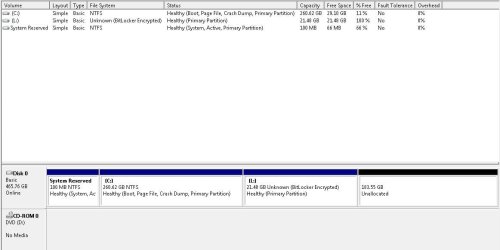
Did you pay attention to where you were installing Win7 on the hard drive? If you wanted to Dual Boot you should have created a new partition to install to. If you wanted to replace Win8 you needed to delete all partitions to create and format a new one to install.

Post back a screenshot of Disk Management - Post a Screen Capture Image
so we can see what you've done. Tell us what is on each partition if you know.

Are you satisfied with the performance of Win7 so far? If not or if your install was done much differently than the perfect install compiled in Clean Reinstall - Factory OEM Windows 7 then I would do it over.
 
I'm assuming it's the 183gb unallocated??
 

Attachments

  • Disk.JPG
    Disk.JPG
    50.9 KB · Views: 5

My Computer My Computer

At a glance

Windows 7 Ultimate 64-bitAMD Dual-Core E1-1200 Accelerated ProcessorDDR3 - 6gbAMD Radeon HD 7310 Graphics
Computer type
Laptop
Computer Manufacturer/Model Number
Toshiba
OS
Windows 7 Ultimate 64-bit
CPU
AMD Dual-Core E1-1200 Accelerated Processor
Motherboard
Chipset: AMD K12 IMC Southbridge: AMD A55/A60M
Memory
DDR3 - 6gb
Graphics Card(s)
AMD Radeon HD 7310 Graphics
Hard Drives
500gb HDD
Antivirus
Malware Bytes Pro
Browser
Chrome / Mozilla
Jeremy -

It looks correct althought the Bitlocker encryption if not intended should be undone as it can mess you up later unless carefully managed. The 183gb Unallocated is empty and can be created into a new Logical data partition http://www.sevenforums.com/tutorials/2674-partition-volume-create-new.html or you can extend C into the space using How to extend partition easily with Partition Wizard - video help.

No you can never revert to an old OS using System Restore, just System Imaging which is the best way to preserved your install so you don't have to reinstall again.

If you're happy with your install then you can back up an image externally. Backup Complete Computer - Create an Image Backup
 
I downloaded the tool. I was following the video, but immediately upon clicking 'expand partition', a pop up says 'cannot extend partition, not enough space'. I can right click the unallocated space and choose 'wipe partition'. Is this what I should do, and then attempt to extend?
 

My Computer My Computer

At a glance

Windows 7 Ultimate 64-bitAMD Dual-Core E1-1200 Accelerated ProcessorDDR3 - 6gbAMD Radeon HD 7310 Graphics
Computer type
Laptop
Computer Manufacturer/Model Number
Toshiba
OS
Windows 7 Ultimate 64-bit
CPU
AMD Dual-Core E1-1200 Accelerated Processor
Motherboard
Chipset: AMD K12 IMC Southbridge: AMD A55/A60M
Memory
DDR3 - 6gb
Graphics Card(s)
AMD Radeon HD 7310 Graphics
Hard Drives
500gb HDD
Antivirus
Malware Bytes Pro
Browser
Chrome / Mozilla
It's likely the Bitlocker partition is immovable so you can't annex the space to its right for C. You can try to decrypt Bitlocker so you can do this, or just create a separate Data partition there, preferably Logical NTFS created with Partition Wizard.

There is no reason why you can't have a perfect Win7 install on that laptop if you'll only have the patience to follow the same steps, tools and methods used in Clean Reinstall - Factory OEM Windows 7.

 
I don't think I need to reinstall if that unallocated space is attainable. I thought it was MIA haha. And I know the password for the bit locker drive? I was just self learning how to use a virtual machine etc and thought I had to make a separate partition for the other OS.
 

My Computer My Computer

At a glance

Windows 7 Ultimate 64-bitAMD Dual-Core E1-1200 Accelerated ProcessorDDR3 - 6gbAMD Radeon HD 7310 Graphics
Computer type
Laptop
Computer Manufacturer/Model Number
Toshiba
OS
Windows 7 Ultimate 64-bit
CPU
AMD Dual-Core E1-1200 Accelerated Processor
Motherboard
Chipset: AMD K12 IMC Southbridge: AMD A55/A60M
Memory
DDR3 - 6gb
Graphics Card(s)
AMD Radeon HD 7310 Graphics
Hard Drives
500gb HDD
Antivirus
Malware Bytes Pro
Browser
Chrome / Mozilla
And I apologize and really appreciate the help but I really have no idea what a logical NTFS etc is..
 

My Computer My Computer

At a glance

Windows 7 Ultimate 64-bitAMD Dual-Core E1-1200 Accelerated ProcessorDDR3 - 6gbAMD Radeon HD 7310 Graphics
Computer type
Laptop
Computer Manufacturer/Model Number
Toshiba
OS
Windows 7 Ultimate 64-bit
CPU
AMD Dual-Core E1-1200 Accelerated Processor
Motherboard
Chipset: AMD K12 IMC Southbridge: AMD A55/A60M
Memory
DDR3 - 6gb
Graphics Card(s)
AMD Radeon HD 7310 Graphics
Hard Drives
500gb HDD
Antivirus
Malware Bytes Pro
Browser
Chrome / Mozilla
If you remember the password and can handle BitLocker then you can unlock its encryption to see if it will let you extend that partition to the right or extend C into the Unallocated Space.

I would not use Bitlocker myself because of data loss we've seen here.

If you prefer to make the Unallocated Space into its own data partition, follow the steps here for Partition Wizard Create Partition - Video Help where you will see choices for NTFS Logical partition, drive letter assignment, and a place to type in your label for the partition.

Once you create the partition it will show up in the left-hand Explorer tree on each file window you are in, under Computer, so that you can drag files to it and access it as you need. It will also be available under Computer in the Start Menu.
 
Back
Top