
Solved Downgrading from 10 to 7

bbqbrisket

New member
Local time
4:36 PM
Messages
26
My tablet came with Windows 8. I then upgraded to Windows 10. I now want to downgrade to Windows 7.
I'm going to be transferring Windows 7 CD to a bootable flash drive.
In selecting an ISO file, I have several options to select from of Windows 7 Pro.
Where would I find what version of the Windows 7 Pro it is; either on the CD or on the flash drive? Or does it even matter?
Thanks
 

Attachments
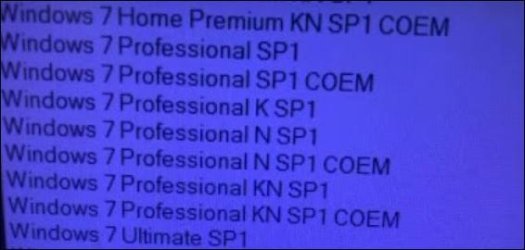
  • versions of windows 7.JPG
    versions of windows 7.JPG
    29.8 KB · Views: 20

My Computer

Computer type
PC/Desktop
Computer Manufacturer/Model Number
lenovo
OS
windows 7 64 Pro
My tablet came with Windows 8

which edition of windows 8 ?

what is the exact make and model of the tablet?

what type of storage does it have ?
 

My Computers

System One System Two

  • Computer type
    PC/Desktop
    OS
    7 X64
    CPU
    i5 8400
    Motherboard
    gigabyte b365m ds3h
    Memory
    2x8gb 3200mhz
    Hard Drives
    various
    PSU
    pure power 11 400w cm
    Case
    Coolermaster
    Cooling
    cryorig m9i
  • Computer type
    PC/Desktop
    OS
    7x64
    CPU
    g5400
    Motherboard
    ga b365m ds3h
    Memory
    8gb ddr4 2400
    PSU
    xfx pro 450w
Is your Win 7 CD a M$ original or is one of those you download from the Internet?

To make a Win 7 USB boot able drive:

Open a CMD window as administrator and type:

diskpart
list disk (it will list all drives. Identify the USB drive number)
select disk n (replace n by the USB drive number obtained with list disk)
clean
convert mbr
create part primary
select part 1
format fs=fat32 quick
assign
active
exit (to exit diskpart)

If you have a Win 7 installation iso file
On Win 7 use 7Zip to extract all files and folders from the Win 7 iso file to the USB drive.
On Win 10, mount the iso file and copy all files and folders to the USB drive.

If you have a Win 7 installation DVD
On another computer that has ODD, copy all files and folders from the DVD to the USB drive

To make it UEFI boot able you must add the \efi\boot folder
419872-windows-7-laptop-users-why-my-laptop-slow-efi-boot.jpg


To make it universal (all Win 7 versions), go to \sources on the USB drive and delete \sources\ei.cfg
 

My Computers

System One System Two

  • Computer type
    PC/Desktop
    Computer Manufacturer/Model Number
    custom build
    OS
    Windows 7 HP 64
    CPU
    i5 6600K - 800MHz to 4200MHz
    Motherboard
    GA-Z170-HD3P
    Memory
    4+4G GSkill DDR4 3000
    Graphics Card(s)
    IG - Intel 530
    Monitor(s) Displays
    Samsung 226BW
    Screen Resolution
    1680x1050
    Hard Drives
    (1) -1 SM951 – 128GB M.2 AHCI PCIe SSD drive for Windows 7 and Lubuntu
    (2) -1 WD SATA 3 - 1T for Data
    (3) -1 WD SATA 3 - 1T for backup
    PSU
    Thermaltake 450W TR2 gold
    Keyboard
    Old and good Chicony mechanical keyboard
    Mouse
    Logitech mX performance - 9 buttons (had to disable some)
    Internet Speed
    500Mb/s
    Browser
    Firefox 64
    Other Info
    TinyWall firewall
  • Computer type
    Laptop
    System Manufacturer/Model Number
    Asus Q550LF
    OS
    Windows 7 Pro
    CPU
    i7-4500U 800MHz to 3.0GHz
    Motherboard
    Asus Q550LF
    Memory
    (4+4)G DDR3 1600
    Graphics Card(s)
    IG intel 4400 + NVIDIA GeForce GT 745M
    Sound Card
    Realtek
    Monitor(s) Displays
    LG Display LP156WF4-SPH1
    Screen Resolution
    1920 x 1080
    Hard Drives
    BX500 120G SSD for Windows and programs +
    1T HDD for data
    Internet Speed
    500 Mb/s
    Browser
    Firefox
    Other Info
    TinyWall firewall
Nextbook Flexx 11
2 GB ram
32 x 64 processor
Total disc space 57 GB

Don't know version of Windows 8

What's an "ODD"?

- - - Updated - - -

I'm trying to create an ISO file from Universal Windows Downloader and it doesn't provide an "All Windows". Microsoft no longer provides support for an iso file creater for Windows 7
 

My Computer

Computer type
PC/Desktop
Computer Manufacturer/Model Number
lenovo
OS
windows 7 64 Pro
ODD = Optical Disk Drive

I'm trying to create an ISO file from Universal Windows Downloader and it doesn't provide an "All Windows". Microsoft no longer provides support for an iso file creater for Windows 7

Any win 7 iso or DVD has ALL versions (Home HP, Pro & Ultimate) on it.
To make it universal (all Win 7 versions), go to \sources on the USB drive and delete \sources\ei.cfg
 

My Computers

System One System Two

  • Computer type
    PC/Desktop
    Computer Manufacturer/Model Number
    custom build
    OS
    Windows 7 HP 64
    CPU
    i5 6600K - 800MHz to 4200MHz
    Motherboard
    GA-Z170-HD3P
    Memory
    4+4G GSkill DDR4 3000
    Graphics Card(s)
    IG - Intel 530
    Monitor(s) Displays
    Samsung 226BW
    Screen Resolution
    1680x1050
    Hard Drives
    (1) -1 SM951 – 128GB M.2 AHCI PCIe SSD drive for Windows 7 and Lubuntu
    (2) -1 WD SATA 3 - 1T for Data
    (3) -1 WD SATA 3 - 1T for backup
    PSU
    Thermaltake 450W TR2 gold
    Keyboard
    Old and good Chicony mechanical keyboard
    Mouse
    Logitech mX performance - 9 buttons (had to disable some)
    Internet Speed
    500Mb/s
    Browser
    Firefox 64
    Other Info
    TinyWall firewall
  • Computer type
    Laptop
    System Manufacturer/Model Number
    Asus Q550LF
    OS
    Windows 7 Pro
    CPU
    i7-4500U 800MHz to 3.0GHz
    Motherboard
    Asus Q550LF
    Memory
    (4+4)G DDR3 1600
    Graphics Card(s)
    IG intel 4400 + NVIDIA GeForce GT 745M
    Sound Card
    Realtek
    Monitor(s) Displays
    LG Display LP156WF4-SPH1
    Screen Resolution
    1920 x 1080
    Hard Drives
    BX500 120G SSD for Windows and programs +
    1T HDD for data
    Internet Speed
    500 Mb/s
    Browser
    Firefox
    Other Info
    TinyWall firewall
Thank you
 

My Computer

Computer type
PC/Desktop
Computer Manufacturer/Model Number
lenovo
OS
windows 7 64 Pro
Nextbook Flexx 11
2 GB ram
32 x 64 processor
Total disc space 57 GB

Don't know version of Windows 8

What's an "ODD"?

- - - Updated - - -

I'm trying to create an ISO file from Universal Windows Downloader and it doesn't provide an "All Windows". Microsoft no longer provides support for an iso file creater for Windows 7

If it has emmc storage, win7 doesn't have native drivers.
There were some emmc drivers for braswell and baytrail cpu I don't know if they are suitable for your hardware. There are also some fujitsu branded drivers I don't know if they work for anything else, they might.
SEE HERE :ar: Installing Windows 7 on Sandisk eMMC chip

ALSO:

Intel(R) Atom(TM)/Celeron(R)/Pentium(R) Processor eMMC Host Controller1.2.3.1010 (15.06.2015)

64 bit
Intel-FORCED-IO-7x64-iaiosd-drp.zip

32 bit
Intel-FORCED-IO-7x86-iaiosd-drp.zip

win7 emmc drivers might also require Windows6.1-KB2732471-v2-x64.msu

I dont have a machine to test it on.
emmc-driver for legacy-mode only / searching for acpi-solution - Windows 7/Vista/Server 2008 - Win-Raid Forum
 
Last edited:

My Computers

System One System Two

  • Computer type
    PC/Desktop
    OS
    7 X64
    CPU
    i5 8400
    Motherboard
    gigabyte b365m ds3h
    Memory
    2x8gb 3200mhz
    Hard Drives
    various
    PSU
    pure power 11 400w cm
    Case
    Coolermaster
    Cooling
    cryorig m9i
  • Computer type
    PC/Desktop
    OS
    7x64
    CPU
    g5400
    Motherboard
    ga b365m ds3h
    Memory
    8gb ddr4 2400
    PSU
    xfx pro 450w
If it has emmc storage, win7 doesn't have native drivers.
There were some emmc drivers for braswell and baytrail cpu I don't know if they are suitable for your hardware. There are also some fujitsu branded drivers I don't know if they work for anything else, they might.
SEE HERE :ar: Installing Windows 7 on Sandisk eMMC chip

ALSO:

Intel(R) Atom(TM)/Celeron(R)/Pentium(R) Processor eMMC Host Controller1.2.3.1010 (15.06.2015)

64 bit
Intel-FORCED-IO-7x64-iaiosd-drp.zip

32 bit
Intel-FORCED-IO-7x86-iaiosd-drp.zip

win7 emmc drivers might also require Windows6.1-KB2732471-v2-x64.msu

I dont have a machine to test it on.
emmc-driver for legacy-mode only / searching for acpi-solution - Windows 7/Vista/Server 2008 - Win-Raid Forum
You can also get eMMC drivers from George King's XP2ESD pack, see here: [TOOL] XP2ESD - Create modern Windows XP installer v1.6.2 | My Digital Life Forums. Also make sure you know whether or not you are on CSM boot mode or UEFI boot mode. If you have UEFI Class 3, you will need to use EFI files from something like UEFISeven or FlashBootPro, both of which can be found in the XP2ESD pack. You need to do something like this, otherwise Windows 7 will hang at "Starting Windows" or give you the 0xc0000000d error. Personally I recommend FlashBootPro, as I used it to help me install Windows Vista and Windows 7 on a UEFI-only Surface Pro 1, see here: How to install Windows 7 on a Surface Pro 1. Here are some EFI files you can use:
- FlashBootPro (look in the apps folder in the XP2ESD pack)
- MSFN article on native UEFI support apparently added:
Error
- UefiSeven (didn't work for me but has worked for others apparently): Release 1.30 . manatails/uefiseven . GitHub
- Quibble (probably won't work as you don't have CSM): Release Version 20230328 . maharmstone/quibble . GitHub
- Disable vga.sys (didn't work for me either, but this was on my Surface Pro 6): Install Windows 7 at UEFI Graphics Output Protocol (GOP) hardware - Windows 7 - reboot.pro
- Windows 10 bootmgr (again, didn't work for me either, but this was on my Surface Pro 6, but this guy w.keller claims for it to work flawlessly for him every time):
   Tip
Windows 7 UEFI install without CSM | My Digital Life Forums
   Tip

-VgaShim: GitHub - davidcie/VgaShim: Enables some recent Apple computers to run Windows 7, [GUIDE] Install Windows 7 on Air 2015 | MacRumors Forums
- Normal boot files as you have a graphics driver installed (this worked for me on my Surface Pro 1 once I got drivers working)
 

My Computer

Computer type
Laptop
Computer Manufacturer/Model Number
MSI
OS
Windows 11 x64
Back
Top