downgrading from windows 7 to windows xp pro

mdr guamie

New member
Local time
7:21 PM
Messages
6
just purchased my computer and it came with windows 7 home ed. 64 bit. i would like to re-format my hard drive to remove the 7 and install xp. having a hard time doing so because of a partion created by 7. any ideas how i can go about deleting it and then installing xp pro? sorry new to all this. thanks!!
 

My Computer

OS
windows 7 64bit
ingopan, thank you for the reply. could you please let me know where to find the "ISO" that i need to burn to a disc? and where do i find "GNOME partion editor"? sorry, new to this. thanks!!
 

My Computer

OS
windows 7 64bit
ingopan, thank you for the reply. could you please let me know where to find the "ISO" that i need to burn to a disc? and where do i find "GNOME partion editor"? sorry, new to this. thanks!!

When you click that link you'll see a big, green download button. Click it, save the iso and then burn it to cd.
 

My Computer

Computer Manufacturer/Model Number
tw33k
OS
Windows 7 Ultimate (x64) SP1
CPU
Intel 3770k 4.6GHz
Motherboard
ASUS Maximus V Formula
Memory
8GB (2x 4GB) Crucial Ballistix
Graphics Card(s)
Sapphire 7950 (1060/1600)
Sound Card
On Board Realtek HD Audio
Monitor(s) Displays
27" Acer B273HU (via HDMI)
Screen Resolution
2048 x 1152
Hard Drives
Crucial M4 128GB
2TB WD Black
1TB Samsung F3 SATA
1TB WD Elite External
2TB WD USB 3.0
PSU
Corsair AX750 Gold
Case
Corsair Obsidian 800DW
Cooling
Corsair H100 (2x AP-121/2x UK-3000 push/pull)
Keyboard
Microsoft Wireless 5000
Mouse
Microsoft Wireless 5000
Internet Speed
5mb/s
Other Info
Logitech z-2300 2.1 speakers
Lamptron FC-5 v2
got it.. thanks! done. where do i go to find "gnome partition editor"?
 

My Computer

OS
windows 7 64bit
sorry, i burned the ISO to the disc already. but there are no programs that would run that was burned to the disc. there are few files. could you please help me on what is the next step i need to do? sorry for all the newbie questions. thanks!!
 

My Computer

OS
windows 7 64bit
I echo gregrocker. You should consider a dual boot system since you now have the latest OS.
 

My Computer

Computer Manufacturer/Model Number
Home built
OS
Windows 7 Ultimate 32 bit
CPU
Intel(R) Pentium(R) 4 CPU 3.00GHz
Motherboard
ASUS P4P800-VM Motherboard Chipset: Intel 865G + ICH5
Memory
2.50 GB RAM
Graphics Card(s)
NVIDIA GeForce 7600 GS
Sound Card
SoundMax Integrated Digital Audio (Chip)
Monitor(s) Displays
ViewSonic VX 1962 wm
Screen Resolution
1680 X 1050
Hard Drives
Seagate Barracuda 7200.10 80 GB
ST380215A ATA Device 18.6 GB
Western Digital "My Book" external hard drive 750 GB
Cooling
Fan based
Keyboard
Microsoft Comfort Curve Keyboard 2000 v10 USB
Mouse
Logitec optic USB
Internet Speed
3.01 Mb/s download 0.64 Mb/s upload
just purchased my computer and it came with windows 7 home ed. 64 bit. i would like to re-format my hard drive to remove the 7 and install xp. having a hard time doing so because of a partion created by 7. any ideas how i can go about deleting it and then installing xp pro? sorry new to all this. thanks!!

Why do you what delete Win 7?

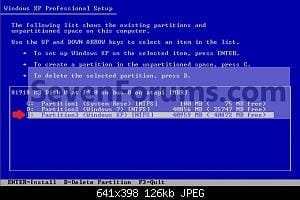
You can delete all the partitions at this screen.
 

Attachments

  • W7-XP-6.jpg
    W7-XP-6.jpg
    12.6 KB · Views: 574

My Computer

OS
ME/XP/Vista/Win7
unfortunately my solidworks 2009 and autocad 2009 does not work with windows 7. which was the main reason for the new computer. plus figured with the old OS, XP, all softwares work with it already. will look at the dual boost installation now. cant seem to get to the XP installation part that allows me to delete all the partitions. even set the startup on the BIOS to startup on the cd and not hard drive.
 

My Computer

OS
windows 7 64bit
Let us know how it turns out. I think the dual boot is a good choice.
 

My Computer

Computer Manufacturer/Model Number
Home built
OS
Windows 7 Ultimate 32 bit
CPU
Intel(R) Pentium(R) 4 CPU 3.00GHz
Motherboard
ASUS P4P800-VM Motherboard Chipset: Intel 865G + ICH5
Memory
2.50 GB RAM
Graphics Card(s)
NVIDIA GeForce 7600 GS
Sound Card
SoundMax Integrated Digital Audio (Chip)
Monitor(s) Displays
ViewSonic VX 1962 wm
Screen Resolution
1680 X 1050
Hard Drives
Seagate Barracuda 7200.10 80 GB
ST380215A ATA Device 18.6 GB
Western Digital "My Book" external hard drive 750 GB
Cooling
Fan based
Keyboard
Microsoft Comfort Curve Keyboard 2000 v10 USB
Mouse
Logitec optic USB
Internet Speed
3.01 Mb/s download 0.64 Mb/s upload
unfortunately my solidworks 2009 and autocad 2009 does not work with windows 7. which was the main reason for the new computer. plus figured with the old OS, XP, all softwares work with it already. will look at the dual boost installation now. cant seem to get to the XP installation part that allows me to delete all the partitions. even set the startup on the BIOS to startup on the cd and not hard drive.

How far can go in this tutorial?

How to Install Windows XP
 

My Computer

OS
ME/XP/Vista/Win7
finally got everything to work. thank you everyone!! havent figured out why but it works. the original windows xp disc i was using for some reason did not allow me to boot up and install. but when i used a DELL windows xp disc that came with my laptop, it allowed me to boot up directly from the disc and allowed me to install xp and delete any partions i wanted.
 

My Computer

OS
windows 7 64bit
Very good. I am glad you you got it sorted out.
 

My Computer

Computer Manufacturer/Model Number
Home built
OS
Windows 7 Ultimate 32 bit
CPU
Intel(R) Pentium(R) 4 CPU 3.00GHz
Motherboard
ASUS P4P800-VM Motherboard Chipset: Intel 865G + ICH5
Memory
2.50 GB RAM
Graphics Card(s)
NVIDIA GeForce 7600 GS
Sound Card
SoundMax Integrated Digital Audio (Chip)
Monitor(s) Displays
ViewSonic VX 1962 wm
Screen Resolution
1680 X 1050
Hard Drives
Seagate Barracuda 7200.10 80 GB
ST380215A ATA Device 18.6 GB
Western Digital "My Book" external hard drive 750 GB
Cooling
Fan based
Keyboard
Microsoft Comfort Curve Keyboard 2000 v10 USB
Mouse
Logitec optic USB
Internet Speed
3.01 Mb/s download 0.64 Mb/s upload
Back
Top