
SamCec
New member
OS = Windows 7 Ultimate 64 bit
Firefox = version 14
IE-9
System is not recognizing the DOWNLOADS folder. Listed below are the steps I followed. I have done these steps using Firefox and IE. The same results on both of them.
1. Downloaded files
2. Using Firefox, clicked on TOOLS/DOWNLOADS (same as IE View Downloads) the page appeared but it did not contain any files. The HEADER on the page was "DOWNLOADS".
3. Using Firefox, clicked on TOOLS/OPTIONS/GENERAL tab. About the center of the screen, there is an option to change the name and location of the DOWNLOADS folder. I created a NEW folder called "NEWDOWNLOADS".
4. I re-downloaded the file, and again did #2 above. It gave me the SAME results and the HEADER was still "DOWNLOADS" NOT "NEWDOWNLOADS">
5. USing the START menu, I clicked on COMPUTER, and went to my new folder called "NEWDOWNLOADS"
6. Opened the folder and all my files were there.
7. Did #5 and #6 to The DOWNLOADS folder. All files were there.
Bottom line of all this is:
If you have any ideas, please let me know.
Thanks,
Sam
Firefox = version 14
IE-9
System is not recognizing the DOWNLOADS folder. Listed below are the steps I followed. I have done these steps using Firefox and IE. The same results on both of them.
1. Downloaded files
2. Using Firefox, clicked on TOOLS/DOWNLOADS (same as IE View Downloads) the page appeared but it did not contain any files. The HEADER on the page was "DOWNLOADS".
3. Using Firefox, clicked on TOOLS/OPTIONS/GENERAL tab. About the center of the screen, there is an option to change the name and location of the DOWNLOADS folder. I created a NEW folder called "NEWDOWNLOADS".
4. I re-downloaded the file, and again did #2 above. It gave me the SAME results and the HEADER was still "DOWNLOADS" NOT "NEWDOWNLOADS">
5. USing the START menu, I clicked on COMPUTER, and went to my new folder called "NEWDOWNLOADS"
6. Opened the folder and all my files were there.
7. Did #5 and #6 to The DOWNLOADS folder. All files were there.
Bottom line of all this is:
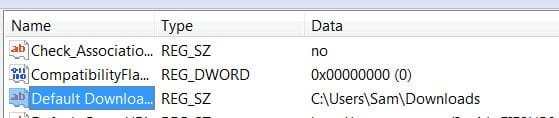
I can not get the file listing of the downloads folder (newdownloads) to be listed. Somewhere there must be another area that is ALWAYS defaulting the location to "C:/USERS/username/DOWNLOADS"
If you have any ideas, please let me know.
Thanks,
Sam
My Computer
- Computer Manufacturer/Model Number
- Home Made
- OS
- Windows 7 Ultimate (64bit)
- CPU
- AMD Phenom II X4 980 Processor 3.70 ghz
- Memory
- 8 GB
- Monitor(s) Displays
- Samsung
- Hard Drives
- (c) WD500 - ATA
(d) WD500 - ATA
 , the version of Firefox (15.01) is the same.