
devildog93
Banned
OK. I put this here as Brink helped me with an icon problem.
I managed to resolve the issue with Brink's awesome help, and got all icons in question in the right spot.
This was the tutorial I used:
http://www.sevenforums.com/tutorials/49819-icon-cache-rebuild.html
I managed to resolve the issue by using option 2, the elevated command prompt method.
But in the trials, I did attempt the first method of downloading this:
Rebuild_Icon_Cache.bat
and I could not open the .bat file. This is what I got:
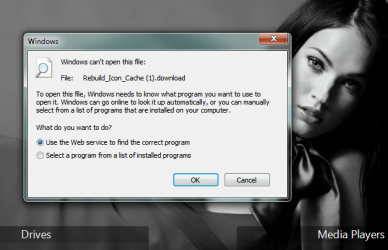
Notice that the file Windows is claiming it can't open is named :
Rebuild_Icon_Cache.DOWNLOAD
Because Brink wants to keep only one topic under the given tutorial, he mentioned that I should post somewhere else, and then we could tackle it.
I was unsure of WHERE to put it, not really knowing how to classify this problem, so if someone could move me to the proper place, by all means, I would appreciate that.
This was a very perplexing problem, especially when it came to common sense....hard to explain, as you would have to read the posts under the tutorial, and read them WELL to understand why I was so confused.
REGARDLESS. I was wondering if someone could help me figure this issue out, as to why the downloads are being labelled wrong.
I appreciate any and all help, and thanks ahead of time.
:devil 93
93
I managed to resolve the issue with Brink's awesome help, and got all icons in question in the right spot.
This was the tutorial I used:
http://www.sevenforums.com/tutorials/49819-icon-cache-rebuild.html
I managed to resolve the issue by using option 2, the elevated command prompt method.
But in the trials, I did attempt the first method of downloading this:
Rebuild_Icon_Cache.bat
and I could not open the .bat file. This is what I got:
Notice that the file Windows is claiming it can't open is named :
Rebuild_Icon_Cache.DOWNLOAD
Because Brink wants to keep only one topic under the given tutorial, he mentioned that I should post somewhere else, and then we could tackle it.
I was unsure of WHERE to put it, not really knowing how to classify this problem, so if someone could move me to the proper place, by all means, I would appreciate that.
This was a very perplexing problem, especially when it came to common sense....hard to explain, as you would have to read the posts under the tutorial, and read them WELL to understand why I was so confused.
REGARDLESS. I was wondering if someone could help me figure this issue out, as to why the downloads are being labelled wrong.
I appreciate any and all help, and thanks ahead of time.
:devil
93My Computer
At a glance
Windows 7 ProfessionalIntel Core2 Duo CPU T6400 @ 2.00GHz3 GBlowly Intel Express Chipset WHOPPING 64 mb de...
- Computer Manufacturer/Model Number
- Laptop Acer Aspire 6930
- OS
- Windows 7 Professional
- CPU
- Intel Core2 Duo CPU T6400 @ 2.00GHz
- Memory
- 3 GB
- Graphics Card(s)
- lowly Intel Express Chipset WHOPPING 64 mb dedicated.LOL
- Monitor(s) Displays
- 26" RCA and 40" Haier, and laptop 17" screen
- Screen Resolution
- 26":1366X768 40":1920X1080 Laptop Screen: 1366X768
- Hard Drives
- Onboard HDD 300 GB/
Seagate 1TB External HDD/
Verbatim 500 GB External HDD/
Firelite 160 GB USB HDD
- Keyboard
- Microsoft Intellitype Wireless Multimedia Keyboard 1.1
- Mouse
- Microsoft Wireless Optical Mouse 2000
- Other Info
- Currently using Telus DSL. I currently have a 3.0 connection, but on wait list for 15.0 connection.


