Download photos from camera

vidanova

New member
Member
Local time
4:35 AM
Messages
57
My first enquiry, have a camera plugged into usb port on my laptop usually I get a question which program to open/download photos but nothing happening, any ideas? :(
 

My Computer My Computer

Computer Manufacturer/Model Number
Samsung
OS
windows 7 home premium 64 bit
CPU
Core i5
Memory
1 TB
Hi vidanova and welcome to Windows 7 Forums :party:

Is your camera powered on? Most need to be on when plugged in via USB to transfer images and data. A better solution is to invest in a suitable card reader (if you haven't already got one) and use that to read the information directly off the memory card itself.
 

My Computer My Computer

Computer type
PC/Desktop
Computer Manufacturer/Model Number
Dwarf Dwf/11/2012 r09/2013
OS
Windows 8.1 Pro RTM x64
CPU
Intel Core-i5-3570K 4-core @ 3.4GHz (Ivy Bridge) (OC 4.4GHz)
Motherboard
ASRock Z77 Extreme4-M
Memory
4 x 4GB DDR3-1600 Corsair Vengeance CMZ8GX3M2A1600C9B (16GB)
Graphics Card(s)
MSI GeForce GTX770 Gaming OC 2GB
Sound Card
Realtek High Definition on board solution (ALC 898)
Monitor(s) Displays
ViewSonic VA1912w Widescreen (VGA)
Screen Resolution
1440x900
Hard Drives
OCZ Agility 3 SSD 120GB SATA III x2 (RAID 0)
Samsung HD501LJ 500GB SATA II x2
Hitachi HDS721010CLA332 1TB SATA II
Iomega 1.5TB Ext USB 2.0
WD 2.0TB Ext USB 3.0
PSU
XFX Pro Series 850W Semi-Modular
Case
Gigabyte IF233
Cooling
1 x 120mm Front Inlet 1 x 120mm Rear Exhaust
Keyboard
Microsoft Comfort Curve Keyboard 3000 (USB)
Mouse
Microsoft Comfort Mouse 3000 for Business (USB)
Internet Speed
NetGear DG834Gv3 ADSL Modem/Router (Ethernet) ~4.0 Mb/s (O2)
Antivirus
Avast! 8.0.1497
Browser
IE 11
Other Info
Optical Drive: HL-DT-ST BD-RE BH10LS30 SATA Bluray
Lexmark S305 Printer/Scanner/Copier (USB)
WEI Score: 8.1/8.1/8.5/8.5/8.25
Asus Eee PC 1011PX Netbook (Windows 7 x86 Starter)
Hi Dwarf

Thanks for fast response. Yes camera powered up ok the link to download used to work ok, its not a problem for me but just wondered if there is a simple answer but like all things computerised there vary rarely is.
 

My Computer My Computer

Computer Manufacturer/Model Number
Samsung
OS
windows 7 home premium 64 bit
CPU
Core i5
Memory
1 TB
Is the camera in PLAY mode? Most need to be.

Even if you do not get a download notification, you can use Windows Explorer to transfer the photos, by searching for the external device (camera) in Computer.

Then by dragging the files to a folder you want.

Or with some cameras, you need to Copy all, then Paste all to a folder you want.
 

My Computer My Computer

Computer type
PC/Desktop
Computer Manufacturer/Model Number
iBuild™ custom PC
OS
Windows 7 Home Premium 64 bit
CPU
Intel® Core™ i5 650 Dual Core 2x 3.2Ghz 4MB Cache
Motherboard
ASUS P7H55-M 6x Rear USB 2.0 2x Front
Memory
Samsung 4GB (2x2GB) DDR3 1333MHz
Graphics Card(s)
nvidia GT430 1GB Graphics Card
Sound Card
Built-in audio
Monitor(s) Displays
Videoseven CMC 17" AD
Screen Resolution
1280 x 1024
Hard Drives
250GB 7200RPM SATA II
Hitachi 1TB Serial ATA II 32MB cache
PSU
Corsair 500Watt PSU
Case
Gigabyte GZ-X2 Black ATX MIDI Tower Case
Cooling
Standard CPU Cooling Fan
Keyboard
Packard Bell 9205
Mouse
Microsoft IntelliMouse Optical
Internet Speed
Supposed to be 100mbps (Average: 54mbps!)
Other Info
Also Windows 7 64 Bit on my Acer i3 Laptop
Will try this later,Thanks
 

My Computer My Computer

Computer Manufacturer/Model Number
Samsung
OS
windows 7 home premium 64 bit
CPU
Core i5
Memory
1 TB
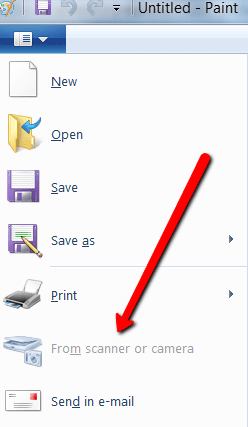
Try Paint:
 

Attachments

  • 2011-02-28_0216.png
    2011-02-28_0216.png
    10.5 KB · Views: 10

My Computer My Computer

Computer Manufacturer/Model Number
HP, Dell, Gateway, Toshiba - 4 laptops and 2 desktops
OS
Vista, Windows7, Mint Mate, Zorin, Windows 8
CPU
from 1.6GHz Duo to i7
Monitor(s) Displays
2x HP w2207
Hard Drives
5x HDD, 7x SSD, 12x Externals
Keyboard
with trackball - no mices
Mouse
Trackball mice
Internet Speed
DSL 6000
WHS
Yes this works fine but I would like to know if possible why the camera cannot be recognised when plugged it used to and was asked which program to open with.

:confused:
 

My Computer My Computer

Computer Manufacturer/Model Number
Samsung
OS
windows 7 home premium 64 bit
CPU
Core i5
Memory
1 TB

My Computer My Computer

Computer Manufacturer/Model Number
HP, Dell, Gateway, Toshiba - 4 laptops and 2 desktops
OS
Vista, Windows7, Mint Mate, Zorin, Windows 8
CPU
from 1.6GHz Duo to i7
Monitor(s) Displays
2x HP w2207
Hard Drives
5x HDD, 7x SSD, 12x Externals
Keyboard
with trackball - no mices
Mouse
Trackball mice
Internet Speed
DSL 6000
Can`t get gpedit.msc to do anything but with Ex. 1 under open device stage all I get is TAKE NO ACTION
 

My Computer My Computer

Computer Manufacturer/Model Number
Samsung
OS
windows 7 home premium 64 bit
CPU
Core i5
Memory
1 TB
Plug your camera into a USB port, then turn it on. Click on Computer, is your camera showing up as a portable device? If it is, right click and choose to 'import pictures and videos'.
 

My Computer My Computer

Computer type
PC/Desktop
Computer Manufacturer/Model Number
Bruce ... somewhere in his 40's
OS
Windows 7 Ultimate 32bit SP1
CPU
Intel(R) Core(TM)2 Quad CPU @ 2.40GHz, 2400 MHz
Motherboard
INTEL/D975XBX2
Memory
4 GB
Graphics Card(s)
ATI Radeon HD 2600 Pro
Monitor(s) Displays
Samsung SyncMaster 914v
Screen Resolution
1280 x 1024
Hard Drives
2/500GB each ... ST3500630AS ATA Device.
One is not connected
PSU
Rocketfish 700 W
Case
G.Skill Gigabyte Chassis
Keyboard
Standard PS/2 Keyboard
Mouse
Microsoft PS/2 Mouse
Internet Speed
DSL
Antivirus
Avira Internet Security
Browser
IE 11
Other Info
ATI HDMI Audio
Yes this works fine many thanks for ALL your help and ideas :D
 

My Computer My Computer

Computer Manufacturer/Model Number
Samsung
OS
windows 7 home premium 64 bit
CPU
Core i5
Memory
1 TB
Good deal!! :geek:
 

My Computer My Computer

Computer type
PC/Desktop
Computer Manufacturer/Model Number
Bruce ... somewhere in his 40's
OS
Windows 7 Ultimate 32bit SP1
CPU
Intel(R) Core(TM)2 Quad CPU @ 2.40GHz, 2400 MHz
Motherboard
INTEL/D975XBX2
Memory
4 GB
Graphics Card(s)
ATI Radeon HD 2600 Pro
Monitor(s) Displays
Samsung SyncMaster 914v
Screen Resolution
1280 x 1024
Hard Drives
2/500GB each ... ST3500630AS ATA Device.
One is not connected
PSU
Rocketfish 700 W
Case
G.Skill Gigabyte Chassis
Keyboard
Standard PS/2 Keyboard
Mouse
Microsoft PS/2 Mouse
Internet Speed
DSL
Antivirus
Avira Internet Security
Browser
IE 11
Other Info
ATI HDMI Audio
Back
Top