
Downloading display box

willythecat

New member
Member
Local time
9:13 AM
Messages
54
Location
SW France
Am using W7 Ultimate with the latest Firefox browser.
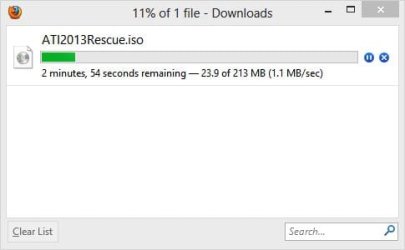
Probably talking a load of old tosh here to you gurus, but l seem to remember in days gone by that when l downloaded something from a website, a box popped up in the left hand corner of the screen, and the green download bar showed the status of the download.
Nowadays, when the download decides to finally kick in, l get a box in the bottom right hand corner asking me whether l want to save it or not.
I'd like to get back to that old display, if that makes sense?
Any suggestions welcome.
Regards
 

My Computer

Computer Manufacturer/Model Number
Home Built System
OS
32bit Windows 7 Ultimate
CPU
AMD Athlon II X2 250 dual core
Motherboard
MSI 760GM-E51
Memory
4 x 1GB dual channel DDR3 @587MHz (7-7-7-20) Crucial Ram
Graphics Card(s)
Built in ATI graphics
Sound Card
Sound Maker Value 5.1
Monitor(s) Displays
Acer P224W
Screen Resolution
1680 x 1050
Hard Drives
2 x 500gb Samsung HD502HJ Sata
PSU
Heden 480W ATX V2.2
Case
ATX Tower
Cooling
n/a
Keyboard
Logitech hard wired Qwerty Keyboard
Mouse
Microsoft Basic Optical hard wired
Internet Speed
ADSL Av.download - 2.10Mb/s Av.upload - 0.14Mb/s
Other Info
Matshita DVD-ROM SR-8584A
TSSTcorp CDDVDW SH-S202N
To switch back to the old download window, in the address bar type about:config press Enter and set browser.download.useToolkitUI to true
by clicking on it.

Jerry
 
Last edited:

My Computer

Computer type
Laptop
Computer Manufacturer/Model Number
Sager NP9170
OS
Win 7 Pro x64 / Win 10 Pro
CPU
Intel(R) Core(TM) i7-3630QM CPU @ 2.40GHz
Motherboard
CLEVO P170EM
Memory
12 GB
Graphics Card(s)
(1) Intel(R) HD Graphics 4000 (2) NVIDIA GeForce GTX 675M
Sound Card
(1) Realtek High Definition Audio (2) Intel(R) Display Aud
Monitor(s) Displays
17.3
Screen Resolution
1920x1080
Hard Drives
(1) Samsung 860 EVO 500GB(OS) (1) Samsung 860 EVO 500GB(Data)
Keyboard
Backlite
Antivirus
MSE, Malwarebytes Pro
Browser
Firefox
Other Info
DESKTOP: Custom-built.
OS: Win 10 Pro x64.
CASE: Rosewill R5.
CPU: Intel I5 4670K CPU @ 3.40GHz.
CPU COOLER: Cool Master Hyper 212 EVO.
MOTHERBOARD: Asus Z87-A.
MEMORY: Kingston HyperX 2x4 GB.
GPU: Nvidia Geforce 650 TI.
PSU: Corsair TX750.
DRIVES: (1) Samsung 840 120 GB SSD (2) Western Digital blue 500 GB 7200 RPM.
I've not made any changes to Firefox about:config yet I still get the window you said you wanted:

FireFox Download Window.jpg

Just checked and this is what I see in Firefox about:config

FireFox about-config.jpg
 

My Computer

Computer type
PC/Desktop
Computer Manufacturer/Model Number
Lenovo IdeaCenter 450
OS
Windows 10 Pro X64
CPU
Intel Quad Core i7-4770 @ 3.4Ghz
Memory
16.0GB PC3-12800 DDR3 SDRAM 1600 MHz
Graphics Card(s)
Intel Integrated HD Graphics
Sound Card
Realtek HD Audio
Monitor(s) Displays
HP 22" LCD
Screen Resolution
1680 x 1050
Hard Drives
250GB Samsung EVO SATA-3 SSD
2TB Seagate ST2000DM001 SATA-2
1.5TB Seagate ST3150041AS SATA
Keyboard
Dell USB
Mouse
Lenovo USB
Internet Speed
Cable via Road Runner 3MB Upload, 30MB Download
Antivirus
Windows Defender, MBAM Pro, MBAE
Browser
Seamonkey
Other Info
UEFI/GPT
PLDS DVD-RW DH16AERSH
Thanks very much for the prompt replies.
Tried changing the toolkitui to true as suggested, but am still getting that same save/cancel box appearing.
Ok it's not critical to the day to day running of things, but l just preferred it to download automatically with the visual green bar display, rather than that dull grey save or cancel display box which requires an answer to be given!
Well at least l now know the area in the about:config of where to look so thanks for that at least.
I don't recall ever having changed any of these settings but hey, just had a thought!
Could someone post me any images of their FF's about:config file which include all the browser settings so l can compare it with mine? A full copy would be even better as l don't think it will give away any sensitive information.
Thanks
 

My Computer

Computer Manufacturer/Model Number
Home Built System
OS
32bit Windows 7 Ultimate
CPU
AMD Athlon II X2 250 dual core
Motherboard
MSI 760GM-E51
Memory
4 x 1GB dual channel DDR3 @587MHz (7-7-7-20) Crucial Ram
Graphics Card(s)
Built in ATI graphics
Sound Card
Sound Maker Value 5.1
Monitor(s) Displays
Acer P224W
Screen Resolution
1680 x 1050
Hard Drives
2 x 500gb Samsung HD502HJ Sata
PSU
Heden 480W ATX V2.2
Case
ATX Tower
Cooling
n/a
Keyboard
Logitech hard wired Qwerty Keyboard
Mouse
Microsoft Basic Optical hard wired
Internet Speed
ADSL Av.download - 2.10Mb/s Av.upload - 0.14Mb/s
Other Info
Matshita DVD-ROM SR-8584A
TSSTcorp CDDVDW SH-S202N
thats the download manager you are describing, it has been updated and now to see it you have to click the downloads arrow.
also, now when a download is taking a few mins it shows a tiny progress bar and countdown where the download arrow is, i prefer it personally,
 

My Computer

Computer Manufacturer/Model Number
Hewlett packard/p6512uk
OS
Microsoft Windows 7 Home Premium 64-bit 7600
CPU
IIx4 amd athelon 635 processor
Motherboard
FOXCONN 2AA9
Memory
2x2gb
Graphics Card(s)
ati radeon HD 5450
Sound Card
(1) Realtek High Definition Audio (2) AMD High Definition
Monitor(s) Displays
samsung lcd tv 32"
Screen Resolution
1360x 768
Hard Drives
(1) WDC WD10 01FAES-60Z2A0 SATA Disk Device (2) Maxtor OneTouch USB Device (3) ST310003 33AS USB Device (4) WD My Book 1111 USB Device
PSU
?
Cooling
air!
Keyboard
wireless hp
Mouse
wireless Hp,optical
Internet Speed
1.10mb/s
Antivirus
MSE
Browser
Firefox
Do you have Firefox / Options / General tab set to Always ask where to save files? What happens if you select Save Files to?
 

My Computer

Computer type
PC/Desktop
Computer Manufacturer/Model Number
Lenovo IdeaCenter 450
OS
Windows 10 Pro X64
CPU
Intel Quad Core i7-4770 @ 3.4Ghz
Memory
16.0GB PC3-12800 DDR3 SDRAM 1600 MHz
Graphics Card(s)
Intel Integrated HD Graphics
Sound Card
Realtek HD Audio
Monitor(s) Displays
HP 22" LCD
Screen Resolution
1680 x 1050
Hard Drives
250GB Samsung EVO SATA-3 SSD
2TB Seagate ST2000DM001 SATA-2
1.5TB Seagate ST3150041AS SATA
Keyboard
Dell USB
Mouse
Lenovo USB
Internet Speed
Cable via Road Runner 3MB Upload, 30MB Download
Antivirus
Windows Defender, MBAM Pro, MBAE
Browser
Seamonkey
Other Info
UEFI/GPT
PLDS DVD-RW DH16AERSH
Thanks Ztruker,
Blimey, my brains getting really rusty lately, but am getting there slow but sure. Have added the download arrow icon
back onto the FF toolbar and whilst l still have to type in save, l now get the download box showing that l had in the first place. I'm going to check out Download Managers, but at least l know what to look for now.
I'll also do a FF backup using Mozbackup, and then have a good old mess around with the config settings so l can then restore back should l make a mess of things.
By the way, my settings are (and have always been) save to a specified file.
Thanks for the advice.
Regards
 

My Computer

Computer Manufacturer/Model Number
Home Built System
OS
32bit Windows 7 Ultimate
CPU
AMD Athlon II X2 250 dual core
Motherboard
MSI 760GM-E51
Memory
4 x 1GB dual channel DDR3 @587MHz (7-7-7-20) Crucial Ram
Graphics Card(s)
Built in ATI graphics
Sound Card
Sound Maker Value 5.1
Monitor(s) Displays
Acer P224W
Screen Resolution
1680 x 1050
Hard Drives
2 x 500gb Samsung HD502HJ Sata
PSU
Heden 480W ATX V2.2
Case
ATX Tower
Cooling
n/a
Keyboard
Logitech hard wired Qwerty Keyboard
Mouse
Microsoft Basic Optical hard wired
Internet Speed
ADSL Av.download - 2.10Mb/s Av.upload - 0.14Mb/s
Other Info
Matshita DVD-ROM SR-8584A
TSSTcorp CDDVDW SH-S202N
Back
Top
