Downloading file from IE8 replaces spaces with underscores

helpo11

New member
Local time
3:15 PM
Messages
1
Hi All,

When I download a file from IE8, if the file name has spaces, the spaces turn to underscores. IE 8 is fully updated, and so is my Windows 7 Pro. Couldn't find a solution any where, any help would be great.

Thanks
 

My Computer My Computer

At a glance

Windows 7
OS
Windows 7
Hello Helpo11, welcome to the Seven Forums.

Downloading files from Internet using Internet Explorer is not replacing spaces with underscores, they are there to start with. It is not an error or bug but instead completely normal behavior. I will try to explain it, as well as tell you how to avoid those underscores. Please read patiently to the end, it is necessary first to understand why this happens so my explanation might be a bit long... ;)

A so called Internet address is called URL (Uniform Resource Locator,). For instance the Seven Forums URL is http://www.sevenforums.com. A URL consists of a protocol identifier and a domain name. Most common protocols are HTTP (Hypertext Transfer Protocol), HTTPS (Hypertext Transfer Protocol Secure), FTP (File Transfer Protocol) and FILE for internal file system.

More about FILE protocol identifier to better understand my example below:
You can browse your Windows computer with any browser using URL, try for instance writing file:///C:/ on your browser's addressbar and see what happens! Notice that URL starting with FILE is followed by 3 shlashes ///, not two as other URLs. First two slashes belong to protocol identifier, the third one is to tell to system browsing starts from root.

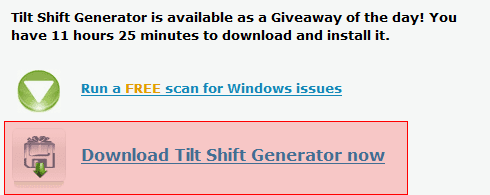
When you click a download link on a web page, it is also a URL. Look for instance the Giveaway of the Day site (gives daily one application for free), their freebie today is a program called Tilt Shift Generator. From the site you can find this download link:
Download_URL_example_1.png

When you click the link it starts downloading. This is because when your browser does not recognize the extension of a link (URL) to be one that should be opened on browser, it correctly assumes that this URL is file to be downloaded. Typical extensions that just open a webpage are .html, .htm, .php, .asp and so on. Extensions .exe, .zip and .rar are typical examples of "downloadable" extensions.

Now the most important thing regarding this matter: A URL can not have spaces!. The same with the name of a downloadable file on a website, it can not contain spaces.

An example:
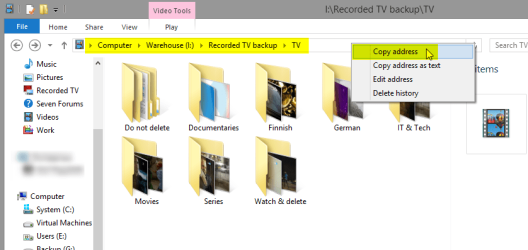
I am browsing my PC being at the moment in folder I:\Recorded TV backup\TV. I want to continue browsing with browser. I simply right click Windows Explorer addressbar and copy the address:
Download_URL_example_3.png

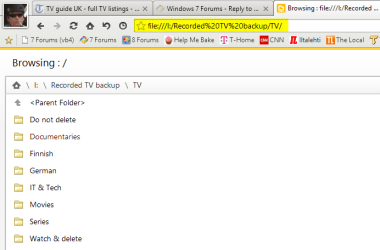
Now let's paste the address to browser addressbar. As this address (folder path) contains spaces which are not allowed in a URL, they must be converted to something a browser can understand before the folder path can be used as a URL. This conversion is done by system, automatically. See the addressbar, the URL system has encoded every space to characters %20, ASCII code for a space:
Download_URL_example_2.png

This, replacing spaces and other special characters on URLs to something the system can understand is called URL encoding or Percent encoding. A complete list of ASCII codes for all characters as well as more information in this matter can be found on this page.

Finally, your answer ;):
Those underscores are there to start with. As an old school geek from the times when spaces in filenames were absolutely forbidden, I as well as most of the geeks still don't use them. We replace spaces in filenames with underscores to make them one word. See what I mean, scroll up to the one of the screenshots in this post, hover your cursor on top of the image to see the filename I gave to that image. See?

A clickable link is often underlined so it is easy not to notice the underscore. Here a bogus link for example: www.anexamplesite.com/download_this_file. Noticed the underscores?

When you click these downloadable links on IE8 and later notice that the filename contains underscores, it is because it was originally there. IE does not change the filename when you download it.

To get rid of underscores, do not select Save when downloading. Select Save As instead and replace underscores with spaces, or change the filename to whatever you'd like to.

Kari

 
Last edited:

My Computer My Computer

At a glance

Windows 10 Pro x64 EN-GB1.6 GHz Intel Core i7-720QM Processor6 GBATI Mobility Radeon HD 5850 Graphics
Computer type
Laptop
Computer Manufacturer/Model Number
HP ENVY 17-1150eg
OS
Windows 10 Pro x64 EN-GB
CPU
1.6 GHz Intel Core i7-720QM Processor
Memory
6 GB
Graphics Card(s)
ATI Mobility Radeon HD 5850 Graphics
Sound Card
Beats sound system with integrated subwoofer
Monitor(s) Displays
17" laptop display, 22" LED and 32" Full HD TV through HDMI
Screen Resolution
1600*900 (1), 1920*1080 (2&3)
Hard Drives
Internal: 2 x 500 GB SATA Hard Disk Drive 7200 rpm
External: 2TB for backups, 3TB USB3 network drive for media
Cooling
As Envy runs a bit warm, I have it on a Cooler Master pad
Keyboard
Logitech diNovo Media Desktop Laser (bluetooth)
Mouse
Logitech Performance Mouse MX
Internet Speed
50/10 Mbps VDSL
Antivirus
Windows Defender 4.3.9431.0
Browser
Maxthon 3.5.2., IE11
Hi All,

When I download a file from IE8, if the file name has spaces, the spaces turn to underscores. IE 8 is fully updated, and so is my Windows 7 Pro. Couldn't find a solution any where, any help would be great.

Thanks
As Kari has explained - spaces are not allowed in a URL path...

...however IE8 should turn the "%20" that Kari mentioned back into a space for you.

Most links have an underscore under the file name which would hide any underscores might be in the original file name.

Start with a file name like:
"some image.jpg"
You might see the link as:
"some image.jpg"

Or I can start with a file name like:
"some_image.jpg"
You might see the link as:
"some_image.jpg"

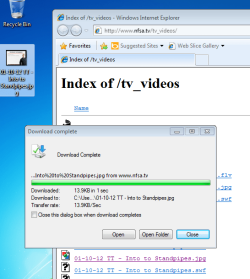
How can you be sure that the original file has spaces in its file name? Are you seeing one or more "%20" replacements as shown in the first image below?

Please visit this website that I found via a random Google for "Index of":
http://www.nfsa.tv/tv_videos/

Both IE9 and IE8 downloaded the file shown below and the resulting file had spaces in the name:

spaced-out1.png

spaced-out2.png

Please provide a link to a file that demonstrates the problem that you are having?
 

My Computer My Computer

At a glance

W7 Pro SP1 64biti78GBIntel HD Graphics
Computer type
Laptop
Computer Manufacturer/Model Number
Employer provided Dell Latitude
OS
W7 Pro SP1 64bit
CPU
i7
Memory
8GB
Graphics Card(s)
Intel HD Graphics
Hard Drives
crappy SSD
Antivirus
Employer mandated Symantec Endpoint Protection
Browser
Pale Moon 64bit, IE11 64bit & Chrome 64bit
As Kari has explained - spaces are not allowed in a URL path...

...however IE8 should turn the "%20" that Kari mentioned back into a space for you.

Most links have an underscore under the file name which would hide any underscores might be in the original file name.

...
...
Important addition, I forgot to mention that. Thanks.

As UsernameIssues told, URI Encoding works two ways. If a URL has encoded characters like %20 for a space, when the file is downloaded the %20 is re-converted to space.

My main point is still valid after what UsernameIssues added: IE does not replace spaces with underscores.

Kari
 

My Computer My Computer

At a glance

Windows 10 Pro x64 EN-GB1.6 GHz Intel Core i7-720QM Processor6 GBATI Mobility Radeon HD 5850 Graphics
Computer type
Laptop
Computer Manufacturer/Model Number
HP ENVY 17-1150eg
OS
Windows 10 Pro x64 EN-GB
CPU
1.6 GHz Intel Core i7-720QM Processor
Memory
6 GB
Graphics Card(s)
ATI Mobility Radeon HD 5850 Graphics
Sound Card
Beats sound system with integrated subwoofer
Monitor(s) Displays
17" laptop display, 22" LED and 32" Full HD TV through HDMI
Screen Resolution
1600*900 (1), 1920*1080 (2&3)
Hard Drives
Internal: 2 x 500 GB SATA Hard Disk Drive 7200 rpm
External: 2TB for backups, 3TB USB3 network drive for media
Cooling
As Envy runs a bit warm, I have it on a Cooler Master pad
Keyboard
Logitech diNovo Media Desktop Laser (bluetooth)
Mouse
Logitech Performance Mouse MX
Internet Speed
50/10 Mbps VDSL
Antivirus
Windows Defender 4.3.9431.0
Browser
Maxthon 3.5.2., IE11
Hi I have been searching as to why IE is changing my hyperlinks with # to %20 when I found this thread and hope you can help me. I understand why the underscores are there my issue is when I add a hyperlink to a word document that has underscores it alters the hyperlink from # to %20. Here is an example
Social Security Act 1991 to http://www.comlaw.gov.au/Details/C2014C00682/Html/Volume_3 - _Toc399337376 and this causes errors. My own IT staff are not able to answer this for me. The only reason I can think of is that as it is not the start of the page it is further down using the pages TOC this is causes this issue..... Please help.
 

My Computer My Computer

At a glance

Windows 7 64bit
Computer type
PC/Desktop
OS
Windows 7 64bit
Hmmm Kaos239, you sure came up with an interesting issue (bug?).


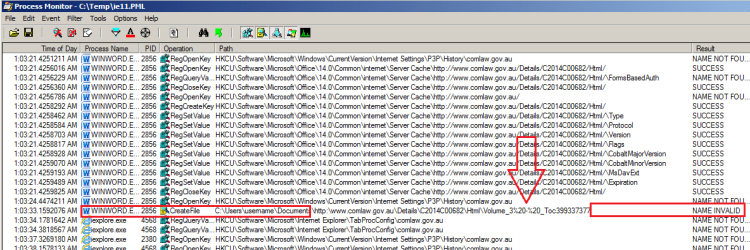
I was able to reproduce your issue using IE11 on W7pro64bit. I then used Process Monitor to capture some of what goes on when one clicks on such a link from within an MS Word (Office 2010) document.
IE11-1.png

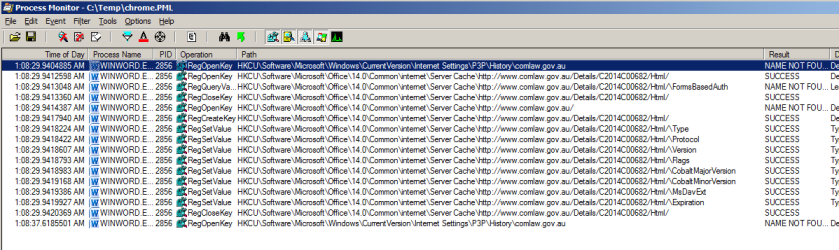
I made Chrome the default browser and this is what Process Monitor captured when one clicks on the link.
chrome.png
(Notice that there is no CreateFile operation.)

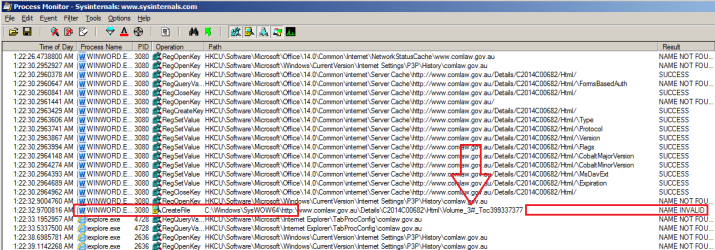
When I put IE back as the default browser, the process worked.
(i.e. IE11 opened the website to the correct location.)
IE11-2.png

All of the Process Monitor captures pictured above were filtered to only show entries that contained "comlaw" in the Path.


So... I started all over.
I opened a W7pro64bit Virtual Machine
...installed/updated IE11
...installed MS Office 2010
...opened Word and pasted in your link.

Sure enough, IE11 failed.
Word sent "%20-%20" instead of "#".
Notice the hyphen between the each "%20".

Installing Chrome fixed the issue...
...even when IE11 was set as the default browser again
...even when Chrome was uninstalled
...even after restarting the virtual computer.
Nothing could break IE11 once Chrome had been the default browser. Unfortunately, Chrome changes a boatload of stuff in the Windows registry and we have known for a long time that uninstalling Chrome leaves stuff behind in the registry.

I'm afraid that I cannot help you fix this - unless you want to tell all of those that get your Word document to install Chrome, make it the default browser and then uninstall Chrome.

Code:
http://www.comlaw.gov.au/Details/C2014C00682/Html/Volume_3#_Toc399337377
edit: you are not alone in reporting this:
http://answers.microsoft.com/en-us/...0/4e8a2e8d-b889-4c77-8276-551b11e296d4?page=1

The registry entry near the bottom of page one is one of the things that I've seen after Chrome touches a computer. I find it interesting that some users in that thread seemed to have the issue even when using Chrome as the default browser.
 

My Computer My Computer

At a glance

W7 Pro SP1 64biti78GBIntel HD Graphics
Computer type
Laptop
Computer Manufacturer/Model Number
Employer provided Dell Latitude
OS
W7 Pro SP1 64bit
CPU
i7
Memory
8GB
Graphics Card(s)
Intel HD Graphics
Hard Drives
crappy SSD
Antivirus
Employer mandated Symantec Endpoint Protection
Browser
Pale Moon 64bit, IE11 64bit & Chrome 64bit
Interesting stuff,
All I can say is word 2007 when creating a hyperlink paste as save text only will show the correct url to the section in the drop down menu,
View attachment 336878
That was off the section below where your link pointed to,
Code:
style[COLOR=#0000ff]="width:20px;height:1px"></[/COLOR][COLOR=#a31515]div[/COLOR][COLOR=#0000ff]></[/COLOR][COLOR=#a31515]td[/COLOR][COLOR=#0000ff]><[/COLOR][COLOR=#a31515]td[/COLOR][COLOR=#0000ff]><[/COLOR][COLOR=#a31515]div[/COLOR][COLOR=#ff0000]style[/COLOR][COLOR=#0000ff]="width:20px;height:1px"></[/COLOR][COLOR=#a31515]div[/COLOR][COLOR=#0000ff]></[/COLOR][COLOR=#a31515]td[/COLOR][COLOR=#0000ff]><[/COLOR][COLOR=#a31515]td[/COLOR][COLOR=#0000ff]><[/COLOR][COLOR=#a31515]div[/COLOR][COLOR=#ff0000]style[/COLOR][COLOR=#0000ff]="width:20px;height:1px"></[/COLOR][COLOR=#a31515]div[/COLOR][COLOR=#0000ff]></[/COLOR][COLOR=#a31515]td[/COLOR][COLOR=#0000ff]><[/COLOR][COLOR=#a31515]td[/COLOR][COLOR=#0000ff]><[/COLOR][COLOR=#a31515]div[/COLOR][COLOR=#ff0000]style[/COLOR][COLOR=#0000ff]="width:20px;height:1px"></[/COLOR][COLOR=#a31515]div[/COLOR][COLOR=#0000ff]></[/COLOR][COLOR=#a31515]td[/COLOR][COLOR=#0000ff]><[/COLOR][COLOR=#a31515]td[/COLOR][COLOR=#0000ff]><[/COLOR][COLOR=#a31515]div[/COLOR][COLOR=#ff0000]style[/COLOR][COLOR=#0000ff]="width:20px;height:1px"></[/COLOR][COLOR=#a31515]div[/COLOR][COLOR=#0000ff]></[/COLOR][COLOR=#a31515]td[/COLOR][COLOR=#0000ff]><[/COLOR][COLOR=#a31515]td[/COLOR][COLOR=#0000ff]><[/COLOR][COLOR=#a31515]img[/COLOR][COLOR=#ff0000]src[/COLOR][COLOR=#0000ff]="/WebResource.axd?d=VCF9irJdZc_LjMfCWQn6-QpbGpsZhz0oL8lU5ywN8D_sIAjLUqWzjsx-uiZKNHsAPgMdkafFDtDGfjMv2CFD1jM5BcCOObdKf9yJ4ZxmoPvj44Kw0&t=635296337968570163"[/COLOR][COLOR=#ff0000]alt[/COLOR][COLOR=#0000ff]=""[/COLOR][COLOR=#0000ff]/></[/COLOR][COLOR=#a31515]td[/COLOR][COLOR=#0000ff]><[/COLOR][COLOR=#a31515]td[/COLOR][COLOR=#ff0000]class[/COLOR][COLOR=#0000ff]="tree ctl00_MainContent_ctl05_HtmlToc_trTOC_2"[/COLOR][COLOR=#ff0000]style[/COLOR][COLOR=#0000ff]="white-space:nowrap;"><[/COLOR][COLOR=#a31515]a[/COLOR][COLOR=#ff0000]class[/COLOR][COLOR=#0000ff]="ctl00_MainContent_ctl05_HtmlToc_trTOC_0 tree ctl00_MainContent_ctl05_HtmlToc_trTOC_1"[/COLOR][COLOR=#ff0000]href[/COLOR][COLOR=#0000ff]="http://www.comlaw.gov.au/Details/C2014C00682/Html/Volume_3#_Toc399337338"[/COLOR][COLOR=#ff0000]title[/COLOR][COLOR=#0000ff]="1119 Value of asset-tested income streams that are not defined benefit income streams"[/COLOR][COLOR=#ff0000]id[/COLOR][COLOR=#0000ff]="ctl00_MainContent_ctl05_HtmlToc_trTOCt1853"[/COLOR][COLOR=#ff0000]style[/COLOR][COLOR=#0000ff]="border-style:none;font-size:1em;">[/COLOR][COLOR=#000000]1119 Value of asset-tested income streams that are not defined benefit income streams[/COLOR][COLOR=#0000ff]</[/COLOR][COLOR=#a31515]a[/COLOR][COLOR=#0000ff]></[/COLOR][COLOR=#a31515]td[/COLOR][COLOR=#0000ff]>[/COLOR]
 
Last edited:

My Computer My Computer

At a glance

Win-7-Pro64bit 7-H-Prem-64biti7-5930K 2nd i9-9940x both water blocked VRM'...Trident-z 3200C14 2nd Trident-z 3600C16EVGA 1080ti ftw3 2nd Titan Xp both water blocked
Computer type
PC/Desktop
Computer Manufacturer/Model Number
Custom assembled by me :}
OS
Win-7-Pro64bit 7-H-Prem-64bit
CPU
i7-5930K 2nd i9-9940x both water blocked VRM's too
Motherboard
ASUS SABERTOOTH X99 2nd ASUS x299 Apex
Memory
Trident-z 3200C14 2nd Trident-z 3600C16
Graphics Card(s)
EVGA 1080ti ftw3 2nd Titan Xp both water blocked
Sound Card
Built-in Realtek
Monitor(s) Displays
1-AOC G2460PG 24"G-Sync 144Hz/ 2nd 1-ASUS VG248QE 24" 144Hz
Screen Resolution
1920 x 1080 144Hz
Hard Drives
2-Samsung M.2 Evo & Evo Plus
2-Samsung 850 EVO 500GB SSD's/ 3-2.5 W.D. Black 1tb-&3-1tb/3-3.5 WD Black 1tb hdd's
PSU
EVGA SuperNOVA 1000-P2 2nd 1200-P2
Case
2-Corsair Obsidian Series 450D Black ATX Mid Tower
Cooling
Custom water loops
Keyboard
Logitech G710+/ 2nd Logitech G910
Mouse
2-RedDragon M901 Perdition 16400 dpi Gaming mouse = wired
Internet Speed
Comcast Ping 19ms 89.31mbps download speed 6.12mbps upload
Antivirus
Malwarebytes Pro/ Superantispyware Pro
Browser
FireFox & Pale moon
Other Info
2nd ASUS X299 Apex/Intel i9-9940x with Custom water loop/7H-Prem-x64/Corsair 450D case/Ram Trident-z 3600C16 4x8gb / Samsung970Evo plus 500gb SSD/Dual ssd EZ swap evo/PSU EVGA SuperNova 1200w-P2 80+Platinum/GPU Titan Xp /8-ML-140 on push-pull on 2-280GTX rads
Hi I have been searching as to why IE is changing my hyperlinks with # to %20 when I found this thread and hope you can help me. I understand why the underscores are there my issue is when I add a hyperlink to a word document that has underscores it alters the hyperlink from # to %20. Here is an example
Social Security Act 1991 to http://www.comlaw.gov.au/Details/C2014C00682/Html/Volume_3 - _Toc399337376 and this causes errors. My own IT staff are not able to answer this for me. The only reason I can think of is that as it is not the start of the page it is further down using the pages TOC this is causes this issue..... Please help.


Try this simple registry change under local user settings, one for HTTP and HTTPS

You could try setting these registry keys, the changes solved my problem and it is better then change 300+ docs with multiple hyperlinks:

[HKEY_CURRENT_USER\Software\Microsoft\Windows\Shell\Associations\UrlAssociations\ add key "http"]
[HKEY_CURRENT_USER\Software\Microsoft\Windows\Shell\Associations\UrlAssociations\http\add key "UserChoice"]
add a new string "Progid" with a value ="IE.HTTP"


[HKEY_CURRENT_USER\Software\Microsoft\Windows\Shell\Associations\UrlAssociations\ add key "https"]
[HKEY_CURRENT_USER\Software\Microsoft\Windows\Shell\Associations\UrlAssociations\https\ add key "UserChoice"]
add a new string "Progid" with a value ="IE.HTTPS"


Thank you Erik Davidsson and now I need to sign up to MS site to thank that fella.
 

My Computer My Computer

At a glance

windows 7
Computer type
PC/Desktop
OS
windows 7
Back
Top