Downloading makes 7 really slow

I know, I've been too lazy to install them since the clean install. I have the same problem with them but I'll get them now.
 

My Computer My Computer

At a glance

Windows 7 Ultimate x64 | Windows XP Pro x86 |...AMD Athlon 64 X2 Dual Core 5200 2.7 GHz3G RAMATI HD Radeon 4670
Computer Manufacturer/Model Number
Started out as an AST180
OS
Windows 7 Ultimate x64 | Windows XP Pro x86 | Windows Vista Ultimate x86
CPU
AMD Athlon 64 X2 Dual Core 5200 2.7 GHz
Motherboard
Acer EM61SM/EM61PM
Memory
3G RAM
Graphics Card(s)
ATI HD Radeon 4670
Screen Resolution
1280x1024
Hard Drives
Western Digital Caviar Black WD1001FALS 1TB 7200 RPM 32MB Cache, 160 GB Seagate
PSU
Corsair 450VX 450W
Keyboard
Microsoft Media Pro 3000
Mouse
Logitech MX310
I got money that says it's KAV causing it.


Kaspersky AV is not the problem here it's the files that have been downloading. Kav doesn't like certain files and so uses up all the RAM when scanning them.:eek:
 

My Computer My Computer

At a glance

Stools
OS
Stools
I don't use kaspersky anymore, I use microsoft security essentials.
 

My Computer My Computer

At a glance

Windows 7 Ultimate x64 | Windows XP Pro x86 |...AMD Athlon 64 X2 Dual Core 5200 2.7 GHz3G RAMATI HD Radeon 4670
Computer Manufacturer/Model Number
Started out as an AST180
OS
Windows 7 Ultimate x64 | Windows XP Pro x86 | Windows Vista Ultimate x86
CPU
AMD Athlon 64 X2 Dual Core 5200 2.7 GHz
Motherboard
Acer EM61SM/EM61PM
Memory
3G RAM
Graphics Card(s)
ATI HD Radeon 4670
Screen Resolution
1280x1024
Hard Drives
Western Digital Caviar Black WD1001FALS 1TB 7200 RPM 32MB Cache, 160 GB Seagate
PSU
Corsair 450VX 450W
Keyboard
Microsoft Media Pro 3000
Mouse
Logitech MX310
Still fighting IRQ sharing problem, I see...

zzz2496

Edit:
Spiking on CPU usage under network transfer = bad driver, combine that with IRQ sharing problem, you got what you have right now, bad/crackling/latency issues audio+high CPU usage (due to bad driver).
 

My Computer My Computer

At a glance

Windows7 Ultimate 64bitIntel Core 2 Quad Q6600DDR2 Adata 4GBNvidia GeForce GTX 285 1024 and Nvidia GeForc...
Computer Manufacturer/Model Number
Self Built
OS
Windows7 Ultimate 64bit
CPU
Intel Core 2 Quad Q6600
Motherboard
Abit IN9-32X-MMAX
Memory
DDR2 Adata 4GB
Graphics Card(s)
Nvidia GeForce GTX 285 1024 and Nvidia GeForce 8800GT 512
Sound Card
Asus Xonar HDAV 1.3
Monitor(s) Displays
Dell 2407WFP and BenQ 2400v and Philips 150v3
Screen Resolution
3840x1200 and 1024x768
Hard Drives
2 WDC 1TB
1 WDC 1.5TB
1 WDC 640GB
1 WDC 320GB
1 Seagate 200GB
PSU
Corsair TX 850W
Case
Cooler Master HAF932
Cooling
Arctic Cooling Freezer Extreme and plenty of fans...
Keyboard
MicrosoftNaturalKeyboard 4000/Apple Alu keyboard/Dinovo mini
Mouse
Logitech G5/MarbleMouseTrackball/PerformanceMX/SpacePilotPRO
Internet Speed
1.5Mbps down/384Kbps up
Other Info
APC SURT 1000XL
Logitech Z-560
Wiimote
Mikrotik Router
Linksys (now Cisco) SD2008 8 port Gigabit switch
Linksys WRT54G (acting as AP)
Apple wireless Aluminium keyboard
Apple Magic Mouse
Xbox360 wired controller
Still fighting IRQ sharing problem, I see...

zzz2496

Edit:
Spiking on CPU usage under network transfer = bad driver, combine that with IRQ sharing problem, you got what you have right now, bad/crackling/latency issues audio+high CPU usage (due to bad driver).

Then why does my sister's laptop have the same problem under my network?
 

My Computer My Computer

At a glance

Windows 7 Ultimate x64 | Windows XP Pro x86 |...AMD Athlon 64 X2 Dual Core 5200 2.7 GHz3G RAMATI HD Radeon 4670
Computer Manufacturer/Model Number
Started out as an AST180
OS
Windows 7 Ultimate x64 | Windows XP Pro x86 | Windows Vista Ultimate x86
CPU
AMD Athlon 64 X2 Dual Core 5200 2.7 GHz
Motherboard
Acer EM61SM/EM61PM
Memory
3G RAM
Graphics Card(s)
ATI HD Radeon 4670
Screen Resolution
1280x1024
Hard Drives
Western Digital Caviar Black WD1001FALS 1TB 7200 RPM 32MB Cache, 160 GB Seagate
PSU
Corsair 450VX 450W
Keyboard
Microsoft Media Pro 3000
Mouse
Logitech MX310
Then why does my sister's laptop have the same problem under my network?

That would make it a hardware problem (router or modem), not a Windows 7 problem.
 

My Computer My Computer

At a glance

Win 7 Ultimate x64FX-8350 @ 4.6 GHz so farADATA XPG V1 Series Black 8GB DDR3 1600Sapphire R9 270x Dual-X
Computer type
PC/Desktop
Computer Manufacturer/Model Number
Me
OS
Win 7 Ultimate x64
CPU
FX-8350 @ 4.6 GHz so far
Motherboard
Asus M5A97 EVO
Memory
ADATA XPG V1 Series Black 8GB DDR3 1600
Graphics Card(s)
Sapphire R9 270x Dual-X
Sound Card
Xonar DGX w/ Corsair Vengence 1300
Monitor(s) Displays
Acer S232HL Abid
Screen Resolution
1920x1080
Hard Drives
120 GB OCZ Vertex 3
500 GB Seagate 7200.12
PSU
Antec Earthwatts 650W Green
Case
Antec Three Hundred
Cooling
Cooler Master 212 EVO
Keyboard
Logitech G510
Mouse
Logitech G500s
Internet Speed
35000/3000
Can you tell me your network topology? It's like this (in my case):

Internet <--> Cable Modem <--> Router <--> 8 Port Gigabit Switch <--> "Computers/AP/another router"

"Computers/AP/another router" = this segment is where my computers/access points/another router resides.

zzz2496

Edit: I really hope you don't share your network connection using your computer (with ICS) as the "Gateway"...
 

My Computer My Computer

At a glance

Windows7 Ultimate 64bitIntel Core 2 Quad Q6600DDR2 Adata 4GBNvidia GeForce GTX 285 1024 and Nvidia GeForc...
Computer Manufacturer/Model Number
Self Built
OS
Windows7 Ultimate 64bit
CPU
Intel Core 2 Quad Q6600
Motherboard
Abit IN9-32X-MMAX
Memory
DDR2 Adata 4GB
Graphics Card(s)
Nvidia GeForce GTX 285 1024 and Nvidia GeForce 8800GT 512
Sound Card
Asus Xonar HDAV 1.3
Monitor(s) Displays
Dell 2407WFP and BenQ 2400v and Philips 150v3
Screen Resolution
3840x1200 and 1024x768
Hard Drives
2 WDC 1TB
1 WDC 1.5TB
1 WDC 640GB
1 WDC 320GB
1 Seagate 200GB
PSU
Corsair TX 850W
Case
Cooler Master HAF932
Cooling
Arctic Cooling Freezer Extreme and plenty of fans...
Keyboard
MicrosoftNaturalKeyboard 4000/Apple Alu keyboard/Dinovo mini
Mouse
Logitech G5/MarbleMouseTrackball/PerformanceMX/SpacePilotPRO
Internet Speed
1.5Mbps down/384Kbps up
Other Info
APC SURT 1000XL
Logitech Z-560
Wiimote
Mikrotik Router
Linksys (now Cisco) SD2008 8 port Gigabit switch
Linksys WRT54G (acting as AP)
Apple wireless Aluminium keyboard
Apple Magic Mouse
Xbox360 wired controller
Can you tell me your network topology? It's like this (in my case):

Internet <--> Cable Modem <--> Router <--> 8 Port Gigabit Switch <--> "Computers/AP/another router"

"Computers/AP/another router" = this segment is where my computers/access points/another router resides.

zzz2496

Edit: I really hope you don't share your network connection using your computer (with ICS) as the "Gateway"...

Internet > Cable Modem > Router > Access Point
 

My Computer My Computer

At a glance

Windows 7 Ultimate x64 | Windows XP Pro x86 |...AMD Athlon 64 X2 Dual Core 5200 2.7 GHz3G RAMATI HD Radeon 4670
Computer Manufacturer/Model Number
Started out as an AST180
OS
Windows 7 Ultimate x64 | Windows XP Pro x86 | Windows Vista Ultimate x86
CPU
AMD Athlon 64 X2 Dual Core 5200 2.7 GHz
Motherboard
Acer EM61SM/EM61PM
Memory
3G RAM
Graphics Card(s)
ATI HD Radeon 4670
Screen Resolution
1280x1024
Hard Drives
Western Digital Caviar Black WD1001FALS 1TB 7200 RPM 32MB Cache, 160 GB Seagate
PSU
Corsair 450VX 450W
Keyboard
Microsoft Media Pro 3000
Mouse
Logitech MX310
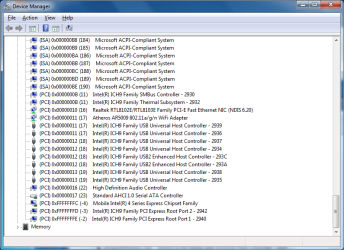
All I can say (based on what you said) is both have the infamous DPC latency problem, crackling sound when playing audio. I know for sure that IRQ sharing can cause this, and your PC shows that Network controller is sharing IRQ with Audio device, so this is an IRQ sharing problem. What's on your sister's computer... I don't really know, you don't tell me anything, no screenshots of the HP's Device manager. And you said the last page(s), when you connect directly to the modem, no speed problem, but audio problem presists (indicating IRQ sharing problem). Thus I said, "Still fighting IRQ sharing problem, I see...", your situation hasn't changed...

zzz2496
 

My Computer My Computer

At a glance

Windows7 Ultimate 64bitIntel Core 2 Quad Q6600DDR2 Adata 4GBNvidia GeForce GTX 285 1024 and Nvidia GeForc...
Computer Manufacturer/Model Number
Self Built
OS
Windows7 Ultimate 64bit
CPU
Intel Core 2 Quad Q6600
Motherboard
Abit IN9-32X-MMAX
Memory
DDR2 Adata 4GB
Graphics Card(s)
Nvidia GeForce GTX 285 1024 and Nvidia GeForce 8800GT 512
Sound Card
Asus Xonar HDAV 1.3
Monitor(s) Displays
Dell 2407WFP and BenQ 2400v and Philips 150v3
Screen Resolution
3840x1200 and 1024x768
Hard Drives
2 WDC 1TB
1 WDC 1.5TB
1 WDC 640GB
1 WDC 320GB
1 Seagate 200GB
PSU
Corsair TX 850W
Case
Cooler Master HAF932
Cooling
Arctic Cooling Freezer Extreme and plenty of fans...
Keyboard
MicrosoftNaturalKeyboard 4000/Apple Alu keyboard/Dinovo mini
Mouse
Logitech G5/MarbleMouseTrackball/PerformanceMX/SpacePilotPRO
Internet Speed
1.5Mbps down/384Kbps up
Other Info
APC SURT 1000XL
Logitech Z-560
Wiimote
Mikrotik Router
Linksys (now Cisco) SD2008 8 port Gigabit switch
Linksys WRT54G (acting as AP)
Apple wireless Aluminium keyboard
Apple Magic Mouse
Xbox360 wired controller
Here's the laptops IRQs. I've read somewhere that IRQ sharing isn't that big of a deal anymore as it was in earlier operating systems.

My computer was working fine for about 5 months until out of no where, this problem showed up.
 

Attachments

  • IRQs.png
    IRQs.png
    22.7 KB · Views: 36

My Computer My Computer

At a glance

Windows 7 Ultimate x64 | Windows XP Pro x86 |...AMD Athlon 64 X2 Dual Core 5200 2.7 GHz3G RAMATI HD Radeon 4670
Computer Manufacturer/Model Number
Started out as an AST180
OS
Windows 7 Ultimate x64 | Windows XP Pro x86 | Windows Vista Ultimate x86
CPU
AMD Athlon 64 X2 Dual Core 5200 2.7 GHz
Motherboard
Acer EM61SM/EM61PM
Memory
3G RAM
Graphics Card(s)
ATI HD Radeon 4670
Screen Resolution
1280x1024
Hard Drives
Western Digital Caviar Black WD1001FALS 1TB 7200 RPM 32MB Cache, 160 GB Seagate
PSU
Corsair 450VX 450W
Keyboard
Microsoft Media Pro 3000
Mouse
Logitech MX310
Does your sister's computer produces crackling noise too?
Anyway, download DPC latency checker over here, see if your sister's computer does have the same problem as yours too... (check with the tool).

zzz2496

Edit:
Processing of streaming data in real-time is a very challenging task for Windows based applications and device drivers. This is because by design Windows is not a real-time operating system. There is no guarantee that certain (periodic) actions can be executed in a timely manner.

Audio or video data streams transferred from or to an external device are typically handled by a kernel-mode device driver. Data processing in such device drivers is interrupt-driven. Typically, the external hardware periodically issues interrupts to request the driver to transfer the next block of data. In Windows NT based systems (Windows 2000 and better) there is a specific interrupt handling mechanism. A device driver cannot process data immediately in its interrupt routine. It has to schedule a Deferred Procedure Call (DPC) which basically is a callback routine that will be called by the operating system as soon as possible. Any data transfer performed by the device driver takes place in the context of this callback routine, named DPC for short.

The operating system maintains DPCs scheduled by device drivers in a queue. There is one DPC queue per CPU available in the system. At certain points the kernel checks the DPC queue and if no interrupt is to be processed and no DPC is currently running the first DPC will be un-queued and executed. DPC queue processing happens before the dispatcher selects a thread and assigns the CPU to it. So, a Deferred Procedure Call has a higher priority than any thread in the system.

Note that the Deferred Procedure Call concept exists in kernel mode only. Any user-mode code (Windows applications) runs in the context of a thread. Threads are managed and scheduled for execution by the dispatcher.

While there is a pre-emptive multitasking for threads, DPCs are executed sequentially according to the first in, first out nature of a DPC queue. Thus, a sort of cooperative multitasking scheme exists for Deferred Procedure Calls. If any DPC runs for an excessive amount of time then other DPCs will be delayed by that amount of time. Consequently, the latency of a particular DPC is defined as the sum of the execution time of all DPCs queued in front of that DPC. In order to achieve reasonable DPC latencies, in the Windows Device Driver Kit (DDK) documentation Microsoft recommends to return from a DPC routine as quick as possible. Any lengthy operation and specifically loops that wait for a hardware state change (polling) are strongly discouraged.

Unfortunately, many existing device drivers do not conform to this advice. Such drivers spend an excessive amount of time in their DPC routines, causing an exceptional large latency for any other driver's DPCs. For a device driver that handles data streams in real-time it is crucial that a DPC scheduled from its interrupt routine is executed before the hardware issues the next interrupt. If the DPC is delayed and runs after the next interrupt occurred, typically a hardware buffer overrun occurs and the flow of data is interrupted. A drop-out occurs.

We know that one of your hardware is screwing up, just need to pin point at one...
 

My Computer My Computer

At a glance

Windows7 Ultimate 64bitIntel Core 2 Quad Q6600DDR2 Adata 4GBNvidia GeForce GTX 285 1024 and Nvidia GeForc...
Computer Manufacturer/Model Number
Self Built
OS
Windows7 Ultimate 64bit
CPU
Intel Core 2 Quad Q6600
Motherboard
Abit IN9-32X-MMAX
Memory
DDR2 Adata 4GB
Graphics Card(s)
Nvidia GeForce GTX 285 1024 and Nvidia GeForce 8800GT 512
Sound Card
Asus Xonar HDAV 1.3
Monitor(s) Displays
Dell 2407WFP and BenQ 2400v and Philips 150v3
Screen Resolution
3840x1200 and 1024x768
Hard Drives
2 WDC 1TB
1 WDC 1.5TB
1 WDC 640GB
1 WDC 320GB
1 Seagate 200GB
PSU
Corsair TX 850W
Case
Cooler Master HAF932
Cooling
Arctic Cooling Freezer Extreme and plenty of fans...
Keyboard
MicrosoftNaturalKeyboard 4000/Apple Alu keyboard/Dinovo mini
Mouse
Logitech G5/MarbleMouseTrackball/PerformanceMX/SpacePilotPRO
Internet Speed
1.5Mbps down/384Kbps up
Other Info
APC SURT 1000XL
Logitech Z-560
Wiimote
Mikrotik Router
Linksys (now Cisco) SD2008 8 port Gigabit switch
Linksys WRT54G (acting as AP)
Apple wireless Aluminium keyboard
Apple Magic Mouse
Xbox360 wired controller
Yep, latency problem. (laptop)
 

Attachments

  • dpclatency.png
    dpclatency.png
    16.5 KB · Views: 19

My Computer My Computer

At a glance

Windows 7 Ultimate x64 | Windows XP Pro x86 |...AMD Athlon 64 X2 Dual Core 5200 2.7 GHz3G RAMATI HD Radeon 4670
Computer Manufacturer/Model Number
Started out as an AST180
OS
Windows 7 Ultimate x64 | Windows XP Pro x86 | Windows Vista Ultimate x86
CPU
AMD Athlon 64 X2 Dual Core 5200 2.7 GHz
Motherboard
Acer EM61SM/EM61PM
Memory
3G RAM
Graphics Card(s)
ATI HD Radeon 4670
Screen Resolution
1280x1024
Hard Drives
Western Digital Caviar Black WD1001FALS 1TB 7200 RPM 32MB Cache, 160 GB Seagate
PSU
Corsair 450VX 450W
Keyboard
Microsoft Media Pro 3000
Mouse
Logitech MX310
Yikes, according to that site, try disabling devices from your device manager to see which one is the culprit (DO NOT DISABLE ANY SYSTEM DEVICES INCLUDING BUT NOT LIMITED TO KEYBOARDS, DISPLAY ADAPTERS, MOUSE(s), COMPUTER). Read the site for the complete warning.

zzz2496
 

My Computer My Computer

At a glance

Windows7 Ultimate 64bitIntel Core 2 Quad Q6600DDR2 Adata 4GBNvidia GeForce GTX 285 1024 and Nvidia GeForc...
Computer Manufacturer/Model Number
Self Built
OS
Windows7 Ultimate 64bit
CPU
Intel Core 2 Quad Q6600
Motherboard
Abit IN9-32X-MMAX
Memory
DDR2 Adata 4GB
Graphics Card(s)
Nvidia GeForce GTX 285 1024 and Nvidia GeForce 8800GT 512
Sound Card
Asus Xonar HDAV 1.3
Monitor(s) Displays
Dell 2407WFP and BenQ 2400v and Philips 150v3
Screen Resolution
3840x1200 and 1024x768
Hard Drives
2 WDC 1TB
1 WDC 1.5TB
1 WDC 640GB
1 WDC 320GB
1 Seagate 200GB
PSU
Corsair TX 850W
Case
Cooler Master HAF932
Cooling
Arctic Cooling Freezer Extreme and plenty of fans...
Keyboard
MicrosoftNaturalKeyboard 4000/Apple Alu keyboard/Dinovo mini
Mouse
Logitech G5/MarbleMouseTrackball/PerformanceMX/SpacePilotPRO
Internet Speed
1.5Mbps down/384Kbps up
Other Info
APC SURT 1000XL
Logitech Z-560
Wiimote
Mikrotik Router
Linksys (now Cisco) SD2008 8 port Gigabit switch
Linksys WRT54G (acting as AP)
Apple wireless Aluminium keyboard
Apple Magic Mouse
Xbox360 wired controller
It doesn't make sense, why would this be happening on two different machines? Both that have been clean installed? I've tried disabling drivers one by one on my desktop but I couldn't find the culprit. I had similar DPC latency checker results on a clean install format with nothing installed and everything on default.
 

My Computer My Computer

At a glance

Windows 7 Ultimate x64 | Windows XP Pro x86 |...AMD Athlon 64 X2 Dual Core 5200 2.7 GHz3G RAMATI HD Radeon 4670
Computer Manufacturer/Model Number
Started out as an AST180
OS
Windows 7 Ultimate x64 | Windows XP Pro x86 | Windows Vista Ultimate x86
CPU
AMD Athlon 64 X2 Dual Core 5200 2.7 GHz
Motherboard
Acer EM61SM/EM61PM
Memory
3G RAM
Graphics Card(s)
ATI HD Radeon 4670
Screen Resolution
1280x1024
Hard Drives
Western Digital Caviar Black WD1001FALS 1TB 7200 RPM 32MB Cache, 160 GB Seagate
PSU
Corsair 450VX 450W
Keyboard
Microsoft Media Pro 3000
Mouse
Logitech MX310
As I said before, IRQ sharing can cause this. If a clean install doesn't resolve it, then you got a (or several?) bad driver(s). Read my quote from the site 2 posts up.

zzz2496
 

My Computer My Computer

At a glance

Windows7 Ultimate 64bitIntel Core 2 Quad Q6600DDR2 Adata 4GBNvidia GeForce GTX 285 1024 and Nvidia GeForc...
Computer Manufacturer/Model Number
Self Built
OS
Windows7 Ultimate 64bit
CPU
Intel Core 2 Quad Q6600
Motherboard
Abit IN9-32X-MMAX
Memory
DDR2 Adata 4GB
Graphics Card(s)
Nvidia GeForce GTX 285 1024 and Nvidia GeForce 8800GT 512
Sound Card
Asus Xonar HDAV 1.3
Monitor(s) Displays
Dell 2407WFP and BenQ 2400v and Philips 150v3
Screen Resolution
3840x1200 and 1024x768
Hard Drives
2 WDC 1TB
1 WDC 1.5TB
1 WDC 640GB
1 WDC 320GB
1 Seagate 200GB
PSU
Corsair TX 850W
Case
Cooler Master HAF932
Cooling
Arctic Cooling Freezer Extreme and plenty of fans...
Keyboard
MicrosoftNaturalKeyboard 4000/Apple Alu keyboard/Dinovo mini
Mouse
Logitech G5/MarbleMouseTrackball/PerformanceMX/SpacePilotPRO
Internet Speed
1.5Mbps down/384Kbps up
Other Info
APC SURT 1000XL
Logitech Z-560
Wiimote
Mikrotik Router
Linksys (now Cisco) SD2008 8 port Gigabit switch
Linksys WRT54G (acting as AP)
Apple wireless Aluminium keyboard
Apple Magic Mouse
Xbox360 wired controller
As I said before, IRQ sharing can cause this. If a clean install doesn't resolve it, then you got a (or several?) bad driver(s). Read my quote from the site 2 posts up.
Personally,, I want to believe this .. I really do.
But similar or same exact problems on 2 completely different PC's on one network, leads me to other places.

As I said before,, fixing IRQ's and/or fixing drivers,, might fix the problem on the 2 PC's, but I would like to see a third dropped ont aht network and see if it has problems. If it does, then IRQ's and Drivers are not the problem.

I don't want to steer away from a potential fix, but it is very odd to have this issue on 2 different PC's and have it be IRQ and Driver issues.
 

My Computer My Computer

At a glance

Win 7 Ultimate 32bitC2D E6600 2.4Ghz4G Kingston KHX5400D2EVGA GTX 570 HD SC (012-P3-1573-KR)
Computer Manufacturer/Model Number
Self Built
OS
Win 7 Ultimate 32bit
CPU
C2D E6600 2.4Ghz
Motherboard
Intel D965WH
Memory
4G Kingston KHX5400D2
Graphics Card(s)
EVGA GTX 570 HD SC (012-P3-1573-KR)
Sound Card
On-Board
Monitor(s) Displays
Samsung 226BW
Screen Resolution
1680 x 1050
Hard Drives
2 x 250 Seagate Barracuda
2 x 500 Seagate Barracuda (Raid1)
PSU
Corsair TX750W
Case
In-Win C589
Cooling
Stock Intel Cooling
Unfortunately I don't have a third machine to test out and the laptop is not here anymore.
 

My Computer My Computer

At a glance

Windows 7 Ultimate x64 | Windows XP Pro x86 |...AMD Athlon 64 X2 Dual Core 5200 2.7 GHz3G RAMATI HD Radeon 4670
Computer Manufacturer/Model Number
Started out as an AST180
OS
Windows 7 Ultimate x64 | Windows XP Pro x86 | Windows Vista Ultimate x86
CPU
AMD Athlon 64 X2 Dual Core 5200 2.7 GHz
Motherboard
Acer EM61SM/EM61PM
Memory
3G RAM
Graphics Card(s)
ATI HD Radeon 4670
Screen Resolution
1280x1024
Hard Drives
Western Digital Caviar Black WD1001FALS 1TB 7200 RPM 32MB Cache, 160 GB Seagate
PSU
Corsair 450VX 450W
Keyboard
Microsoft Media Pro 3000
Mouse
Logitech MX310
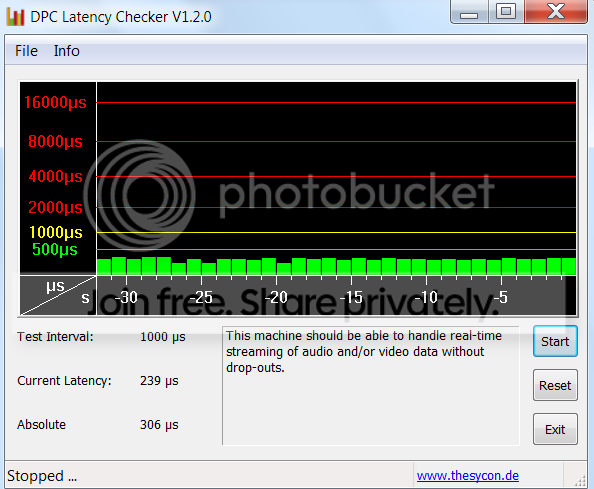
I would follow the advice given and check your drivers first before reinstalling. And check what both PCs have in common besides the basic system. Here is how a "healthy" latency check looks like:

2010-01-31_184306.png
 

My Computer My Computer

At a glance

Vista, Windows7, Mint Mate, Zorin, Windows 8from 1.6GHz Duo to i7
Computer Manufacturer/Model Number
HP, Dell, Gateway, Toshiba - 4 laptops and 2 desktops
OS
Vista, Windows7, Mint Mate, Zorin, Windows 8
CPU
from 1.6GHz Duo to i7
Monitor(s) Displays
2x HP w2207
Hard Drives
5x HDD, 7x SSD, 12x Externals
Keyboard
with trackball - no mices
Mouse
Trackball mice
Internet Speed
DSL 6000
My school laptop also has red bars in DPC latency checker under Windows XP at school.
 

Attachments

  • dpclatency.PNG
    dpclatency.PNG
    10.7 KB · Views: 6

My Computer My Computer

At a glance

Windows 7 Ultimate x64 | Windows XP Pro x86 |...AMD Athlon 64 X2 Dual Core 5200 2.7 GHz3G RAMATI HD Radeon 4670
Computer Manufacturer/Model Number
Started out as an AST180
OS
Windows 7 Ultimate x64 | Windows XP Pro x86 | Windows Vista Ultimate x86
CPU
AMD Athlon 64 X2 Dual Core 5200 2.7 GHz
Motherboard
Acer EM61SM/EM61PM
Memory
3G RAM
Graphics Card(s)
ATI HD Radeon 4670
Screen Resolution
1280x1024
Hard Drives
Western Digital Caviar Black WD1001FALS 1TB 7200 RPM 32MB Cache, 160 GB Seagate
PSU
Corsair 450VX 450W
Keyboard
Microsoft Media Pro 3000
Mouse
Logitech MX310
Back
Top