Downloading Windows 7

friwise

Banned
Local time
5:55 AM
Messages
54
Hello and Happy New Year to all of you!!!!!

I had some problems activating my Windows 7 so I contacted my university from which I got the dvd and now I can download windows 7 from msdn academic alliance.

I ordered to download Windows 7 Professional (x64)-DVD Greek.
BUT I dont know where shall I download it. A dvd or a empty space hard disk?

P.S: Probably I will have more questions later

Thanks a lot

Friwise
 

My Computer

Computer Manufacturer/Model Number
Acer Aspire 4315
OS
Windows 7
Screen Resolution
1280x800
Hello and Happy New Year to all of you!!!!!

I had some problems activating my Windows 7 so I contacted my university from which I got the dvd and now I can download windows 7 from msdn academic alliance.

I ordered to download Windows 7 Professional (x64)-DVD Greek.
BUT I dont know where shall I download it. A dvd or a empty space hard disk?

P.S: Probably I will have more questions later

Thanks a lot

Friwise

Hi and welcome

download it first to HD, then burn to dvd at a slow speed.

Ken J+
 

My Computer

Computer Manufacturer/Model Number
HP Pavillion dv-7 1005 Tx
OS
Win 8 Release candidate 8400
CPU
[email protected]
Memory
4 gigs
Graphics Card(s)
Nvidia 9600M
Sound Card
HD built-in
Monitor(s) Displays
17" Wxga
Screen Resolution
1440x900
Cooling
none
Internet Speed
45Mb down 5Mb up
Thanks Ken J+
 

My Computer

Computer Manufacturer/Model Number
Acer Aspire 4315
OS
Windows 7
Screen Resolution
1280x800
Thanks Ken J+
As my friend Ken has explained do use dvd media to install, hoe ever be aware that there may be issues if you do not use the slowest burn speed. Also if you have a penndrive it may be more effective extracting the iso to the flash drive as a bootable disk. Some issues of missing dvd drivers have been reported so ensure that you update your optical drive and burn to the installation disk.
As always we will be here should you need further assistance.

Regards,
Adrian
 

My Computer

Computer Manufacturer/Model Number
Custom Build
OS
Windows 7 7600 1 X64
CPU
AMD PHENOM II X 550 PROCESSOR 3.1 ghz
Motherboard
ASUS M4A78-TE
Memory
Corsair 4 gig ddr 3
Graphics Card(s)
ati radeon 3300
Sound Card
ati hd
Monitor(s) Displays
syncmaster 2033sw
Screen Resolution
1600X900 60 hz refresh
Hard Drives
twin_seagates SATA's 1 TB & 500 Gig, hitachi_slimline 160 gig
PSU
antec_550 watt
Case
cooler master GLite
Cooling
stock_heat sink
Internet Speed
20mbs up/ 1.5mbs down
Other Info
favorite child "stewie"
favorite dog "brian"
Thanks Adrian!

" it may be more effective extracting the iso to the flash drive as a bootable disk"

I dont know what that means!!!
I can install windows from usb instead of dvd?
 

My Computer

Computer Manufacturer/Model Number
Acer Aspire 4315
OS
Windows 7
Screen Resolution
1280x800

My Computers

System One System Two

  • Computer type
    PC/Desktop
    OS
    7 X64
    CPU
    i5 8400
    Motherboard
    gigabyte b365m ds3h
    Memory
    2x8gb 3200mhz
    Hard Drives
    various
    PSU
    pure power 11 400w cm
    Case
    Coolermaster
    Cooling
    cryorig m9i
  • Computer type
    PC/Desktop
    OS
    7x64
    CPU
    g5400
    Motherboard
    ga b365m ds3h
    Memory
    8gb ddr4 2400
    PSU
    xfx pro 450w
Really good!
So when the download is finished I shall download Windows 7 USB/DVD Download Tool and I will install windows through usb

Thanks a lot SIW2
 

My Computer

Computer Manufacturer/Model Number
Acer Aspire 4315
OS
Windows 7
Screen Resolution
1280x800
Really good!
So when the download is finished I shall download Windows 7 USB/DVD Download Tool and I will install windows through usb

Thanks a lot SIW2
We will be here if U need us, please fill out your system specs with as much detail as possible.
Standing by!
 

My Computer

Computer Manufacturer/Model Number
Custom Build
OS
Windows 7 7600 1 X64
CPU
AMD PHENOM II X 550 PROCESSOR 3.1 ghz
Motherboard
ASUS M4A78-TE
Memory
Corsair 4 gig ddr 3
Graphics Card(s)
ati radeon 3300
Sound Card
ati hd
Monitor(s) Displays
syncmaster 2033sw
Screen Resolution
1600X900 60 hz refresh
Hard Drives
twin_seagates SATA's 1 TB & 500 Gig, hitachi_slimline 160 gig
PSU
antec_550 watt
Case
cooler master GLite
Cooling
stock_heat sink
Internet Speed
20mbs up/ 1.5mbs down
Other Info
favorite child "stewie"
favorite dog "brian"
Good afternoon!
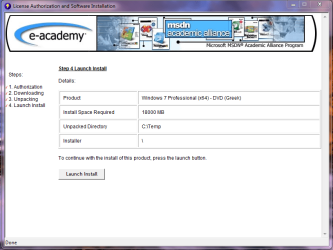
The downloading has been completed and now there is a message, from the page I was downloading, to continue with the installation pressing the launch button.
Shall I do so or shall I follow another process?
 

My Computer

Computer Manufacturer/Model Number
Acer Aspire 4315
OS
Windows 7
Screen Resolution
1280x800
That is the message box!
 

Attachments

  • windows7.PNG
    windows7.PNG
    55.2 KB · Views: 19

My Computer

Computer Manufacturer/Model Number
Acer Aspire 4315
OS
Windows 7
Screen Resolution
1280x800
Press Launch Install....
 

My Computer

Computer type
PC/Desktop
Computer Manufacturer/Model Number
LENOVO K450 @3.0GHZ
OS
64-bit Windows 8.1 Pro
CPU
Core(TM) i5 CPU 4330 Haswell @ 3.20GHz
Motherboard
LENOVO
Memory
12.00 GB
Graphics Card(s)
Intel(R) HD Graphics
Sound Card
Intel HD integtrated
Monitor(s) Displays
HP 25' ISP Monitor
Screen Resolution
1900/1020
Hard Drives
(1) ST1000DM003-1CH162 (2) Generic STORAGE DEVICE USB Device (3) Generic STORAGE DEVICE USB Device
Internet Speed
100mb down/10mb up

My Computers

System One System Two

  • Computer type
    PC/Desktop
    OS
    7 X64
    CPU
    i5 8400
    Motherboard
    gigabyte b365m ds3h
    Memory
    2x8gb 3200mhz
    Hard Drives
    various
    PSU
    pure power 11 400w cm
    Case
    Coolermaster
    Cooling
    cryorig m9i
  • Computer type
    PC/Desktop
    OS
    7x64
    CPU
    g5400
    Motherboard
    ga b365m ds3h
    Memory
    8gb ddr4 2400
    PSU
    xfx pro 450w
It is a good idea to copy the files you downloaded to an external device - in case you need them later.

Even better to make a bootable from them first:

Bootable ISO - Create from Installation Files

Your answers are always really good for a guy like me who doesnt know so much of computers. On the other hand I have no idea how to make an iso. I saw your link which is really simple but I have no idea where to find these 3 files.
The zipped file when I open it it has really many files.
Shall I extract them first?
Really sorry for being so annoying

Thanks a lot anyway!!!
 

My Computer

Computer Manufacturer/Model Number
Acer Aspire 4315
OS
Windows 7
Screen Resolution
1280x800

My Computers

System One System Two

  • Computer type
    PC/Desktop
    OS
    7 X64
    CPU
    i5 8400
    Motherboard
    gigabyte b365m ds3h
    Memory
    2x8gb 3200mhz
    Hard Drives
    various
    PSU
    pure power 11 400w cm
    Case
    Coolermaster
    Cooling
    cryorig m9i
  • Computer type
    PC/Desktop
    OS
    7x64
    CPU
    g5400
    Motherboard
    ga b365m ds3h
    Memory
    8gb ddr4 2400
    PSU
    xfx pro 450w
Ok!
I downloaded vlite though
 

Attachments

  • 7 windows.PNG
    7 windows.PNG
    38.1 KB · Views: 9

My Computer

Computer Manufacturer/Model Number
Acer Aspire 4315
OS
Windows 7
Screen Resolution
1280x800
That's perfect.

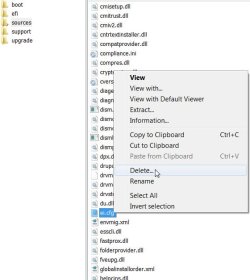
Open the folder called sources - find a file called ei.cfg. Rt click the ei.cfg file and Delete.

EI.CFG-DELETE-2010-01-10_202901.jpg

Then open vlite - when you get to step 3 of the tutorial- click Browse - browse to the folder called windows 7 ( the one that contains all those in the screenshot) , click Open .

then continue with the rest of the tutorial
 

My Computers

System One System Two

  • Computer type
    PC/Desktop
    OS
    7 X64
    CPU
    i5 8400
    Motherboard
    gigabyte b365m ds3h
    Memory
    2x8gb 3200mhz
    Hard Drives
    various
    PSU
    pure power 11 400w cm
    Case
    Coolermaster
    Cooling
    cryorig m9i
  • Computer type
    PC/Desktop
    OS
    7x64
    CPU
    g5400
    Motherboard
    ga b365m ds3h
    Memory
    8gb ddr4 2400
    PSU
    xfx pro 450w
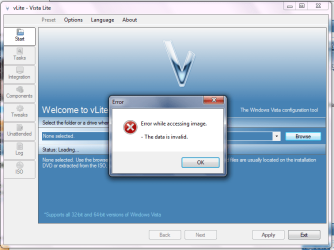
I deleted ei.cfg but I have a problem with step 3
 

Attachments

  • vlite.PNG
    vlite.PNG
    35 KB · Views: 8

My Computer

Computer Manufacturer/Model Number
Acer Aspire 4315
OS
Windows 7
Screen Resolution
1280x800
That's strange.

Did you rt click the .zip you downloaded ,Properties, Unblock, Apply, OK - before you extracted it?
 

My Computers

System One System Two

  • Computer type
    PC/Desktop
    OS
    7 X64
    CPU
    i5 8400
    Motherboard
    gigabyte b365m ds3h
    Memory
    2x8gb 3200mhz
    Hard Drives
    various
    PSU
    pure power 11 400w cm
    Case
    Coolermaster
    Cooling
    cryorig m9i
  • Computer type
    PC/Desktop
    OS
    7x64
    CPU
    g5400
    Motherboard
    ga b365m ds3h
    Memory
    8gb ddr4 2400
    PSU
    xfx pro 450w
no
i will try to do it now
 

My Computer

Computer Manufacturer/Model Number
Acer Aspire 4315
OS
Windows 7
Screen Resolution
1280x800
there is no unblock option
 

My Computer

Computer Manufacturer/Model Number
Acer Aspire 4315
OS
Windows 7
Screen Resolution
1280x800
Back
Top