Downloads have all disappeared. Unable to restore.

Sparklieboots

New member
Local time
11:47 AM
Messages
8
I have lost all my downloads. It just happened. One day they were all there, the next day gone. I thought that I must have accidentally deleted the folder, but the recycle bin was empty too. When I click on the download arrow (top right of firefox browser) the downloads are listed. However, apart from the three latest ones, none of them will open.
I know I had all my downloads on 22 July but they disappeared on that date or 23 July. I have tried several times to restore the system to an earlier date but without success. I keep getting the message that system restore was not completed. Can anyone please help. Thank you. I am not very IT literate so please keep it simple. Thank you again.
 

My Computer My Computer

At a glance

Windows 7
Computer type
PC/Desktop
Computer Manufacturer/Model Number
Lenovo
OS
Windows 7
Antivirus
Bullguard
Browser
Firefox
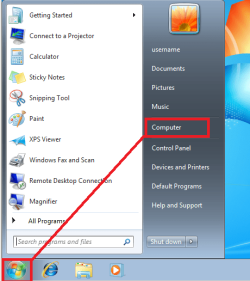
Click on Start > Computer

DL1.png


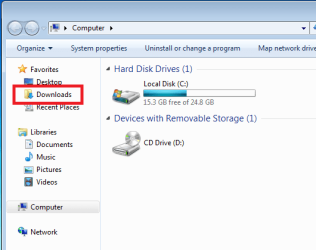
Once Windows (file) Explorer comes up...
...click on Downloads in the left pane:

DL2.png


Are the files of interest shown in the right pane?
 

My Computer My Computer

At a glance

W7 Pro SP1 64biti78GBIntel HD Graphics
Computer type
Laptop
Computer Manufacturer/Model Number
Employer provided Dell Latitude
OS
W7 Pro SP1 64bit
CPU
i7
Memory
8GB
Graphics Card(s)
Intel HD Graphics
Hard Drives
crappy SSD
Antivirus
Employer mandated Symantec Endpoint Protection
Browser
Pale Moon 64bit, IE11 64bit & Chrome 64bit
Hi,

Thank you for responding.
No, only the last 3 downloads I made are shown in the right pane.
 

My Computer My Computer

At a glance

Windows 7
Computer type
PC/Desktop
Computer Manufacturer/Model Number
Lenovo
OS
Windows 7
Antivirus
Bullguard
Browser
Firefox
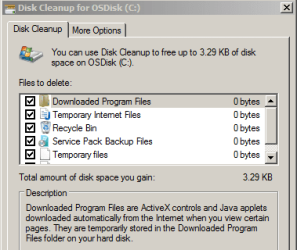
Have you run Disk Cleanup?

DL3.PNG


Or maybe CCleaner?
 

My Computer My Computer

At a glance

W7 Pro SP1 64biti78GBIntel HD Graphics
Computer type
Laptop
Computer Manufacturer/Model Number
Employer provided Dell Latitude
OS
W7 Pro SP1 64bit
CPU
i7
Memory
8GB
Graphics Card(s)
Intel HD Graphics
Hard Drives
crappy SSD
Antivirus
Employer mandated Symantec Endpoint Protection
Browser
Pale Moon 64bit, IE11 64bit & Chrome 64bit
No, I haven't. Where do I find Disk Cleanup please.
 

My Computer My Computer

At a glance

Windows 7
Computer type
PC/Desktop
Computer Manufacturer/Model Number
Lenovo
OS
Windows 7
Antivirus
Bullguard
Browser
Firefox
Type "disk cleanup" into the start button search box.
 

My Computer My Computer

At a glance

Windows 7 Home Premium SP1, 64-bitIntel Skylake i5-6600K, not overclocked8 GB HyperX DDR4-2666 (2 x 4 GB)none; graphics are integrated on CPU
Computer type
PC/Desktop
Computer Manufacturer/Model Number
Ignatz Special; 4 speed manual gearbox; factory air conditioning; one of one
OS
Windows 7 Home Premium SP1, 64-bit
CPU
Intel Skylake i5-6600K, not overclocked
Motherboard
AsRock Z170M Extreme 4, micro ATX
Memory
8 GB HyperX DDR4-2666 (2 x 4 GB)
Graphics Card(s)
none; graphics are integrated on CPU
Sound Card
onboard: Realtek ALC1150; external: USB Behringer UF0-202
Monitor(s) Displays
Dell S2340M 23 inch IPS
Screen Resolution
1600 x 900
Hard Drives
System: Crucial MX100 series SSD, 128 GB;
Data: Samsung Spinpoint 103SJ, 1 TB;
Backup: WD Caviar Green WD30EZRX-00D8PB0, 3 TB
PSU
Rosewill SilentNight 500 watt fanless, semi-modular
Case
Antec Solo II
Cooling
Noctua NH-U12S; Noctua F12 intake, Noctua S12A exhaust
Keyboard
Microsoft 200 6JH-00001 USB
Mouse
Dell or Microsoft optical wired; USB
Antivirus
Microsoft Security Essentials and Malwarebytes Premium
Browser
Pale Moon
Other Info
All fans PWM; speeds at idle: CPU circa 500 rpm; intake circa 600 rpm; exhaust circa 600 rpm; CPU temps 27 idle and 47 C load in a warm room (27 C/81 F) when running Intel Extreme Tuning Utility stress test.
Sorry that I was not clear. I was not suggesting that you run the Disk Cleanup tool.

Disk Cleanup or CCleaner would be tools that might remove files from the download folder.

You might see if the steps in this tutorial show any problems with your hard drive:
http://www.sevenforums.com/tutorials/433-disk-check.html
 

My Computer My Computer

At a glance

W7 Pro SP1 64biti78GBIntel HD Graphics
Computer type
Laptop
Computer Manufacturer/Model Number
Employer provided Dell Latitude
OS
W7 Pro SP1 64bit
CPU
i7
Memory
8GB
Graphics Card(s)
Intel HD Graphics
Hard Drives
crappy SSD
Antivirus
Employer mandated Symantec Endpoint Protection
Browser
Pale Moon 64bit, IE11 64bit & Chrome 64bit
Thank you. I have found it. Should I run it?
 

My Computer My Computer

At a glance

Windows 7
Computer type
PC/Desktop
Computer Manufacturer/Model Number
Lenovo
OS
Windows 7
Antivirus
Bullguard
Browser
Firefox
I have lost all my downloads. It just happened. One day they were all there, the next day gone. I thought that I must have accidentally deleted the folder, but the recycle bin was empty too. When I click on the download arrow (top right of firefox browser) the downloads are listed. However, apart from the three latest ones, none of them will open.
I know I had all my downloads on 22 July but they disappeared on that date or 23 July. I have tried several times to restore the system to an earlier date but without success. I keep getting the message that system restore was not completed. Can anyone please help. Thank you. I am not very IT literate so please keep it simple. Thank you again.

If you right-click the filename in Firefox, does it give option to open it or open its folder? If so, that may be the key. (I don't use Firefox, but Google Chrome DOES give those options.)(I'm probably reaching here.)

I don't think System Restore would help since it's not supposed to mess with your data, just system files. Downloads are under your User name, yes?
 

My Computer My Computer

At a glance

Windows 7 SP1 64 bit Home PremiumIntel Core I5-2430 @ 2.4GHz8GB
Computer type
Laptop
Computer Manufacturer/Model Number
Dell
OS
Windows 7 SP1 64 bit Home Premium
CPU
Intel Core I5-2430 @ 2.4GHz
Memory
8GB
Thank you. I have found it. Should I run it?
You can run chkdsk if you want. Follow the tutorial and chkdsk won't hurt anything. chkdsk probably won't get your files back. But chkdsk might let us know why they went away.
 

My Computer My Computer

At a glance

W7 Pro SP1 64biti78GBIntel HD Graphics
Computer type
Laptop
Computer Manufacturer/Model Number
Employer provided Dell Latitude
OS
W7 Pro SP1 64bit
CPU
i7
Memory
8GB
Graphics Card(s)
Intel HD Graphics
Hard Drives
crappy SSD
Antivirus
Employer mandated Symantec Endpoint Protection
Browser
Pale Moon 64bit, IE11 64bit & Chrome 64bit
Hello,

I ran chkdsk. Unfortunately, it took so long (3+ hours) that I I had to go out before it finished.
When I returned the PC had restarted so I don't what the result was. However, it has not changed anything regarding my lost downloads.:(
 

My Computer My Computer

At a glance

Windows 7
Computer type
PC/Desktop
Computer Manufacturer/Model Number
Lenovo
OS
Windows 7
Antivirus
Bullguard
Browser
Firefox
Hello dslomer64.

Thank you for your post.
If I right click the downloads folder it just shows the three downloads I made after everything disappeared.
 

My Computer My Computer

At a glance

Windows 7
Computer type
PC/Desktop
Computer Manufacturer/Model Number
Lenovo
OS
Windows 7
Antivirus
Bullguard
Browser
Firefox

My Computer My Computer

At a glance

W7 Pro SP1 64biti78GBIntel HD Graphics
Computer type
Laptop
Computer Manufacturer/Model Number
Employer provided Dell Latitude
OS
W7 Pro SP1 64bit
CPU
i7
Memory
8GB
Graphics Card(s)
Intel HD Graphics
Hard Drives
crappy SSD
Antivirus
Employer mandated Symantec Endpoint Protection
Browser
Pale Moon 64bit, IE11 64bit & Chrome 64bit
Hello again,

I tried to see the results of check disk. I followed your tutorial (thank you) but when I right-clicked applications "find" was not highlighted so I couldn't click on it? No idea what to do now.:confused:
 

My Computer My Computer

At a glance

Windows 7
Computer type
PC/Desktop
Computer Manufacturer/Model Number
Lenovo
OS
Windows 7
Antivirus
Bullguard
Browser
Firefox
Hello again,

I tried to see the results of check disk. I followed your tutorial (thank you) but when I right-clicked applications "find" was not highlighted so I couldn't click on it? No idea what to do now.:confused:

CHKDSK results:

Start/Control Panel/Administrative Tools/Event Viewer and open Windows logs in left pane. Double-click "Application". Look for chkdsk in the source column in the right pane for the time chkdsk was run. Double click that row to bring up details.

If the chkdsk is run on a reboot, as it would for a C drive, the results should be under a “wininit” listing in the source column, rather than under chkdsk.
 

My Computer My Computer

At a glance

Windows 7 Home Premium SP1, 64-bitIntel Skylake i5-6600K, not overclocked8 GB HyperX DDR4-2666 (2 x 4 GB)none; graphics are integrated on CPU
Computer type
PC/Desktop
Computer Manufacturer/Model Number
Ignatz Special; 4 speed manual gearbox; factory air conditioning; one of one
OS
Windows 7 Home Premium SP1, 64-bit
CPU
Intel Skylake i5-6600K, not overclocked
Motherboard
AsRock Z170M Extreme 4, micro ATX
Memory
8 GB HyperX DDR4-2666 (2 x 4 GB)
Graphics Card(s)
none; graphics are integrated on CPU
Sound Card
onboard: Realtek ALC1150; external: USB Behringer UF0-202
Monitor(s) Displays
Dell S2340M 23 inch IPS
Screen Resolution
1600 x 900
Hard Drives
System: Crucial MX100 series SSD, 128 GB;
Data: Samsung Spinpoint 103SJ, 1 TB;
Backup: WD Caviar Green WD30EZRX-00D8PB0, 3 TB
PSU
Rosewill SilentNight 500 watt fanless, semi-modular
Case
Antec Solo II
Cooling
Noctua NH-U12S; Noctua F12 intake, Noctua S12A exhaust
Keyboard
Microsoft 200 6JH-00001 USB
Mouse
Dell or Microsoft optical wired; USB
Antivirus
Microsoft Security Essentials and Malwarebytes Premium
Browser
Pale Moon
Other Info
All fans PWM; speeds at idle: CPU circa 500 rpm; intake circa 600 rpm; exhaust circa 600 rpm; CPU temps 27 idle and 47 C load in a warm room (27 C/81 F) when running Intel Extreme Tuning Utility stress test.
Hello again,

I tried to see the results of check disk. I followed your tutorial (thank you) but when I right-clicked applications "find" was not highlighted so I couldn't click on it? No idea what to do now.:confused:
Step 4 in that tutorial is missing some info.

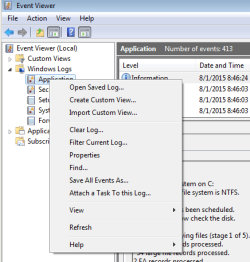
If you follow step 4 exactly as written, you will see this:

event logs1.PNG


If you do these steps:

In the left pane of Event Viewer,
double click on Windows Logs to expand it,
click on Application to select it
then right click on Application
and click on Find.

You should see this:

event logs3.PNG


I have posted this to that tutorial thread too.
 
Last edited:

My Computer My Computer

At a glance

W7 Pro SP1 64biti78GBIntel HD Graphics
Computer type
Laptop
Computer Manufacturer/Model Number
Employer provided Dell Latitude
OS
W7 Pro SP1 64bit
CPU
i7
Memory
8GB
Graphics Card(s)
Intel HD Graphics
Hard Drives
crappy SSD
Antivirus
Employer mandated Symantec Endpoint Protection
Browser
Pale Moon 64bit, IE11 64bit & Chrome 64bit
Hello again,

I tried to see the results of check disk. I followed your tutorial (thank you) but when I right-clicked applications "find" was not highlighted so I couldn't click on it? No idea what to do now.:confused:

CHKDSK results:

Start/Control Panel/Administrative Tools/Event Viewer and open Windows logs in left pane. Double-click "Application". Look for chkdsk in the source column in the right pane for the time chkdsk was run. Double click that row to bring up details.

If the chkdsk is run on a reboot, as it would for a C drive, the results should be under a “wininit” listing in the source column, rather than under chkdsk.
I think that Administrative Tools is not shown via control panel unless one changes to one of the icon views.
Start > Control Panel
In the upper right corner, change "View by:" to "Large icons" or "Small icons"
Administrative Tools > Event Viewer.


I had never noticed that the source column can be wininit (locked volume) or chkdsk (unlocked volume). I guess that is because I electronically search for chkdsk - which finds both wininit and chkdsk entries.
 

My Computer My Computer

At a glance

W7 Pro SP1 64biti78GBIntel HD Graphics
Computer type
Laptop
Computer Manufacturer/Model Number
Employer provided Dell Latitude
OS
W7 Pro SP1 64bit
CPU
i7
Memory
8GB
Graphics Card(s)
Intel HD Graphics
Hard Drives
crappy SSD
Antivirus
Employer mandated Symantec Endpoint Protection
Browser
Pale Moon 64bit, IE11 64bit & Chrome 64bit
Hello UsernameIssues and ignatzatsonic,

Thank you both. I have now been able to see the results of running chkdsk. I don't really understand most of it, but it does seem that nothing 'bad' was found.
FYI My download names all appear in a long list when I click the downloads arrow, but when I try to open them, there is nothing there. Almost all my downloads are word or pdf files associated with my research. No films or music.
I am using a Lenovo ideacentre running intel core i5. Around the time all my downloads disappeared, I "optimised" the system, as prompted to do, since it appeared to be running very slowly. I don't know if that has anything to do with the disappearance? I have "optimised" before with no ill effects - at least, none of which I am aware.
Thank you for helping me.
 

My Computer My Computer

At a glance

Windows 7
Computer type
PC/Desktop
Computer Manufacturer/Model Number
Lenovo
OS
Windows 7
Antivirus
Bullguard
Browser
Firefox
I did not think that chkdsk would find any problems - but just wanted to check anyway.

The list of downloads that you see in the Firefox browser is just a history that the browser keeps. As you see, that list does not necessarily correlate with files on the hard drive. It appears that some (most?) of the files in the folder named Downloads were removed by some process. The "optimize" process could have been that process. It could have changed what actions it takes based on what it finds or maybe the software doing this optimization was (silently?) updated - so now it does different things.

Each time that you download a file, you might want to use Windows (file) Explorer to move that file to the folder named Documents (My Documents). You would then use Windows (file) Explorer to get to each file that you have downloaded in the past.
 

My Computer My Computer

At a glance

W7 Pro SP1 64biti78GBIntel HD Graphics
Computer type
Laptop
Computer Manufacturer/Model Number
Employer provided Dell Latitude
OS
W7 Pro SP1 64bit
CPU
i7
Memory
8GB
Graphics Card(s)
Intel HD Graphics
Hard Drives
crappy SSD
Antivirus
Employer mandated Symantec Endpoint Protection
Browser
Pale Moon 64bit, IE11 64bit & Chrome 64bit
Back
Top