DPC Latency & sound dropouts

piledriver721

Banned
Local time
1:19 AM
Messages
3
Hello everyone,

Recently I upgraded my computer hardware to a new motherboard, graphics card and processor. I moved my old hard disks (from my old hardware) into this new computer, turned it on and it started right up, I just had to re-validate Windows 7, which went without a hitch.

Yesterday, I bought a new headset and started using it with my PC (before I was using desktop speakers), however, when I turned on some music, I was hearing a lot of stuttering/static while it was playing. I had this problem before, but it usually only happened when there was a program running that was taxing the CPU, and that isn't an issue now.

I read around for a while last night about the issue, and it turns out that it's something called "DPC Latency", so I downloaded all the tools and tried to troubleshoot it for a few hours before I went to bed with no luck.

So far I've tried:
  • disabling HPET in bios & switching it to 64 bit mode (it was on 32 previously)
  • turning off Powermizer on the Nvidia card
  • disabling all USB ports one by one
  • disabling all audio and network drivers
  • changing the power settings for the CPU and HDD (tried this http://www.sevenforums.com/tutorials/177819-ahci-link-power-management-enable-hipm-dipm.html
  • updated all my drivers except by BIOS so far (I haven't tried that because it seems kind of risky, but I suppose I would do it as a last resort)
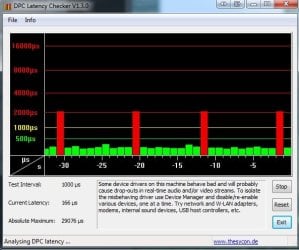
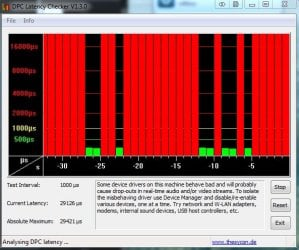
Another issue I was having was with my processor making this high pitched whistling noise, but when I turn off "disable processor idle" in the Windows power management area, it stops making noise. The weird thing to me is, it changes my dpclat.exe from full red bars to this for about 1-3 minutes (but after a few minutes it just goes back to full red bars, 28000μs):


Untitled2.jpg


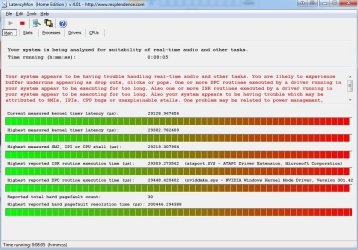
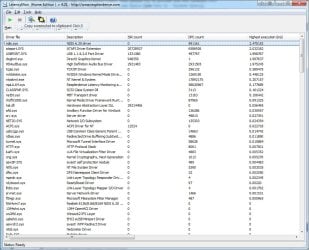
Before I went to bed last night, I turned on a 2 hour audio track and set it to loop with LatencyMon running. You can see in the screenshot below that the main culprits are:

  • ndis.sys
  • ataport.sys
  • usbport.sys
  • dxgkrnl.sys
  • HDAudBus.sys
I've looked around on how to fix these individually, but I can't come up with anything at all. If I purchase a PCI sound card, would it fix these issues? I would prefer to fix it without having to do that, but if that's the only way to fix it for sure I can do it.


Here's the pastebin of the report so it doesn't make this post massively long - http://pastebin.com/Je0dgy8y


If anyone has any ideas on how to fix this, I would really appreciate it!
Untitled.jpg
 

My Computer

OS
Windows 7 Professional 64bit
CPU
Intel i7-930
Motherboard
Gigabyte GA-EX58-UD3R
Memory
6GB DDR3
Graphics Card(s)
Nvidia GeForce GTX 460
Hard Drives
650GB Western Digital SATA
750GB Western Digital SATA
As you moved to a new motherboard, you need to install all the motherboard chipset drivers and the device drivers for the hardware devices including the audio. The audio is especially critical and you should only use the drivers from the motherboard vendor, as non vendor drivers can have problems.

Start with the install of the correct drivers and work from that. Also, the video drivers are an issue with the sound problems you are having.
 

My Computer

Computer type
PC/Desktop
Computer Manufacturer/Model Number
My Own Build
OS
Windows 10 64 bit
CPU
Intel i7 6700K
Motherboard
ASUS ROG Maximus VIII Hero
Memory
16GB Corsair Dominator
Graphics Card(s)
Intel CPU Graphics
Sound Card
RealTek
Monitor(s) Displays
27" Dell S2719dgf
Screen Resolution
2560X1440
Hard Drives
1 TB Samsung 850 EVO SSD for Win 10 Pro
500GB Samsung 850 EVO SSD for Win 10 Insider
2 TB drive for backup
PSU
EVGA Supernova 750G2
Case
BeQuiet Silent Base 600
Cooling
Deepcool Captain 120EX
Keyboard
Microsoft Wireless 2000
Mouse
Microsoft wireless
Internet Speed
100 MB/sec (Cable)
Antivirus
Microsoft Defender and Malwarebytes
Browser
Edge/Firefox
Other Info
Cakewalk (Sonar) by BandLab and Studio One 4.1 Pro recording studio software. MOTU 896Mk3 Hybrid recording interface, Frontier Tranzport wireless control unit, Behringer X-Touch Control Surface.
Five USB connected optical drives for CD Audio production using Nero BurningROM
When I set up the new parts, I installed these drivers:


off this page GIGABYTE - Motherboard - Socket 1366 - GA-EX58-UD3R (rev. 1.0) for Windows 7 64bit.

I also ran the Realtek Etherenet Diagnostic Utility tests, but everything passed with no issues.

I downgraded the Realtek driver I installed from their website yesterday to the one on the Gigabyte website, but nothing changed.
 

My Computer

OS
Windows 7 Professional 64bit
CPU
Intel i7-930
Motherboard
Gigabyte GA-EX58-UD3R
Memory
6GB DDR3
Graphics Card(s)
Nvidia GeForce GTX 460
Hard Drives
650GB Western Digital SATA
750GB Western Digital SATA
So you really didn't just boot from the old hard drive and nothing else.

The chipset driver should be the first driver installed. The chipset driver defines the hardware on the motherboard and in most cases if the chipset driver is not installed the sound will not install.

The stuttering/noise, etc in the audio is a common complaint. There is no "one fix" for the problem. Sound Drivers is the first issue. Other drivers such as video are another issue. If you have wi-fi that can cause the problems.

Another issue is the shared IRQ (interrupt) that sound is on with. Sound is considered a low priority in Windows and thus is assigned a shared IRQ with a higher priority device. If you uninstall the sound in the device manager, restart the PC and when Windows starts it will detect and reinstall it and SOMETIMES it will put it on a different shared IRQ and help the stuttering problems.

I use my PC for my recording studio (I use Sonar X1) and I have it tweaked for recording but you shouldn't have to go that far.

There are many threads on here about the Stuttering, etc. Look over them.
 

My Computer

Computer type
PC/Desktop
Computer Manufacturer/Model Number
My Own Build
OS
Windows 10 64 bit
CPU
Intel i7 6700K
Motherboard
ASUS ROG Maximus VIII Hero
Memory
16GB Corsair Dominator
Graphics Card(s)
Intel CPU Graphics
Sound Card
RealTek
Monitor(s) Displays
27" Dell S2719dgf
Screen Resolution
2560X1440
Hard Drives
1 TB Samsung 850 EVO SSD for Win 10 Pro
500GB Samsung 850 EVO SSD for Win 10 Insider
2 TB drive for backup
PSU
EVGA Supernova 750G2
Case
BeQuiet Silent Base 600
Cooling
Deepcool Captain 120EX
Keyboard
Microsoft Wireless 2000
Mouse
Microsoft wireless
Internet Speed
100 MB/sec (Cable)
Antivirus
Microsoft Defender and Malwarebytes
Browser
Edge/Firefox
Other Info
Cakewalk (Sonar) by BandLab and Studio One 4.1 Pro recording studio software. MOTU 896Mk3 Hybrid recording interface, Frontier Tranzport wireless control unit, Behringer X-Touch Control Surface.
Five USB connected optical drives for CD Audio production using Nero BurningROM
I booted from the old drive and installed the drivers as soon as I was able to. Everything works perfectly (video drivers, hard disks, LAN, USB etc) except for the stuttering with the sound.

I've read a lot of the threads and I haven't been able to come up with a fix so far, but these are the steps that I've done since the last post:

I first disabled the Realtek PCIe GBE Family Controller network adapter, and that stopped some small spikes in dcplat:

set2.jpg

I then let it run for a while, about 5-6 minutes without touching the computer (with the driver still disabled), came back and it looked like this:

set3.jpg

I had LatencyMon open over the same period too (since I disabled the network adapter):

set4.jpg

I tried disabling the NVIDIA GeForce GTX 460 display adapter while it was running, but there were zero noticeable changes in the latency meter or the sound clip I had on loop.

set5.jpg


and the pastebin from LatencyMon - ______________________________________________________________________________ - Pastebin.com


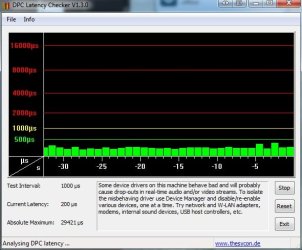
edit: and 15 minutes later, this is what dpclat looks like, the same as before I disabled the realtek network driver:

set6.jpg
 

My Computer

OS
Windows 7 Professional 64bit
CPU
Intel i7-930
Motherboard
Gigabyte GA-EX58-UD3R
Memory
6GB DDR3
Graphics Card(s)
Nvidia GeForce GTX 460
Hard Drives
650GB Western Digital SATA
750GB Western Digital SATA
I don't really have any other suggestions.
 

My Computer

Computer type
PC/Desktop
Computer Manufacturer/Model Number
My Own Build
OS
Windows 10 64 bit
CPU
Intel i7 6700K
Motherboard
ASUS ROG Maximus VIII Hero
Memory
16GB Corsair Dominator
Graphics Card(s)
Intel CPU Graphics
Sound Card
RealTek
Monitor(s) Displays
27" Dell S2719dgf
Screen Resolution
2560X1440
Hard Drives
1 TB Samsung 850 EVO SSD for Win 10 Pro
500GB Samsung 850 EVO SSD for Win 10 Insider
2 TB drive for backup
PSU
EVGA Supernova 750G2
Case
BeQuiet Silent Base 600
Cooling
Deepcool Captain 120EX
Keyboard
Microsoft Wireless 2000
Mouse
Microsoft wireless
Internet Speed
100 MB/sec (Cable)
Antivirus
Microsoft Defender and Malwarebytes
Browser
Edge/Firefox
Other Info
Cakewalk (Sonar) by BandLab and Studio One 4.1 Pro recording studio software. MOTU 896Mk3 Hybrid recording interface, Frontier Tranzport wireless control unit, Behringer X-Touch Control Surface.
Five USB connected optical drives for CD Audio production using Nero BurningROM
Hey guys,

This is my first post here, but I'm taking this opportunity to join the conversation because I've been experiencing similar problems to those described by @Piledriver721.

My system is custom built by ADK Pro Audio, a Kentucky-based company who specializes in assembling PCs optimized for audio and video production.

The audio playback issue started soon after I received the system, but for the most part, it has been intermittent. However, the brief audio dropouts seem to be occurring more frequently now and my workflow has been greatly impaired.

I have tried a couple of the suggestions listed here: disabling devices in Devices Manager and updating old drivers. Still, the problem persists. At this point, my DPC Latency Checker looks like this (as posted by Piledriver721) on a normal basis:

213518d1337960849-dpc-latency-sound-dropouts-set6.jpg


Whenever I start up Sonar X1 (my DAW of choice) or even when I use VLC player, the display turns completely red and audio playback is near impossible.

Are there any other possible fixes? Would changing to a PCI or PCIe audio interface help?

Thanks in advance guys.

This is a great forum.
 

My Computer

Computer Manufacturer/Model Number
ADK Pro Audio
OS
Windows 7 Home Premium 64 bit
CPU
Core i7 930
Memory
Mushkin - 6gig (3x2GB) DDR3 1600
Sound Card
M-Audio Firewire 610
Monitor(s) Displays
Dell 24"
Hard Drives
SEAGATE - 500G Sata II 32mb cache Perpendicular (System)
SEAGATE - 1TB Sata II 32mb cache (Samples)
SEAGATE - 1TB Sata II 32mb cache (Audio)
PSU
Coolermaster - 700W Silent Pro M Pro 16DB (quiet)
Case
ADK 4U rackmount case - 4x5.25 1x3.5 2x3.5 internal 20.5
Cooling
ADK Extreme silence CPU cooling 17DB
Have you talked to Scott, at ADK?

I'm just building a new DAW system for Sonar X1 (and Pro Tools MP9). I'm using an ASRock Z77 Professional M/B, i7 3770 CPU, 16GB of RAM and an SSD for the OS and Sonar, and a 1TB 7200 RPM for projects, etc. I'll probably be at the point of "smoke testing" it Friday, as the SSD is not due in until tomorrow. It will probably be tweaking to get it running properly. I have my current system tweaked that I have very low latency with the DPC Latency Test. I'm using a Roland Octa Capture for the recording interface unit. Wish me luck.
 

My Computer

Computer type
PC/Desktop
Computer Manufacturer/Model Number
My Own Build
OS
Windows 10 64 bit
CPU
Intel i7 6700K
Motherboard
ASUS ROG Maximus VIII Hero
Memory
16GB Corsair Dominator
Graphics Card(s)
Intel CPU Graphics
Sound Card
RealTek
Monitor(s) Displays
27" Dell S2719dgf
Screen Resolution
2560X1440
Hard Drives
1 TB Samsung 850 EVO SSD for Win 10 Pro
500GB Samsung 850 EVO SSD for Win 10 Insider
2 TB drive for backup
PSU
EVGA Supernova 750G2
Case
BeQuiet Silent Base 600
Cooling
Deepcool Captain 120EX
Keyboard
Microsoft Wireless 2000
Mouse
Microsoft wireless
Internet Speed
100 MB/sec (Cable)
Antivirus
Microsoft Defender and Malwarebytes
Browser
Edge/Firefox
Other Info
Cakewalk (Sonar) by BandLab and Studio One 4.1 Pro recording studio software. MOTU 896Mk3 Hybrid recording interface, Frontier Tranzport wireless control unit, Behringer X-Touch Control Surface.
Five USB connected optical drives for CD Audio production using Nero BurningROM
Thanks for replying @Firebird. I spoke to Eric over at ADK a few months ago. But I will ask for Scott the next time I call or email.

Your new system sounds like my dream build. Are you building it yourself?

Is there anyway to avoid the IRQ issue with a new build? Also, are there any other measures you know of to remedy my dropout problem?
 

My Computer

Computer Manufacturer/Model Number
ADK Pro Audio
OS
Windows 7 Home Premium 64 bit
CPU
Core i7 930
Memory
Mushkin - 6gig (3x2GB) DDR3 1600
Sound Card
M-Audio Firewire 610
Monitor(s) Displays
Dell 24"
Hard Drives
SEAGATE - 500G Sata II 32mb cache Perpendicular (System)
SEAGATE - 1TB Sata II 32mb cache (Samples)
SEAGATE - 1TB Sata II 32mb cache (Audio)
PSU
Coolermaster - 700W Silent Pro M Pro 16DB (quiet)
Case
ADK 4U rackmount case - 4x5.25 1x3.5 2x3.5 internal 20.5
Cooling
ADK Extreme silence CPU cooling 17DB
Focusrite has some suggestions on tweaking a system for recording. They talk about their own equipment but its applicable to any system. Look it over and see if there is anything that you or ADK hasn't done.

Optimising your PC for audio on Windows 7 .: Focusrite Answerbase

Yes, I'm building the system myself. I'm a retired computer techie that still hasn't completely retired. I needed a new system for Sonar X1 (I have X1D Extended Producer) and Pro Tools. The system I have now I built 4 years ago. What I'm building now is more than needed right now but I'm practicing what I preach to the computer clients I support when they ask me about a new PC system "buy as much as your pocketbook can stand" or "buy overkill".
 

My Computer

Computer type
PC/Desktop
Computer Manufacturer/Model Number
My Own Build
OS
Windows 10 64 bit
CPU
Intel i7 6700K
Motherboard
ASUS ROG Maximus VIII Hero
Memory
16GB Corsair Dominator
Graphics Card(s)
Intel CPU Graphics
Sound Card
RealTek
Monitor(s) Displays
27" Dell S2719dgf
Screen Resolution
2560X1440
Hard Drives
1 TB Samsung 850 EVO SSD for Win 10 Pro
500GB Samsung 850 EVO SSD for Win 10 Insider
2 TB drive for backup
PSU
EVGA Supernova 750G2
Case
BeQuiet Silent Base 600
Cooling
Deepcool Captain 120EX
Keyboard
Microsoft Wireless 2000
Mouse
Microsoft wireless
Internet Speed
100 MB/sec (Cable)
Antivirus
Microsoft Defender and Malwarebytes
Browser
Edge/Firefox
Other Info
Cakewalk (Sonar) by BandLab and Studio One 4.1 Pro recording studio software. MOTU 896Mk3 Hybrid recording interface, Frontier Tranzport wireless control unit, Behringer X-Touch Control Surface.
Five USB connected optical drives for CD Audio production using Nero BurningROM
Yea I already had most of those optimizations done. Still experienced the latency/dropout issues.

Thanks for your help though.
 

My Computer

Computer Manufacturer/Model Number
ADK Pro Audio
OS
Windows 7 Home Premium 64 bit
CPU
Core i7 930
Memory
Mushkin - 6gig (3x2GB) DDR3 1600
Sound Card
M-Audio Firewire 610
Monitor(s) Displays
Dell 24"
Hard Drives
SEAGATE - 500G Sata II 32mb cache Perpendicular (System)
SEAGATE - 1TB Sata II 32mb cache (Samples)
SEAGATE - 1TB Sata II 32mb cache (Audio)
PSU
Coolermaster - 700W Silent Pro M Pro 16DB (quiet)
Case
ADK 4U rackmount case - 4x5.25 1x3.5 2x3.5 internal 20.5
Cooling
ADK Extreme silence CPU cooling 17DB

My Computer

Computer type
PC/Desktop
Computer Manufacturer/Model Number
My Own Build
OS
Windows 10 64 bit
CPU
Intel i7 6700K
Motherboard
ASUS ROG Maximus VIII Hero
Memory
16GB Corsair Dominator
Graphics Card(s)
Intel CPU Graphics
Sound Card
RealTek
Monitor(s) Displays
27" Dell S2719dgf
Screen Resolution
2560X1440
Hard Drives
1 TB Samsung 850 EVO SSD for Win 10 Pro
500GB Samsung 850 EVO SSD for Win 10 Insider
2 TB drive for backup
PSU
EVGA Supernova 750G2
Case
BeQuiet Silent Base 600
Cooling
Deepcool Captain 120EX
Keyboard
Microsoft Wireless 2000
Mouse
Microsoft wireless
Internet Speed
100 MB/sec (Cable)
Antivirus
Microsoft Defender and Malwarebytes
Browser
Edge/Firefox
Other Info
Cakewalk (Sonar) by BandLab and Studio One 4.1 Pro recording studio software. MOTU 896Mk3 Hybrid recording interface, Frontier Tranzport wireless control unit, Behringer X-Touch Control Surface.
Five USB connected optical drives for CD Audio production using Nero BurningROM
Reducing the dpc latency

well friends I also tried many things but what I think worked is as follows

1. I removed all audio and midi drivers from device manager
2. disabled serial port , parellel port, hpet, and onboard audio
3. As I was using firewire card (pci via ), I changed the IRQ of pci slot 1 to 4 and pci slot 2 to 9
4. Disabled all speed step, boost virtualization, hiper threading, power saving in bios
5. Rebooted the pc.

Shut down the pc and inserted pci firewire card and then started

then onwards my dpc latency shown negligible
later i enabled the onboard audio.. and installed audio midi drivers still all perfect
 

My Computer

Computer Manufacturer/Model Number
assembled
OS
Windows 7 Ultimate x64
CPU
q9550
Motherboard
g41 combo gigabyte
Memory
8gb ddr3
Graphics Card(s)
nvdia 8400gs
Sound Card
motu audio wxpress
Monitor(s) Displays
lg 20 inch
Hard Drives
wd 1 tb
PSU
vip 600 w
Case
circle
Cooling
coolermaster hyper 212 plus
According to Focusrite, the "legacy" firewire driver should be used in Vista/Win 7. I don't know if that will affect latency but improves firewire device operation.
 

My Computer

Computer type
PC/Desktop
Computer Manufacturer/Model Number
My Own Build
OS
Windows 10 64 bit
CPU
Intel i7 6700K
Motherboard
ASUS ROG Maximus VIII Hero
Memory
16GB Corsair Dominator
Graphics Card(s)
Intel CPU Graphics
Sound Card
RealTek
Monitor(s) Displays
27" Dell S2719dgf
Screen Resolution
2560X1440
Hard Drives
1 TB Samsung 850 EVO SSD for Win 10 Pro
500GB Samsung 850 EVO SSD for Win 10 Insider
2 TB drive for backup
PSU
EVGA Supernova 750G2
Case
BeQuiet Silent Base 600
Cooling
Deepcool Captain 120EX
Keyboard
Microsoft Wireless 2000
Mouse
Microsoft wireless
Internet Speed
100 MB/sec (Cable)
Antivirus
Microsoft Defender and Malwarebytes
Browser
Edge/Firefox
Other Info
Cakewalk (Sonar) by BandLab and Studio One 4.1 Pro recording studio software. MOTU 896Mk3 Hybrid recording interface, Frontier Tranzport wireless control unit, Behringer X-Touch Control Surface.
Five USB connected optical drives for CD Audio production using Nero BurningROM
well friends I also tried many things but what I think worked is as follows

1. I removed all audio and midi drivers from device manager
2. disabled serial port , parellel port, hpet, and onboard audio
3. As I was using firewire card (pci via ), I changed the IRQ of pci slot 1 to 4 and pci slot 2 to 9
4. Disabled all speed step, boost virtualization, hiper threading, power saving in bios
5. Rebooted the pc.

Shut down the pc and inserted pci firewire card and then started

then onwards my dpc latency shown negligible
later i enabled the onboard audio.. and installed audio midi drivers still all perfect

Good for you - you did yer research too on latency and stuff.

In my experience when you remove the drivers for reinstall
Use special software tools that hunt out all leftovers.
Then a good registry cleaner.

After reinstall - reboot between each driver to settle the order in properly.
If you have a problem still

clear computer properly of driver leftovers/registry fluff
Then install in a different order/reboot between each install

Still have a problem - use different version drivers.

Drivers chipset/sound/lan/firewire/wireless/anti virus progs
- usual culprits

Quite often in past M/S updates used to affect drivers.
So you have to be aware of them - till they fix it.
 
Last edited:

My Computer

Computer type
PC/Desktop
Computer Manufacturer/Model Number
D.I.Y.
OS
WIN7 Ultimate 64bit
CPU
AMD FX8150/Trinity A10-5700
Motherboard
Asus Sabertooth v.1 /Asus F2A85-M Pro
Memory
G-Skill 2400 x2 @ 1866 (both pc's)
Graphics Card(s)
Sapphire (factory OC version) AMD 7770
Sound Card
onboard
Monitor(s) Displays
T260 Samsung
Screen Resolution
1920x1080
Hard Drives
Western Digital Sata 2TB/1TB Caviar Blacks
Buffalo 1TB usb (excellent drive)
PSU
Be-Quiet 700W E-9/Be-Quiet 550W E-9(E-9 = built by FSP)
Case
Antec P183/Antec P180mini
Cooling
x2 Xigmatek SXHH7-U01 + C-Master R4-EXBB-20PK-R0 120mm Fans
Keyboard
Cherry
Mouse
MS Explorer 3.0
Other Info
LG Blu ray combo
Pioneer 207D/208 Blu ray burners
Back
Top