DPC Latency when idle - Keyword *IDLE*

SomeUserName

Banned
Local time
8:15 AM
Messages
129
Location
Niagara Falls, ON
I've been having latency issues lately on P5Q pro turbo while streaming radio, netflix or watching youtube (The typical popping & stuttering I've been reading about). I don't know how long I have had it but I just started noticing a week or 2 ago. Been idle all night while I slept and turn the monitors on first thing today and still getting red spikes.

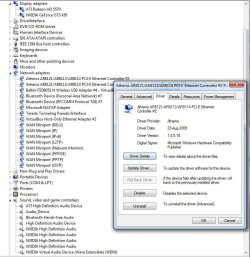
I have Atheros® L1E Gigabit LAN controller featuring AI NET 2 on a P5Q pro turbo motherboard and have tried driver versions 1.0.0.15, 1.0.0.16 and 1.0.0.18 versions of the Atheros AR8121/AR8113/AR8114 PCI ethernet controller. The driver version on the MB CD is 1.0.0.16.

I have downloaded this package from this site Drivers Informer: Atheros AR8121/AR8113/AR8114 PCI-E Ethernet Controller overview Which says Win7 should be 1.0.0.49 but when I installed it, it only installed 1.0.0.18. It gave no option which one to install. I cant seem to install .49 version. Funny thing is version .18 isn't even listed in the above link.

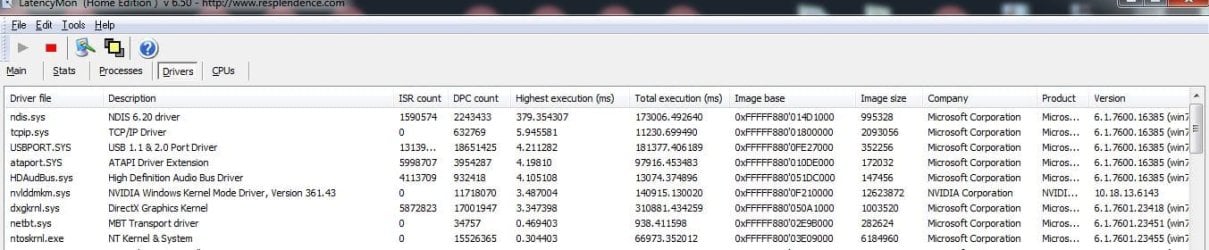
NDIS 6.20 is the worst latency offender. Can I safely put NDIS 6.30 or 6.40 on Windows 7x64?

I have tried disabling LAN, video and sound in the device manager as well as a backup Logitech BT mouse driver.

I have 2 video card slots on my MB each with a card. I swapped the card positions around in case something was conflicting. According to How to Detect an IRQ Conflict | eHow I have no conflicting devices and no yellow exclamations.

Nothing seems to help. The ONLY thing that seems to put a temporary fix to the latency is rebooting. Then it will be good for a few hours and then its back.

This morning I have my highest numbers ever. I dont know what they mean except the higher the number the worse things are. Been messing with this for about 2 weeks now and seem to have made 0 progress. When I took the screen shot NDIS was 379us highest execution and now its up to 402us.

I am typing this in notepad before I put it here and in fact just after I wrote highest numbers ever in the above sentence, DPC latency checker went ALL red. This is the first time I have seen it go all red. I wasn't fast enough to get a screen shot but the spikes were between 4000us and 8000us.

Anything I can try next based on the information provided?
 

Attachments
  • lm.JPG
    lm.JPG
    77.5 KB · Views: 3
  • dm.JPG
    dm.JPG
    103.1 KB · Views: 1

My Computer My Computer

Computer type
PC/Desktop
Computer Manufacturer/Model Number
Custom built by myself
OS
Windows 7 Ultimate 64Bit (SP1)
CPU
Intel® Core™ i3-6100 Processor (3M Cache, 3.70 GHz)
Motherboard
Asus B150M-C D3
Memory
Kingston 16GB Hyper X Fury Blue DDR3 1600Mhz (2x 8GB sticks)
Graphics Card(s)
On board (Asus B150M-C D3) VGA and DVI on Extended Desktop
Sound Card
On Board (Asus B150M-C D3)
Monitor(s) Displays
Left DVI: Samsung 920WM - Right VGA: Samsung 941BW
Hard Drives
WD WD5000AADS 500GB SATA Green--WD 1TB WD1001FALS SATA Black--WD 320GB WD3200JB
PSU
Cooler Master 700W Silent Pro
Case
See through Side panel--right hinge door--5x 5" & 2x 3" bays
Cooling
Side, Front, Rear fan & Power supply fan
Keyboard
Logitech MX5000 BT
Mouse
Logitech MX500
Internet Speed
40Mb down--10Mb Up
Antivirus
AVG Internet Security
Browser
Chrome-Firefox-Opera-IE-TOR
Other Info
2x LG DVD-RW--NZXT Fan contoller--4in1 Card reader
First, this really belongs in another forum section. Audio may be affected but its more some system or driver problem.

However, on the sound side, looking at the Device Manager listing, I don't really see a true hardware driver for your PC sound. I see ATI High Definition and NVIDIA High Definition but those are most likely HDMI audio drivers, not PC sound drivers. VIA, according to what I find on the ASUS site is the correct on-board audio.

https://www.asus.com/Motherboards/P5Q_PRO_Turbo/HelpDesk_Download/

Another Item I see is a wireless adapter. Wi-Fi is a know cause of audio dropout. Disable that or even unplug it if you are not using Wi-Fi. If you are using Wi-Fi, stop and use a wired LAN connection.

The so called driver sites do not always have the latest or even correct drivers. Best to use the ones from the motherboard vendor, or in the case of Intel devices direct from Intel.

Finally, download and run the free Resplendence Latency Mon program. It is much more than the limited DPC Latency Checker program.

Resplendence Software - LatencyMon: suitability checker for real-time audio and other tasks
 

My Computer My Computer

Computer type
PC/Desktop
Computer Manufacturer/Model Number
My Own Build
OS
Windows 10 64 bit
CPU
Intel i7 6700K
Motherboard
ASUS ROG Maximus VIII Hero
Memory
16GB Corsair Dominator
Graphics Card(s)
Intel CPU Graphics
Sound Card
RealTek
Monitor(s) Displays
27" Dell S2719dgf
Screen Resolution
2560X1440
Hard Drives
1 TB Samsung 850 EVO SSD for Win 10 Pro
500GB Samsung 850 EVO SSD for Win 10 Insider
2 TB drive for backup
PSU
EVGA Supernova 750G2
Case
BeQuiet Silent Base 600
Cooling
Deepcool Captain 120EX
Keyboard
Microsoft Wireless 2000
Mouse
Microsoft wireless
Internet Speed
100 MB/sec (Cable)
Antivirus
Microsoft Defender and Malwarebytes
Browser
Edge/Firefox
Other Info
Cakewalk (Sonar) by BandLab and Studio One 4.1 Pro recording studio software. MOTU 896Mk3 Hybrid recording interface, Frontier Tranzport wireless control unit, Behringer X-Touch Control Surface.
Five USB connected optical drives for CD Audio production using Nero BurningROM
So I found a program called driver easy and learned today that under no circumstances can windows driver seach be trusted. It always says the best driver is already installed.
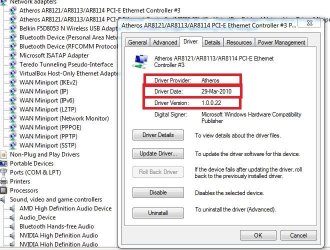
There was 35 out of date drivers on my machine including an updated Atheros driver. They are now all up to date.
Then I checked another program called Iobit driver booster and it found MORE that DriverEasy missed and those are all up to date now too. Some of the drivers were dated as far back as 2006. While updating my drivers I did multiple reboots so I'll see how it after a few hours of use.

In response to the reply above:
I am hooked up to LAN. When I first moved here I had to buy a wireless stick so I had internet until my appointment to get my cable modem hooked up. The driver is still there but the stick is not in use.

If I recall the VIA HD driver was a Microsoft driver and DriverEasy found me the the actual VIA driver.
------------------------------------------------
If this should be in another section the feel free to move it to another place but hopefully all these updates fixes the problem. This evening will tell.
 

Attachments

  • atheros.JPG
    atheros.JPG
    75.1 KB · Views: 26
  • via.JPG
    via.JPG
    76.3 KB · Views: 27

My Computer My Computer

Computer type
PC/Desktop
Computer Manufacturer/Model Number
Custom built by myself
OS
Windows 7 Ultimate 64Bit (SP1)
CPU
Intel® Core™ i3-6100 Processor (3M Cache, 3.70 GHz)
Motherboard
Asus B150M-C D3
Memory
Kingston 16GB Hyper X Fury Blue DDR3 1600Mhz (2x 8GB sticks)
Graphics Card(s)
On board (Asus B150M-C D3) VGA and DVI on Extended Desktop
Sound Card
On Board (Asus B150M-C D3)
Monitor(s) Displays
Left DVI: Samsung 920WM - Right VGA: Samsung 941BW
Hard Drives
WD WD5000AADS 500GB SATA Green--WD 1TB WD1001FALS SATA Black--WD 320GB WD3200JB
PSU
Cooler Master 700W Silent Pro
Case
See through Side panel--right hinge door--5x 5" & 2x 3" bays
Cooling
Side, Front, Rear fan & Power supply fan
Keyboard
Logitech MX5000 BT
Mouse
Logitech MX500
Internet Speed
40Mb down--10Mb Up
Antivirus
AVG Internet Security
Browser
Chrome-Firefox-Opera-IE-TOR
Other Info
2x LG DVD-RW--NZXT Fan contoller--4in1 Card reader
I do not trust any of the driver sites. I ONLY use drivers from the motherboard vendor, hardware vendor or Microsoft.
I use my PC for my recording studio so I have to be careful of what drivers I use.

Download and run the Resplendence Latency Mon program as I previously suggested. It is the best program available for DPC latency.
 

My Computer My Computer

Computer type
PC/Desktop
Computer Manufacturer/Model Number
My Own Build
OS
Windows 10 64 bit
CPU
Intel i7 6700K
Motherboard
ASUS ROG Maximus VIII Hero
Memory
16GB Corsair Dominator
Graphics Card(s)
Intel CPU Graphics
Sound Card
RealTek
Monitor(s) Displays
27" Dell S2719dgf
Screen Resolution
2560X1440
Hard Drives
1 TB Samsung 850 EVO SSD for Win 10 Pro
500GB Samsung 850 EVO SSD for Win 10 Insider
2 TB drive for backup
PSU
EVGA Supernova 750G2
Case
BeQuiet Silent Base 600
Cooling
Deepcool Captain 120EX
Keyboard
Microsoft Wireless 2000
Mouse
Microsoft wireless
Internet Speed
100 MB/sec (Cable)
Antivirus
Microsoft Defender and Malwarebytes
Browser
Edge/Firefox
Other Info
Cakewalk (Sonar) by BandLab and Studio One 4.1 Pro recording studio software. MOTU 896Mk3 Hybrid recording interface, Frontier Tranzport wireless control unit, Behringer X-Touch Control Surface.
Five USB connected optical drives for CD Audio production using Nero BurningROM
I have been running LatenctMon. Thats where I got the 379ms highest execution time in my 1st post. Updating my drivers didnt seem to help as I still have stutters and pops. DPC Checker is hitting red again and LatencyMon still shows NDIS as the main offender. 6.5 hours running and now the highest execution is 40.498977(ms) for NDIS.sys 6.20. It was going good for a while until I used Netflix. Then the numbers soared.
 

My Computer My Computer

Computer type
PC/Desktop
Computer Manufacturer/Model Number
Custom built by myself
OS
Windows 7 Ultimate 64Bit (SP1)
CPU
Intel® Core™ i3-6100 Processor (3M Cache, 3.70 GHz)
Motherboard
Asus B150M-C D3
Memory
Kingston 16GB Hyper X Fury Blue DDR3 1600Mhz (2x 8GB sticks)
Graphics Card(s)
On board (Asus B150M-C D3) VGA and DVI on Extended Desktop
Sound Card
On Board (Asus B150M-C D3)
Monitor(s) Displays
Left DVI: Samsung 920WM - Right VGA: Samsung 941BW
Hard Drives
WD WD5000AADS 500GB SATA Green--WD 1TB WD1001FALS SATA Black--WD 320GB WD3200JB
PSU
Cooler Master 700W Silent Pro
Case
See through Side panel--right hinge door--5x 5" & 2x 3" bays
Cooling
Side, Front, Rear fan & Power supply fan
Keyboard
Logitech MX5000 BT
Mouse
Logitech MX500
Internet Speed
40Mb down--10Mb Up
Antivirus
AVG Internet Security
Browser
Chrome-Firefox-Opera-IE-TOR
Other Info
2x LG DVD-RW--NZXT Fan contoller--4in1 Card reader
If there is a better section this post can be put in, can an admin please move it there? This is more serious than I thought. The audio problem isn't just with streaming, it seems I'm also having trouble withe media player as well while watching a downloaded movie. Nothing is/was streaming. It was playing off the secondary HDD. The popping/stuttering/choppiness remains. Updating all the drivers didn't do a damn thing.
 

My Computer My Computer

Computer type
PC/Desktop
Computer Manufacturer/Model Number
Custom built by myself
OS
Windows 7 Ultimate 64Bit (SP1)
CPU
Intel® Core™ i3-6100 Processor (3M Cache, 3.70 GHz)
Motherboard
Asus B150M-C D3
Memory
Kingston 16GB Hyper X Fury Blue DDR3 1600Mhz (2x 8GB sticks)
Graphics Card(s)
On board (Asus B150M-C D3) VGA and DVI on Extended Desktop
Sound Card
On Board (Asus B150M-C D3)
Monitor(s) Displays
Left DVI: Samsung 920WM - Right VGA: Samsung 941BW
Hard Drives
WD WD5000AADS 500GB SATA Green--WD 1TB WD1001FALS SATA Black--WD 320GB WD3200JB
PSU
Cooler Master 700W Silent Pro
Case
See through Side panel--right hinge door--5x 5" & 2x 3" bays
Cooling
Side, Front, Rear fan & Power supply fan
Keyboard
Logitech MX5000 BT
Mouse
Logitech MX500
Internet Speed
40Mb down--10Mb Up
Antivirus
AVG Internet Security
Browser
Chrome-Firefox-Opera-IE-TOR
Other Info
2x LG DVD-RW--NZXT Fan contoller--4in1 Card reader
I can't move posts. But, it really does belong in a system problem section. The sound is affected but that is a byproduct of whatever system issues you have.
 

My Computer My Computer

Computer type
PC/Desktop
Computer Manufacturer/Model Number
My Own Build
OS
Windows 10 64 bit
CPU
Intel i7 6700K
Motherboard
ASUS ROG Maximus VIII Hero
Memory
16GB Corsair Dominator
Graphics Card(s)
Intel CPU Graphics
Sound Card
RealTek
Monitor(s) Displays
27" Dell S2719dgf
Screen Resolution
2560X1440
Hard Drives
1 TB Samsung 850 EVO SSD for Win 10 Pro
500GB Samsung 850 EVO SSD for Win 10 Insider
2 TB drive for backup
PSU
EVGA Supernova 750G2
Case
BeQuiet Silent Base 600
Cooling
Deepcool Captain 120EX
Keyboard
Microsoft Wireless 2000
Mouse
Microsoft wireless
Internet Speed
100 MB/sec (Cable)
Antivirus
Microsoft Defender and Malwarebytes
Browser
Edge/Firefox
Other Info
Cakewalk (Sonar) by BandLab and Studio One 4.1 Pro recording studio software. MOTU 896Mk3 Hybrid recording interface, Frontier Tranzport wireless control unit, Behringer X-Touch Control Surface.
Five USB connected optical drives for CD Audio production using Nero BurningROM
?????
 

My Computer My Computer

Computer type
PC/Desktop
Computer Manufacturer/Model Number
Custom built by myself
OS
Windows 7 Ultimate 64Bit (SP1)
CPU
Intel® Core™ i3-6100 Processor (3M Cache, 3.70 GHz)
Motherboard
Asus B150M-C D3
Memory
Kingston 16GB Hyper X Fury Blue DDR3 1600Mhz (2x 8GB sticks)
Graphics Card(s)
On board (Asus B150M-C D3) VGA and DVI on Extended Desktop
Sound Card
On Board (Asus B150M-C D3)
Monitor(s) Displays
Left DVI: Samsung 920WM - Right VGA: Samsung 941BW
Hard Drives
WD WD5000AADS 500GB SATA Green--WD 1TB WD1001FALS SATA Black--WD 320GB WD3200JB
PSU
Cooler Master 700W Silent Pro
Case
See through Side panel--right hinge door--5x 5" & 2x 3" bays
Cooling
Side, Front, Rear fan & Power supply fan
Keyboard
Logitech MX5000 BT
Mouse
Logitech MX500
Internet Speed
40Mb down--10Mb Up
Antivirus
AVG Internet Security
Browser
Chrome-Firefox-Opera-IE-TOR
Other Info
2x LG DVD-RW--NZXT Fan contoller--4in1 Card reader
Back
Top