DPI or other setting problem ?

julia99r

New member
Local time
6:54 AM
Messages
11
I was unsure which category to place my question so hope I am in the right place.
I recently changed monitors and am now using a Benq FP731. The resolution is set to default but I needed to increase the DPI to 120%. While using my previous monitor I had created (over the past year) a great number of worksheets on a related subject and had meticulously entered information so that it fitted precisely onto each page of each worksheet (page breaks etc). Since the change of monitors and the DPI setting when I check the worksheets they don't appear how I had set them up (using my old monitor). The page breaks are now overlapping into next pages and outside the width of the page.
I have tried every setting I can think of but the only DPI setting that does show the worksheets correctly is 125% but this makes everything else on my PC too big. I also want to be able to put the files on disc for my family but want them to be able to view it as I had set it up.
I would have expected that changing the DPI would only change the size of viewing, not the actual setup of previously saved work.
Is there a setting I have missed - I have tried everything I can think of and I'm desperate for some help.
Thanks
 

My Computer

Computer type
PC/Desktop
Computer Manufacturer/Model Number
ACPI X 86 based PC
OS
windows 7 PRO 32bit
CPU
Intel core 2 quad CPU 8400 @ 2.66GH3
Graphics Card(s)
ATI Radeon 6450 graphics card with 1gig DOR3
Hard Drives
500 gig HDD
Antivirus
AVG
Browser
google
It's your new monitor the same size as your previous one?, and these worksheets, what software are you using?. You could try to create a more suitable display file like a PDF, but I'm not 100% sure in what are you working.

Oh, and I'm not a mod but maybe this would go in Hardware & Devices.
 

My Computer

Computer type
PC/Desktop
Computer Manufacturer/Model Number
Custom Build
OS
Windows 7 Ultimate 64bit
CPU
AMD Phenom X4 9850
Motherboard
Gigabyte Technology GA-MA74GM-S2 (Socket M2)
Memory
4.00GB Crucial Dual-Channel DDR2 @ 401MHz (5-5-5-18)
Graphics Card(s)
ATI Radeon 2100 (Gigabyte)
Sound Card
Realtek High Definition Audio
Monitor(s) Displays
LM742 on ATI Radeon 2100
Screen Resolution
1280x1024 pixels
Hard Drives
WDC WD15EARS-00Z5B1 ATA Device, 1.5 TB, 2 partitions: - 500 GB (aprox.) Where Windows 7 resides, - 1 TB (aprox.) Storage
PSU
Ultra X4 ATX 600W
Case
ST ATX Mid-Tower Case
Cooling
Ultra Carbon X3
Keyboard
Logitech K360
Mouse
Logitech MX10
Internet Speed
802.11n USB Wireless LAN Card
Antivirus
AVG Internet Security 2014
Browser
Firefox Mozilla
Other Info
I use a graphic tablet, a XBOX360 Wired Controller, a external CD/DVD Driver, and my entire system is connected to a 6 slots Protected Power-surge
Yes the monitor is the same size as the old one but I have tried different sizes even a widescreen all giving me the same result. The worksheets are done in Excel (Microsoft Office).
It doesn't make sense that changing the DPI could cause this problem. I'm thinking it must be software, maybe another setting that would counteract this ? That's why I thought hardware & devices wouldn't be right to post my questions, but am open to any suggestions anyone has so might be worth a try, thanks.
 

My Computer

Computer type
PC/Desktop
Computer Manufacturer/Model Number
ACPI X 86 based PC
OS
windows 7 PRO 32bit
CPU
Intel core 2 quad CPU 8400 @ 2.66GH3
Graphics Card(s)
ATI Radeon 6450 graphics card with 1gig DOR3
Hard Drives
500 gig HDD
Antivirus
AVG
Browser
google
Hey julia, I'm sorry I wasn't able to reply sooner again.
Yes the monitor is the same size as the old one but I have tried different sizes even a widescreen all giving me the same result. The worksheets are done in Excel (Microsoft Office). It doesn't make sense that changing the DPI could cause this problem.
You are somewhat wrong, because DPI scaling changes not just text, but the user interface also, here is a little explanation:
Optimize Display Scaling and Fix Scaling Issues on Windows 7

So, if you say you are trying to watch some sheets, with a different scaling than the one you originally used, it will change your entire work on the display. Could I suggest you try your old monitor and see how it looks?, and if it does looks the way you need it, try to save it in a different format like .pdf and then connect your new monitor, with the same DPI scaling, and open that .pdf file, see how it looks. I could also suggest you try perhaps another procedure, one that doesn't require a specific screen size for the desired result, in other words, don't rely on the size of your monitor hardware, instead, if what you want is to let others watch the information you have worked on a sheet previously, use a different set of document sizes in resolution (for example, the most common would be 800x600, 1024x768, 1366x768, 1920x1080 pixels, and so on, you normally see this option under the Design tab) in order to fit different monitors as you need. If you have any questions, just ask. :)
 

My Computer

Computer type
PC/Desktop
Computer Manufacturer/Model Number
Custom Build
OS
Windows 7 Ultimate 64bit
CPU
AMD Phenom X4 9850
Motherboard
Gigabyte Technology GA-MA74GM-S2 (Socket M2)
Memory
4.00GB Crucial Dual-Channel DDR2 @ 401MHz (5-5-5-18)
Graphics Card(s)
ATI Radeon 2100 (Gigabyte)
Sound Card
Realtek High Definition Audio
Monitor(s) Displays
LM742 on ATI Radeon 2100
Screen Resolution
1280x1024 pixels
Hard Drives
WDC WD15EARS-00Z5B1 ATA Device, 1.5 TB, 2 partitions: - 500 GB (aprox.) Where Windows 7 resides, - 1 TB (aprox.) Storage
PSU
Ultra X4 ATX 600W
Case
ST ATX Mid-Tower Case
Cooling
Ultra Carbon X3
Keyboard
Logitech K360
Mouse
Logitech MX10
Internet Speed
802.11n USB Wireless LAN Card
Antivirus
AVG Internet Security 2014
Browser
Firefox Mozilla
Other Info
I use a graphic tablet, a XBOX360 Wired Controller, a external CD/DVD Driver, and my entire system is connected to a 6 slots Protected Power-surge
Thanks for getting back to me..
By your opening statement it would mean:- unless another person has exactly the same DPI and Resolution settings as me, and I emailed or copied to disc a Word, Excel, or PDF document the recipient will not be able to view or print it properly (in the way it had been setup). Nothing would fit to page or within margins ??? Of course that would not just apply to me it would apply to everyone who emails a document or copies it to disc. ...sorry but I just can't believe that to be the case. It would mean that I would need contact a recipient to obtain their computer settings, change my computer to the same settings as their, laboriously change all the files I want to send/copy, just so they can view them properly (the way they were set up). I have posted my problem on a heap of forums and no-one has heard of it before nor know how to fix it, but if this problem is the way the programs/settings work wouldn't it be an extremely common complaint that everyone knows about?
The old monitor does exactly the same thing as the one I am using now when changing DPI & resolution. I have tried other monitors & a widescreen all with the same outcome. Saving as a .pdf has no affect, the page break & margins still appear differently when dpi & res are changed (and different monitors with different settings). I have tried changing to various resolutions keeping my DPI at default (or higher/lower)... nothing has worked. I just cannot figure it out.
Thanks kindly again for your reply and suggestions, but unfortunately the problem still exists.
 

My Computer

Computer type
PC/Desktop
Computer Manufacturer/Model Number
ACPI X 86 based PC
OS
windows 7 PRO 32bit
CPU
Intel core 2 quad CPU 8400 @ 2.66GH3
Graphics Card(s)
ATI Radeon 6450 graphics card with 1gig DOR3
Hard Drives
500 gig HDD
Antivirus
AVG
Browser
google
Hey julia, I can understand a lot of people don't getting exactly what's your issue with the desired display of your info, perhaps one of the documents you are working could make a better graphic example?, that way here we could have a better idea of what's the problem. Although, you also need to have a little understanding of how resolutions and units of measure play a role in the whole process, because you clearly are having trouble with working on different screen sizes (a recurring theme in graphic design). You don't need to know the exact size (in pixels per inch and/or DPI) of every single monitor your colleagues are using, that would be insane, but, you need to understand there are different sizes when in comes not only to screen but to display size (since maybe someone would be using a better graphics card than the rest, and chances are it may have a bigger resolution on his/her PC). Also, what I'm getting is that, your work on these spreadsheets will be eventually printed?, is the printing the final goal?, because if so, then now you would be limited by what printer are you using, and which paper size it handles. Even if you take your time to arrange the sheets in a very specific way, finally the program and the printer driver will decide how the sheets will be printed (unless, of course, you use a .pdf file, which are, by the way, specially designed for printing, this time the format will help you). So you see julia, there are a lot of small but interconnected details, which need to be explained for particular issues like this one, because otherwise, as it happened to you, it will be hard to get people to understand. But post a file, let's have a look how are you working, if it's ok with you.
 

My Computer

Computer type
PC/Desktop
Computer Manufacturer/Model Number
Custom Build
OS
Windows 7 Ultimate 64bit
CPU
AMD Phenom X4 9850
Motherboard
Gigabyte Technology GA-MA74GM-S2 (Socket M2)
Memory
4.00GB Crucial Dual-Channel DDR2 @ 401MHz (5-5-5-18)
Graphics Card(s)
ATI Radeon 2100 (Gigabyte)
Sound Card
Realtek High Definition Audio
Monitor(s) Displays
LM742 on ATI Radeon 2100
Screen Resolution
1280x1024 pixels
Hard Drives
WDC WD15EARS-00Z5B1 ATA Device, 1.5 TB, 2 partitions: - 500 GB (aprox.) Where Windows 7 resides, - 1 TB (aprox.) Storage
PSU
Ultra X4 ATX 600W
Case
ST ATX Mid-Tower Case
Cooling
Ultra Carbon X3
Keyboard
Logitech K360
Mouse
Logitech MX10
Internet Speed
802.11n USB Wireless LAN Card
Antivirus
AVG Internet Security 2014
Browser
Firefox Mozilla
Other Info
I use a graphic tablet, a XBOX360 Wired Controller, a external CD/DVD Driver, and my entire system is connected to a 6 slots Protected Power-surge
To give you a “CLEAR” understanding of my issue, this is exactly what it is…

Example:- I set the DPI% to 125% (through “personalisation” & “Display”).. I create a 5 page long Excel Spreadsheet. The information I enter on page 1 fits precisely within the first pagebreak. I manually number the page "1". I continue entering my information on the next 5 pages, ensuring each page is within the page “pagebreak”….preview & save the document… Now if I go back into “personalisation” & “display” and change the DPI to 100% (or another %) and open the same document I had created, the page breaks have lowered, so that page 1 data is overlapping by pagebreak into page 2… page two is overlapping into 3 and so on. NOT only by the actual “preview” view but the actual setup.
Similarly, if I were to copy that document onto disc, or email it to you, AND you have a different DPI setting on your computer other than 125% you also would "see" pages flowing into the next with the page breaks in the wrong places. If you wanted to print the document by “data page” as it was originally created, you would have to adjust the pagebreaks etc manually on the document before you could print. It has nothing at all to do with Printer settings or preferences it is the actual set up of the spreadsheet that would need to be changed.
So if I change monitors and prefer to use a different DPI% setting other than the one I originally used to create the document on, all the “created” pages would appear incorrect with page breaks changed. I would have to physical change ALL my document .
Attached are various images as listed below.

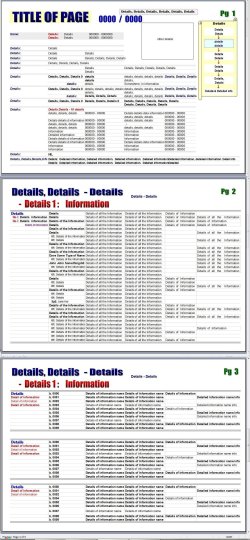
Spreadsheet was created with DPI setting on 125%
Image 1 – Spreadsheet pg 1, 2, 3, image screenshot with DPI setting on 125% DPI (appears correct)
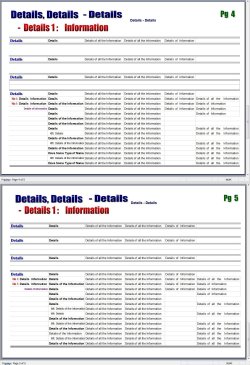
Image 2 – cont'd - pg 4 & 5 image screenshot with DPI setting on 125% (appears correct)

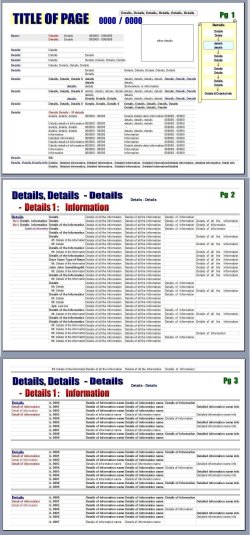
Image 3 – the same spreadsheet view with DPI setting at 100% -Page 1, 2, 3 (pagebreaks have changed)
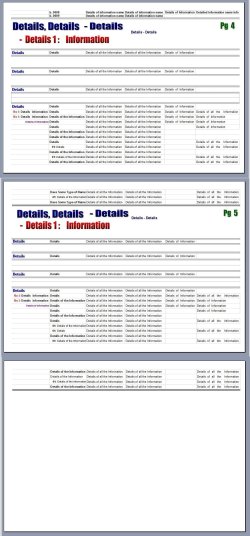
Image 4 - cont'd - page 4, 5, & overflow of page 5 (view with 100% DPI) (pagebreaks have changed)
 

Attachments

  • image 1 - pg 1 2 3 - 125 dpi.jpg
    image 1 - pg 1 2 3 - 125 dpi.jpg
    743.7 KB · Views: 0
  • image 2 - pg 4 5 - 125 dpi.jpg
    image 2 - pg 4 5 - 125 dpi.jpg
    431 KB · Views: 0
  • image 3 - pg 1 2 3 - 100 dpi.jpg
    image 3 - pg 1 2 3 - 100 dpi.jpg
    617 KB · Views: 3
  • image 4 - pg 4 5 6 - 100 dpi.jpg
    image 4 - pg 4 5 6 - 100 dpi.jpg
    395 KB · Views: 2

My Computer

Computer type
PC/Desktop
Computer Manufacturer/Model Number
ACPI X 86 based PC
OS
windows 7 PRO 32bit
CPU
Intel core 2 quad CPU 8400 @ 2.66GH3
Graphics Card(s)
ATI Radeon 6450 graphics card with 1gig DOR3
Hard Drives
500 gig HDD
Antivirus
AVG
Browser
google
in addition to my previous message, I emailed one of my spreadsheets to a friend, the spreadsheet text fitted perfectly within the margins and the pagebreak. My friend replied saying there was issues with the margins and pagebreaks as they do not appear in the right places. Also a popup message appeared as soon as she viewed it and so she sent me back a snapshot of the image view. I have smudged out personal information to show you this (for obvious reasons) but you will be able to see how margins etc are being changed.
I felt this extra information would be of assistance.
thanks
 

Attachments

  • popup message.jpg
    popup message.jpg
    82.9 KB · Views: 1

My Computer

Computer type
PC/Desktop
Computer Manufacturer/Model Number
ACPI X 86 based PC
OS
windows 7 PRO 32bit
CPU
Intel core 2 quad CPU 8400 @ 2.66GH3
Graphics Card(s)
ATI Radeon 6450 graphics card with 1gig DOR3
Hard Drives
500 gig HDD
Antivirus
AVG
Browser
google
It's weird, I just did the same procedure as you, made a document with at least 3 sheets, saved (Fig. 1), changed DPI to 125% but all looks fine. (Fig. 2)
Just by pure curiosity, have you changed any of these settings in any way? (Fig.3), especially the Width and Height settings, are they in Automatic? (not only yours, but your colleagues PC's too?). Have you tried to start Excel in safe mode or re-registering it?:
Startup Errors In Excel
 

Attachments

  • Fig1.png
    Fig1.png
    70.2 KB · Views: 0
  • Fig2.png
    Fig2.png
    84.3 KB · Views: 0
  • Fig3.jpg
    Fig3.jpg
    94.3 KB · Views: 1

My Computer

Computer type
PC/Desktop
Computer Manufacturer/Model Number
Custom Build
OS
Windows 7 Ultimate 64bit
CPU
AMD Phenom X4 9850
Motherboard
Gigabyte Technology GA-MA74GM-S2 (Socket M2)
Memory
4.00GB Crucial Dual-Channel DDR2 @ 401MHz (5-5-5-18)
Graphics Card(s)
ATI Radeon 2100 (Gigabyte)
Sound Card
Realtek High Definition Audio
Monitor(s) Displays
LM742 on ATI Radeon 2100
Screen Resolution
1280x1024 pixels
Hard Drives
WDC WD15EARS-00Z5B1 ATA Device, 1.5 TB, 2 partitions: - 500 GB (aprox.) Where Windows 7 resides, - 1 TB (aprox.) Storage
PSU
Ultra X4 ATX 600W
Case
ST ATX Mid-Tower Case
Cooling
Ultra Carbon X3
Keyboard
Logitech K360
Mouse
Logitech MX10
Internet Speed
802.11n USB Wireless LAN Card
Antivirus
AVG Internet Security 2014
Browser
Firefox Mozilla
Other Info
I use a graphic tablet, a XBOX360 Wired Controller, a external CD/DVD Driver, and my entire system is connected to a 6 slots Protected Power-surge
Yes, I too have done a quick test by creating a worksheet and viewing it at different DPI settings and it looks fine, but I'm going to play around with that test sheet a bit more and one by one change excel settings to see if I can duplicate the problem.
(90% of the time I change margin size to suit the entries I need to enter, and the orientation is changed quite often to suit also. Not just for the spreadsheets in question but every one I ever create.
When doing this group of spreadsheets (which are my "family history") I never use one as a template for another spreadsheet I always create a new one from scratch. Yes I DID adjust the margins, orientation, row height, column width, I DID NOT change: print area, background, print titles, scale. There is a lot of information that I want to appear on each page these sheets so I need to adjust things to fit, but always making sure they are within the margin & pagebreak . Excel supplies the options to adjust these settings, so I wouldn't have thought they would corrupt the sheet if used.
My colleague made no changes at all, she just viewed it, did a screen print and emailed it back to me.
I have not tried to start Excel in safe mode or re-registered it.. I have run "detect and repair".
I will do those things and look through the "startup errors in Excel" link supplied at the bottom of your last message. I'll get back to you with the outcome. Thanks for your extra suggestions
 

My Computer

Computer type
PC/Desktop
Computer Manufacturer/Model Number
ACPI X 86 based PC
OS
windows 7 PRO 32bit
CPU
Intel core 2 quad CPU 8400 @ 2.66GH3
Graphics Card(s)
ATI Radeon 6450 graphics card with 1gig DOR3
Hard Drives
500 gig HDD
Antivirus
AVG
Browser
google
I typed a reply but need to retract it while I check something else out
 
Last edited:

My Computer

Computer type
PC/Desktop
Computer Manufacturer/Model Number
ACPI X 86 based PC
OS
windows 7 PRO 32bit
CPU
Intel core 2 quad CPU 8400 @ 2.66GH3
Graphics Card(s)
ATI Radeon 6450 graphics card with 1gig DOR3
Hard Drives
500 gig HDD
Antivirus
AVG
Browser
google
ok, I have found that the problem arises when I manually adjust column widths and row heights by "dragging". Although the margin & page breaks show to be within the limits of that page after I have made the adjustments, it is the cause of the issue to occur. Excel "help" & tutorials show this procedure as a way of adjusting columns and rows but don't warn of the effect it will have if used.
I have tried "auto fit & "auto adjust" but that changes back the row heights I had adjusted, and therefore changes the way I need & want the page to be setup.
Unless you know of a setting that will only allow me to adjust columns & row heights without exceeding the page limit (even though it does not show the limit has been exceeded) while still keeping the maximum amount of entry space, i'm just going to forget about it and put it down to a program glitch - accepting that the files will not appear correct for the recipients of my copied files. This is really doing my head in, so might be that I just need to accept defeat and go with what I have. Its just such a disappointing outcome for the years of work I have done.
 

My Computer

Computer type
PC/Desktop
Computer Manufacturer/Model Number
ACPI X 86 based PC
OS
windows 7 PRO 32bit
CPU
Intel core 2 quad CPU 8400 @ 2.66GH3
Graphics Card(s)
ATI Radeon 6450 graphics card with 1gig DOR3
Hard Drives
500 gig HDD
Antivirus
AVG
Browser
google
Hey julia, I feel what you say, I have experienced a lot of frustration with office programs too. You know, maybe you are still not defeated, although I cannot assure you anything, but you can try to open your files with LibreOffice Calc:
LibreOffice Stable | LibreOffice - Free Office Suite - Fun Project - Fantastic People
LibreOffice is a open-source office suite (much like Windows Office, it has a word processor, presentations, etc), but it can open WinOffice files too, and since is open-source, the development of the program itself it's in the hands of the community, who can also help you in any kind of issues (like this one for example) since it's the community who works on this. Just try it, it doesn't hurt, and if you don't want to install it per se, you could just download the PortableApps version:
LibreOffice Portable | PortableApps.com - Portable software for USB, portable and cloud drives
It's probable that when you open your files with LibreOffice, the format may change a little, but once you get the grip, maybe you find it better and more customizable, but then again you may not (who knows), you could just give it a try.
And if you really cannot find yourself in this new program, and you really can't find another way to workaround this issue with Excel, then maybe as a last resort, you could try to find another software to store and also display info in a nice way, except if you are in an office where Excel it's mandatory.
If you do decide to change to other software, I recommend you this page, Alternative To:
AlternativeTo - Social Software Recommendations
It's like a wiki for software, you can browse by category, and also see ratings and some reviews about the programs, that way you can find the one who fits your needs.
 

My Computer

Computer type
PC/Desktop
Computer Manufacturer/Model Number
Custom Build
OS
Windows 7 Ultimate 64bit
CPU
AMD Phenom X4 9850
Motherboard
Gigabyte Technology GA-MA74GM-S2 (Socket M2)
Memory
4.00GB Crucial Dual-Channel DDR2 @ 401MHz (5-5-5-18)
Graphics Card(s)
ATI Radeon 2100 (Gigabyte)
Sound Card
Realtek High Definition Audio
Monitor(s) Displays
LM742 on ATI Radeon 2100
Screen Resolution
1280x1024 pixels
Hard Drives
WDC WD15EARS-00Z5B1 ATA Device, 1.5 TB, 2 partitions: - 500 GB (aprox.) Where Windows 7 resides, - 1 TB (aprox.) Storage
PSU
Ultra X4 ATX 600W
Case
ST ATX Mid-Tower Case
Cooling
Ultra Carbon X3
Keyboard
Logitech K360
Mouse
Logitech MX10
Internet Speed
802.11n USB Wireless LAN Card
Antivirus
AVG Internet Security 2014
Browser
Firefox Mozilla
Other Info
I use a graphic tablet, a XBOX360 Wired Controller, a external CD/DVD Driver, and my entire system is connected to a 6 slots Protected Power-surge
Thanks so much for your suggestions, I will definitely look into them. Excel certainly isn't an ideal program and especially for what I am using it for. I was actually thinking myself that I would look around to find something more compatible.
I do appreciate you following me though with my post query, and even though we didn't come to a solution I guess we both have learned something because of it. ... Cheers
 

My Computer

Computer type
PC/Desktop
Computer Manufacturer/Model Number
ACPI X 86 based PC
OS
windows 7 PRO 32bit
CPU
Intel core 2 quad CPU 8400 @ 2.66GH3
Graphics Card(s)
ATI Radeon 6450 graphics card with 1gig DOR3
Hard Drives
500 gig HDD
Antivirus
AVG
Browser
google
Back
Top