Drag & Drop Problem

AlexHosking

New member
Local time
8:05 AM
Messages
2
When I attempt to Drag & Drop a photo in any of my photo folders just to reposition it I get a small circle with a bar across it. I know what this means "it can't be done" but why?? Is there a setting somewhere that will allow it?
It is very annoying because if I want to group a number of photos together to email to someone I can't do it.
 

My Computer

OS
Windows 7 (RC)
Install Picasa3 .... it's will search for all photos so you have them in one place. Select the ones you want to send, click on 'hold', then send the whole group :D
Picasa 3: Free download from Google

Uncheck Google Tool bar if it's pre-checked!
 

My Computer

Computer type
PC/Desktop
Computer Manufacturer/Model Number
Bruce ... somewhere in his 40's
OS
Windows 7 Ultimate 32bit SP1
CPU
Intel(R) Core(TM)2 Quad CPU @ 2.40GHz, 2400 MHz
Motherboard
INTEL/D975XBX2
Memory
4 GB
Graphics Card(s)
ATI Radeon HD 2600 Pro
Monitor(s) Displays
Samsung SyncMaster 914v
Screen Resolution
1280 x 1024
Hard Drives
2/500GB each ... ST3500630AS ATA Device.
One is not connected
PSU
Rocketfish 700 W
Case
G.Skill Gigabyte Chassis
Keyboard
Standard PS/2 Keyboard
Mouse
Microsoft PS/2 Mouse
Internet Speed
DSL
Antivirus
Avira Internet Security
Browser
IE 11
Other Info
ATI HDMI Audio
Drag & Drop Problel

Thanks for the reply. Yes, I am aware that it is possible to do it in other programs. Also, adding a group of photos individually to email in "Windows Live Mail" is no real hassle. I was just wondering, as you can Drag & Drop easily in XP & Vista, why it can't be done in Windows 7. I though that I may have had a setting incorrectly set.
 

My Computer

OS
Windows 7 (RC)
I am having the same problem, and it's infuriating!!! I specifically chose this netbook with the new Windows 7 instead of the tried and true Windows XP because I was SURE that it would totally kick butt, having been so enamored with XP's features!

I swear, I feel like returning it and getting the XP version!

WINDOWS TEAM, PLEASE WRITE A DEBUG OR REGISTRY FIX FOR THIS GLARING OVERSIGHT!!!!

If anyone has a solution, please email me at [email protected] !!!
 

My Computer

Computer Manufacturer/Model Number
Eee netbook
OS
Windows 7 on an Eee netbook with Intel "atom inside"
CPU
don't know what that means
Motherboard
don't know what that means
Memory
222 GB
Graphics Card(s)
no idea
Sound Card
no idea
Monitor(s) Displays
no ideea
Hard Drives
no external
I'm not really sure what exactly you are trying to do here. At first, it sounds like you are just trying to drag files around in the same folder, but then you talk about emailing pictures via drag & drop which is a completely different scenario.

Regardless, your problems most likely have to do with the running privilege levels of each application. If you have file explorer running as normal user and a program running as admin or elevated user, you won't be able to drag & drop things across the two. Hopefully that makes sense and helps you arrive at a solution.
 

My Computer

OS
XP / Win7 x64 Pro
CPU
Intel Quad-Core Q9450 @ 3.2GHz
Motherboard
Asus P5-E
Memory
2x2GB GSkill DDR2
Graphics Card(s)
NVIDIA GeForce 8600 GTS (EVGA)
Monitor(s) Displays
Dell 2408WFP
Screen Resolution
1920x1200
I think he means manual arrangement in folders which was removed, because some dumb f*ck thought people don't use it.
 

My Computer

OS
Windows 7 build 7600 64 bit
CPU
Intel Core2Quad Q8200 2.33 GHz @ 2.33 GHz
Motherboard
Gigabyte GA-P35-S3 rev. 1
Memory
GoodRAM DDR2 3 x 1 GB 800 MHz
Graphics Card(s)
HIS ATI Radeon HD 4850 512 MB VRAM
Sound Card
Creative X-FI Gamer
PSU
400 W
The problem is very simple...

FliGi7, I'm not sure why people have a problem understanding what the problem is here? Maybe it's just TOO simple?

Let's say that I have six photos--three of my dog and three of my cat. I want to move the three photos of my dog so that photos 1,2 and 3 are of my dog, in a line. I want photos 4,5 and 6 to be of my cat. I cannot do this without renumbering them (a tedious, time-wasting process!) I cannot simply drag the photos next to each other and have them "insert" themselves between each other--they'll stay stuck right like they are.

You can't do this by changing the view to "details" because you simply can't see what the heck you're moving!

This is a HUGE oversight on Windows 7--so much so that I would not hesitate to advise people AWAY from purchasing it! If you use your photo library as much as I, and most people do, this puts Windows 7 at the level of a kindergarten program for tots, in my opinion!
 

My Computer

Computer Manufacturer/Model Number
Eee netbook
OS
Windows 7 on an Eee netbook with Intel "atom inside"
CPU
don't know what that means
Motherboard
don't know what that means
Memory
222 GB
Graphics Card(s)
no idea
Sound Card
no idea
Monitor(s) Displays
no ideea
Hard Drives
no external
Ah, I see what you're saying now. Hm, that is interesting and I haven't actually experienced that myself, so I'll have to play around with it when I get home tonight to see if I can see any sort of workaround or fix.
 

My Computer

OS
XP / Win7 x64 Pro
CPU
Intel Quad-Core Q9450 @ 3.2GHz
Motherboard
Asus P5-E
Memory
2x2GB GSkill DDR2
Graphics Card(s)
NVIDIA GeForce 8600 GTS (EVGA)
Monitor(s) Displays
Dell 2408WFP
Screen Resolution
1920x1200

My Computer

Computer Manufacturer/Model Number
Rig 1
OS
Windows 7 Ultimate x64
CPU
AMD Phenom II X4 940 Black Edition @ 3.4GHz (AM2+)
Motherboard
Gigabyte GA-MA790X-UD4P (AM2+)
Memory
Corsair CM2X4096-8500C5 (4 X 2GB)
Graphics Card(s)
XFX Radeon HD 5770 / Diamond Radeon HD 5770 CrossFireX
Sound Card
Asus Xonar DS (PCI)
Monitor(s) Displays
Samsung SyncMaster 932bw+ (3)
Screen Resolution
4320x900
Hard Drives
OCZ Vertex 2 80 GB - Windows 7 System --
WD Caviar Black 1TB - Music, Movies, Vids, Pics --
WD Caviar Black 640GB - User Profiles & Games --
WD My Book 320GB external
PSU
Corsair CMPSU-750TX
Case
Cooler Master HAF 932
Cooling
Corsair Hydro Series H50
Keyboard
Logitech Desktop Wave
Mouse
Logitech LX8 Laser
Internet Speed
20 down / 2 up
Other Info
LG GGC-H20L Blu-Ray / HDDVD combo --
Hauppauge HVR-1250 --
Silverstone MFP-51 --
Logitech Webcam C600
Wow. What an S*show that discussion turned into. Duly noted, however.
 

My Computer

OS
XP / Win7 x64 Pro
CPU
Intel Quad-Core Q9450 @ 3.2GHz
Motherboard
Asus P5-E
Memory
2x2GB GSkill DDR2
Graphics Card(s)
NVIDIA GeForce 8600 GTS (EVGA)
Monitor(s) Displays
Dell 2408WFP
Screen Resolution
1920x1200
i never knew that function existed in windows xp, so i had never noticed that it was removed from windows 7. i searched around and found this:

Why has the ability to deactivate Auto Arrange been removed in Windows 7?
Gentlemen, thank you for your replies, and for the attention to this.
I appreciate the link to the discussion there; unfortunately, the suggested "remedies" are both rather unacceptable, as you cannot "see" the photo that you are moving when in either "details" or "list". What we need is the good old familiar ability to move thumbnails as in Windows XP. For the life of me, I cannot understand why this feature would have been left out of the program?

For casual computer novices like me. the photo library is a major part of the reasons I use a computer; to manage and store photos. Also, since I am an author who writes for a hobby/modeling magazine, I need the ability to arrange photos in a cohesive series of "steps"--assembly, preparation, painting, finishing, etc--that are not necessarily in perfect order when the photos come out of the camera. You can see how the inability to manage this function is a serious detriment to my work and enjoyment of this program.

A "fix" or correction of this omission would be a godsend, and I and millions of others would be most appreciative of your efforts. Otherwise, I will be forced to resell this netbook and purchase a new one with Windows XP---and I'd hate to have to incur that expense

Thank you, guys. :)
 

My Computer

Computer Manufacturer/Model Number
Eee netbook
OS
Windows 7 on an Eee netbook with Intel "atom inside"
CPU
don't know what that means
Motherboard
don't know what that means
Memory
222 GB
Graphics Card(s)
no idea
Sound Card
no idea
Monitor(s) Displays
no ideea
Hard Drives
no external
When I attempt to Drag & Drop a photo in any of my photo folders just to reposition it I get a small circle with a bar across it. I know what this means "it can't be done" but why?? Is there a setting somewhere that will allow it?
It is very annoying because if I want to group a number of photos together to email to someone I can't do it.
Hello AlexHosking! Please allow me to be the first to welcome you to Windows Seven Forums!

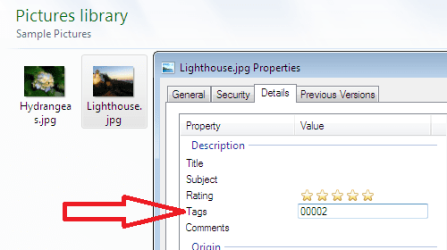
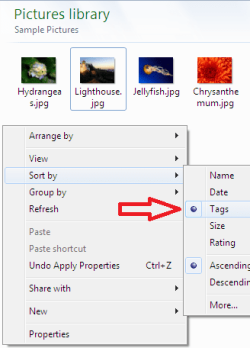
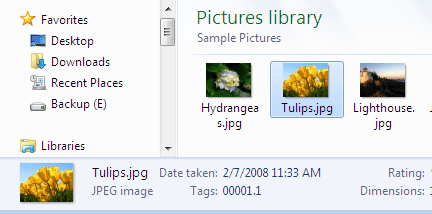
There is a *relatively* easy workaround to the manual arrangement of photos. No, it is not as easy as just moving a thumbnail's position with a mouse. But until MS changes the OS to allow a "drag and drop", here is a way to arrange them with just a little effort:

Give each photo a "tag" and sort by "tag"

sort_by_tag_01.png

sort_by_tag_02.png

Depending on one's needs, you could use either a numeric or alphabetic sort order. And what if you want to alter the order of one photo? Notice I have changed the tag to "00001.1" moving its position from the end to the second position. The tag can be changed from the "Properties" bar at the bottom of the window.

sort_by_tag_03.png

sort_by_tag_04.png

Cheers!
Robert
 

My Computer

OS
...
Thank you, Robert, for your suggestion! Not what I want, but it's good to hear from all sides!
Karl
 

My Computer

Computer Manufacturer/Model Number
Eee netbook
OS
Windows 7 on an Eee netbook with Intel "atom inside"
CPU
don't know what that means
Motherboard
don't know what that means
Memory
222 GB
Graphics Card(s)
no idea
Sound Card
no idea
Monitor(s) Displays
no ideea
Hard Drives
no external
Man I never even knew xp had that feature, it was something I wanted too, blah. Why does MS ever take things away.... Happy thoughts..
 

My Computer

Computer Manufacturer/Model Number
acer timeline 3810t
OS
Windows 7 64-bit Windows 7 32-bit
CPU
Intel Core 2 Solo (1.4 GHz)
Memory
4 GB DDR3 SDRAM - 1066 MHz SO DIMM 204-pin
Graphics Card(s)
Intel GMA 4500MHD Dynamic Video Memory Technology 5.0
Monitor(s) Displays
Widescreen 13.3 in TFT active matrix
Hard Drives
# 250 GB - Serial ATA-150 - 5400 rpm
Case
# Ultraportable (Under 4 lbs.) , Budget

My Computer

Computer Manufacturer/Model Number
Acer 7738G
OS
Windows 7 Home Premium X64 SP1
CPU
Intel Core2 duo T6600
Memory
4gb
Graphics Card(s)
Nvidia GeForce GT 1gb
Hard Drives
2 X 500 gb
I have written a batch that performs all the necessary described steps in one step - for users who don't dare to manipulate the registry:
  1. Add the 5 Keys for "General folder", "Documents folder", "Music folder", "Pictures folder" and "Videos folder"
  2. Export everything under the registry key "AllFolders" into a separate file "AllFolders.reg"
  3. Delete everything under the registry key "Bags"
  4. Import again exported file "AllFolders.reg"
  5. Delete exported file "AllFolders.reg"
 

My Computer

OS
Windows 7 32 bit
Back
Top