
Dreaded USB device not recognized

thoob

New member
Local time
9:04 AM
Messages
9
Here's my problem.
I built my own system. Everything works great except for the USB.
Mouse and keyboard work flawlessly. I can connect up to 2 devices in addition to the mouse and keyboard. If I connect a 3rd device, I get a message saying the USB device isn't recognized and that it has malfunctioned. It doesn't matter which device either so I know it's not a hardware malfunction. The device manager shows it as an unknown device.
I've tried re-installing the USB drivers. Updated the BIOS. Cleared the CMOS. Nothing seems to help.

Any assistance with the problem would be greatly appreciated.
 

My Computer

OS
windows7 64 bit
Here's my problem.
I built my own system. Everything works great except for the USB.
Mouse and keyboard work flawlessly. I can connect up to 2 devices in addition to the mouse and keyboard. If I connect a 3rd device, I get a message saying the USB device isn't recognized and that it has malfunctioned. It doesn't matter which device either so I know it's not a hardware malfunction. The device manager shows it as an unknown device.
I've tried re-installing the USB drivers. Updated the BIOS. Cleared the CMOS. Nothing seems to help.

Any assistance with the problem would be greatly appreciated.

may be power related. system specs?
 

My Computer

Computer Manufacturer/Model Number
HP Pavillion dv-7 1005 Tx
OS
Win 8 Release candidate 8400
CPU
[email protected]
Memory
4 gigs
Graphics Card(s)
Nvidia 9600M
Sound Card
HD built-in
Monitor(s) Displays
17" Wxga
Screen Resolution
1440x900
Cooling
none
Internet Speed
45Mb down 5Mb up
Since you built it, did you install the MB drivers that come with the MB. ?
 

My Computer

Computer type
PC/Desktop
Computer Manufacturer/Model Number
Built them myself, Science Experiments !
OS
Win7 Enterprise, Win7 x86 (Ult 7600), Win7 x64 Ult 7600, TechNet RTM on AMD x64 (2.8Ghz)
CPU
AMD fx8350 4ghz, AMD-32 2400mhz, AMD-64 3200mhz, AMDx64 2.8G
Motherboard
SIS 755, ECS-K8M890M-M (Ult 7600), GigaByte & others
Memory
2gb, 4gb on the Ult 7600, 4gb on Technet RTM, 32gb on FX8350
Graphics Card(s)
Draw my own Graphics, several nVidia cards
Sound Card
on motherboard
Monitor(s) Displays
19" flat scr, 28" I-Inc widescr,22" Emprex Widescr, 23" Acer
Screen Resolution
1280 x 1024, 1440 x 900, 1920 x 1080
Hard Drives
6 pata Ide HD's & 2 Sata HD's
added 80gb external on Ult 7600 computer,
numerous extra 1tb, 2TB, 3Tb SATA HD's
A collection of ext HD Docks w/ HDs
PSU
430w, 550w, 600w, 700, 800, etc
Case
All Generic Full Towers
Cooling
Open Air & a few fans, some w/ colored LEDs
Keyboard
Compaq & Dell recycled from GoodWill
Mouse
Made in China Optical Wired Mouse
Internet Speed
Fast Cable InterNet
Antivirus
AVG Free on 24 different Desktops, NO Problems!
Browser
IE 8 is preferred, but use FireFox sometimes
Other Info
Linksys Routers, switches, & Hubs
Too Many USB Flash Drives to count, Biggest is 64GB !
Eight computers in my home network.
Sixteen computers at my business network.
Linked via TeamViewer !
Lots of old used spare computer parts everywhere!
Here's my problem.
I built my own system. Everything works great except for the USB.
Mouse and keyboard work flawlessly. I can connect up to 2 devices in addition to the mouse and keyboard. If I connect a 3rd device, I get a message saying the USB device isn't recognized and that it has malfunctioned. It doesn't matter which device either so I know it's not a hardware malfunction. The device manager shows it as an unknown device.
I've tried re-installing the USB drivers. Updated the BIOS. Cleared the CMOS. Nothing seems to help.

Any assistance with the problem would be greatly appreciated.

Hello thoob, Welcome to the forum,

Try this out; General USB problems
After a USB device is installed and then removed Windows hides the driver this first part makes all hidden drivers visible.
Remove all USB devices
Click on start orb, Type Advanced System settings in the search box and click to go there.
Click on Advanced tab, Click on Enviroment Variables.
Under the window System variables click on New.
Type " devmgr_show_nonpresent_devices" (without the ") as the variable name and type 1 as the value.
Click ok 3 times to close the windows
Click on start orb, Type Device Manager in the search box and click to go there.
Click on View, Click on Show hidden devices.
Now you can uninstall all old and unknown USB devices.
The infcache.1 file is used to store information about USB drivers, the information in this file may have become corrupted or may cause windows to load the wrong driver or cause a driver not found message to be generated.
Deleting this file will force windows to generate a new infcache.1 file
Right click on the start orb and select Windows Explorer,
Select Computer in the address bar and search for infcache.1
Right click on the file infcache.1 (if you have more instances of Windows installed only do this for infcache.1 C:\Windows\System32\Driver Store)
Click on properties, Click on security tab, Click on Edit, Click on Add
Type Administrators In the window with the blinking cursor, Click OK
Place a tick in the box under allow to the right of Full Control, Click Apply, Yes and OK
Delete the infcache.1 file
Connect a USB device, but not the one you were having trouble with to make a new infcache .1
New Start the PC and try your device again.
 

My Computer

Computer Manufacturer/Model Number
Something I threw together
OS
Windows 7 Ultimate x64
CPU
Intel Core i7-2600K
Motherboard
Asus P8P67
Memory
16 GB G Skill F3-10666 CL9D-4GBRL
Graphics Card(s)
ATI Radeon HD 6870
Sound Card
ATI Radeon HDMI / Realtek ALC892
Monitor(s) Displays
2 x 22" standard monitors / LG32LC56v TV to watch films
Screen Resolution
1920 x1080
Hard Drives
2 x OCZ Vertex2 111.79GB
3 x Samsung103SJ
1 x Samsung103UJ
1 x WD3200BEVT
1 x Hitachi5K320-160
PSU
Thermaltake Toughpower Cable Management 750W
Case
Antec 300
Cooling
Noctua NH-U12P SE2 and 5 120mm Case fans
Keyboard
Microsoft Comfort Curve Keyboard 2000
Mouse
Hama M3110 / Logitech M305
Internet Speed
16000
Other Info
I have also used Fedora, Suse, Ubuntu Linux
And all other Windows from 95 to date except ME
The motherboard is a GIGABYTE G41M-Combo, intel duel core 3.2, 1TB HD, GeForce graphics card, 4 Gig ram. I have installed the MB drivers. However, I did this after I installed windows.
I do believe this could be a power issue but how the heck do I fix it?
 

My Computer

OS
windows7 64 bit
Have you tried the above post?
It may look difficult, but if you take your time and follow it through you will find it is easier than it looks
 
Last edited:

My Computer

Computer Manufacturer/Model Number
Something I threw together
OS
Windows 7 Ultimate x64
CPU
Intel Core i7-2600K
Motherboard
Asus P8P67
Memory
16 GB G Skill F3-10666 CL9D-4GBRL
Graphics Card(s)
ATI Radeon HD 6870
Sound Card
ATI Radeon HDMI / Realtek ALC892
Monitor(s) Displays
2 x 22" standard monitors / LG32LC56v TV to watch films
Screen Resolution
1920 x1080
Hard Drives
2 x OCZ Vertex2 111.79GB
3 x Samsung103SJ
1 x Samsung103UJ
1 x WD3200BEVT
1 x Hitachi5K320-160
PSU
Thermaltake Toughpower Cable Management 750W
Case
Antec 300
Cooling
Noctua NH-U12P SE2 and 5 120mm Case fans
Keyboard
Microsoft Comfort Curve Keyboard 2000
Mouse
Hama M3110 / Logitech M305
Internet Speed
16000
Other Info
I have also used Fedora, Suse, Ubuntu Linux
And all other Windows from 95 to date except ME
You could also check that you have USB HiSpeed selected in the BIOS
 

My Computer

Computer Manufacturer/Model Number
Something I threw together
OS
Windows 7 Ultimate x64
CPU
Intel Core i7-2600K
Motherboard
Asus P8P67
Memory
16 GB G Skill F3-10666 CL9D-4GBRL
Graphics Card(s)
ATI Radeon HD 6870
Sound Card
ATI Radeon HDMI / Realtek ALC892
Monitor(s) Displays
2 x 22" standard monitors / LG32LC56v TV to watch films
Screen Resolution
1920 x1080
Hard Drives
2 x OCZ Vertex2 111.79GB
3 x Samsung103SJ
1 x Samsung103UJ
1 x WD3200BEVT
1 x Hitachi5K320-160
PSU
Thermaltake Toughpower Cable Management 750W
Case
Antec 300
Cooling
Noctua NH-U12P SE2 and 5 120mm Case fans
Keyboard
Microsoft Comfort Curve Keyboard 2000
Mouse
Hama M3110 / Logitech M305
Internet Speed
16000
Other Info
I have also used Fedora, Suse, Ubuntu Linux
And all other Windows from 95 to date except ME
No I haven't tried the above post. I will when I have some time. Also, I don't have an option in the BIOS to enable HiSpeed.
 

My Computer

OS
windows7 64 bit
Last edited by a moderator:

My Computer

Computer type
PC/Desktop
Computer Manufacturer/Model Number
Custom Build
OS
Windows 10 Pro x64, Arch Linux
CPU
Intel Core 2 Quad Q8200 OC'd 3.08GHz
Motherboard
Asus Rampage formula LGA775
Memory
8GB DDR2 900Mhz
Graphics Card(s)
MSI GT730 2GB GDDR5 (Kepler)
Sound Card
Supreme FX2
Monitor(s) Displays
Samsung LS22F350 LED
Screen Resolution
1080P
Hard Drives
Kingston SSDNow UV400 120GB, 500GB Hitachi, 2TB Samsung, 500GB Seagate FreeAgent, 640GB Samsung, 160GB Toshiba (Arch)
PSU
AeroCool 500W Bronze
Cooling
Cooler Master V6 + 3X fans
Keyboard
Prolink keyboard
Mouse
Logitech M705
Internet Speed
1MiB/s
Browser
Chrome Beta
Ok, hotfix wouldn't work for some reason. I did try the above post by pooch. It didn't work. Here's what I have hooked up right now and these all work fine.
USB keyboard
WD mass storage HD
HP photosmart printer
WD 320 gig hard drive

If I connect another device on top of that, it says it malfunctioned or says it's not recognized. This number of devices is all I get regardless. I can mix and match but I only get 4 devices total. It really sucks.
 

My Computer

OS
windows7 64 bit
I'm also not sure this is power related. Any device I plug in on top of the 4th has power to it. For instance, my phone will charge as normal.
 

My Computer

OS
windows7 64 bit
what is your legacy device setting on in BIOS
Do you have a USB hub you can try out and see if it is possible to add more devices that way?
Do all USB ports work if you plug your 4 devices in in other ports?
If you add a 5th device with its own power supply does it work?
 

My Computer

Computer Manufacturer/Model Number
Something I threw together
OS
Windows 7 Ultimate x64
CPU
Intel Core i7-2600K
Motherboard
Asus P8P67
Memory
16 GB G Skill F3-10666 CL9D-4GBRL
Graphics Card(s)
ATI Radeon HD 6870
Sound Card
ATI Radeon HDMI / Realtek ALC892
Monitor(s) Displays
2 x 22" standard monitors / LG32LC56v TV to watch films
Screen Resolution
1920 x1080
Hard Drives
2 x OCZ Vertex2 111.79GB
3 x Samsung103SJ
1 x Samsung103UJ
1 x WD3200BEVT
1 x Hitachi5K320-160
PSU
Thermaltake Toughpower Cable Management 750W
Case
Antec 300
Cooling
Noctua NH-U12P SE2 and 5 120mm Case fans
Keyboard
Microsoft Comfort Curve Keyboard 2000
Mouse
Hama M3110 / Logitech M305
Internet Speed
16000
Other Info
I have also used Fedora, Suse, Ubuntu Linux
And all other Windows from 95 to date except ME
Pooch, I'll check my legacy device settings in the BIOS after this post.
I do have a USB hub I'll try out.
All my USB ports work. I've already tried plugging the 4 devices into various ports and they all work fine.
One of my 4 devices is a 2TB external drive with it's own power supply. It works fine but doesn't work if I plug it in as the 5th device.
 

My Computer

OS
windows7 64 bit
Ok, I guess I don't have a USB hub to try. I thought I did.
I don't have the option in the BIOS menu for USB legacy options.
Any more ideas I could try before I wipe it clean and start over?
 

My Computer

OS
windows7 64 bit
Ok I think a New install could potentially save time :) Before you do that can you confirm these BIOS settings, assuming I have the right manual. See attachment.
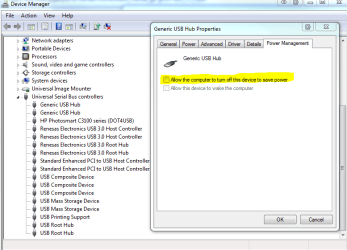
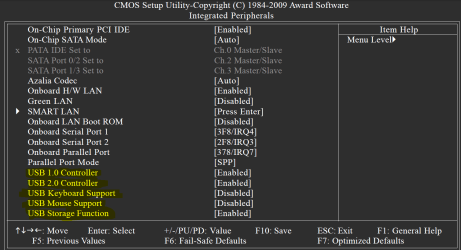
Do you use the easy energy saver? if yes be aware and I am guessing here that it might limit power to the USB ports.
Check in Device Manager that Power Management is turned off for all USB Devices
 

Attachments

  • Capture1.PNG
    Capture1.PNG
    24.7 KB · Views: 58
  • Capture.PNG
    Capture.PNG
    59.1 KB · Views: 42

My Computer

Computer Manufacturer/Model Number
Something I threw together
OS
Windows 7 Ultimate x64
CPU
Intel Core i7-2600K
Motherboard
Asus P8P67
Memory
16 GB G Skill F3-10666 CL9D-4GBRL
Graphics Card(s)
ATI Radeon HD 6870
Sound Card
ATI Radeon HDMI / Realtek ALC892
Monitor(s) Displays
2 x 22" standard monitors / LG32LC56v TV to watch films
Screen Resolution
1920 x1080
Hard Drives
2 x OCZ Vertex2 111.79GB
3 x Samsung103SJ
1 x Samsung103UJ
1 x WD3200BEVT
1 x Hitachi5K320-160
PSU
Thermaltake Toughpower Cable Management 750W
Case
Antec 300
Cooling
Noctua NH-U12P SE2 and 5 120mm Case fans
Keyboard
Microsoft Comfort Curve Keyboard 2000
Mouse
Hama M3110 / Logitech M305
Internet Speed
16000
Other Info
I have also used Fedora, Suse, Ubuntu Linux
And all other Windows from 95 to date except ME
All my settings mirror the ones you've posted. I'm really baffled. I can't help but wonder if this may be a faulty MB. I'll probably be forced to do a fresh windows install. Whats the best way to do that?
 

My Computer

OS
windows7 64 bit
I believe you, :(

Last try at a fix. I can't think how you could have plugged the front/extra USB ports in wrongly and they still work, but best check them again, maybe unplug and replug them, then try the new install if you still have no joy

Have a look here; http://www.sevenforums.com/tutorials/1649-clean-install-windows-7-a.html

You should be able to get the board checked by a reputable dealer, then you will know for certain if it is a faulty MB

Let us know how you get on

Brian
 

My Computer

Computer Manufacturer/Model Number
Something I threw together
OS
Windows 7 Ultimate x64
CPU
Intel Core i7-2600K
Motherboard
Asus P8P67
Memory
16 GB G Skill F3-10666 CL9D-4GBRL
Graphics Card(s)
ATI Radeon HD 6870
Sound Card
ATI Radeon HDMI / Realtek ALC892
Monitor(s) Displays
2 x 22" standard monitors / LG32LC56v TV to watch films
Screen Resolution
1920 x1080
Hard Drives
2 x OCZ Vertex2 111.79GB
3 x Samsung103SJ
1 x Samsung103UJ
1 x WD3200BEVT
1 x Hitachi5K320-160
PSU
Thermaltake Toughpower Cable Management 750W
Case
Antec 300
Cooling
Noctua NH-U12P SE2 and 5 120mm Case fans
Keyboard
Microsoft Comfort Curve Keyboard 2000
Mouse
Hama M3110 / Logitech M305
Internet Speed
16000
Other Info
I have also used Fedora, Suse, Ubuntu Linux
And all other Windows from 95 to date except ME
I did double check that I had the USB ports plugged into the MB correctly. It definitely wouldn't hurt to check them again.
As far as the mother board goes, I'm an American living in Italy. Italians aren't exactly technologically savvy. I'll have an extremely hard time finding a dealing to check the MB. MB's aren't really all that expensive so I could just buy another. Before I do that, I'll try a clean install. When I first got the system up and running I installed windows and ran it without the chip set drivers for a good bit of time. Maybe 2 weeks went by before I realized that I needed to do that. So, once I did that, the USB drivers worked better but not great. I did a repair install of windows, and the USB functions got better yet. So here I am. They work but they're not working perfectly. I'll let you know how the clean install goes after I get everything backed up.
 

My Computer

OS
windows7 64 bit
Back
Top