I was wondering if anyone could give some insight here. I've gone up to tier 2 techs so far that still don’t seem to have a clue as to what is going on.
This is the gist of what I'm running, to be followed by the quite annoying problem...
-CD:24X Double Layer Dual Format DVD+-R/+-RW + CD-R/RW Drive
-CPU:AMD FX-8120 3.10 GHz Eight-Core AM3+ CPU 8MB L2 Cache & Turbo Core Technology
-HDD:* 60 GB OCZ Agility 3 SATA III 6.0Gb/s SSD - 525MB/s Read & 475MB/s Write [-60] (60GB x 2 (120GB Capacity) Raid 0 Extreme Performance)
-MEMORY:8GB (2GBx4) DDR3/2000MHz Dual Channel Memory
-MOTHERBOARD:* [CrossFireX] GigaByte GA-970A-D3 AMD 970 Socket AM3+ ATX Mainboard w/ On/Off Charge, 7.1 Audio, GbLAN, USB3.0, SATA-III RAID, 2 Gen2 PCIe X16, 3 PCIe X1 & 2 PCI
-OS:None - FORMAT HARD DRIVE ONLY
The OS, of course is the problem here. I have read up on and been told many things each less helpful than the last. I'm going to tell you what is happening and maybe let you draw up a better theory.
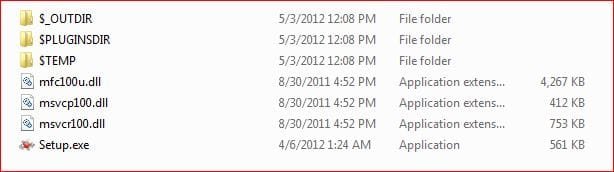
I boot up the machine, and just like normal it prompts you to insert your disk. I put the windows 7 home ed. 64bit OS full version disk in and it starts to run through it. I get past the part where it is asking me for the language, country, and currency to the part where it is collecting information. This is where I get my error. It tells me that I need CD/DVD drive device drivers. I followed the last techs advice all of the way to when he was stumped...I got onto the AMD web site and downloaded the AHCI and RAID drivers onto a thumb drive. Only problem is, when I open up the appropriate removable disk drive all it shows is empty folders for the AHCI & RAID. The tech traced my steps and says..."hmm oh my, you're right, the folders are empty. I've never seen that before...I need to talk with my colleagues and I'll try to get back with you tomorrow.”
Wtf man. Maybe it’s just my no bull shit way of thing but don’t believe that they weren’t supposed to have these on there already. Installing an operating system is supposed to be a run of the mil procedure that any Joe Blow can do…not go over the head of their “teir two techs”.
Can anyone give me a plain easy to understand and follow answer to this?
This is the gist of what I'm running, to be followed by the quite annoying problem...
-CD:24X Double Layer Dual Format DVD+-R/+-RW + CD-R/RW Drive
-CPU:AMD FX-8120 3.10 GHz Eight-Core AM3+ CPU 8MB L2 Cache & Turbo Core Technology
-HDD:* 60 GB OCZ Agility 3 SATA III 6.0Gb/s SSD - 525MB/s Read & 475MB/s Write [-60] (60GB x 2 (120GB Capacity) Raid 0 Extreme Performance)
-MEMORY:8GB (2GBx4) DDR3/2000MHz Dual Channel Memory
-MOTHERBOARD:* [CrossFireX] GigaByte GA-970A-D3 AMD 970 Socket AM3+ ATX Mainboard w/ On/Off Charge, 7.1 Audio, GbLAN, USB3.0, SATA-III RAID, 2 Gen2 PCIe X16, 3 PCIe X1 & 2 PCI
-OS:None - FORMAT HARD DRIVE ONLY
The OS, of course is the problem here. I have read up on and been told many things each less helpful than the last. I'm going to tell you what is happening and maybe let you draw up a better theory.
I boot up the machine, and just like normal it prompts you to insert your disk. I put the windows 7 home ed. 64bit OS full version disk in and it starts to run through it. I get past the part where it is asking me for the language, country, and currency to the part where it is collecting information. This is where I get my error. It tells me that I need CD/DVD drive device drivers. I followed the last techs advice all of the way to when he was stumped...I got onto the AMD web site and downloaded the AHCI and RAID drivers onto a thumb drive. Only problem is, when I open up the appropriate removable disk drive all it shows is empty folders for the AHCI & RAID. The tech traced my steps and says..."hmm oh my, you're right, the folders are empty. I've never seen that before...I need to talk with my colleagues and I'll try to get back with you tomorrow.”
Wtf man. Maybe it’s just my no bull shit way of thing but don’t believe that they weren’t supposed to have these on there already. Installing an operating system is supposed to be a run of the mil procedure that any Joe Blow can do…not go over the head of their “teir two techs”.
Can anyone give me a plain easy to understand and follow answer to this?
My Computer
- OS
- Win7 64bit