Solved Drive Image Problem

jongo46

New member
Local time
7:48 AM
Messages
9
I have a C: drive 160 Gig that holds Windows 7 and an E: drive 450 Gig for storage.

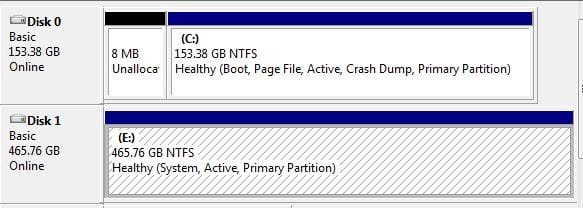
I want to image the C: drive to bigger hard drive but backup and restore will only let me image both drives. I noticed the wrong drive is the active partition and if i unplug E: the system will not boot saying software or hardware changes prevent it from booting.

Can i make C: the active partition?

I have backed up the E: drive and made an image of everything so all is safe on an external drive.

Any help appreciated.
 

Attachments
  • Capture.JPG
    Capture.JPG
    30.2 KB · Views: 10

My Computer

OS
Windows 7 64 bit
Sounds like you installed to C with the E drive attached and im guessing in the sata0 port which will auto put the boot info on E drive
Easiest fix may be to disconnect E drive then run startup repair to fix the missing boot info
http://www.sevenforums.com/tutorials/681-startup-repair.html
note - you may need to run this upto three times with reboots inbetween runs
 

My Computer

Computer type
PC/Desktop
Computer Manufacturer/Model Number
Pauly Special
OS
Win7 Ultimate X64
CPU
Intel i5 3570K
Motherboard
Gigabyte Z77X-DS3H
Memory
8GB DDR3 1600
Graphics Card(s)
Onboard
Sound Card
Onboard
Screen Resolution
1280x1024
Hard Drives
Samsung 840 Evo SSD (OS)
1TB Spinner (Data)
PSU
800W Arctic
Case
Cooler Master
Cooling
3x120mm Fans
Keyboard
MS Wireless
Mouse
MS Wireless
Internet Speed
20M
Thanks for the speedy reply

Thank you very much for the quick answer.

I have tried system repair disc but only ran it once. I will run it a few times and post reply when done.

John
 

My Computer

OS
Windows 7 64 bit
Hi,

I ran the repair 6 times, all with the same error:
Startup repair cannot repair automatically. Amongst other errors was problem signiture 07 - Corrupt Config Data

Trying without E; drive connected without repair disc gives black screen with:
The boot selection failed because a required device is inaccessible.

Hope this helps you.

John
 

My Computer

OS
Windows 7 64 bit

My Computer

Computer Manufacturer/Model Number
HP, Dell, Gateway, Toshiba - 4 laptops and 2 desktops
OS
Vista, Windows7, Mint Mate, Zorin, Windows 8
CPU
from 1.6GHz Duo to i7
Monitor(s) Displays
2x HP w2207
Hard Drives
5x HDD, 7x SSD, 12x Externals
Keyboard
with trackball - no mices
Mouse
Trackball mice
Internet Speed
DSL 6000
Hi,
Once again, thank you both for your time and help.


I ran BCD and it says it has changed the boot to C: However, if I unplug the E: drive I have the same problem at boot.

I ran the system repair again with the same errors.

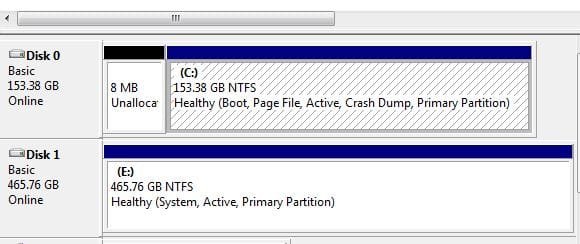
I have attached Disc Management picture, I am frightened to change E: to not boot because I might not be able to boot at all if i do.

Many Thanks

John
 

Attachments

  • Capture.JPG
    Capture.JPG
    30 KB · Views: 7

My Computer

OS
Windows 7 64 bit
I see from your disk management that disk 1 still shows as "active". You could try making it inactive and see if that helps.
http://www.sevenforums.com/tutorials/197157-partition-mark-inactive.html

Note: If you try this I would advise you to first disconnect drive 0 from your system, so drive 1 is the only disk hooked up and then run diskpart from your system repair disk.
 

My Computer

Computer Manufacturer/Model Number
Customized build from CyberPower
OS
Windows 7 Home Premium 64bit SP 1
CPU
Intel i5 2500k
Motherboard
Asus P8P67 Deluxe
Memory
8 gigabytes Corsair PC3-12800 DDR3
Graphics Card(s)
EVGA GeForce GTX 460 superclocked
Sound Card
Integrated
Monitor(s) Displays
ViewSonic 23" LCD
Screen Resolution
1980 x 1080
Hard Drives
120 Gb Samsung 840 Pro SSD
120 Gb Kingston Hyper X SSD
1 Tb WD Caviar Black HDD
PSU
Coolermaster 1000 watt modular
Case
Coolermaster HAF X full tower
Cooling
Coolermaster Hyper 212 plus
Keyboard
Logitech USB
Mouse
Microsoft 3 button
Internet Speed
download 1.5 Mb/sec upload 300Kb/sec
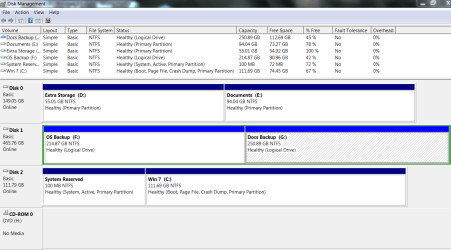
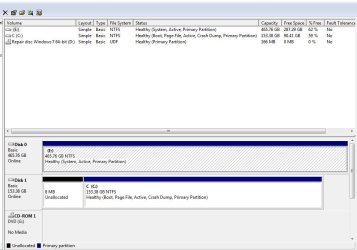
I don't think the System File has transferred yet. Could you post the whole Disk Management with the columns extended so we can read all of the print. It should look like this.
 

Attachments

  • Capture.PNG
    Capture.PNG
    33 KB · Views: 5

My Computer

Computer type
PC/Desktop
Computer Manufacturer/Model Number
Custom Build
OS
Windows 7 Home Premium 32-Bit - Build 7600 SP1
CPU
Intel Core i3-2120 3.30Ghz
Motherboard
Asus P8Z68-V LX Intel Z68 Socket H2 ATX
Memory
Kingston 4 GB DDR3 1333 mhz
Graphics Card(s)
AMD Radeon HD6670
Sound Card
Sound Blaster Audigy SE 24-Bit
Monitor(s) Displays
Asus VE228
Screen Resolution
1440 X 900
Hard Drives
OCZ Vertex 3 120 GB Sata 3 SSD ==
Kingston SH103/S3 120 G Hyper X 120 GB SSD ==
Western Digital 500 GB Caviar Green 7200 RPM ==
PSU
Corsair CX600M == 600 Watt
Case
NZXT Apollo - Silver with Clear Side Panel
Cooling
Three 120 mm Fans
Keyboard
Microsoft Natural 4000
Mouse
Microsoft Custom Optical 3000
Internet Speed
AT&T Fiber Optic Wireless Network
Antivirus
Microsoft Security Essentials
Browser
Chrome
Other Info
120 mm Blue LED Fan -- Three Blue LED Lazer Light Sticks
Disconnecting disk1 for the operations that LittleJay has outlined is a good idea. If it still does not boot, use the bootable CD of Partition Wizard (last entry on the page) to fix the MBR - it's on the left side of the PW window once you booted with the CD.

When you downloaded the bootable CD .iso of PW, you have to burn it to CD. Use ImgBurn.
 

My Computer

Computer Manufacturer/Model Number
HP, Dell, Gateway, Toshiba - 4 laptops and 2 desktops
OS
Vista, Windows7, Mint Mate, Zorin, Windows 8
CPU
from 1.6GHz Duo to i7
Monitor(s) Displays
2x HP w2207
Hard Drives
5x HDD, 7x SSD, 12x Externals
Keyboard
with trackball - no mices
Mouse
Trackball mice
Internet Speed
DSL 6000
Hi,

I made the drive inactive and could not start windows at all, I have learned a little bit of Dos from your post LittleJay, so given this new skill I managed to put the drive back to active.

I have now downloaded Partition Wizard and I am burning it as I type. I will try to run this with the E: drive unplugged to repair the MBR on C:.

As per usual LittleJay had I read all of your post I would have unplugged the other drive first so that was my own fault.

I have attached the Disc Management full screen and instead of jumping feet first I will await your reply WHS, and then proceed.

Again Thanks for the Help.

John
 

Attachments

  • Capture.JPG
    Capture.JPG
    76.1 KB · Views: 12

My Computer

OS
Windows 7 64 bit
http://www.sevenforums.com/tutorials/104341-bootmgr-missing-fix.html

Have you tried using the manual method outlined in step 4 of this tutorial? I know you are worried about making changes and not being able to boot afterwards, so before attempting anything else, you should make a system image of both drives, if you haven't done so already. That way you can restore things to the way they were if something should go amiss. I use Macrium Reflect also, as whs suggested. Also please remember to disconnect the other drive from your system when making any changes, and when you disconnect the drive, shut down your system to do so. You may be aware of all that, but I just want to be sure.
 

My Computer

Computer Manufacturer/Model Number
Customized build from CyberPower
OS
Windows 7 Home Premium 64bit SP 1
CPU
Intel i5 2500k
Motherboard
Asus P8P67 Deluxe
Memory
8 gigabytes Corsair PC3-12800 DDR3
Graphics Card(s)
EVGA GeForce GTX 460 superclocked
Sound Card
Integrated
Monitor(s) Displays
ViewSonic 23" LCD
Screen Resolution
1980 x 1080
Hard Drives
120 Gb Samsung 840 Pro SSD
120 Gb Kingston Hyper X SSD
1 Tb WD Caviar Black HDD
PSU
Coolermaster 1000 watt modular
Case
Coolermaster HAF X full tower
Cooling
Coolermaster Hyper 212 plus
Keyboard
Logitech USB
Mouse
Microsoft 3 button
Internet Speed
download 1.5 Mb/sec upload 300Kb/sec
Hi,

Thanks to all for the help but I had to re-format in the end as nothing appeared to work.

I have learned by your comments to install to a new drive making sure no other drives are attached.

Once again Thanks for your support.

John
 

My Computer

OS
Windows 7 64 bit
Added Drive

I would like to thank everyone for their efforts.
Unfortunatley everything i attempted didn't work, i have added a second drive and detached the drive whilst re- instaling windows 7 (as you said, that was my original mistake).

All working and thanks for the support.

John
 

My Computer

OS
Windows 7 64 bit
I'm restoring a system image via Win 7 DVD. I have the new (empty) HDD installed but when I go to the "select a system image backup" it shows my External HDD as Drive C: then I click>next>next which takes me to "Your computer will be restored from the following image" it shows "drives to restore" as \\?\Volume {26579eda-de02-11e0-aed3-806e6f6e6963}, C:. I'd like to know is this supposed to happen and if not, then what should I do.
 

My Computer

OS
Windows 7 x64
I'm restoring a system image via Win 7 DVD. I have the new (empty) HDD installed but when I go to the "select a system image backup" it shows my External HDD as Drive C: then I click>next>next which takes me to "Your computer will be restored from the following image" it shows "drives to restore" as \\?\Volume {26579eda-de02-11e0-aed3-806e6f6e6963}, C:. I'd like to know is this supposed to happen and if not, then what should I do.

Please start a new thread with your problem. You will get better help this way. Thanks,
 

My Computer

Computer type
PC/Desktop
Computer Manufacturer/Model Number
Custom Build
OS
Windows 7 Home Premium 32-Bit - Build 7600 SP1
CPU
Intel Core i3-2120 3.30Ghz
Motherboard
Asus P8Z68-V LX Intel Z68 Socket H2 ATX
Memory
Kingston 4 GB DDR3 1333 mhz
Graphics Card(s)
AMD Radeon HD6670
Sound Card
Sound Blaster Audigy SE 24-Bit
Monitor(s) Displays
Asus VE228
Screen Resolution
1440 X 900
Hard Drives
OCZ Vertex 3 120 GB Sata 3 SSD ==
Kingston SH103/S3 120 G Hyper X 120 GB SSD ==
Western Digital 500 GB Caviar Green 7200 RPM ==
PSU
Corsair CX600M == 600 Watt
Case
NZXT Apollo - Silver with Clear Side Panel
Cooling
Three 120 mm Fans
Keyboard
Microsoft Natural 4000
Mouse
Microsoft Custom Optical 3000
Internet Speed
AT&T Fiber Optic Wireless Network
Antivirus
Microsoft Security Essentials
Browser
Chrome
Other Info
120 mm Blue LED Fan -- Three Blue LED Lazer Light Sticks
Back
Top