
Drive Letter Path Shenanigans....

Linux Vista

New member
Local time
12:09 AM
Messages
12
Location
-
I have a few partitions of a single hard disk.... BUT, they always go missing! I can find them and make them appear again! I have to create drive letter paths for them! They will appear but they will be gone, over and over again, after every reboot, restart and shutdown! This has been driving me nuts since forever! This happened for the first time, after a month of purchasing the computer.... The purchase happened a few years ago.... I didn't bring it to the service center, because I thought, it was no big deal.... It is annoying.... What should I do, you guys!?!?


Have a nice day ;-)
 
Last edited:

My Computer

Computer type
Laptop
Computer Manufacturer/Model Number
Numerous! Varies!
OS
Windows 7 Home Premium 64 - BIT!
CPU
Numerous! Varies!
Motherboard
Numerous! Varies!
Memory
Numerous! Varies!
Graphics Card(s)
Numerous! Varies
Sound Card
Numerous! Varies!
Monitor(s) Displays
Numerous! Varies!
Screen Resolution
Numerous! Varies!
Hard Drives
Numerous! Varies!
PSU
Numerous! Varies!
Case
Numerous! Varies!
Cooling
Numerous! Varies!
Keyboard
Numerous! Varies!
Mouse
Numerous! Varies!
Internet Speed
Numerous! Varies!
Antivirus
Numerous! Varies!
Browser
See ----> Other Info!
Other Info
Broswer ----> Numerous! Varies! BUT, my main man is Monsieur Opera Browser! BUT, using Version 11.64! Version 12 is bad, try to imagine Version 15!
Guys, come on.... This is the most annoying problem I have, but not a single reply.... What should I do, guys!?!?


Also, my other computer has the same problem.... BUT, once, I designate drive letter paths, for all the partitions, they will be fine! They will only go missing occasionally!
 

My Computer

Computer type
Laptop
Computer Manufacturer/Model Number
Numerous! Varies!
OS
Windows 7 Home Premium 64 - BIT!
CPU
Numerous! Varies!
Motherboard
Numerous! Varies!
Memory
Numerous! Varies!
Graphics Card(s)
Numerous! Varies
Sound Card
Numerous! Varies!
Monitor(s) Displays
Numerous! Varies!
Screen Resolution
Numerous! Varies!
Hard Drives
Numerous! Varies!
PSU
Numerous! Varies!
Case
Numerous! Varies!
Cooling
Numerous! Varies!
Keyboard
Numerous! Varies!
Mouse
Numerous! Varies!
Internet Speed
Numerous! Varies!
Antivirus
Numerous! Varies!
Browser
See ----> Other Info!
Other Info
Broswer ----> Numerous! Varies! BUT, my main man is Monsieur Opera Browser! BUT, using Version 11.64! Version 12 is bad, try to imagine Version 15!
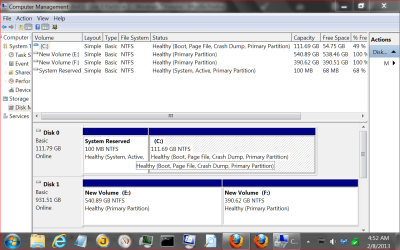
I'm no expert on this but I will try.
One problem is you state this happens on two different computers.
You and you alone knows what you are doing the same on these two computers that is causing this.
Then your specs state (Hard Drives Numerous! Varies) so we have no idea what hard drive configuration you did have, do have, or will have.

**Numerous! Varies doesn't get it. We need proper system specs.
Try this by our friend Brink.

http://www.sevenforums.com/tutorials/180324-system-info-see-your-system-specs.html


Please look at the bottom of this post at My System specs. It will give you a good idea what can be displayed there.

Then post one of these.

Disk Management.PNG

Using this by Brink.

http://www.sevenforums.com/tutorials/9733-screenshots-files-upload-post-seven-forums.html

I don't know what you mean when you post (designate drive letter paths) and what method you are using.
Take your time.
You stated in your first post that this has been going on for years indicating no hurry.
The more we know your system and what you are doing the better chance of giving proper guidance.
 

My Computer

Computer type
PC/Desktop
Computer Manufacturer/Model Number
Home made Desktop
OS
Windows 10 Pro. 64/ version 1709 Windows 7 Pro/64
CPU
Intel i7-6800K @ 4.3
Motherboard
ASUS X-99 Deluxe II
Memory
Corsair Platinum 16 gig @2400
Graphics Card(s)
EVGA GTX 1070 OC
Monitor(s) Displays
Asus 27" LED LCD/VE278Q
Screen Resolution
1920-1080 or 1280-720 HDMI
Hard Drives
INTEL SSD 730-240 Gb Sata 3.0/
PSU
EVGA Platium 1200W
Case
Phanteks Luxe Tempered Glass 8 fans/ one radiator
Cooling
XSPC/ Water Cooled CPU
Keyboard
Das 4 Professional
Mouse
Logitech M705/MX Anywhere 2-S
Internet Speed
100 mbits
Antivirus
Microsoft Security Essentials/ Malwarebytes Premium 3.0/ SAS
Browser
I.E. 11 default/Firefox/ ISP Time Warner Cable/Spectrum
Other Info
LG BluRay Burner/
Sound system-KLipsch-THX/
Icy Dock ssd Hot Swap bays.
Right click "computer" from the windows explorer view. Choose "manage" then choose "disk management". You can change any letter but the drive the OS is installed on. Windows, well under certain circumstances, use a letter other than "C:\" as the OS drive.
 

My Computer

Computer type
PC/Desktop
Computer Manufacturer/Model Number
Custom, Dell and Lenono LT's
OS
Win8/8.1,Win7-U64, Vista U64, uncounted Linux distor's
CPU
AMD and Intell, 9590, 8350, i5 3570k
Motherboard
CFVFZ, GA990FXA, Z77e-itx
Memory
Corsair G Skill
Graphics Card(s)
Crossfired Sapphire HD 7950 Vapor-X, ASUS R9 280X TOP
Sound Card
Realtek ALC889
Monitor(s) Displays
ViewSonic VX2770SMH 27" / ViewSonic VX2433 LCD 24"
Screen Resolution
1080i HD
Hard Drives
Samsung SSD 840 Pro
OCZ Agility 3's
OCZ Vector's
WD's Blue, red, green, Velociraptors
Seagate USB3 & Hybrid's
ASUS Blu-Ray
ASUS DVD
PSU
Corsair AX1200i, Seasonice 850 Gold
Case
Cooler Master HAF 922 & HAF 932, Lian Li Train case.
Cooling
Air, Glacer 240L expanded, custom EK loop with duel D5's
Keyboard
Microsoft SideWinder X4 USB Keyboard / Logitech 250 PS2
Mouse
Logitech G500 / MS wireless 5000
Internet Speed
Best of 5ms / 75+ dn / 12+ up More or less.
Antivirus
MS esentials-MalwareBytes
Browser
Firefox Chromebook
I would like to see a picture of Disk Management before anything is changed.
Another way to get there.
*Start Orb
*Right click on Computer and select Manage.
*Left column select Disk Management.
 

My Computer

Computer type
PC/Desktop
Computer Manufacturer/Model Number
Home made Desktop
OS
Windows 10 Pro. 64/ version 1709 Windows 7 Pro/64
CPU
Intel i7-6800K @ 4.3
Motherboard
ASUS X-99 Deluxe II
Memory
Corsair Platinum 16 gig @2400
Graphics Card(s)
EVGA GTX 1070 OC
Monitor(s) Displays
Asus 27" LED LCD/VE278Q
Screen Resolution
1920-1080 or 1280-720 HDMI
Hard Drives
INTEL SSD 730-240 Gb Sata 3.0/
PSU
EVGA Platium 1200W
Case
Phanteks Luxe Tempered Glass 8 fans/ one radiator
Cooling
XSPC/ Water Cooled CPU
Keyboard
Das 4 Professional
Mouse
Logitech M705/MX Anywhere 2-S
Internet Speed
100 mbits
Antivirus
Microsoft Security Essentials/ Malwarebytes Premium 3.0/ SAS
Browser
I.E. 11 default/Firefox/ ISP Time Warner Cable/Spectrum
Other Info
LG BluRay Burner/
Sound system-KLipsch-THX/
Icy Dock ssd Hot Swap bays.
Back
Top