TheAnonymity
New member
- Local time
- 6:49 PM
- Messages
- 79
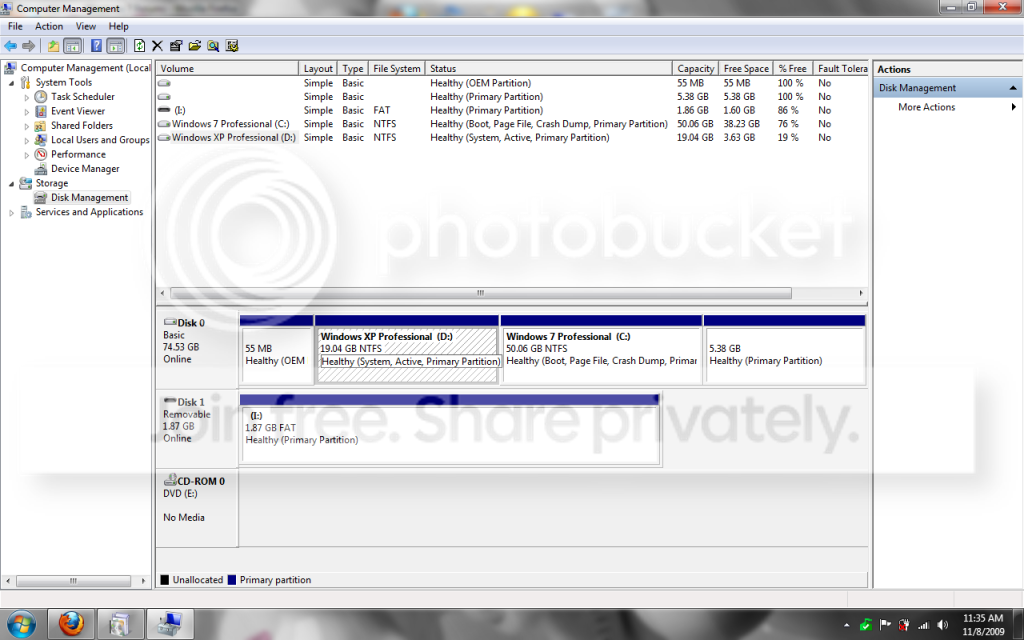
After a recent HDD failure, my manufacturer sent me a new one, as my warranty is still valid. After I purchased the full version of Windows 7 Professional, I burned it onto a disk, and booted my computer from the CD rom drive. It's only an 80 GB hard drive, but I had 4 partitions. 1. (EISA Config), 2. (C:-Windows XP Professional) 3. (E:-Empty, reserved for win7), 4. (DellRestore).. after I booted from the CD ROM drive with my windows 7 installation disk inserted, I was asked which partition I would like to install 7 on. I chose E:, because it's the partition I was reserving for it. After installing windows 7, I realize my C: (Windows XP Pro) drive has been bumped to D:, and my CD-ROM drive is now E:, and win7 is on C:. I'm aware that this can cause problems when trying to install software or games from a disk, so I'd like to know how to fix it. Also, I should note, all of my Shortcuts which were in C:, which changed to D:, are now non-working, as they refer to a C: directory. Any advice in these matters would be appreciated. Thanks..
~TA
~TA
My Computer
- Computer Manufacturer/Model Number
- Dell Inspiron 1501
- OS
- Windows 7 Ultimate x86 7600.16385
- CPU
- AMD Turion 64 Mobile Technology MK-36 2.00 GHz
- Motherboard
- Dell UW953
- Memory
- 1.00 GB (894 MB usable)
- Graphics Card(s)
- ATI Radeon XPRESS 128MB
- Sound Card
- Dunno
- Monitor(s) Displays
- 15"
- Screen Resolution
- 1280 x 800
- Hard Drives
- Fujitsu MJA2080BH G2 ATA Device (80 GB, 5400 RPM)
- Cooling
- Laptop fans ftw.
- Keyboard
- Laptop Keyboard..
- Mouse
- Laptop touchpad..
- Internet Speed
- 16.45 Mb/s download, 3.84 Mb/s upload
- Other Info
- My computer sucks.