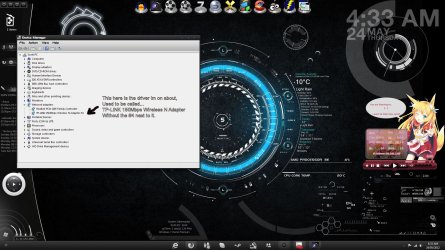
I have a TP-LINK 150Mbps Wireless N Adapter directly in my motherboard and i needed to update its drivers to the latest as i was experiencing BSOD's and had to update it in case this was a cause, Anyways Windows kept saying it was up to date and the sate it had in options was 2009 and the latest was 2010 so i removed it from my PC and reinstalled the new driver and now it says 2010 at last but now the problem is it used to be called (TP-LINK 150Mbps Wireless N Adapter) but now its called (TP-LINK 150Mbps Wireless N Adapter #4) is there anyway i can make it back to (TP-LINK 150Mbps Wireless N Adapter) again? Sorry i am a little OCD when it comes to this stuff and like my computer in order and neatly done haha, Thank you in advance.
HIS ATI HD 7950 PCIE 3.0, 3GB 384-bit GDDR5, 800/5000MHZ
Sound Card
Realtek 7.1 CH HD Definition Audio
Monitor(s) Displays
Samsung 23" S23B300H Widescreen HDMI LED Monitor
Screen Resolution
1920x1080
Hard Drives
Corsair Force Series 3 120GB SSD SATA 6Gb/s. R/W: 500/510 MB/s
Seagate ST31000524AS 1TB 7200RPM SATA3
Western Digital My Passport 070B 500GB USB Device
PSU
Corsair TX-850v2 850W ATX Power Supply
Case
NZXT Phantom Black Full Tower
Cooling
Cooler Master X6, NZXT Phantom Black Full Tower Case Fans
Is this name change in device manager list or network connections?
for now you can go to Control Panel\Network and Internet\Network Connections /right click the properties there you can change the name if the controller
HIS ATI HD 7950 PCIE 3.0, 3GB 384-bit GDDR5, 800/5000MHZ
Sound Card
Realtek 7.1 CH HD Definition Audio
Monitor(s) Displays
Samsung 23" S23B300H Widescreen HDMI LED Monitor
Screen Resolution
1920x1080
Hard Drives
Corsair Force Series 3 120GB SSD SATA 6Gb/s. R/W: 500/510 MB/s
Seagate ST31000524AS 1TB 7200RPM SATA3
Western Digital My Passport 070B 500GB USB Device
PSU
Corsair TX-850v2 850W ATX Power Supply
Case
NZXT Phantom Black Full Tower
Cooling
Cooler Master X6, NZXT Phantom Black Full Tower Case Fans
HIS ATI HD 7950 PCIE 3.0, 3GB 384-bit GDDR5, 800/5000MHZ
Sound Card
Realtek 7.1 CH HD Definition Audio
Monitor(s) Displays
Samsung 23" S23B300H Widescreen HDMI LED Monitor
Screen Resolution
1920x1080
Hard Drives
Corsair Force Series 3 120GB SSD SATA 6Gb/s. R/W: 500/510 MB/s
Seagate ST31000524AS 1TB 7200RPM SATA3
Western Digital My Passport 070B 500GB USB Device
PSU
Corsair TX-850v2 850W ATX Power Supply
Case
NZXT Phantom Black Full Tower
Cooling
Cooler Master X6, NZXT Phantom Black Full Tower Case Fans
Yes but that only renames the the network connection i am currently connected to not change the drivers name as i have shown this is in the device manager in network and sharing center the connection name is named the same name as my routers SSID.
HIS ATI HD 7950 PCIE 3.0, 3GB 384-bit GDDR5, 800/5000MHZ
Sound Card
Realtek 7.1 CH HD Definition Audio
Monitor(s) Displays
Samsung 23" S23B300H Widescreen HDMI LED Monitor
Screen Resolution
1920x1080
Hard Drives
Corsair Force Series 3 120GB SSD SATA 6Gb/s. R/W: 500/510 MB/s
Seagate ST31000524AS 1TB 7200RPM SATA3
Western Digital My Passport 070B 500GB USB Device
PSU
Corsair TX-850v2 850W ATX Power Supply
Case
NZXT Phantom Black Full Tower
Cooling
Cooler Master X6, NZXT Phantom Black Full Tower Case Fans
The only other thing i can think of right now is in device managed right click properties uninstall device making sure to check the box that says to uninstall drivers....
Reboot or scan for new hardware then manually reinstall the driver using the have disc option threw device manager
By doing this it should set the driver device count back to device #0 which in turn should be displayed as the device name without and # + Number
HIS ATI HD 7950 PCIE 3.0, 3GB 384-bit GDDR5, 800/5000MHZ
Sound Card
Realtek 7.1 CH HD Definition Audio
Monitor(s) Displays
Samsung 23" S23B300H Widescreen HDMI LED Monitor
Screen Resolution
1920x1080
Hard Drives
Corsair Force Series 3 120GB SSD SATA 6Gb/s. R/W: 500/510 MB/s
Seagate ST31000524AS 1TB 7200RPM SATA3
Western Digital My Passport 070B 500GB USB Device
PSU
Corsair TX-850v2 850W ATX Power Supply
Case
NZXT Phantom Black Full Tower
Cooling
Cooler Master X6, NZXT Phantom Black Full Tower Case Fans