
You are using an out of date browser. It may not display this or other websites correctly.
You should upgrade or use an alternative browser.
You should upgrade or use an alternative browser.
Driver for camera's
- Thread starter tkpatric
- Start date

Does it give an error, or just require a re install every time you try to use it? Have you used the latest driver?
My Computer
- Computer type
- PC/Desktop
- Computer Manufacturer/Model Number
- Dude Build
- OS
- Windows 10 Pro X64
- CPU
- Intel(R) Core(TM) i5-3570K CPU OC@ 4.5GHZ Turbo
- Motherboard
- MSI Z77A-G45 Gaming
- Memory
- 8.00 GB DDR3 1600Mhz
- Graphics Card(s)
- MSI Gaming X GTX 1070
- Sound Card
- Realtek High Definition
- Monitor(s) Displays
- Dell S23O9W, HP L1710
- Screen Resolution
- DELL-1920 x 1080 HP-1280 x1024
- Hard Drives
- Crucial m4 256 SSD, WD 7200RPM 500GB WD 1TB
- PSU
- Seasonic X650 GOLD
- Case
- Zalman Z12
- Cooling
- Antec Kuhler 920
- Keyboard
- Logitech
- Mouse
- MSI DS100 Interceptor
- Internet Speed
- 50 down and 5 up
- Antivirus
- MSE
- Browser
- Chrome, IE 11
- Other Info
- Logitech X-620 Speakers
Just take the flash card out of the camera and use an external USB card reader like this one. You will never need "camera drivers" again.
My Computer
- Computer type
- PC/Desktop
- Computer Manufacturer/Model Number
- Home-built, two systems (1) and (2)
- OS
- Windows 7 Pro x64 (1), Win7 Pro X64 (2)
- CPU
- i5-3350p 3.1Ghz/6MB-cache (1); E8400 3.0Ghz/6MB-cache (2)
- Motherboard
- ASUS P8Z77-V Pro (1); ASUS P5Q3 (2)
- Memory
- 8GB PC3-12800 DDR3 (1); 4GB PC3-10600 DDR3 (2)
- Graphics Card(s)
- ATI HD7750 (1), (see TV cards); ATI R7 250 (2)
- Sound Card
- Realtek ALC892 HD Audio (1); Realtek ALC1200 HD Audio (2)
- Monitor(s) Displays
- Eizo HD2441W LCD, Eizo S2433W (1); Eizo 24" S2433W (2)
- Screen Resolution
- 1920x1200, 1920x1200 (1); 1920x1200 (2)
- Hard Drives
- (1) 1TB SATA-II (7200RPM), 2x2TB SATA-III (7200RPM), 250GB SATA-III (10000RPM) for OS; 2x2TB external USB 3.0
(2) 320GB SATA-II (7200RPM), 750GB SATA-II (7200RPM), 150GB SATA-II (10000RPM) for OS; 2TB external USB 3.0
- PSU
- Nesteq ECS-6001 600W (1); Nesteq ECS-5001 500W (2)
- Case
- Acousti-Case 360 (1) and (2)
- Cooling
- Noctua NH-U12P SE2 for CPU, 2x120mm case fans (1) and (2)
- Keyboard
- IBM PS/2 (1) and (2)
- Mouse
- Logitech MX Revolution wireless (1); Microsoft wired (2)
- Internet Speed
- 100mbps down / 10mbps up
- Antivirus
- Microsoft Security Essentials; Malwarebyte Anti-Malware Pro
- Browser
- Firefox
- Other Info
- Ceton InfiniTV 4-tuner cablecard-enabled TV card as well as Hauppauge HVR-2250 OTA/ATSC 2-tuner TV card in (1), running under Win7 WMC
Well, you do say that you have to reinstall the drivers everytime you freshly connect the camera to the PC, so that's inconvenient as well.Thanks but I already do that, and it is very inconvenient because I take a few photo's (at home) and I directly look at them.
I know nothing about Canon, but I use the standard Nikon software for my D300 (not P300 like you have). I've got the latest Nikon software installed, from Nikon's software download site. No problem connecting the camera directly to my Win7 x64 PC and transferring pictures.
I don't know about the P300, but with the D300 you configure the camera to communicate over the USB connection in either of two ways: MTP/PTP, or MSC.
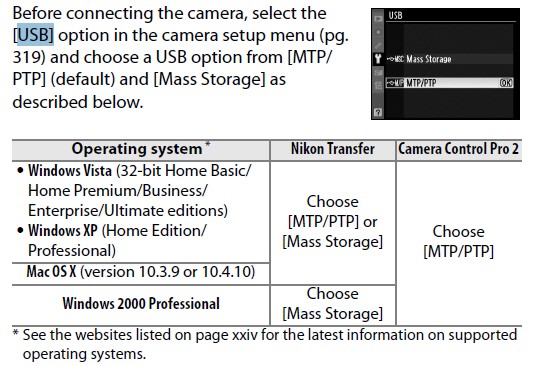
The MSC approach assigns a drive letter to the "removable" camera storage, and also requires that you "safely remove hardware" before you disconnect the USB cable. You can use Windows Explorer and 100% of normal programs to access the contents of the flash card while inside the camera, because a standard Windows drive letter has been assigned.
In contrast, the PTP/MTP approach requires special drivers or software, and typically ONLY Windows Explorer or camera-provided software can access the contents of the flash card inside the camera. This is because NO Windows drive letter is assigned (although the camera shows up in Explorer as a removable device with a name), so only software specifically capable of communicating through PTP/MTP can be used.
Does the P300 have a similar configuration option? Have you tried both methods?
My Computer
- Computer type
- PC/Desktop
- Computer Manufacturer/Model Number
- Home-built, two systems (1) and (2)
- OS
- Windows 7 Pro x64 (1), Win7 Pro X64 (2)
- CPU
- i5-3350p 3.1Ghz/6MB-cache (1); E8400 3.0Ghz/6MB-cache (2)
- Motherboard
- ASUS P8Z77-V Pro (1); ASUS P5Q3 (2)
- Memory
- 8GB PC3-12800 DDR3 (1); 4GB PC3-10600 DDR3 (2)
- Graphics Card(s)
- ATI HD7750 (1), (see TV cards); ATI R7 250 (2)
- Sound Card
- Realtek ALC892 HD Audio (1); Realtek ALC1200 HD Audio (2)
- Monitor(s) Displays
- Eizo HD2441W LCD, Eizo S2433W (1); Eizo 24" S2433W (2)
- Screen Resolution
- 1920x1200, 1920x1200 (1); 1920x1200 (2)
- Hard Drives
- (1) 1TB SATA-II (7200RPM), 2x2TB SATA-III (7200RPM), 250GB SATA-III (10000RPM) for OS; 2x2TB external USB 3.0
(2) 320GB SATA-II (7200RPM), 750GB SATA-II (7200RPM), 150GB SATA-II (10000RPM) for OS; 2TB external USB 3.0
- PSU
- Nesteq ECS-6001 600W (1); Nesteq ECS-5001 500W (2)
- Case
- Acousti-Case 360 (1) and (2)
- Cooling
- Noctua NH-U12P SE2 for CPU, 2x120mm case fans (1) and (2)
- Keyboard
- IBM PS/2 (1) and (2)
- Mouse
- Logitech MX Revolution wireless (1); Microsoft wired (2)
- Internet Speed
- 100mbps down / 10mbps up
- Antivirus
- Microsoft Security Essentials; Malwarebyte Anti-Malware Pro
- Browser
- Firefox
- Other Info
- Ceton InfiniTV 4-tuner cablecard-enabled TV card as well as Hauppauge HVR-2250 OTA/ATSC 2-tuner TV card in (1), running under Win7 WMC

The connection of a camera directly to the PC is basically a bad idea, any type of issue with the camera or camera power will often result in lost data, it is much safer to use a card reader to transfer images.
You will also find that good quality card readers will transfer images a lot quicker than a direct camera connection - I use professional level cameras and although they have the facility for direct connection, they strongly advise that this direct connection is only used as a last resort and then only with a camera powered by an external power supply. my normal transfer is about 200 images and direct camera connection would take 30 to 40% longer than my in-built card reader
You will also find that good quality card readers will transfer images a lot quicker than a direct camera connection - I use professional level cameras and although they have the facility for direct connection, they strongly advise that this direct connection is only used as a last resort and then only with a camera powered by an external power supply. my normal transfer is about 200 images and direct camera connection would take 30 to 40% longer than my in-built card reader
My Computers
System One System Two
-
- Computer type
- PC/Desktop
- Computer Manufacturer/Model Number
- ChillBlast - Custom to my design
- OS
- Windows 11 Pro x64 [Latest Release and Release Preview]
- CPU
- Ryzen 9 5950X, 3.8 - 5.2 MHz
- Motherboard
- Asus Prime X570-Pro
- Memory
- 64GB [2 x 32GB] DDR4 3200MHz
- Graphics Card(s)
- 4GB NVIDIA GEFORCE GTX 1650 Ti
- Sound Card
- On-board SPDIF to 5.1 System + HDMI [5.1 system]
- Monitor(s) Displays
- 32" UHD 32 Bit HDR Monitor + 43" UHD 4K 32Bit HDR TV
- Screen Resolution
- 2 x 3840 x 2160 @60Hz
- Hard Drives
- 1TB M2 SSD OS, 500GB Fast Access SSD, 2 x 8TB Data + Various Externals from 1TB to 4TB, 10TB NAS
- PSU
- NZXT C750 80 PLUS Gold 750W Modular PSU
- Case
- Workstation Case [Matt Black]
- Cooling
- NZXT Kraken X63 280mm CPU Cooler +2x Quiet Case fans
- Keyboard
- Logitech Wireless MX Keys & K400 + others
- Mouse
- Logitech Wireless MX Master 3S
- Internet Speed
- 920 MB Down 50 MB Up
- Antivirus
- BitDefender Total Security Pro
- Browser
- Chrome (always run latest Non-Beta)
- Other Info
- Also run ...
Laptop - Quad 8GB - Windows 10 Pro x64
Nexus 7 Android tablet x2
Samsung 10.2" tablet
Blackview TAB 8 4G Android Tablet c/w Keyboard
Wacom Intuos Pro Medium Pen Pad
Wacom Intuos Pro Small Pen Pad
Wacom Expresskeys Remote
Loopdeck+ Graphics Controller
Shuttle Pro v2 Control
-
- Computer type
- Laptop
- System Manufacturer/Model Number
- Dell XPS 17 10750H
- OS
- Windows 11 Pro x64 Latest RP
- CPU
- Intel I7 10750H 5.0GHz
- Motherboard
- Dell XPS
- Memory
- 32GB [2x16GB] DDR4 2933 MHz
- Graphics Card(s)
- nVidia GTX1650Ti 4 GB GDDR6
- Sound Card
- Stock [Realtek] 4 Speaker
- Monitor(s) Displays
- 17" IPS UHD+ Infinity Edge Touchscreen
- Screen Resolution
- 3840 x 2400
- Hard Drives
- 2TB M2 NVMe, 4TB External + various 500GB & 1TB External NVMe (also have access to spinner HDD from
- PSU
- Stock
- Case
- Stock XPS Aluminium & Carbon Fibre
- Cooling
- Stock - Active Fan Control
- Keyboard
- Backlit + Various Logitech
- Mouse
- Stock Track Pad + Logitech MX Trackball
- Internet Speed
- 72 MB Down 18MB Up
- Browser
- Chrome
- Other Info
- Also run ...
Laptop - Quad 8GB - Windows 10 Pro x64
Nexus 7 Android tablet x2
10.2" tablet
Sony Z3 Android Smartphone
Wacom Intuos Pro Medium Pen Pad
Wacom Intuos Pro Small Pen Pad
Wacom Expresskeys Remote
Loopdeck+ Graphics Controller
Shuttle Pro v2 Control Pad
10TB NAS

As a photographer with a high end camera (Nikon D800E) I attach mine to my PC all the time and have never had any data loss.
BTW the D800 comes with a USB 3.0 connection so it transfers pretty darn quick when doing about 50 images; and these are 72ish meg RAW files as the D800 is a 36.3 megapixel camera.
That said, you can never be too cautious. Since my camera has two card slots, for critical shots, I use the other as backup.
BTW the D800 comes with a USB 3.0 connection so it transfers pretty darn quick when doing about 50 images; and these are 72ish meg RAW files as the D800 is a 36.3 megapixel camera.
That said, you can never be too cautious. Since my camera has two card slots, for critical shots, I use the other as backup.
My Computer
- Computer type
- PC/Desktop
- Computer Manufacturer/Model Number
- Custom built by me.
- OS
- Windows 10 Pro
- CPU
- Intel Core i7-4770K (3.5Ghz)
- Motherboard
- Gigabyte G1 Sniper 5 (F10 Bios)
- Memory
- 32 gig Corsair Dominator Platinum (4x8Gig)
- Graphics Card(s)
- Sapphire Tri-X R9 Fury
- Sound Card
- Soundblaster ZXR
- Monitor(s) Displays
- NEC PA242W 24" LCD Monitor
- Screen Resolution
- 1920 x 1200
- Hard Drives
- Primary - Samsung 850 Pro (512gig), Samsung 840 Pro (256gig), 2TB WD Caviar Black.
- PSU
- EVGA Supernova 1000 G2
- Case
- Cooler Master HAF X
- Cooling
- Corsair H100i with Corsair Air Series SP120 Quiet Fans
- Keyboard
- Logitech Wireless Wave
- Mouse
- Logitech Performance MX
- Internet Speed
- High Speed Cable
- Antivirus
- Norton Security
- Browser
- IE11
- Other Info
- Memory Timings - 1866MHz @ 9-9-9-27-1T @ 1.5 volts