Driver installation

szj

New member
Local time
1:40 PM
Messages
4
Hi all,

I am unfamiliar with the necessary drivers required for a fresh installation of Window 7.

So far, I have only installed drivers for the graphic card and network card.

May I know what other drivers I am missing?

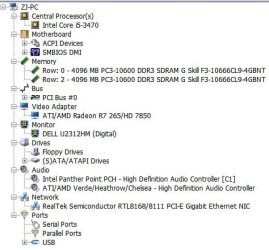
Attached is a screenshot of hwinfo.

Under the Audio, there are two entries. Which one should I download and install the driver for?

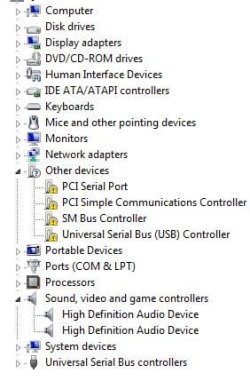
In the other screenshot, there are 4 question marks under 'Other devices'.

Will installing the chipset driver solve the problem? Would the driver in question be 'Intel INF installation'?

Thanks!


zj
 

Attachments
  • hwinfo.JPG
    hwinfo.JPG
    39.3 KB · Views: 32
  • unknown.JPG
    unknown.JPG
    31 KB · Views: 32

My Computer

Computer type
PC/Desktop
Computer Manufacturer/Model Number
custom build
OS
Windows 7 Ultimate x64 SP1
CPU
Intel(R) Core(TM) i5-3470 CPU @ 3.20GHz 3.60 GHz
Motherboard
Gigabyte ga-b75m-d3v
Memory
8GB
Graphics Card(s)
AMD Radeon HD 7800 - Msi twin frozr ii 7850
Sound Card
(1) AMD High Definition Audio (2) Realtek High Definition
Monitor(s) Displays
Dell U2312HM DVI
Screen Resolution
1920 x 1080
Hard Drives
Samsung SSD 850 EVO 250GB ATA Device
PSU
Aurum series AU-500
Go here and download and install the Chipset drivers, Intel INF installation.

I would consider installing the others as well.

Gigabyte
 

My Computer

Computer type
PC/Desktop
Computer Manufacturer/Model Number
Custom Built
OS
Windows 10 Pro x64, Windows 8.1 Pro x64, Windows 7 Ultimate x64 SP1,
CPU
INTEL i9-7920X LGA 2066
Motherboard
Gigabyte X299-WU8 F3
Memory
64 GB (4 X 16 GB) G-Skill V Series DDR4 3200 Quad Channel
Graphics Card(s)
EVGA GTX 1060 SC 3 GB
Sound Card
Realtek Onboard ALC1220
Monitor(s) Displays
2 x Samsung S27E310
Screen Resolution
1920x1080
Hard Drives
Samsung 2 x 970 EVO Plus 500 GB NVMe
1 x 6TB WD 6003FZBX SATA
1 x 6TB WD 60EFRX SATA
12 x 3TB WD 30EFRX SATA
PSU
Seasonic X-1050
Case
Thermaltake Armor+
Cooling
Corsair H80i V2 Liquid AOI Cooler
Keyboard
Logitech G510s
Mouse
Logitech MX Master 2S
Internet Speed
200 Mb/s
Antivirus
ESET NOD32 13.1
Browser
EDGE (Dev, Canary, Beta), Chrome
Other Info
ASUS RT-AC68U router
Malwarebytes 4.0.4
Thanks pbcopter!

My main concern is that too many unnecessary drivers are installed which might cause BSODs like it did before.

May I know what drivers should be installed minimally?

Are both components required for SATA RAID/AHCI?
Intel® Rapid Storage Technology
Intel SATA Preinstall driver

Also, should I upgrade the BIOS version from F5 to F13?
 

My Computer

Computer type
PC/Desktop
Computer Manufacturer/Model Number
custom build
OS
Windows 7 Ultimate x64 SP1
CPU
Intel(R) Core(TM) i5-3470 CPU @ 3.20GHz 3.60 GHz
Motherboard
Gigabyte ga-b75m-d3v
Memory
8GB
Graphics Card(s)
AMD Radeon HD 7800 - Msi twin frozr ii 7850
Sound Card
(1) AMD High Definition Audio (2) Realtek High Definition
Monitor(s) Displays
Dell U2312HM DVI
Screen Resolution
1920 x 1080
Hard Drives
Samsung SSD 850 EVO 250GB ATA Device
PSU
Aurum series AU-500
You should install the Chipset drivers. That should fix your other devices issue.

If you intend to use AHCI, you should install the Intel Rapid storage driver. The preinstall driver is only necessary for a new install when the operating system does not have a driver. Is your system set to AHCI now? If so, no other driver is really needed.

As long as everything is working properly, it is not necessary to install any other drivers since it appears that most of the other components have drivers installed and working. If you look at the drivers history on the Gigabyte site, you may be able to determine if it would be desirable to update.

Again if your system is working properly, it may not be necessary to update the BIOS. I would look at the BIOS history to see if a later one fixes any issue that you may be seeing. Many times a BIOS update is made to accommodate new hardware.
 

My Computer

Computer type
PC/Desktop
Computer Manufacturer/Model Number
Custom Built
OS
Windows 10 Pro x64, Windows 8.1 Pro x64, Windows 7 Ultimate x64 SP1,
CPU
INTEL i9-7920X LGA 2066
Motherboard
Gigabyte X299-WU8 F3
Memory
64 GB (4 X 16 GB) G-Skill V Series DDR4 3200 Quad Channel
Graphics Card(s)
EVGA GTX 1060 SC 3 GB
Sound Card
Realtek Onboard ALC1220
Monitor(s) Displays
2 x Samsung S27E310
Screen Resolution
1920x1080
Hard Drives
Samsung 2 x 970 EVO Plus 500 GB NVMe
1 x 6TB WD 6003FZBX SATA
1 x 6TB WD 60EFRX SATA
12 x 3TB WD 30EFRX SATA
PSU
Seasonic X-1050
Case
Thermaltake Armor+
Cooling
Corsair H80i V2 Liquid AOI Cooler
Keyboard
Logitech G510s
Mouse
Logitech MX Master 2S
Internet Speed
200 Mb/s
Antivirus
ESET NOD32 13.1
Browser
EDGE (Dev, Canary, Beta), Chrome
Other Info
ASUS RT-AC68U router
Malwarebytes 4.0.4
Not that you are wrong pbcopter but this time the BIOS update might actually be a smart option:

bios.PNG
 

My Computer

Computer type
PC/Desktop
Computer Manufacturer/Model Number
Custom build
OS
Windows 7 Home Premium
CPU
i5-3570k
Motherboard
ASUS Sabertooth z77
Memory
16 GB DDR3 G Skill Sniper
Graphics Card(s)
GIGABYTE GeForce GTX 970 GV-N970WF3OC-4GD
Monitor(s) Displays
ASUS ROG PG278Q
Screen Resolution
2560x1440@60Hz/120Hz/144Hz
Hard Drives
56GB KINGSTON SVP200S37A60G
512GB Crucial MX100
1863GB Seagate ST2000DM001-1CH164
2795GB Seagate ST3000DM001-9YN166
PSU
Corsair GS800
Case
Storm Trooper Stryker White
Keyboard
Logitech G910 Orion Spark
Mouse
Logitech G502
Antivirus
MSE
Browser
Firefox/Chrome
Other Info
Logitech G633
Logitech Mouse Matt
If my system is having BSODs, would upgrading the BIOS help?

bluescreenview screenshot attached.
 

Attachments

  • bsod.JPG
    bsod.JPG
    54 KB · Views: 4

My Computer

Computer type
PC/Desktop
Computer Manufacturer/Model Number
custom build
OS
Windows 7 Ultimate x64 SP1
CPU
Intel(R) Core(TM) i5-3470 CPU @ 3.20GHz 3.60 GHz
Motherboard
Gigabyte ga-b75m-d3v
Memory
8GB
Graphics Card(s)
AMD Radeon HD 7800 - Msi twin frozr ii 7850
Sound Card
(1) AMD High Definition Audio (2) Realtek High Definition
Monitor(s) Displays
Dell U2312HM DVI
Screen Resolution
1920 x 1080
Hard Drives
Samsung SSD 850 EVO 250GB ATA Device
PSU
Aurum series AU-500

My Computer

Computer type
PC/Desktop
Computer Manufacturer/Model Number
Custom build
OS
Windows 7 Home Premium
CPU
i5-3570k
Motherboard
ASUS Sabertooth z77
Memory
16 GB DDR3 G Skill Sniper
Graphics Card(s)
GIGABYTE GeForce GTX 970 GV-N970WF3OC-4GD
Monitor(s) Displays
ASUS ROG PG278Q
Screen Resolution
2560x1440@60Hz/120Hz/144Hz
Hard Drives
56GB KINGSTON SVP200S37A60G
512GB Crucial MX100
1863GB Seagate ST2000DM001-1CH164
2795GB Seagate ST3000DM001-9YN166
PSU
Corsair GS800
Case
Storm Trooper Stryker White
Keyboard
Logitech G910 Orion Spark
Mouse
Logitech G502
Antivirus
MSE
Browser
Firefox/Chrome
Other Info
Logitech G633
Logitech Mouse Matt
Back
Top