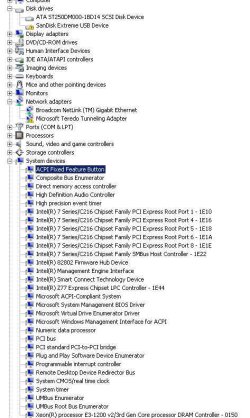
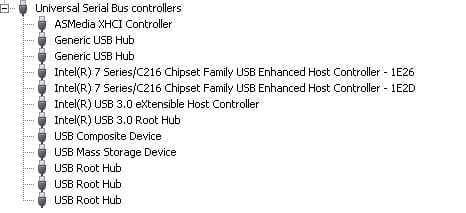
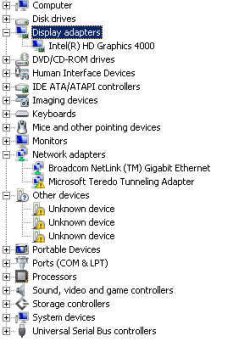
The HDD for my OS with win 7 ultimate came from a GA-G31M-S2L with an Intel(R) 82801GB/GR/GH (ICH7 Family) & Intel Pentium Dual CPU E2220 @ 2.20GHz. Present specs can be viewed on Profile. At first installing drivers went well even able to access USB 2.0 and after everything was done USB 2.0/3.0 was inaccessible at reboot. Through regedit I managed to eleminate Acronis issues (Beware of Acronis "Leftovers" Issues - Wilders Security Forums). There must be an Intel/Windows driver conflict. I'm not sure what to uninstall/reinstall if any. I wish to uninstall all Intel drivers but Intel is having trouble finding apps or drivers.
Attachments
Reg1.jpg
68.6 KB
· Views: 2
Reg2.jpg
16.5 KB
· Views: 15
My Computer
At a glance
Win 7 UltimateIntel Core i5 3570K @ 3.40GHz2 X 4.0GB RAM (KHX1600C9D3/4GX)Intel HD Graphics 4000
Hi there ... Is none of your USB ports working or is it just Devices that is not working ... Have you tried the Drivers from your Motherboards website ...
Hi there ... It might be worth trying the older version and the USB Drivers from the Motherboards website they some times work best .. And if nothing else would rule that out ...
When did this first happen .. When you where doing a Clean Install of windows .. I have to admit i am fresh out of Options .. If it was my Computer i would start from scratch again .. Have seen this happen before and that was the only cure ...
With a Clean Install you would lose all your Data .. Do you have a Windows Disc .. The Tutorial below will show you how to proceed if you so wish to do a Clean Install ...
I guess what I'm trying to say is there a way to reinstall win 7 in such a way to preserve as much of the data, settings etc? On another note if I were to upgrade to win 8 would that clear these issues?
My Computer
At a glance
Win 7 UltimateIntel Core i5 3570K @ 3.40GHz2 X 4.0GB RAM (KHX1600C9D3/4GX)Intel HD Graphics 4000
You could do a Repair and Install .. Not sure that would help though .. Your System should work well with Windows 7 would you really want Windows 8 ...
I used Driver Genius to resolve the USB 3.0 issues among others. The only thing that's leaving me puzzled is the fact that I can't install Intel Graphics Driver (15.33.8.64.3345) to replace Intel HD Graphics 4000 (9.18.10.3257). I found this out when I went to Intel Driver Update Utility. I don't think this driver may be a big deal but when I installed it I got stuck at "Intel Display Audio Version: 6.16.00.3129" and then stated that it failed to install one or more drivers. I did use Driver Genius but as far as it is concerned everything was installed correctly. I wonder if there is a conflict with Realtek.
This is what it looks like now.
My Computer
At a glance
Win 7 UltimateIntel Core i5 3570K @ 3.40GHz2 X 4.0GB RAM (KHX1600C9D3/4GX)Intel HD Graphics 4000