Driver My Book WD Essential 1 TB

zquezie

New member
Local time
11:47 AM
Messages
4
Hi everybody

My external harddrive works perfectly untill 2 hours ago, than came a message that the driver couldn't be found....

I have searched on the web for drivers or firmware but I don't found an explanation for this error.

Somebody who knows what te problem could be?

My laptop is a Toshiba P300-18M if it's nescesary.
And I'm running on Windows 7 64-bit Ultimate.
 

My Computer My Computer

At a glance

Windows 7 64Bit
OS
Windows 7 64Bit
Hello there.

Did you try to connect the HDD to a different USB port? those drives are plug & play, they don't need drivers.

Probably some mistake, reboot your PC, connect it to a different port and report back, please :)
 

My Computer My Computer

At a glance

Windows
Computer type
PC/Desktop
OS
Windows
Nope, I tried it on all my USB drives but all with the same result.
I tried to update with the device manager but also no result.
 

My Computer My Computer

At a glance

Windows 7 64Bit
OS
Windows 7 64Bit
Uninstall the driver in Device Manager > Properties and reboot
 

My Computer My Computer

At a glance

Vista, Windows7, Mint Mate, Zorin, Windows 8from 1.6GHz Duo to i7
Computer Manufacturer/Model Number
HP, Dell, Gateway, Toshiba - 4 laptops and 2 desktops
OS
Vista, Windows7, Mint Mate, Zorin, Windows 8
CPU
from 1.6GHz Duo to i7
Monitor(s) Displays
2x HP w2207
Hard Drives
5x HDD, 7x SSD, 12x Externals
Keyboard
with trackball - no mices
Mouse
Trackball mice
Internet Speed
DSL 6000
Have a look here
WD Product Update
These drives come with drive firmware and "Smartware" software. WD recommend you use the most up todate version. See the link. Updating may solve your problem.

Personally I stick with the Elements (bare bones) range. The driver is handled by Windows.
 

My Computer My Computer

At a glance

Windows 7x64 Home Premium SP1Intel i7 2600kG.Skill Ripjaws (DDR3-1600) 2x4GBNvidia GeForce GTS 450; Intel HD Graphics 300...
Computer type
PC/Desktop
Computer Manufacturer/Model Number
Own build
OS
Windows 7x64 Home Premium SP1
CPU
Intel i7 2600k
Motherboard
ASUS P8Z68 Deluxe
Memory
G.Skill Ripjaws (DDR3-1600) 2x4GB
Graphics Card(s)
Nvidia GeForce GTS 450; Intel HD Graphics 3000(GT2+)
Monitor(s) Displays
Dell Ultrasharp IPS panel U2311H, Samsung SyncMaster P2350
Screen Resolution
1920x1080
Hard Drives
Samsung 850 Pro SSD 256GB, Samsung SSD 840 120GB, Seagates 1TB Barracuda ST31000528AS x2
PSU
Seasonic M12II 520W
Case
Lian Li Lancool PC-K60
Cooling
Case: 1x120mm, 3x140mm CPU: Hyper 212+
Keyboard
Logitech MK520 (wireless)
Mouse
Logitech MK520
Internet Speed
6-7 Mbps
Antivirus
Norton Security Premium, Malwarebytes on 2 (MSE on 3rd PC)
Browser
FireFox
Other Info
Audio: Logitech Z523 2.1
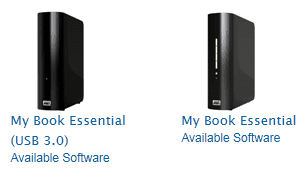
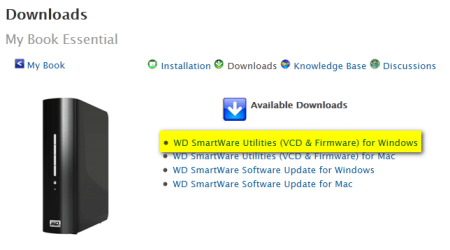
Here is the link to the Western digital downloads page then click on either the My Book Essential ( USB 3.0 ) or the My Book Essential link depending on which drive you own ( hint the USB 3.0 are recent new drives and the other is the older drives ) on the next page click on the WD Smartware Utilities (VCD & Firmware) for Windows link (see screenshots below) and read all instructions carefully before downloading and installing.

2011-02-21_134147.png2011-02-21_134346.png

After successful installation you should see 2 drivers in device manager (see below)

2011-02-21_130339.png2011-02-21_130425.png

If Widows still still does not recognize your drive the this WD Knowledge Base article may be of some help.
 

My Computer My Computer

At a glance

Windows 10 Pro x 2/Windows 11 HomeIntel i7 2600K @ 3.40 GHzCorsair Vengeance 16GB DDR3 1600MHz CL8 Dual ...EVGA GeForce RTX 3080 XC3 ULTRA GAMING 10GB G...
Computer type
PC/Desktop
Computer Manufacturer/Model Number
My own abomination, I call it the Money Pit
OS
Windows 10 Pro x 2/Windows 11 Home
CPU
Intel i7 2600K @ 3.40 GHz
Motherboard
ASUS Sabertooth P67
Memory
Corsair Vengeance 16GB DDR3 1600MHz CL8 Dual Channel Kit
Graphics Card(s)
EVGA GeForce RTX 3080 XC3 ULTRA GAMING 10GB GDDR6X
Sound Card
Onboard Realtek or Nvidia High Definition Audio (HDMI)
Monitor(s) Displays
Samsung JS7000 50" SUHD TV or Samsung 27" FHD 60Hz 8ms GTG V
Screen Resolution
1920 x 1080
Hard Drives
1 x Samsung 870 EVO 250 GB SSD (Windows 10 Pro), 1 x Samsung 850 EVO 250 GB SSD (Windows 10 Pro)
PSU
Corsair AX860 - 860W Modular Power Supply
Case
Phanteks Enthoo Luxe Full Tower Case - Black
Cooling
CORSAIR Hydro Series H150i PRO RGB 360mm Liquid CPU Cooler
Keyboard
Logitech K830 Illuminated Living-Room Keyboard
Mouse
Logitech MX Anywhere 2S Wireless Mouse
Internet Speed
100 Mbps
Antivirus
ESET Internet Security
Browser
Latest Version Of Firefox & Microsoft Edge Chromium Stable
Other Info
LG Super Multi Blue Internal Blu-ray Disk Rewriter - BH10LS30
6x2 HDMI Switcher (6 inputs, 2 outputs) so I can send the output of my Cable Box, Roku, or any my 4 computers to either my TV or Monitor separately or simultaneously.
Thanks for the help.

It seems to work :)
 

My Computer My Computer

At a glance

Windows 7 64Bit
OS
Windows 7 64Bit
Back
Top