
Driver Power State Failure Error Message on Dell XPS 1530

BeautifulJackal

New member
Local time
4:10 PM
Messages
4
When I tried to put my computer in sleep mode, I got a blue error screen with the bug "Driver Power State Failure." Upon using BlueScreenView, I got this information:

Dump File 101512-14476-01.dmp

Crash Time 10/15/2012 9:02:26

Bug Check String PMDRIVER_POWER_STATE_FAILURE

Bug Check Code 0x0000009f

Parameter 1 0x00000003

Parameter 2 0x85b7a2e0

Parameter 3 0x83328ae0

Parameter 4 0x8a1ab868

Caused By Driver ntkrnlpa.exe

Caused By Address ntkrnlpa.exe+dee98

File Description NT Kernel & System

Product Name Microsoft® Windows® Operating System

Company Microsoft Corporation

File Version 6.1.7601.17944 (win7sp1_gdr.120830-0333)

Processor 32-bit

Crash Address ntkrnlpa.exe+dee98

Stack Address 1 ntkrnlpa.exe+c7637

Stack Address 2 ntkrnlpa.exe+c76b0

Stack Address 3 ntkrnlpa.exe+79799

Computer Name

Full Path C:\Windows\Minidump\101512-14476-01.dmp

Processors Count 2

Major Version 15

Minor Version 7601

Dump File Size 760,256

I don't know what kind of system information would be useful in this context, but this is a Dell XPS 1530.

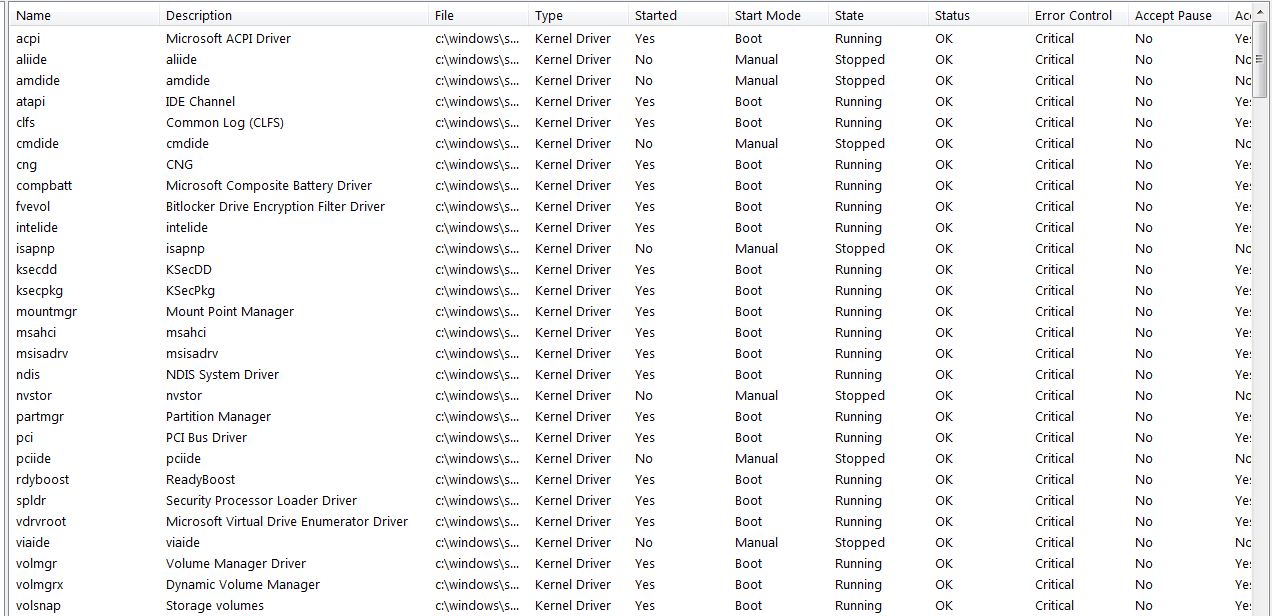
When looking at the drivers in system info, I have a ton of drivers classified as critical under error control. Can anyone help me troubleshoot this problem? I would greatly appreciate it, and can provide additional information if needed.
ZY1GT.jpg
 

My Computer My Computer

At a glance

Windows 7 Home Premium 32bit
Computer Manufacturer/Model Number
Dell XPS 1530
OS
Windows 7 Home Premium 32bit

My Computer My Computer

At a glance

Windows 10 Home 64BitIntel Core i5 10400 @ 2.90GHz8.00GB Single-Channel Unknown @ 1329MHz (16-2...
Computer type
PC/Desktop
Computer Manufacturer/Model Number
Self assembled
OS
Windows 10 Home 64Bit
CPU
Intel Core i5 10400 @ 2.90GHz
Motherboard
Intel Corporation DG41WV (PROCESSOR)
Memory
8.00GB Single-Channel Unknown @ 1329MHz (16-20-20-38)
Sound Card
Realtek High Definition Audio
Monitor(s) Displays
DELL E170S
Screen Resolution
1280x1024 pixels
Hard Drives
931GB TOSHIBA DT01ACA100 (SATA)
238GB TEAM TM8PS7256G (SATA SSD)
Case
Nothing Fancy
Cooling
Fans
Keyboard
A4 Tech Co LTD
Mouse
A4 Tech Co Ltd/Logitech
Internet Speed
25 Mbps
Diagnostic Tool Results

Sorry about not reading the rules before posting. I was somewhat frazzled.

I tried to create a memory dump, but was not asked to restart, and the directions seemed to imply that it was only necessary if prompted. I wasn't sure what the procedure was in attaching it, but saw other users use a .rar extension so I went with that.

The other program wasn't a problem.

I have tried running a Chkdsk before (you will see there was another crash sometime in September, I ran the check then) and still ended up with files that could not be repaired. Should I just do a system repair?

Any advice is appreciated, thank you in advance.
 

My Computer My Computer

At a glance

Windows 7 Home Premium 32bit
Computer Manufacturer/Model Number
Dell XPS 1530
OS
Windows 7 Home Premium 32bit
Bloody hell, I can't seem to operate anything well today. Sorry for the repost, my internet is slow and I thought I didn't hit reply.
 

My Computer My Computer

At a glance

Windows 7 Home Premium 32bit
Computer Manufacturer/Model Number
Dell XPS 1530
OS
Windows 7 Home Premium 32bit
Hi, your dump does not load for me. Could you grab it following the instructions again?

Problematic software:
Code:
Start Menu\Programs\McAfee	Public:Start Menu\Programs\McAfee	Public
Start Menu\Programs\McAfee Security Scan Plus	Public:Start Menu\Programs\McAfee Security Scan Plus	Public
Start Menu\Programs\Spybot - Search & Destroy	Public:Start Menu\Programs\Spybot - Search & Destroy	Public

Please uninstall McAfee, it's known to cause BSoDs. Especially in the situation described in yours. Please uninstall SpyBot S&D as well. It's good at finding things but is known to slow down and corrupt the system. Download and install MSE, it's free, light weight and does not cause such problems in the Windows 7 OS. For additional security, the free version of Malware Bytes is the best.

Run a full scan with both (separately) once downloaded, installed and updated.

Free up your start-up, keep nothing except MSE.
Run the System File Checker that scans the integrity of all protected Windows 7 system files and replaces incorrect corrupted, changed/modified, or damaged versions with the correct versions if possible and then run Disk Check on your hard disk for file system errors and bad sectors on it:

Keep us posted
 

My Computer My Computer

At a glance

Windows 10 Home 64BitIntel Core i5 10400 @ 2.90GHz8.00GB Single-Channel Unknown @ 1329MHz (16-2...
Computer type
PC/Desktop
Computer Manufacturer/Model Number
Self assembled
OS
Windows 10 Home 64Bit
CPU
Intel Core i5 10400 @ 2.90GHz
Motherboard
Intel Corporation DG41WV (PROCESSOR)
Memory
8.00GB Single-Channel Unknown @ 1329MHz (16-20-20-38)
Sound Card
Realtek High Definition Audio
Monitor(s) Displays
DELL E170S
Screen Resolution
1280x1024 pixels
Hard Drives
931GB TOSHIBA DT01ACA100 (SATA)
238GB TEAM TM8PS7256G (SATA SSD)
Case
Nothing Fancy
Cooling
Fans
Keyboard
A4 Tech Co LTD
Mouse
A4 Tech Co Ltd/Logitech
Internet Speed
25 Mbps
Thank you for your response! I think I didn't compress the file properly the first time, but believe this attachment should work.

What seemed to be the main problem with using sleep/hibernate mode was that my wireless card driver had not been updated in a while. Simply turning it off fixed the problem, as well as updating the driver.

I also wanted to mention two other problematic programs/drivers for me in the past, for anyone who may come across this thread in their own troubleshooting. I cannot use the newest version of iTunes without having internet connectivity problems, and the device driver for a WD 1TB external hard drive I had would cause my computer to freeze and become unresponsive, resulting in forcing a shutdown by pressing the power button.

The WD hard drive *really* corrupted a bunch of files and I had to use the sfc/scannow and chkdsk to repair it. You may find the dump file related to that as well.

I have uninstalled McAfee and Spybot, replacing them with the programs you recommended (running the scans now, nothing's popped up yet). At the moment, I still need to run scannow and chkdsk. I will update this thread with that information, but please let me know if you see anything else in the files that should be addressed. Thank you again!
 

My Computer My Computer

At a glance

Windows 7 Home Premium 32bit
Computer Manufacturer/Model Number
Dell XPS 1530
OS
Windows 7 Home Premium 32bit
Hi. The new attachments dumps don't seem to load either. Well it's okay, let us know if you're getting more BSODs after making the changes you did on your computer.

Good luck :)
 

My Computer My Computer

At a glance

Windows 10 Home 64BitIntel Core i5 10400 @ 2.90GHz8.00GB Single-Channel Unknown @ 1329MHz (16-2...
Computer type
PC/Desktop
Computer Manufacturer/Model Number
Self assembled
OS
Windows 10 Home 64Bit
CPU
Intel Core i5 10400 @ 2.90GHz
Motherboard
Intel Corporation DG41WV (PROCESSOR)
Memory
8.00GB Single-Channel Unknown @ 1329MHz (16-20-20-38)
Sound Card
Realtek High Definition Audio
Monitor(s) Displays
DELL E170S
Screen Resolution
1280x1024 pixels
Hard Drives
931GB TOSHIBA DT01ACA100 (SATA)
238GB TEAM TM8PS7256G (SATA SSD)
Case
Nothing Fancy
Cooling
Fans
Keyboard
A4 Tech Co LTD
Mouse
A4 Tech Co Ltd/Logitech
Internet Speed
25 Mbps
So..anymore BSOD-s? :)
 

My Computer My Computer

At a glance

Windows 10 Home 64BitIntel Core i5 10400 @ 2.90GHz8.00GB Single-Channel Unknown @ 1329MHz (16-2...
Computer type
PC/Desktop
Computer Manufacturer/Model Number
Self assembled
OS
Windows 10 Home 64Bit
CPU
Intel Core i5 10400 @ 2.90GHz
Motherboard
Intel Corporation DG41WV (PROCESSOR)
Memory
8.00GB Single-Channel Unknown @ 1329MHz (16-20-20-38)
Sound Card
Realtek High Definition Audio
Monitor(s) Displays
DELL E170S
Screen Resolution
1280x1024 pixels
Hard Drives
931GB TOSHIBA DT01ACA100 (SATA)
238GB TEAM TM8PS7256G (SATA SSD)
Case
Nothing Fancy
Cooling
Fans
Keyboard
A4 Tech Co LTD
Mouse
A4 Tech Co Ltd/Logitech
Internet Speed
25 Mbps
Back
Top