
Driver problems ?

mrbc

New member
Local time
6:06 PM
Messages
21
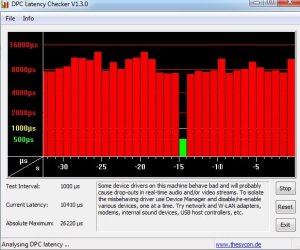
So my computer I just built has been extremely slow compared to what it should be performing at. My specs are listed in my profile and im not really sure what the problem is , but after running DPC latency checker this is what it looks likes.

for example, when I load up skyrim it says my computer should be able to handle skyrim on High settings, I cant even get more then 8 fps on lowest settings though?
 

Attachments
  • erro.jpg
    erro.jpg
    46.1 KB · Views: 11

My Computer

Computer Manufacturer/Model Number
n/a
OS
Windows 7 ultimate x64
CPU
AMD A8 3870K
Motherboard
Gigabyte A75-UD4H ATX FM1 Motherboard
Memory
8gb DDR3 1333 mhz mushkin
Graphics Card(s)
Radeon 6550D (Integrated in the processor)
Sound Card
n/a
Monitor(s) Displays
40" LCD Sony bravia, 21" Gateway LCD, and a 24" LED Asus
Hard Drives
500gb barricuda
PSU
550 watt antec
Case
Custom made
Cooling
stock + fans
Keyboard
steelseries merc stealth 2
Mouse
razer deathadder
Internet Speed
15mbps
Other Info
steel series siberia v2
Have you updated all the drivers from the Gigabyte website?

Gigabyte GA-A75-UD4H

The CD that comes with the motherboard are always out of date, check the website for drivers and BIOS updates, install them all.
 

My Computer

Computer type
PC/Desktop
Computer Manufacturer/Model Number
76~2.0
OS
Windows 7 Ult x64 - SP1/ Windows 8 Pro x64
CPU
Intel Core i5-3570K 4.6GHz
Motherboard
Gigabyte GA-Z77X UD3H, f18
Memory
8GB (2X4GB) DDR3 1600 Corsair Vengeance CL8 1.5v
Graphics Card(s)
Sapphire HD 7770 Vapor-X OC 1GB DDR5
Sound Card
Onboard VIA VT2021
Monitor(s) Displays
22" LCD Dell
Screen Resolution
1680x1050
Hard Drives
Samsung 840Pro 128GB SSD,
Seagate Barracuda 500GB SATA2 7200rpm 32MB cache, Seagate Barracuda 1TB SATA2 7200rpm 32MB cache,
PSU
Corsair HX650W
Case
Cooler Master Storm Scout
Cooling
Corsair H80 2x12cm Noctua NF P12 , 2x14cm case fans
Keyboard
Logitech Wave
Mouse
CM Sentinel
Internet Speed
Dismal
Antivirus
Avast
Browser
Opera Next
Other Info
Haswell laptop: HP Envy 17t-j, i7-4700MQ, GeForce 740M 2GB DDR3, 17.3" Full HD 1920x1080, 16GB RAM, Samsung 840 Pro 128GB, 1TB Hitachi 7200 HDD,
Desktop: eSATA ports,
External eSATA Seagate 500GB SATA2 7200rpm,
External WD USB 500GB
how do I install bios updates?
 

My Computer

Computer Manufacturer/Model Number
n/a
OS
Windows 7 ultimate x64
CPU
AMD A8 3870K
Motherboard
Gigabyte A75-UD4H ATX FM1 Motherboard
Memory
8gb DDR3 1333 mhz mushkin
Graphics Card(s)
Radeon 6550D (Integrated in the processor)
Sound Card
n/a
Monitor(s) Displays
40" LCD Sony bravia, 21" Gateway LCD, and a 24" LED Asus
Hard Drives
500gb barricuda
PSU
550 watt antec
Case
Custom made
Cooling
stock + fans
Keyboard
steelseries merc stealth 2
Mouse
razer deathadder
Internet Speed
15mbps
Other Info
steel series siberia v2
and should I get the beta bios update or the other one
 

My Computer

Computer Manufacturer/Model Number
n/a
OS
Windows 7 ultimate x64
CPU
AMD A8 3870K
Motherboard
Gigabyte A75-UD4H ATX FM1 Motherboard
Memory
8gb DDR3 1333 mhz mushkin
Graphics Card(s)
Radeon 6550D (Integrated in the processor)
Sound Card
n/a
Monitor(s) Displays
40" LCD Sony bravia, 21" Gateway LCD, and a 24" LED Asus
Hard Drives
500gb barricuda
PSU
550 watt antec
Case
Custom made
Cooling
stock + fans
Keyboard
steelseries merc stealth 2
Mouse
razer deathadder
Internet Speed
15mbps
Other Info
steel series siberia v2
how do I install bios updates?

When you click on the appropriate country link, you'll get an option to either run or save the file. Personally, I like to save the file to my desktop and then close all open programs to avoid any conflicts. Once everything is closed, double click the BIOS file icon that's on the desktop and follow the prompts.

and should I get the beta bios update or the other one

A beta of anything means it's still being tested. If it's still being tested it could cause problems for your computer. Especially the BIOS. If the BIOS doesn't work your computer probably won't turn on. So I'd get version F7 for now. Check back every so often to see if F8 is out of beta.
 

My Computer

Computer type
Laptop
Computer Manufacturer/Model Number
Sony Vaio VPCEB47GM Laptop
OS
Win 7 Pro 64-bit
CPU
Intel i5 2.4 Ghz
Memory
8GB DDR3
Graphics Card(s)
Intel HD 3000
Sound Card
IDT High Definition
Monitor(s) Displays
15.6 WGXA Anti-Glare LED
Screen Resolution
1280x800
Hard Drives
640Gb 7200rpm
Antivirus
MSE
Browser
Opera (primary) with IE9 backup
wow just found out my motherboard is only windows 32 bit compatible -_- is it possible ive done damage to my motherboard by using 64bit?
 

My Computer

Computer Manufacturer/Model Number
n/a
OS
Windows 7 ultimate x64
CPU
AMD A8 3870K
Motherboard
Gigabyte A75-UD4H ATX FM1 Motherboard
Memory
8gb DDR3 1333 mhz mushkin
Graphics Card(s)
Radeon 6550D (Integrated in the processor)
Sound Card
n/a
Monitor(s) Displays
40" LCD Sony bravia, 21" Gateway LCD, and a 24" LED Asus
Hard Drives
500gb barricuda
PSU
550 watt antec
Case
Custom made
Cooling
stock + fans
Keyboard
steelseries merc stealth 2
Mouse
razer deathadder
Internet Speed
15mbps
Other Info
steel series siberia v2
Where did you see that it's only 32 bit compatible ony?

If it wasn't 64 bit compatible the 64 bit OS wouldn't have installed.
It is the CPU that has to be compatible, the AMD A8 3870K is 64 bit compatible.

Your motherboard site has Win7 64 bit drivers, so is compatible.
 

My Computer

Computer type
PC/Desktop
Computer Manufacturer/Model Number
76~2.0
OS
Windows 7 Ult x64 - SP1/ Windows 8 Pro x64
CPU
Intel Core i5-3570K 4.6GHz
Motherboard
Gigabyte GA-Z77X UD3H, f18
Memory
8GB (2X4GB) DDR3 1600 Corsair Vengeance CL8 1.5v
Graphics Card(s)
Sapphire HD 7770 Vapor-X OC 1GB DDR5
Sound Card
Onboard VIA VT2021
Monitor(s) Displays
22" LCD Dell
Screen Resolution
1680x1050
Hard Drives
Samsung 840Pro 128GB SSD,
Seagate Barracuda 500GB SATA2 7200rpm 32MB cache, Seagate Barracuda 1TB SATA2 7200rpm 32MB cache,
PSU
Corsair HX650W
Case
Cooler Master Storm Scout
Cooling
Corsair H80 2x12cm Noctua NF P12 , 2x14cm case fans
Keyboard
Logitech Wave
Mouse
CM Sentinel
Internet Speed
Dismal
Antivirus
Avast
Browser
Opera Next
Other Info
Haswell laptop: HP Envy 17t-j, i7-4700MQ, GeForce 740M 2GB DDR3, 17.3" Full HD 1920x1080, 16GB RAM, Samsung 840 Pro 128GB, 1TB Hitachi 7200 HDD,
Desktop: eSATA ports,
External eSATA Seagate 500GB SATA2 7200rpm,
External WD USB 500GB
Everytime I try to run the BIOS update (FLASHSPI.EXE) I get this error. "The version of this file is not comaptible with the version of Windows you;re running. Check your computers system information to see wheter you need an x86 or x64 version of the program, and then contact the software publisher."

On the bios section of my motherboards website their is no indication whether the update is for x64 or x86, you only have one download option.
 

My Computer

Computer Manufacturer/Model Number
n/a
OS
Windows 7 ultimate x64
CPU
AMD A8 3870K
Motherboard
Gigabyte A75-UD4H ATX FM1 Motherboard
Memory
8gb DDR3 1333 mhz mushkin
Graphics Card(s)
Radeon 6550D (Integrated in the processor)
Sound Card
n/a
Monitor(s) Displays
40" LCD Sony bravia, 21" Gateway LCD, and a 24" LED Asus
Hard Drives
500gb barricuda
PSU
550 watt antec
Case
Custom made
Cooling
stock + fans
Keyboard
steelseries merc stealth 2
Mouse
razer deathadder
Internet Speed
15mbps
Other Info
steel series siberia v2
UPDATE: After installing all the updates my computer was still under performing greatly and the DPC latency results were just as bad as before. Ive just finished reformatting my PC and did a fresh install of all the drivers The dpc latency results are now all in the green :D. Still confused with why I cant update my bios?
 

My Computer

Computer Manufacturer/Model Number
n/a
OS
Windows 7 ultimate x64
CPU
AMD A8 3870K
Motherboard
Gigabyte A75-UD4H ATX FM1 Motherboard
Memory
8gb DDR3 1333 mhz mushkin
Graphics Card(s)
Radeon 6550D (Integrated in the processor)
Sound Card
n/a
Monitor(s) Displays
40" LCD Sony bravia, 21" Gateway LCD, and a 24" LED Asus
Hard Drives
500gb barricuda
PSU
550 watt antec
Case
Custom made
Cooling
stock + fans
Keyboard
steelseries merc stealth 2
Mouse
razer deathadder
Internet Speed
15mbps
Other Info
steel series siberia v2
Good work fixing the DPC latency issues, sometimes a re-install is the best way to go.


For your BIOS update, you need to confirm your motherboard model, and the motherboard download website.

BIOS has nothing to do with the OS 32bit/64bit version, it will install for both versions.
D/L the USB flash drive version, this is the best way to update your BIOS.

Gigabyte "How To ~ Qflash Guide"

Go to the "Flashing With Qflash" section.
Use the Qflash method with a USB flash drive formatted to FAT32.
 

My Computer

Computer type
PC/Desktop
Computer Manufacturer/Model Number
76~2.0
OS
Windows 7 Ult x64 - SP1/ Windows 8 Pro x64
CPU
Intel Core i5-3570K 4.6GHz
Motherboard
Gigabyte GA-Z77X UD3H, f18
Memory
8GB (2X4GB) DDR3 1600 Corsair Vengeance CL8 1.5v
Graphics Card(s)
Sapphire HD 7770 Vapor-X OC 1GB DDR5
Sound Card
Onboard VIA VT2021
Monitor(s) Displays
22" LCD Dell
Screen Resolution
1680x1050
Hard Drives
Samsung 840Pro 128GB SSD,
Seagate Barracuda 500GB SATA2 7200rpm 32MB cache, Seagate Barracuda 1TB SATA2 7200rpm 32MB cache,
PSU
Corsair HX650W
Case
Cooler Master Storm Scout
Cooling
Corsair H80 2x12cm Noctua NF P12 , 2x14cm case fans
Keyboard
Logitech Wave
Mouse
CM Sentinel
Internet Speed
Dismal
Antivirus
Avast
Browser
Opera Next
Other Info
Haswell laptop: HP Envy 17t-j, i7-4700MQ, GeForce 740M 2GB DDR3, 17.3" Full HD 1920x1080, 16GB RAM, Samsung 840 Pro 128GB, 1TB Hitachi 7200 HDD,
Desktop: eSATA ports,
External eSATA Seagate 500GB SATA2 7200rpm,
External WD USB 500GB
Back
Top