Driver Verifier - Enable and Disable

How to Enable or Disable Driver Verifier in Windows 7

Contents


   Information
Driver Verifier runs in the background, "testing" drivers for bugs. If it finds one, a Blue Screen of Death (BSOD) will result; the corresponding dump file will hopefully show the faulty driver.


OPTION ONE

To Enable Driver Verifier
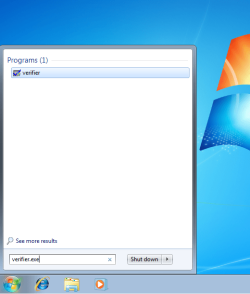
1. Start typing verifier.exe into the start menu, and open Verifier.

snip1.PNG

2. Select "Create custom settings (for code developers)", and hit Next.

snip2.PNG

3. Make sure Standard settings, Force pending I/O requests, and IRP Logging are selected, and hit Next.

snip3.PNG

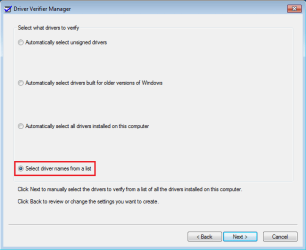
4. Select "Select driver names From a list", and hit Next.
snip4.PNG

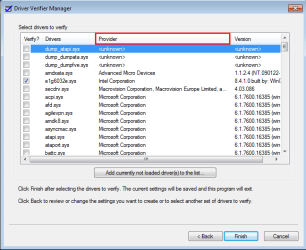
5. Click on "Provider" at the top to sort the list by manufacturer; select all drivers not provided by Microsoft Corporation.
snip5.PNG

6. Press Next, and OK to the resulting window.
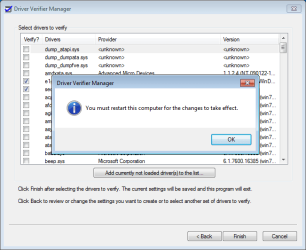
snip6.PNG

After a reboot, driver verifier should be enabled. Use your computer as you normally would, although expect frequent BSODs if there are driver issues. If the system doesn't crash after 24 hours, disable driver verifier.


OPTION TWO

To Disable Driver Verifier

1. Start typing verifier.exe into the start menu, and open Verifier.

snip1.PNG

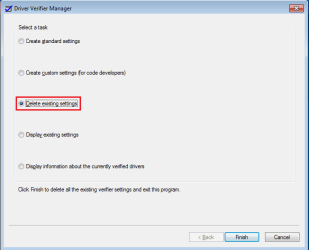
2. Select "Delete existing settings"
snip7.PNG

If you cannot get into Windows to turn off Verifier, try using Safe Mode.
 
Last edited by a moderator:
Hello,

I am following the driver verifier instructions, my computer just bsod, i have restarted,
when into command prompt, typed verifier /query, another prompt popped up with a whole lot of info, then closed.

How do I find the log file with the driver errors? So i can report back to sevenforums..
 

My Computer

Computer type
PC/Desktop
Computer Manufacturer/Model Number
custom build
OS
Windows 7 Ultimate 64bit
CPU
Intel Core 2 Duo
Motherboard
MSI Neo
Memory
8gigs DDR2 RAM 1066mhz
Graphics Card(s)
Nvidia Geforce GTX 650
Antivirus
Avast

My Computer

Computer type
PC/Desktop
Computer Manufacturer/Model Number
Self built custom
OS
64-bit Windows 11 Pro for Workstations
CPU
Intel i7-8700K OC'd to 5 GHz
Motherboard
ASUS ROG Maximus XI Formula Z390
Memory
64 GB (4x16GB) G.SKILL TridentZ RGB DDR4 3600 MHz
Graphics Card(s)
ASUS ROG-STRIX-GTX1080TI-O11G-GAMING
Sound Card
Integrated
Monitor(s) Displays
2 x Samsung Odyssey G7 27"
Screen Resolution
2560x1440
Hard Drives
1TB Samsung 990 PRO M.2,
4TB Samsung 990 PRO PRO M.2,
TerraMaster F8 SSD Plus NAS
PSU
Seasonic Prime Titanium 850W
Case
Thermaltake Core P3
Cooling
Corsair Hydro H115i
Keyboard
Logitech wireless K800
Mouse
Logitech MX Master 4
Internet Speed
2 Gb/s Download and 100 Mb/s Upload
Antivirus
Malwarebyte Anti-Malware Premium
Browser
Google Chrome
Other Info
Logitech Z625 speaker system,
Logitech BRIO 4K Pro webcam,
HP Color LaserJet Pro MFP M477fdn,
APC SMART-UPS RT 1000 XL - SURT1000XLI,
Galaxy S23 Plus phone

My Computer

Computer Manufacturer/Model Number
HP Pavilion p6745f
OS
Microsoft Windows 7 Home Premium 64-bit 7601 Multiprocessor Free Service Pack 1
CPU
Intel(R) Core(TM) i5-2300 CPU @ 2.80GHz
Motherboard
PEGATRON CORPORATION 2AB6
Memory
6 GB
Graphics Card(s)
Radeon 6750 1gb
Sound Card
(1) IDT High Definition Audio CODEC (2) Intel(R) Display A
Monitor(s) Displays
Acer x193w
Hard Drives
(1) WDC WD15EARS-60MVWB0 (2) Generic- Compact Flash USB Device (3) Generic- MS/MS-Pro USB Device (4) Generic- SD/MMC USB Device (5) Generic- SM/xD-Picture USB Device (6) WD My Book 1110 USB Device
PSU
Internal 500W (100V-240V)
Case
Mid-size ATX
Cooling
unknown
Keyboard
HP usb multimedia keyboard
Mouse
HP usb compliant mouse
Internet Speed
256 kbps
Other Info
Ver: CHI_713.bin vCHI7.13
So I been running driver verifier since Id say around 1230-1am. So far no issues, No bsod, No nothing. How am I sure this is running? When I goto command prompt and type verifier /query I got a list of stuff. But I dont see any issues I believ.
And what does Load and Unload mean in that prompt? Thanks
 

My Computer

Computer type
PC/Desktop
OS
windows 7 ultimate x64
CPU
i5 4670K
Motherboard
ASrock Extreme 6
Memory
G.skill Trident
Graphics Card(s)
AMD R9 280X
Hard Drives
Ocz Vertex 120gb SSD
I did it and it popped up a message saying " No settings where changed" ... is that whats it's suppose to say ?
 

My Computer

Computer type
PC/Desktop
OS
None
So I been running driver verifier since Id say around 1230-1am. So far no issues, No bsod, No nothing. How am I sure this is running? When I goto command prompt and type verifier /query I got a list of stuff. But I dont see any issues I believ.
And what does Load and Unload mean in that prompt? Thanks

As stated a few times already. If you see a list of stuff it means it IS running.

AND

If there are any issues there won't be any warnings but the system will crash (BSOD) and make the dump file in which it will say which driver was responsible for the crash. This dump file should be uploaded per these instructions: http://www.sevenforums.com/bsod-help-support/96879-blue-screen-death-bsod-posting-instructions.html
 

My Computer

Computer type
PC/Desktop
Computer Manufacturer/Model Number
Custom build
OS
Windows 7 Professional x64 SP1
CPU
Intel Core 2 Quad Q6600 @ 2.40GHz
Motherboard
ASUSTeK P5K
Memory
OCZ DDR2 6 GB (2x1 GB + 2x2 GB)
Graphics Card(s)
Radeon HD 5800 Series 1024 MB
Sound Card
Realtek High Definition Audio
Monitor(s) Displays
Samsung SyncMaster 206BW
Screen Resolution
1680x1050
Hard Drives
256 Samsung SSD
1 TB Samsung HDD
Antivirus
Microsoft Security Essentials
Browser
Firefox (always updated)
Back
Top