Drivers deleted or corrupted

luke9511

New member
Local time
1:26 AM
Messages
5
Hey everyone about a few months ago I was trying to update my iphone and was having problems doing so and i restarted my computer with the phone still hooked up like I have done many times before but when windows came up I had no usb drivers, sound drivers, network drivers. so now the only way I can use a keyboard and mouse is ps2 and I only have a ps2 keyboard

and from what windows is saying the drivers are missing or corrupted and if I try to reinstall them it fails. if I try to boot from the cd and do an upgrade or repair it says it has to be run inside windows which I cant do as there are no drivers, how do I go about fixing this? this is windows 7 pro x64
 

My Computer

OS
windows 7 pro 64bit
Boot the Win7 DVD or Repair CD, select Repair My Computer on second screen, accept any offered Repair. If Win7 doesn't start up, boot back in to run Startup Repair
repeatedly until it starts.

Startup Repair is run from boot only in Win7. It should automate System Restore, but if not and it fails boot back in to run that from System Recovery Options

You can copy out your files using DVD/Repair CD with this method: Copy & Paste - in Windows Recovery Console

Next see if you can boot into Safe Mode to install and run a full Malwarebytes scan. If not, download and burn to CD Bitdefender bootable AV scan: FREE Bootable AntiVirus Rescue CDs Download List to boot and run a full scan.

If this cleans up infection, try retarting WIn7. If that fails, try all Repairs again including SFC -SCANNOW Run in Command Prompt at Boot
 
I cant download or transfer files as there is no network drivers or usb or cdrom drivers cant run the windows dvd as there is nothing to fix according to it and it says it needs to be run inside of windows which I cant do cause of no drivers
 

My Computer

OS
windows 7 pro 64bit
Instead of ignoring them try each step I gave you in order, report back what the result is on each.

Ask back if you have any questions about the steps.
 
did everything and it still says I need to run the windows dvd from inside windows and I couldn't download or transfer mbam to install it
 

My Computer

OS
windows 7 pro 64bit
If you did everything listed, what were the results from the bootable AV scan?

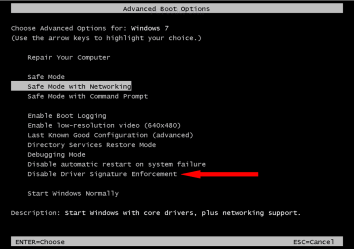
See if you can get into Safe Mode with Networking to install and run Malwarebytes.

Startup Repair cannot be run from inside Windows. Boot the Win7 DVD, select Repair my COmputer, then click through to System Recovery Options to run Startup Repair repeatedly with reboots no matter what it says.

To repair corruption like this you have to be thorough and do each step listed completely, reporting back results, any questions, or the exact wording or error messages.
 
ran the bootable av scan again it found nothing again, startup repair found nothing aswell safe mode as no network drivers just like regular windows so network and usb etc dont work
 

My Computer

OS
windows 7 pro 64bit
not oem I built this computer myself, I also have way to many files to backup and no where to put them there not even enough room to create a 2nd partition and no I cant buy a second hard drive so thats out of the question and I cant reinstall as it says it has to be run from inside windows which that cant happen cause of no drivers
 

My Computer

OS
windows 7 pro 64bit
Sounds like you need to create a Win7 Repair CD or bootable installation DVD or flash stick, so that you can try the Repairs given earlier, copy out your files externally to DVD, and clean reinstall if necessary using the DVD.

Again without detailed feedback it is hard to understand what you need. What is it that you are trying to run that says it must be run from within Windows? Is it the Win7 student download installer? If so you can compile it into an ISO to burn to DVD or write to flash stick this way: http://www.sevenforums.com/tutorials/30470-make-bootable-iso-student-d-l.html

If you have the Win7 installation ISO image file, you can burn it to DVD using ImgBurn or write it to flash stick using this tool - just dropdown Win7 into the windows: Universal USB Installer – Easy as 1 2 3 | USB Pen Drive Linux

Or you can download and burn to CD the Win7 Repair CD to run Startup Repair and copy out your files: System Repair Disc - Create

Try the repairs repeatedly from booted DVD or Repair CD first, then if necessary copy out your files or move them to another partition so you can boot Win7 and reinstall to the Win7 partition.

You can resize Win7 partition to make a data partition to copy your data into using free Partition Wizard bootable CD. Then use the DVD or Repair CD to copy your data following the tutorial I posted earlier, or use Paragon Rescue CD freeware to do this.
 
Back
Top