Drivers for HP photosmart C3180

I have tried everything. But my printer still does not work: is not recognized by my Acer Aspire M1641 with hard disk SATA and windows 7 ultimate. I have formatted and loaded Windows Vista Ultimate x86 and also with the view that same problem with Windows 7.:mad:
 

Attachments

  • Immagine.png
    Immagine.png
    175.9 KB · Views: 107
  • Immagine1.png
    Immagine1.png
    205.5 KB · Views: 175

My Computer My Computer

At a glance

windows 7
OS
windows 7
If still none of previous suggestions help try this:
I unpacked clear drivers from installator for your printer and host it here:RapidShare: 1-CLICK Web hosting - Easy Filehosting

1.Uninstall drivers for printer and adressed software if you have installed
2.Download my drivers and unpack anywhere
3.Connect printer to USB port
4.Open device manager,right click on unknow device which will appear ,right click on it>>Properties>>tab:Driver>>choose:Update Driver>>choose:"Browse my computer for driver software",select my unpacked folder with drivers ,check "Include subfolders" and apply
 

My Computer My Computer

At a glance

Windows 7 Professional x64 PLAMD Athlon 4450eGoodRam DDR2 2x2048MB (FSB 800MHz)nVidia GeForce 9600GT (G94-300) 1024 MB
Computer Manufacturer/Model Number
Custom made
OS
Windows 7 Professional x64 PL
CPU
AMD Athlon 4450e
Motherboard
Giga-Byte GA-MA69G-S3H
Memory
GoodRam DDR2 2x2048MB (FSB 800MHz)
Graphics Card(s)
nVidia GeForce 9600GT (G94-300) 1024 MB
Monitor(s) Displays
SAMSUNG SyncMaster HS2P301688
Hard Drives
Seagate ST3750330AS 750GB
PSU
Corsair 550W
Cooling
AeroCool ExtremeEngine 3T
Thank you! I try your tutorial and tonight you know I do so. Again, thank you!;)
 

My Computer My Computer

At a glance

windows 7
OS
windows 7
Ok Flavius,i have tryed.

Abstract:


they from Italian to English the results provided by my Windows 7 64-bit and you I enclose the related screen.

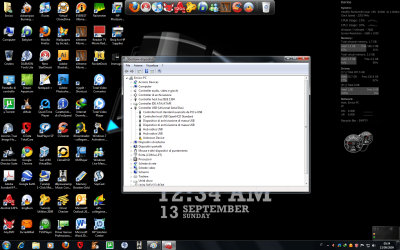
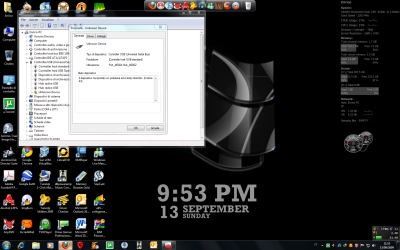
First screen:

If you select the "General" in the window "property" of unknow device (after I connected the printer to the PC), this is what it says: "The device has been a problem and has been interrupted (Code 43)"


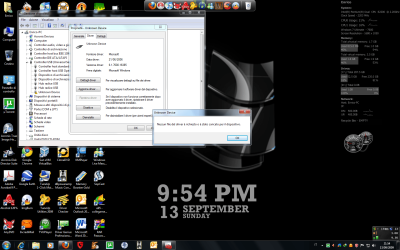
second screen:

Always the voice "property" of "unknov device" and if you select the heading "Driver details" Here is what it tells me Windows 7:

-"no driver file is requested or is loaded for the device".


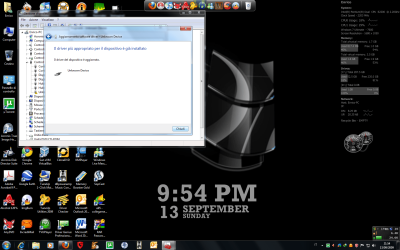
third screen:

Finally, this is what it tells me Windows 7 when I act your procedure and select your folder of drivers:

"The driver of the device is already installed"

and under:

"The driver of the device is updated"


All this is astonishing. There is a logical!!!
 

Attachments

  • Immagine1.png
    Immagine1.png
    172.5 KB · Views: 104
  • Immagine11.png
    Immagine11.png
    173.8 KB · Views: 45
  • Immagine111.png
    Immagine111.png
    176.1 KB · Views: 43

My Computer My Computer

At a glance

windows 7
OS
windows 7
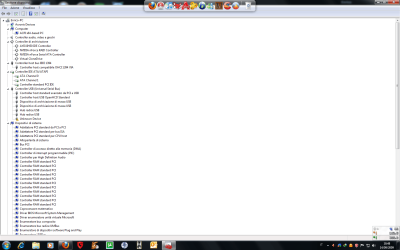
In this way it won't work because you try update driver for USB Controllers not for printer.When you plug printer really don't have you another "unknow device"? -it should directly in root-this means by you "Enrico-PC" ->research exactly whole device manager when you'll plug printer.When you'll corectly install drivers for printer the unknow device in USB controllers should also disappeared.

See how it looks with correct installed driver for printer:
27962d1252927964-drivers-hp-photosmart-c3180-printerd.jpg


translation:

drukarka zgodna z IEEE : printer compatible with IEEE

As you can see there are couple drivers for printer (it depends for printer you may have 1,2,3... in USB controller) but the main driver is outside USB controler in Printer section.When you plug printer in device manager should appear also unknow device directly in device manger root-find it.
 

Attachments

  • PrinterD.jpg
    PrinterD.jpg
    74.3 KB · Views: 3,012
Last edited:

My Computer My Computer

At a glance

Windows 7 Professional x64 PLAMD Athlon 4450eGoodRam DDR2 2x2048MB (FSB 800MHz)nVidia GeForce 9600GT (G94-300) 1024 MB
Computer Manufacturer/Model Number
Custom made
OS
Windows 7 Professional x64 PL
CPU
AMD Athlon 4450e
Motherboard
Giga-Byte GA-MA69G-S3H
Memory
GoodRam DDR2 2x2048MB (FSB 800MHz)
Graphics Card(s)
nVidia GeForce 9600GT (G94-300) 1024 MB
Monitor(s) Displays
SAMSUNG SyncMaster HS2P301688
Hard Drives
Seagate ST3750330AS 750GB
PSU
Corsair 550W
Cooling
AeroCool ExtremeEngine 3T
Thanks Flavius, very kind.:D

I have tried in "Enrico-PC" the voice that I indicating but there is: here is, see you screen that follows:
 

Attachments

  • Immagine.png
    Immagine.png
    57.5 KB · Views: 43
  • Immagine1.png
    Immagine1.png
    58.3 KB · Views: 36

My Computer My Computer

At a glance

windows 7
OS
windows 7
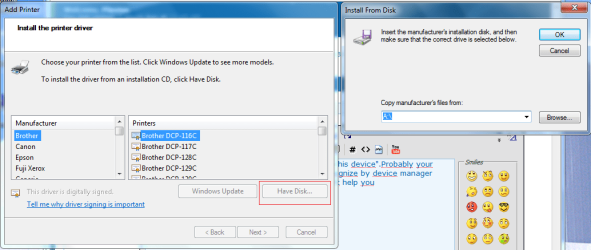
:( Unfortunately I don't see also another "unknow his device".Probably your printer isn't Plug & Play device thus it doesn't recognize by device manager even as "unknow device" .

Try through hdwwiz.exe

Start>>Search>>hdwwiz.exe

When you run it,choose "install hardware manually",next choose Printers

when you see below windows,choose "Have to disk" and select folder with drivers
(image)
 

Attachments

  • Printer2.png
    Printer2.png
    39.8 KB · Views: 77

My Computer My Computer

At a glance

Windows 7 Professional x64 PLAMD Athlon 4450eGoodRam DDR2 2x2048MB (FSB 800MHz)nVidia GeForce 9600GT (G94-300) 1024 MB
Computer Manufacturer/Model Number
Custom made
OS
Windows 7 Professional x64 PL
CPU
AMD Athlon 4450e
Motherboard
Giga-Byte GA-MA69G-S3H
Memory
GoodRam DDR2 2x2048MB (FSB 800MHz)
Graphics Card(s)
nVidia GeForce 9600GT (G94-300) 1024 MB
Monitor(s) Displays
SAMSUNG SyncMaster HS2P301688
Hard Drives
Seagate ST3750330AS 750GB
PSU
Corsair 550W
Cooling
AeroCool ExtremeEngine 3T
Tryed.
Nothing to do: always "unknow device". I am surrender: For we have tried all I believe. Thanks a thousand Flavius for your willingness and competence.

**** HP!!!
 

My Computer My Computer

At a glance

windows 7
OS
windows 7
Kari, Your suggestion did work for me. Here's what I did: 1) Go to devices and printer and remove any C3180 printers 2) Add a C3300 printer using the MS driver 3) Add a C3180 printer and select use existing driver 4) Remove the C3300 printer.

The only problem now is that the automatic C3180 driver install when I reboot or power the printer on still fails but doesn't impact my ability to print.

Now, can you or anyone else who knows how Windows uses drivers can explain how/why this works?
 

My Computer My Computer

At a glance

Windows 7 RC4GB
Computer Manufacturer/Model Number
HP m7580n - all original except as noted below
OS
Windows 7 RC
Memory
4GB
Hard Drives
2 x WD 320GB
Windows 7 64-bit does not recognize never printer HP Photosmart c3180. You know if you are the drivers?
Faubert, unsuccesful installation is due to the following issues:
  • Failure to disconnect printer at the beginning of installation.
  • Lack of drivers/incompatable drivers
  • HP software in your system.
Resolution:
  1. Disconnect the printer from your system
  2. Use Windows "UNINSTALL CLEAN UP PROGRAM" to remove all HP software, use device manager to remove any remnant HP drivers.
  3. Reboot the system.
  4. Download the following: ftp.hp.com/pub/softlib/software10/COL18375/mp-47462-2/AIO_CDA_Full_Non-Network_enu_NB.exe
  5. Again, DO NOT HAVE THE PRINTER CONNECTED TO YOUR PC
  6. Find the downloaded program you just received from HP
  7. Put your mouse on it and right click and go to the drop down menu and view compatability.
  8. Right click it and use VISTA 64 Bit compatability.
  9. Staying in the same drop down menu go up to "RUN AS ADMINISTRATOR". left click on that command.
  10. Execute the file, at the end of the installation you will be prompted to connect your printer, do so and report back the results.
Regards,
Adrian
 

My Computer My Computer

At a glance

Windows 7 7600 1 X64AMD PHENOM II X 550 PROCESSOR 3.1 ghzCorsair 4 gig ddr 3ati radeon 3300
Computer Manufacturer/Model Number
Custom Build
OS
Windows 7 7600 1 X64
CPU
AMD PHENOM II X 550 PROCESSOR 3.1 ghz
Motherboard
ASUS M4A78-TE
Memory
Corsair 4 gig ddr 3
Graphics Card(s)
ati radeon 3300
Sound Card
ati hd
Monitor(s) Displays
syncmaster 2033sw
Screen Resolution
1600X900 60 hz refresh
Hard Drives
twin_seagates SATA's 1 TB & 500 Gig, hitachi_slimline 160 gig
PSU
antec_550 watt
Case
cooler master GLite
Cooling
stock_heat sink
Internet Speed
20mbs up/ 1.5mbs down
Other Info
favorite child "stewie"
favorite dog "brian"
Hello Adrian. Thank you, I have tested your guide.

The results:

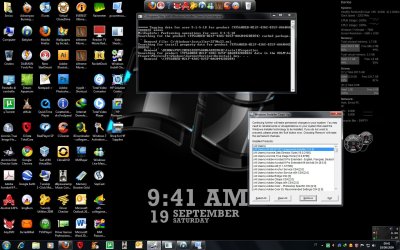
With Windows install cleanup I have uninstalled the files described in the heading of the programme highlighted in blue in screen Annex.

Then I have checked in device Manager and not the result driver HP installed.

Therefore, I have selected "property" in the executable that I you ANNEX: is not present the voice that you say: "vista 64-bit" but the following headings: vista,vista sp1 and vista sp2: have selected run in compatibility with vista sp2.

I installed finally the drivers,
I have lit the printer and have connected to the PC but:


always the same error: "Windows is not able to recognize the device connected to your computer." "unknow device"

 

Attachments

  • scrren1.jpg
    scrren1.jpg
    231.2 KB · Views: 85

My Computer My Computer

At a glance

windows 7
OS
windows 7
Back
Top