Solved Drivers for my Printer

GM74

New member
Local time
5:44 AM
Messages
6
Hi guys!

I wonder if anyone can help me find latest drivers for Samsung ML-1750 laser printer. I need drivers so I can use it on Windows 7 64bit.

Been searching everywhere but with no luck :( even on Samsungs homepage.
Those I downloaded from their homepage are from 2006,they cant be good for windows 7.

Regards
GM
 

My Computer

Computer Manufacturer/Model Number
Windows 7 Enterprise 64bit
OS
Windows 7 Enterprise 64bit
CPU
AMD Athlon 64 x2 6400+
Motherboard
GA-MA790X-UD3P
Memory
Corsair 2 x 2gb CL5 800 MHz
Graphics Card(s)
Nvidia Geforce 8800GTS
Sound Card
Realtek
If you can find VISTA drivers, you can use them in Windows 7 by installing them in Vista compatibility mode ... Compatibility mode allows a older program written for an earlier versions of Windows to possibly run in Windows 7. You can also use Compatibility mode to always have a program to Run as an administrator.

http://www.sevenforums.com/tutorials/316-compatibility-mode.html?ltr=C
 

My Computer

Computer type
PC/Desktop
Computer Manufacturer/Model Number
LENOVO K450 @3.0GHZ
OS
64-bit Windows 8.1 Pro
CPU
Core(TM) i5 CPU 4330 Haswell @ 3.20GHz
Motherboard
LENOVO
Memory
12.00 GB
Graphics Card(s)
Intel(R) HD Graphics
Sound Card
Intel HD integtrated
Monitor(s) Displays
HP 25' ISP Monitor
Screen Resolution
1900/1020
Hard Drives
(1) ST1000DM003-1CH162 (2) Generic STORAGE DEVICE USB Device (3) Generic STORAGE DEVICE USB Device
Internet Speed
100mb down/10mb up

My Computer

Computer Manufacturer/Model Number
Custom Build
OS
Windows 7 Ultimate x64/Windows 8 Consumer Preview x64/Ubuntu 11.04
CPU
Intel Pentium Dual Core E6700 3.2GHz
Motherboard
ASUS P5G41T-M LX
Memory
Strontium 8192MB DDR3 1333Mhz
Graphics Card(s)
msi GeForce N560GTX-M2D1GD5 1GB
Sound Card
Realtek HD Audio
Monitor(s) Displays
CHIMEI CMV 221D 22"
Screen Resolution
1680x1050
Hard Drives
Seagate Barracuda LP Green 3.5'' 2TB Internal HDD 5900RPM + WD Elements Desktop 1TB External HDD 7200RPM
PSU
SHAW Viper-1500w Gaming PSU
Case
Black eMaxx ATX Mini Tower Case
Keyboard
Microsoft Wireless Keyboard 1000
Mouse
Microsoft Wireless Optical Mouse 2000
Internet Speed
100GB @ 4.76Mbps
Thnx guys,will try that :)
 

My Computer

Computer Manufacturer/Model Number
Windows 7 Enterprise 64bit
OS
Windows 7 Enterprise 64bit
CPU
AMD Athlon 64 x2 6400+
Motherboard
GA-MA790X-UD3P
Memory
Corsair 2 x 2gb CL5 800 MHz
Graphics Card(s)
Nvidia Geforce 8800GTS
Sound Card
Realtek
I wonder if anyone can help me find latest drivers for Samsung ML-1750 laser printer. I need drivers so I can use it on Windows 7 64bit.
I don't follow...

According to the Microsoft device compatibility site, the Samsung ML-1750 is supported "out of the box" by Win7 64-bit.

If the printer is plugged into the USB port for the first time, it should be recognized as new hardware and the wizard should do everything it needs to for the automatic install of printer support.

Did that not happen? What happened?
 

My Computer

Computer type
PC/Desktop
Computer Manufacturer/Model Number
Home-built, two systems (1) and (2)
OS
Windows 7 Pro x64 (1), Win7 Pro X64 (2)
CPU
i5-3350p 3.1Ghz/6MB-cache (1); E8400 3.0Ghz/6MB-cache (2)
Motherboard
ASUS P8Z77-V Pro (1); ASUS P5Q3 (2)
Memory
8GB PC3-12800 DDR3 (1); 4GB PC3-10600 DDR3 (2)
Graphics Card(s)
ATI HD7750 (1), (see TV cards); ATI R7 250 (2)
Sound Card
Realtek ALC892 HD Audio (1); Realtek ALC1200 HD Audio (2)
Monitor(s) Displays
Eizo HD2441W LCD, Eizo S2433W (1); Eizo 24" S2433W (2)
Screen Resolution
1920x1200, 1920x1200 (1); 1920x1200 (2)
Hard Drives
(1) 1TB SATA-II (7200RPM), 2x2TB SATA-III (7200RPM), 250GB SATA-III (10000RPM) for OS; 2x2TB external USB 3.0

(2) 320GB SATA-II (7200RPM), 750GB SATA-II (7200RPM), 150GB SATA-II (10000RPM) for OS; 2TB external USB 3.0
PSU
Nesteq ECS-6001 600W (1); Nesteq ECS-5001 500W (2)
Case
Acousti-Case 360 (1) and (2)
Cooling
Noctua NH-U12P SE2 for CPU, 2x120mm case fans (1) and (2)
Keyboard
IBM PS/2 (1) and (2)
Mouse
Logitech MX Revolution wireless (1); Microsoft wired (2)
Internet Speed
100mbps down / 10mbps up
Antivirus
Microsoft Security Essentials; Malwarebyte Anti-Malware Pro
Browser
Firefox
Other Info
Ceton InfiniTV 4-tuner cablecard-enabled TV card as well as Hauppauge HVR-2250 OTA/ATSC 2-tuner TV card in (1), running under Win7 WMC
No it didnt find the driver first.

Its working now,thnx for all help.
 

My Computer

Computer Manufacturer/Model Number
Windows 7 Enterprise 64bit
OS
Windows 7 Enterprise 64bit
CPU
AMD Athlon 64 x2 6400+
Motherboard
GA-MA790X-UD3P
Memory
Corsair 2 x 2gb CL5 800 MHz
Graphics Card(s)
Nvidia Geforce 8800GTS
Sound Card
Realtek
No it didnt find the driver first.

Its working now,thnx for all help.
Can you please explain a bit more?

You tried it again, and this time it DID install the drivers it needed?

How did you manage to solve the problem? Last time you posted you were having trouble.


It looks like the printer driver is available in several flavors on the Microsoft Updates Catalog web site (which you must access through Internet Explorer, not Firefox). Enter ML-1750 in the "search" area, and then follow the download wizard. I'm doing that right now, just for my own curiosity... to see if the needed INF files are really available.

If you let Win7 automatically have access to the online Updates Catalog web site (for both Windows Updates and "new hardware discovered"), then even if the needed drivers were too late delivered to Microsoft by the manufacturer when the Win7 installation DVD got produced, the more recently added and updated drivers are available ONLINE... using this connectivity method. It happens automatically with Win7 when you plug in new hardware, if it needs to happen.

That may have happened in the case of the ML-1750. The MS compatibility site says it IS supported. And yet, when I look in PRNSA002.INF (in the C:\Windows\System32\DriverStore\FileRepository folder) I do not see ML-1750 named. So maybe it was supposed to be supported "out of the box" but Samsung didn't get the drivers to MS in time.

Anyway, my guess is that the Updates Catalog web site is where your proper drivers actually have now been installed from, if you say that "problem solved".


Please provide a bit of description here, for closure, as to what you did do between yesterday and today that solved your problem.

Thanks.
 

My Computer

Computer type
PC/Desktop
Computer Manufacturer/Model Number
Home-built, two systems (1) and (2)
OS
Windows 7 Pro x64 (1), Win7 Pro X64 (2)
CPU
i5-3350p 3.1Ghz/6MB-cache (1); E8400 3.0Ghz/6MB-cache (2)
Motherboard
ASUS P8Z77-V Pro (1); ASUS P5Q3 (2)
Memory
8GB PC3-12800 DDR3 (1); 4GB PC3-10600 DDR3 (2)
Graphics Card(s)
ATI HD7750 (1), (see TV cards); ATI R7 250 (2)
Sound Card
Realtek ALC892 HD Audio (1); Realtek ALC1200 HD Audio (2)
Monitor(s) Displays
Eizo HD2441W LCD, Eizo S2433W (1); Eizo 24" S2433W (2)
Screen Resolution
1920x1200, 1920x1200 (1); 1920x1200 (2)
Hard Drives
(1) 1TB SATA-II (7200RPM), 2x2TB SATA-III (7200RPM), 250GB SATA-III (10000RPM) for OS; 2x2TB external USB 3.0

(2) 320GB SATA-II (7200RPM), 750GB SATA-II (7200RPM), 150GB SATA-II (10000RPM) for OS; 2TB external USB 3.0
PSU
Nesteq ECS-6001 600W (1); Nesteq ECS-5001 500W (2)
Case
Acousti-Case 360 (1) and (2)
Cooling
Noctua NH-U12P SE2 for CPU, 2x120mm case fans (1) and (2)
Keyboard
IBM PS/2 (1) and (2)
Mouse
Logitech MX Revolution wireless (1); Microsoft wired (2)
Internet Speed
100mbps down / 10mbps up
Antivirus
Microsoft Security Essentials; Malwarebyte Anti-Malware Pro
Browser
Firefox
Other Info
Ceton InfiniTV 4-tuner cablecard-enabled TV card as well as Hauppauge HVR-2250 OTA/ATSC 2-tuner TV card in (1), running under Win7 WMC
The beauty of Windows Seven and printer/scanners/ all in one is if you disconnect that item then reboot THEN plug and connect your printer to your computer Windows Seven will find it.
If that doesn't work go to control panel/printers/ then add your printer there.

I have an old HP deskjet 662 that when Vista came along I changed it to 990c. Then when Seven came along I did the above and have no problems printing with it. IMHO
THW
 

My Computer

Computer Manufacturer/Model Number
HP M9077c
OS
Windows 7 Home Premium 64bit
CPU
Intel(R)Core(TM)2 quad [email protected] 2.39GHz
Motherboard
ASUSeK
Memory
6GB DDR2 6400
Graphics Card(s)
GeForce 8500/512MB
Sound Card
Realtek High Def Audio
Monitor(s) Displays
HP w2408 LCD 24" widescreen
Screen Resolution
1920x1200
Cooling
6 pack of Bud
Keyboard
MS wireless Inteli
Mouse
MS wireless Inteli
Hi again!

I did as The Howling Wolwes just explained but first I deleted the old driver that I had installed then reconected the printer and Windows 7 found the drivers.
Its strange though these drivers are very old but yet they work with Windows 7.
The drivers that Windows 7 installed are from 2006-06-21 and driver version is:6.1.7600.16385

Regards
GM
 

My Computer

Computer Manufacturer/Model Number
Windows 7 Enterprise 64bit
OS
Windows 7 Enterprise 64bit
CPU
AMD Athlon 64 x2 6400+
Motherboard
GA-MA790X-UD3P
Memory
Corsair 2 x 2gb CL5 800 MHz
Graphics Card(s)
Nvidia Geforce 8800GTS
Sound Card
Realtek
I did as The Howling Wolwes just explained but first I deleted the old driver that I had installed then reconnected the printer and Windows 7 found the drivers.
I see. "Try it again, and it will then work the second time." Happens all the time.

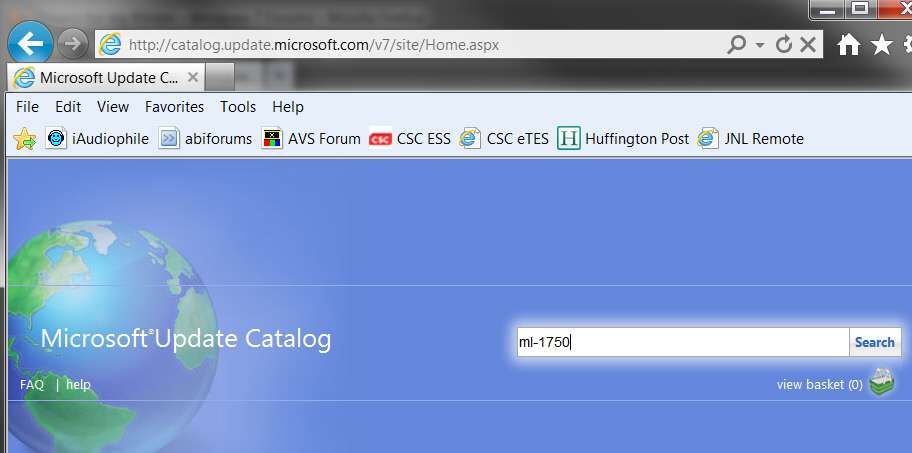
Based on my research into \DriverStore, it does look like the drivers did not make it to the original Win7 installation DVD. Which is why Microsoft has its Microsoft Update Catalog that is the online assistant for Win7's "new hardware device discovered" wizard, to check online for late/recent added/updated drivers.

You start here (using Internet Explorer, not Firefox) and enter either your hardware name/model, or the "hardware ID" (from an existing winXP installation, if you have one). This is exactly what "new hardware device discovered" wizard does when you plug in new hardware and there is no local driver present in \DriverStore... connects to Microsoft's online updates site to get the driver.

catalogsearch.jpg


Its strange though these drivers are very old but yet they work with Windows 7.
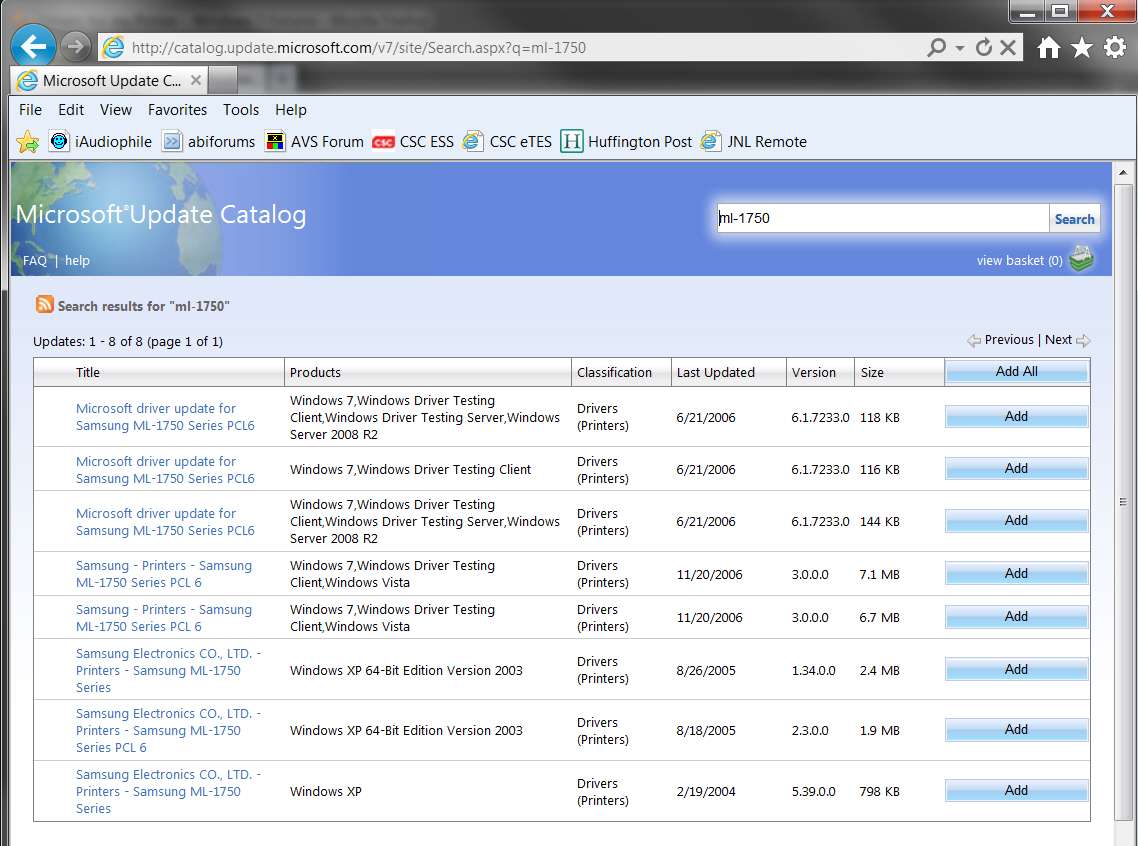
The drivers that Windows 7 installed are from 2006-06-21 and driver version is:6.1.7600.16385
Looks like EXACTLY the drivers that are available on the Microsoft updates site, so that is obviously where your newly installed drivers came from:

catalogdrivers.jpg


It is a bit odd that the Samsung-provided driver packages from 11/2006 (which are newer that the Microsoft drivers, but have a "lower" version number, and are very much larger) were not selected, but rather the 6/2006 drivers were selected.

Perhaps I'll see the difference and we can figure out why the driver you got is that 6/21/2006 version. We could chase this down much further, with the hardware id, device id, driver names, etc., from Properties -> Hardware on the printer, but as long as you say it's now working fine I guess that's all that really matters.
 

My Computer

Computer type
PC/Desktop
Computer Manufacturer/Model Number
Home-built, two systems (1) and (2)
OS
Windows 7 Pro x64 (1), Win7 Pro X64 (2)
CPU
i5-3350p 3.1Ghz/6MB-cache (1); E8400 3.0Ghz/6MB-cache (2)
Motherboard
ASUS P8Z77-V Pro (1); ASUS P5Q3 (2)
Memory
8GB PC3-12800 DDR3 (1); 4GB PC3-10600 DDR3 (2)
Graphics Card(s)
ATI HD7750 (1), (see TV cards); ATI R7 250 (2)
Sound Card
Realtek ALC892 HD Audio (1); Realtek ALC1200 HD Audio (2)
Monitor(s) Displays
Eizo HD2441W LCD, Eizo S2433W (1); Eizo 24" S2433W (2)
Screen Resolution
1920x1200, 1920x1200 (1); 1920x1200 (2)
Hard Drives
(1) 1TB SATA-II (7200RPM), 2x2TB SATA-III (7200RPM), 250GB SATA-III (10000RPM) for OS; 2x2TB external USB 3.0

(2) 320GB SATA-II (7200RPM), 750GB SATA-II (7200RPM), 150GB SATA-II (10000RPM) for OS; 2TB external USB 3.0
PSU
Nesteq ECS-6001 600W (1); Nesteq ECS-5001 500W (2)
Case
Acousti-Case 360 (1) and (2)
Cooling
Noctua NH-U12P SE2 for CPU, 2x120mm case fans (1) and (2)
Keyboard
IBM PS/2 (1) and (2)
Mouse
Logitech MX Revolution wireless (1); Microsoft wired (2)
Internet Speed
100mbps down / 10mbps up
Antivirus
Microsoft Security Essentials; Malwarebyte Anti-Malware Pro
Browser
Firefox
Other Info
Ceton InfiniTV 4-tuner cablecard-enabled TV card as well as Hauppauge HVR-2250 OTA/ATSC 2-tuner TV card in (1), running under Win7 WMC
Yes, working is a real good thing. ;)
 

My Computer

Computer type
PC/Desktop
Computer Manufacturer/Model Number
Home Built Desktop By DataTech
OS
Windows 7 Ultimate X64 SP1
CPU
Intel i5-2550K, Differing ~4.4-4.8GHz No built in GPU
Motherboard
ASUS P8Z68-V PRO/GEN3
Memory
16GB G.Skill Sniper 1866MHz @ 2133MHz 2x8GB
Graphics Card(s)
ASUS GTX650TIB-DC2OC-2GD5, (650TI Boost)
Sound Card
Onboard Realtek 5-1
Monitor(s) Displays
Samsung P2570HD
Screen Resolution
1920x1080
Hard Drives
Samsung 840 Pro 256GB SSD for OS, 500GB Seagate Constellation (Enterprise drive) for Data
PSU
Corsair HX650W
Case
Inwin Dragon Rider
Cooling
Hyper 212 EVO w/two Noctua fans, push-pull, @1300 RPM
Keyboard
E-Z Eyes, bright yellow keys with large characters
Mouse
steelseries SENSEI Laser Pro Gaming
Internet Speed
48-51Mbs Mbs down, 11 Mbs up Xfinity Cable
Antivirus
Norton Internet Security 2013
Browser
IE 10, Opera, Pale Moon if needed
Other Info
4 case fans, LG BluRay-RE, ASUS DVD-RW, Mr. Fusion power supply, 1.21 gigawatts.
Well, I've looked inside the SSUDRV.INF file for the 64-bit version of the printer drivers available from the Microsoft updates site. Actually, it looks like both driver packages from Microsoft and Samsung are really the same. They both contain the exact same number of files, and the same total byte size. And the SSUDRV.INF file is also identical.

Strangely, the information in SSUDRV.INF found inside both the "Microsoft 6/21/2006 (v6.1.7233.0)" and "Samsung 11/20/2006 (v3.0.0.0)" is the same. I don't know where the Microsoft version or date came from:

driverml1750.jpg
 

My Computer

Computer type
PC/Desktop
Computer Manufacturer/Model Number
Home-built, two systems (1) and (2)
OS
Windows 7 Pro x64 (1), Win7 Pro X64 (2)
CPU
i5-3350p 3.1Ghz/6MB-cache (1); E8400 3.0Ghz/6MB-cache (2)
Motherboard
ASUS P8Z77-V Pro (1); ASUS P5Q3 (2)
Memory
8GB PC3-12800 DDR3 (1); 4GB PC3-10600 DDR3 (2)
Graphics Card(s)
ATI HD7750 (1), (see TV cards); ATI R7 250 (2)
Sound Card
Realtek ALC892 HD Audio (1); Realtek ALC1200 HD Audio (2)
Monitor(s) Displays
Eizo HD2441W LCD, Eizo S2433W (1); Eizo 24" S2433W (2)
Screen Resolution
1920x1200, 1920x1200 (1); 1920x1200 (2)
Hard Drives
(1) 1TB SATA-II (7200RPM), 2x2TB SATA-III (7200RPM), 250GB SATA-III (10000RPM) for OS; 2x2TB external USB 3.0

(2) 320GB SATA-II (7200RPM), 750GB SATA-II (7200RPM), 150GB SATA-II (10000RPM) for OS; 2TB external USB 3.0
PSU
Nesteq ECS-6001 600W (1); Nesteq ECS-5001 500W (2)
Case
Acousti-Case 360 (1) and (2)
Cooling
Noctua NH-U12P SE2 for CPU, 2x120mm case fans (1) and (2)
Keyboard
IBM PS/2 (1) and (2)
Mouse
Logitech MX Revolution wireless (1); Microsoft wired (2)
Internet Speed
100mbps down / 10mbps up
Antivirus
Microsoft Security Essentials; Malwarebyte Anti-Malware Pro
Browser
Firefox
Other Info
Ceton InfiniTV 4-tuner cablecard-enabled TV card as well as Hauppauge HVR-2250 OTA/ATSC 2-tuner TV card in (1), running under Win7 WMC
Note... just for future reference on drivers...

ALL of the driver directories for ALL devices supported by Win7 are copied from the installation DVD onto your hard drive at Win7 installation time. They live in:
C:\Windows\System32\DriverStore\FileRepository
Furthermore, if a "new hardware detected" wizard process is invoked because you plug in a new device, such as your ML-1750 printer, if the needed driver is available in the FileRepository, that's where they'll be picked up from.

On the other hand, if the driver for the new device is not found in the FileRepository, then Win7 connects up to the Microsoft updates catalog web site to see if a new/recent driver is available from there. If so, that proper ZIP file is downloaded and unpacked, into the same FileRepository parent folder. The newly downloaded and expanded driver folder(s) will now be there forever, just like happens with the "out of the box" driver folders copied from the Win7 installation DVD.

So... it is now known that for your ML-1750 printer the proper driver INF file is SSUDRV.INF. If you do a SEARCH right now for that SSUDRV.INF file (in your 64-bit Win7 environment in which your printer drivers have now been successfully installed), I'm sure you'll find it in C:\Windows\System32\DriverStore\FileRepository, in some folder that probably starts off with something like SSUDRV.INF_AMD64_neutral in its name. This is the direct result of Win7 downloading the proper driver package file from the Microsoft updates web site... as I have done.

In fact, now that I have downloaded the proper ZIP file, I can actually go through the "add printer" dialog and point to the expanded folder (from my ZIP file), where the SSUDRV.INF lives in the ZIP file expansion. Win7 will actually then copy the folder into FileRepository, for possible future reference.

In fact, this is EXACTLY what the "new hardware detected" wizard is doing under the covers... retrieving the proper driver ZIP file from the Microsoft updates web site for your device, unzipping it, and initiating the "add printer" dialog pointing to this expanded driver folder where the proper INF file lives.

 

My Computer

Computer type
PC/Desktop
Computer Manufacturer/Model Number
Home-built, two systems (1) and (2)
OS
Windows 7 Pro x64 (1), Win7 Pro X64 (2)
CPU
i5-3350p 3.1Ghz/6MB-cache (1); E8400 3.0Ghz/6MB-cache (2)
Motherboard
ASUS P8Z77-V Pro (1); ASUS P5Q3 (2)
Memory
8GB PC3-12800 DDR3 (1); 4GB PC3-10600 DDR3 (2)
Graphics Card(s)
ATI HD7750 (1), (see TV cards); ATI R7 250 (2)
Sound Card
Realtek ALC892 HD Audio (1); Realtek ALC1200 HD Audio (2)
Monitor(s) Displays
Eizo HD2441W LCD, Eizo S2433W (1); Eizo 24" S2433W (2)
Screen Resolution
1920x1200, 1920x1200 (1); 1920x1200 (2)
Hard Drives
(1) 1TB SATA-II (7200RPM), 2x2TB SATA-III (7200RPM), 250GB SATA-III (10000RPM) for OS; 2x2TB external USB 3.0

(2) 320GB SATA-II (7200RPM), 750GB SATA-II (7200RPM), 150GB SATA-II (10000RPM) for OS; 2TB external USB 3.0
PSU
Nesteq ECS-6001 600W (1); Nesteq ECS-5001 500W (2)
Case
Acousti-Case 360 (1) and (2)
Cooling
Noctua NH-U12P SE2 for CPU, 2x120mm case fans (1) and (2)
Keyboard
IBM PS/2 (1) and (2)
Mouse
Logitech MX Revolution wireless (1); Microsoft wired (2)
Internet Speed
100mbps down / 10mbps up
Antivirus
Microsoft Security Essentials; Malwarebyte Anti-Malware Pro
Browser
Firefox
Other Info
Ceton InfiniTV 4-tuner cablecard-enabled TV card as well as Hauppauge HVR-2250 OTA/ATSC 2-tuner TV card in (1), running under Win7 WMC
Back
Top