drivers for new SSD

pulpwood007

New member
Member
Local time
8:31 PM
Messages
45
Biostar 880g+
AMD Phenom 4X
Intel 320 80GB

I did a clean install of Win 7 64bit. At this point I assume I'm running native MS drivers for the SSD.

I'm always confused as to which drivers I should use on a new motherboard install: the ones on the Biostar website, AMD's website, and in some cases the native MS drivers.

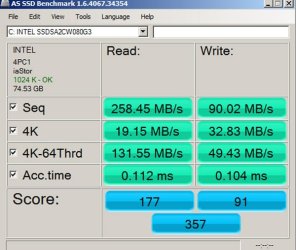
The Intel SSD and appears to be running fine. AS SSD shows seq read/write as 250/90.

The AMD website lists South Bridge, RAID, and SATA drivers. Should I have installed these?

Since the speeds look OK would I benefit from changing drivers at this point?

thanks,
 

My Computer

OS
Windows Professional
you should goto the website of the ssd you have and check for updated drivers from there.

scrooge
 

My Computer

Computer Manufacturer/Model Number
home build
OS
win 7 ( 64 bit)
CPU
Intel Core i7-870 Lynnfield 2.93GHz 8MB L3 Cache LGA 1156 95
Motherboard
ASUS P7P55 LX LGA 1156
Memory
G.SKILL Sniper Series 16GB (4 x 4GB) 240-Pin DDR3 SDRAM
Graphics Card(s)
ATI Radeon HD6800 Series
Sound Card
hdmi
Monitor(s) Displays
42" lg 3d tv
Screen Resolution
1920 x 1080
Hard Drives
1 ssd pci-e revodrive
4 seagate 1.5 tb
PSU
Rosewill BRONZE Series RBR1000-M 1000W Continuous@40°C, 80Pl
Case
CoolMaster 922
Cooling
CORSAIR CWCH60 Hydro Series H60 High Performance Liquid CPU
Keyboard
logtech
Mouse
logitect
Internet Speed
5 mbit
you should goto the website of the ssd you have and check for updated drivers from there.

scrooge

See my OP, exactly WHICH drivers?

I didn't think Intel chipset drivers should be installed on an AMD mb.
 

My Computer

OS
Windows Professional
you should goto the website of the ssd you have and check for updated drivers from there.

scrooge

See my OP, exactly WHICH drivers?

I didn't think Intel chipset drivers should be installed on an AMD mb.


you are only installing firmware for the ssd not for the motherboard

the drivers for the SSD will just make it work smoother with all the other hardware

Don't take it as Intel has to be all intel only there are alot of rigs with mixed match hardware that takes drivers from both teams

It is up to you to understand what you are using and the proper firmware and updates to keep it running at full potential
 

My Computer

Computer type
PC/Desktop
Computer Manufacturer/Model Number
CoreI7-6700K MrFingerIII Special Builds
OS
Windows 10 Home Premium 64bit sp1
CPU
Intel I7-6700K @ 4.6 Ghz 1.344 volts everyday OC
Motherboard
Asrock Fatality K6 Z170 Socket 1151
Memory
32GB G-Skill TridentZ 3200mhz 16-18-18-38 DDR4
Graphics Card(s)
Sli Gigabyte Windforce GTX 980 G1
Sound Card
AC97 Creative Rage Tactic 3D Headphones Bluetooth
Monitor(s) Displays
27" Asus ROG Swift PG278Q G-Sync 48" Vizio Smart HD TV
Screen Resolution
2560x1440p 27"- 48" Currently Gaming at 2560x1440p Res 2K
Hard Drives
250GB Samsung Evo840SSD Seagate baracuda 500 GB WD Mybook 500Gb 1TB Seagate Barracuda
PSU
HX1050w Corsair Silver 80plus certified crosfire/sli
Case
Enthod Pro Full Tower
Cooling
Corsair H110i GT 280 mm High Performance WaterBlock
Keyboard
Logitech wireless keyboard
Mouse
Logitech wireless mouse
Internet Speed
Cox Cable 100+ mb
Antivirus
WebRoot Spysweeper with Antivirus
Browser
IE-10, Chrome, Opera
Other Info
My Other Rig is a AMD FX8320E @4.6Ghz 16GB Ballistic Sport Ram
Mobo Asrock Fatality 990FX 120GB OCZ SSD 1TB Seagate Barracuda Corsair H75 Cooling PSU Corsair CX750
GPU GTX Gigabyte 970G1
you should goto the website of the ssd you have and check for updated drivers from there.

scrooge

See my OP, exactly WHICH drivers?

I didn't think Intel chipset drivers should be installed on an AMD mb.


you are only installing firmware for the ssd not for the motherboard

the drivers for the SSD will just make it work smoother with all the other hardware

Don't take it as Intel has to be all intel only there are alot of rigs with mixed match hardware that takes drivers from both teams

It is up to you to understand what you are using and the proper firmware and updates to keep it running at full potential

I know the difference between firmware and drivers. As far as I can tell in this situation it is NOT recommended to use Intel drivers with the AMD southbridge chip. I have downloaded and installed the ATI Catalyst driver from AMD' website. I simply need to know if there is a separate southbridge driver that would enhance performance of my Intel SSD (over the native Win 7 drivers).

Either I have no clue as to what's going on or I'm just not getting the info I'm looking for.
 

My Computer

OS
Windows Professional
you should goto the website of the ssd you have and check for updated drivers from there.

scrooge

See my OP, exactly WHICH drivers?

I didn't think Intel chipset drivers should be installed on an AMD mb.


you are only installing firmware for the ssd not for the motherboard

the drivers for the SSD will just make it work smoother with all the other hardware

Don't take it as Intel has to be all intel only there are alot of rigs with mixed match hardware that takes drivers from both teams

It is up to you to understand what you are using and the proper firmware and updates to keep it running at full potential

I know the difference between firmware and drivers. As far as I can tell in this situation it is NOT recommended to use Intel drivers with the AMD southbridge chip. I have downloaded and installed the ATI Catalyst driver from AMD' website. I simply need to know if there is a separate southbridge driver that would enhance performance of my Intel SSD (over the native Win 7 drivers). OR does the Catalyst driver also provide storage controller??

Either I have no clue as to what's going on or I'm just not getting the info I'm looking for.
 

My Computer

OS
Windows Professional
if it is firmware for the ssd then why are you worried

sorry to say if you think that would of been a issue why buy a intel ssd ?
 

My Computer

Computer type
PC/Desktop
Computer Manufacturer/Model Number
CoreI7-6700K MrFingerIII Special Builds
OS
Windows 10 Home Premium 64bit sp1
CPU
Intel I7-6700K @ 4.6 Ghz 1.344 volts everyday OC
Motherboard
Asrock Fatality K6 Z170 Socket 1151
Memory
32GB G-Skill TridentZ 3200mhz 16-18-18-38 DDR4
Graphics Card(s)
Sli Gigabyte Windforce GTX 980 G1
Sound Card
AC97 Creative Rage Tactic 3D Headphones Bluetooth
Monitor(s) Displays
27" Asus ROG Swift PG278Q G-Sync 48" Vizio Smart HD TV
Screen Resolution
2560x1440p 27"- 48" Currently Gaming at 2560x1440p Res 2K
Hard Drives
250GB Samsung Evo840SSD Seagate baracuda 500 GB WD Mybook 500Gb 1TB Seagate Barracuda
PSU
HX1050w Corsair Silver 80plus certified crosfire/sli
Case
Enthod Pro Full Tower
Cooling
Corsair H110i GT 280 mm High Performance WaterBlock
Keyboard
Logitech wireless keyboard
Mouse
Logitech wireless mouse
Internet Speed
Cox Cable 100+ mb
Antivirus
WebRoot Spysweeper with Antivirus
Browser
IE-10, Chrome, Opera
Other Info
My Other Rig is a AMD FX8320E @4.6Ghz 16GB Ballistic Sport Ram
Mobo Asrock Fatality 990FX 120GB OCZ SSD 1TB Seagate Barracuda Corsair H75 Cooling PSU Corsair CX750
GPU GTX Gigabyte 970G1
if it is firmware for the ssd then why are you worried

sorry to say if you think that would of been a issue why buy a intel ssd ?

I am not "worried" about anything. Please see the OP. This post was never about firmware. I know how to flash firmware.

This post is about driver(s). Again my question is which drivers to install. I have installed ATI Catalyst from AMD's website. Again, my question is does it contain the storage controller driver in the package or not. If not where would I find this AMD driver.

I bought the Intel 320 because of reliability and so far it is working great. I will be perfectly happy to leave as is but I want to know how to optimize it, if for nothing else academic reasons.
 

My Computer

OS
Windows Professional
I am using an Intel 320 series 80 GB drive, with Intel processor on a Gigabyte motherboard.

Device Manager shows the following:

SSD driver: Microsoft 6.1.7600.16385, dated 6/21/2006.

I'm also using Intel's SATA AHCI controller version 10.1.0.1008, but I'd guess that doesn't apply to you with an AMD processor.

Intel SSD toolbox shows my firmware as 4PC10362.

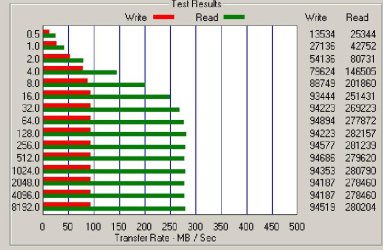
I have no performance issues with the SSD. Attached are two benchmarks for comparison to yours.
 

Attachments

  • AS SSD benchmark of my Intel 320 series 80 gig SSD 62011.jpg
    AS SSD benchmark of my Intel 320 series 80 gig SSD 62011.jpg
    67.5 KB · Views: 21
  • SSD 042811.jpg
    SSD 042811.jpg
    60.1 KB · Views: 12

My Computer

Computer type
PC/Desktop
Computer Manufacturer/Model Number
Ignatz Special; 4 speed manual gearbox; factory air conditioning; one of one
OS
Windows 7 Home Premium SP1, 64-bit
CPU
Intel Skylake i5-6600K, not overclocked
Motherboard
AsRock Z170M Extreme 4, micro ATX
Memory
8 GB HyperX DDR4-2666 (2 x 4 GB)
Graphics Card(s)
none; graphics are integrated on CPU
Sound Card
onboard: Realtek ALC1150; external: USB Behringer UF0-202
Monitor(s) Displays
Dell S2340M 23 inch IPS
Screen Resolution
1600 x 900
Hard Drives
System: Crucial MX100 series SSD, 128 GB;
Data: Samsung Spinpoint 103SJ, 1 TB;
Backup: WD Caviar Green WD30EZRX-00D8PB0, 3 TB
PSU
Rosewill SilentNight 500 watt fanless, semi-modular
Case
Antec Solo II
Cooling
Noctua NH-U12S; Noctua F12 intake, Noctua S12A exhaust
Keyboard
Microsoft 200 6JH-00001 USB
Mouse
Dell or Microsoft optical wired; USB
Antivirus
Microsoft Security Essentials and Malwarebytes Premium
Browser
Pale Moon
Other Info
All fans PWM; speeds at idle: CPU circa 500 rpm; intake circa 600 rpm; exhaust circa 600 rpm; CPU temps 27 idle and 47 C load in a warm room (27 C/81 F) when running Intel Extreme Tuning Utility stress test.
... I'm always confused as to which drivers I should use on a new motherboard install: the ones on the Biostar website, AMD's website, and in some cases the native MS drivers...

My own approach is the following (on new install):
1) Make note of driver versions on the CD that came with the Motherboard
2) Check Motherboard website for any newer versions -- if found, download those (on another PC, of course)
3) Install the drivers from the motherboard CD, except with newer versions, install those as well. In my experience, the motherboard CD install program usually allows you to select which drivers to install.
4) Reboot PC. If still have Device Manager indications, install additional drivers from hardware manufacturer's websites.
5) Reboot PC. If still have Device Manager indications, use Windows Update to search for newer drivers.
 

My Computer

Computer type
PC/Desktop
Computer Manufacturer/Model Number
Custom
OS
Win7 Pro 32-bit, Win8 Pro 32-bit
CPU
AMD Phenom II X6 1090T
Motherboard
Gigabyte
Memory
4GB ddr3 1300
Graphics Card(s)
AMD HD 4290 onboard
Sound Card
Builtin Realtek HD Audio
Monitor(s) Displays
Samsung 24" widescreen, LG 23" widescreen
Screen Resolution
1920x1200/1920x1080
Hard Drives
Kingston 256GB SSD
Keyboard
Logitech Illuminated Keyboard
Mouse
Logitech M705 wireless mouse
Antivirus
Norton Av 2013
Browser
IE v10
Here are the drivers for your motherboard direct from Biostar.> A880G+ :: Motherboard :: BIOSTAR

You will see drivers listed under "Serial ATA AHCI/RAID"

The drivers are for the motherboard for all the hard drives not just the SSD.
You probably have the newest but check the link to be sure.


By the way ATI Catalyst is for an AMD/ATI video card.
 

My Computer

Computer Manufacturer/Model Number
Hopalong/ Godzilla
OS
Windows7 Pro 64bit SP-1; Windows XP Pro 32bit
CPU
Intel Core i7-870 Lynnfield 2.93GHz LGA 1156 95W Quad-Core
Motherboard
ASUS P7P55D-E PRO
Memory
8GB@1400MHz Crucial Ballistix DDR3-1600 4x2GB
Graphics Card(s)
ASUS ENGTX460 DirectCU/2DI/1GD5 1GB 256-bit GDDR5
Sound Card
VIA Onboard
Monitor(s) Displays
Asus VS248H-P 24"; Samsung SyncMaster 941BW 19"ws
Screen Resolution
1920x1080; 1440x900
Hard Drives
Samsung 830 120GB SSD
Intel 320 120GB SSD
Western Digital Caviar Black WD7501AALS 750GB 7200 RPM SATA 3.0Gb/s
Western Digital Caviar Black WD6401AALS 640GB 7200 RPM SATA 3.0Gb/s
PSU
COOLER MASTER Silent Pro RS850-AMBAJ3-US 850W Modular
Case
COOLER MASTER HAF 932 RC-932-KKN5-GP Black
Cooling
Scythe "Mugen-2 Rev.B" (2 ScytheKaze-Jyuni PWM fans)
Keyboard
Logitech K-320
Mouse
Kensington
Antivirus
Avast Inernet Suite
Browser
IE 9 ; Chrome
I'm lost. Is their a problem that pulpwood has with his/her computer? My understanding that everything is working properly. Also my understanding is you should not update drivers or motherboard bio just because their are new ones. Many time the updates are to fix a pacific problem some are having. If you don't have those pacific problems and things are working correctly I would leave it alone. Intel is not going to make SSD just for Intel boards. They want to sell them to everybody including AMD people.
 

My Computer

Computer type
PC/Desktop
Computer Manufacturer/Model Number
Home made Desktop
OS
Windows 10 Pro. 64/ version 1709 Windows 7 Pro/64
CPU
Intel i7-6800K @ 4.3
Motherboard
ASUS X-99 Deluxe II
Memory
Corsair Platinum 16 gig @2400
Graphics Card(s)
EVGA GTX 1070 OC
Monitor(s) Displays
Asus 27" LED LCD/VE278Q
Screen Resolution
1920-1080 or 1280-720 HDMI
Hard Drives
INTEL SSD 730-240 Gb Sata 3.0/
PSU
EVGA Platium 1200W
Case
Phanteks Luxe Tempered Glass 8 fans/ one radiator
Cooling
XSPC/ Water Cooled CPU
Keyboard
Das 4 Professional
Mouse
Logitech M705/MX Anywhere 2-S
Internet Speed
100 mbits
Antivirus
Microsoft Security Essentials/ Malwarebytes Premium 3.0/ SAS
Browser
I.E. 11 default/Firefox/ ISP Time Warner Cable/Spectrum
Other Info
LG BluRay Burner/
Sound system-KLipsch-THX/
Icy Dock ssd Hot Swap bays.
I'm lost. Is their a problem that pulpwood has with his/her computer? My understanding that everything is working properly. Also my understanding is you should not update drivers or motherboard bio just because their are new ones. Many time the updates are to fix a pacific problem some are having. If you don't have those pacific problems and things are working correctly I would leave it alone. Intel is not going to make SSD just for Intel boards. They want to sell them to everybody including AMD people.

That was my whole point glad someone came along that knows what i was talking about

This post is really confusing especially when the driver or firmware would be on the ssd site and drivers from the board site also the only limitations of any intel or amd device is the board and cpu other hardware is simply that hardware :cool:
 

My Computer

Computer type
PC/Desktop
Computer Manufacturer/Model Number
CoreI7-6700K MrFingerIII Special Builds
OS
Windows 10 Home Premium 64bit sp1
CPU
Intel I7-6700K @ 4.6 Ghz 1.344 volts everyday OC
Motherboard
Asrock Fatality K6 Z170 Socket 1151
Memory
32GB G-Skill TridentZ 3200mhz 16-18-18-38 DDR4
Graphics Card(s)
Sli Gigabyte Windforce GTX 980 G1
Sound Card
AC97 Creative Rage Tactic 3D Headphones Bluetooth
Monitor(s) Displays
27" Asus ROG Swift PG278Q G-Sync 48" Vizio Smart HD TV
Screen Resolution
2560x1440p 27"- 48" Currently Gaming at 2560x1440p Res 2K
Hard Drives
250GB Samsung Evo840SSD Seagate baracuda 500 GB WD Mybook 500Gb 1TB Seagate Barracuda
PSU
HX1050w Corsair Silver 80plus certified crosfire/sli
Case
Enthod Pro Full Tower
Cooling
Corsair H110i GT 280 mm High Performance WaterBlock
Keyboard
Logitech wireless keyboard
Mouse
Logitech wireless mouse
Internet Speed
Cox Cable 100+ mb
Antivirus
WebRoot Spysweeper with Antivirus
Browser
IE-10, Chrome, Opera
Other Info
My Other Rig is a AMD FX8320E @4.6Ghz 16GB Ballistic Sport Ram
Mobo Asrock Fatality 990FX 120GB OCZ SSD 1TB Seagate Barracuda Corsair H75 Cooling PSU Corsair CX750
GPU GTX Gigabyte 970G1
Biostar 880g+
AMD Phenom 4X
Intel 320 80GB

I did a clean install of Win 7 64bit. At this point I assume I'm running native MS drivers for the SSD.

I'm always confused as to which drivers I should use on a new motherboard install: the ones on the Biostar website, AMD's website, and in some cases the native MS drivers.

The Intel SSD and appears to be running fine. AS SSD shows seq read/write as 250/90.

The AMD website lists South Bridge, RAID, and SATA drivers. Should I have installed these?

Since the speeds look OK would I benefit from changing drivers at this point?

thanks,
No where does he mention firmware so I provided a direct link to his drivers at Biosatar if he needs them.

All he wanted really was confirmation on what he has installed the way I read it.
----------------------------------------------------------------------

You are good to go.
IF you want to check out the Biostar drivers I provided the link in my above post.

Otherwise enjoy. :D
Mike
 

My Computer

Computer Manufacturer/Model Number
Hopalong/ Godzilla
OS
Windows7 Pro 64bit SP-1; Windows XP Pro 32bit
CPU
Intel Core i7-870 Lynnfield 2.93GHz LGA 1156 95W Quad-Core
Motherboard
ASUS P7P55D-E PRO
Memory
8GB@1400MHz Crucial Ballistix DDR3-1600 4x2GB
Graphics Card(s)
ASUS ENGTX460 DirectCU/2DI/1GD5 1GB 256-bit GDDR5
Sound Card
VIA Onboard
Monitor(s) Displays
Asus VS248H-P 24"; Samsung SyncMaster 941BW 19"ws
Screen Resolution
1920x1080; 1440x900
Hard Drives
Samsung 830 120GB SSD
Intel 320 120GB SSD
Western Digital Caviar Black WD7501AALS 750GB 7200 RPM SATA 3.0Gb/s
Western Digital Caviar Black WD6401AALS 640GB 7200 RPM SATA 3.0Gb/s
PSU
COOLER MASTER Silent Pro RS850-AMBAJ3-US 850W Modular
Case
COOLER MASTER HAF 932 RC-932-KKN5-GP Black
Cooling
Scythe "Mugen-2 Rev.B" (2 ScytheKaze-Jyuni PWM fans)
Keyboard
Logitech K-320
Mouse
Kensington
Antivirus
Avast Inernet Suite
Browser
IE 9 ; Chrome
Biostar 880g+
AMD Phenom 4X
Intel 320 80GB

I did a clean install of Win 7 64bit. At this point I assume I'm running native MS drivers for the SSD.

I'm always confused as to which drivers I should use on a new motherboard install: the ones on the Biostar website, AMD's website, and in some cases the native MS drivers.

The Intel SSD and appears to be running fine. AS SSD shows seq read/write as 250/90.

The AMD website lists South Bridge, RAID, and SATA drivers. Should I have installed these?

Since the speeds look OK would I benefit from changing drivers at this point?

thanks,
No where does he mention firmware so I provided a direct link to his drivers at Biosatar if he needs them.

All he wanted really was confirmation on what he has installed the way I read it.
----------------------------------------------------------------------

You are good to go.
IF you want to check out the Biostar drivers I provided the link in my above post.

Otherwise enjoy. :D
Mike

You are correct Sir! That's exactly what I was asking. I mentioned in the OP that the system was running fine. In fact just about the same AS SSD benchmarks as those ignatz posted. I'm happy and have a stable running system.

I had used the drivers that hopalong linked to from Biostar. I knew I had the latest SSD firmware so that wasn't an issue. I just wanted to confirm I had made the right choice and there wasn't an AMD driver that would improve the SSD.

I'll admit I've always had trouble with mobo driver selection. Sometimes there are unified packages and sometimes the individual drivers are downloaded one at a time. This time I was looking at drivers from three different sources: AMD, Intel, Biostar. And even the native drivers on the Win 7 install disk.

I appreciate everyones input and I will now just enjoy my new SSD. Thanks!
 

My Computer

OS
Windows Professional
Thanks for posting back.

I've been running my Intel 320 120GB since last May. I love it.

Take care.
Mike
 

My Computer

Computer Manufacturer/Model Number
Hopalong/ Godzilla
OS
Windows7 Pro 64bit SP-1; Windows XP Pro 32bit
CPU
Intel Core i7-870 Lynnfield 2.93GHz LGA 1156 95W Quad-Core
Motherboard
ASUS P7P55D-E PRO
Memory
8GB@1400MHz Crucial Ballistix DDR3-1600 4x2GB
Graphics Card(s)
ASUS ENGTX460 DirectCU/2DI/1GD5 1GB 256-bit GDDR5
Sound Card
VIA Onboard
Monitor(s) Displays
Asus VS248H-P 24"; Samsung SyncMaster 941BW 19"ws
Screen Resolution
1920x1080; 1440x900
Hard Drives
Samsung 830 120GB SSD
Intel 320 120GB SSD
Western Digital Caviar Black WD7501AALS 750GB 7200 RPM SATA 3.0Gb/s
Western Digital Caviar Black WD6401AALS 640GB 7200 RPM SATA 3.0Gb/s
PSU
COOLER MASTER Silent Pro RS850-AMBAJ3-US 850W Modular
Case
COOLER MASTER HAF 932 RC-932-KKN5-GP Black
Cooling
Scythe "Mugen-2 Rev.B" (2 ScytheKaze-Jyuni PWM fans)
Keyboard
Logitech K-320
Mouse
Kensington
Antivirus
Avast Inernet Suite
Browser
IE 9 ; Chrome
I mentioned in the OP that the system was running fine.
Hmm, maybe there is something I do not understand. But in your case I would not chase a red herring but go do something useful.
 

My Computer

Computer Manufacturer/Model Number
HP, Dell, Gateway, Toshiba - 4 laptops and 2 desktops
OS
Vista, Windows7, Mint Mate, Zorin, Windows 8
CPU
from 1.6GHz Duo to i7
Monitor(s) Displays
2x HP w2207
Hard Drives
5x HDD, 7x SSD, 12x Externals
Keyboard
with trackball - no mices
Mouse
Trackball mice
Internet Speed
DSL 6000
Back
Top