Solved Drivers for P4M900, VT8237A

RonAshman

New member
Power User
VIP
Local time
4:02 PM
Messages
118
Location
Argentina
Hello,

This is about my sister's computer which used to be mine.
I recently installed Win7x64, like 5 days ago.
I've been around the web and visited literally like 50 pages or websites and I still can't find the chipset drivers for Windows 7 x64 for this PC.

It's a Gigabyte P4M900 with a VIA VT8237A chipset.

In the Gigabyte website the latest drivers are for Vista and don't work, not even in compatibility mode.
Via website the same. I would like the chipset driver since I think it could help me solve some issues.


Does anybody know of a driver website I could check and I missed?


Thanks in advance.
 

My Computer

Computer type
PC/Desktop
OS
Windows 7 Ultimate x64
CPU
AMD Sempron 145, 2800 MHz (14 x 200)
Motherboard
ASRock N68-VS3 FX (nVIDIA nForce 7025-630a, AMD K10)
Memory
6 GB Kingston
Graphics Card(s)
NVIDIA GeForce 7025 / NVIDIA nForce 630a (256 MB)
Sound Card
VIA VT1705 @ nVIDIA nForce 7025-630a (MCP68SE)
Monitor(s) Displays
LG E1941 (Analog) [18.5" LCD] (21112731)
Screen Resolution
1366x768
Hard Drives
* SAMSUNG HD161HJ SCSI Disk Device
* Toshiba Canvio 3.0 USB
Keyboard
Microsoft Wireless Desktop 800 keyboard
Mouse
Microsoft Wireless Desktop 800 mouse
Internet Speed
12mbps
Antivirus
avast!
Browser
Google Chrome
Hi Ron
VIA Technical Support FAQ - VIA Technologies, Inc.
The drivers you are looking for (other than raid) are built into Windows 7 32 and 64 bit. There are no updates since the drivers are mature.
Post a picture of your device manager so we can see the offending issue.
Tony.
 

My Computer

Computer type
PC/Desktop
Computer Manufacturer/Model Number
Bluethunder II
OS
Windows 7 x64 Ultimate and numerous virtual machines
CPU
AMD FX-8350 Vishera 32nm Technology @ 4.2 GHz default
Motherboard
ASUSTeK COMPUTER INC. SABERTOOTH 990FX R2.0 (Socket 942)
Memory
G Skill 32.0GB Dual-Channel DDR3 @ 1204MHz (11-13-13-31)
Graphics Card(s)
EVGA GeForce GTX 960 4GB Super SC ACX 2.0+ with Back Plate
Sound Card
Creative X-Fi Titanium HD Audiophile PCIe
Monitor(s) Displays
LG L227WTG x 3
Screen Resolution
1680 x 1050 16:10
Hard Drives
238GB Samsung850 PRO SATA Disk Device (SSD)
1863GB Seagate ST2000DM 001-1CH164 (SATA)
1397GB Seagate ST1500DL 003-9VT16L(SATA)
466GB Western Digital WDC WD50 03AZEX-00K1GA0 (SATA) x 2
932GB Seagate ST310005 28AS SATA Disk Device (SATA)
PSU
Enermax Revolution87+ 1000 Watts Gold Certified Power Supply
Case
Rocketfish Full Tower
Cooling
Cooler Master Hyper 212 EVO Push Pull 120mm Fans
Keyboard
Logitech K740
Mouse
Logitech G100S Laser LED + Logitech Gamepad F310
Internet Speed
500 mbs down and 30mbs up
Antivirus
Malwarebytes Pro & Avast and MSE on certain Virtual Machines
Browser
Firefox (Main) Chrome, Internet Explorer (Back Up)
Other Info
Logitech X 230 2.1 Stereo System and 5.1 Yamaha RX V2090
B&W DM6 Monitor Speakers + Center and Surround Speakers
Using Mouse Without Borders (Google it)
Hi! Thanks a lot for replying.

Well I had read that, so that's why I researched a little bit more outside VIA and Gigabyte.
It turns out that there was a newer graphic driver which I got from a drivers site, and it actually worked out fine. Now I can use enhancements without slowing down everything.

It just so happens that there are some things that don't work quite well. From time to time this machine might freeze, and with Windows XP it used to reboot out of the blue. The rebooting thing was completely solved after I did a BIOS update which I got from the Gigabyte site.

I have already tested memory with Memtest86+, it ran for 16 hours, 14 passes and no errors found. I also checked the only hard drive with the Seagate tool.

The only thing I can think of is bad drivers.
I tried to install the RAID driver for Vista from the Gigabyte site but didn't go through.


There are no devices in conflict showing in the device manager. But there is something wrong here and I just don't know what.
Last night my sister turned on the computer, opened Chrome to go to YouTube and it just crashed or froze.
I fresh installed Windows 5 days ago and the only software installed besides the one included in the OS is Chrome, MS Office and Java. Absolutely nothing else.


Any suggestions?
Thanks again.
 

My Computer

Computer type
PC/Desktop
OS
Windows 7 Ultimate x64
CPU
AMD Sempron 145, 2800 MHz (14 x 200)
Motherboard
ASRock N68-VS3 FX (nVIDIA nForce 7025-630a, AMD K10)
Memory
6 GB Kingston
Graphics Card(s)
NVIDIA GeForce 7025 / NVIDIA nForce 630a (256 MB)
Sound Card
VIA VT1705 @ nVIDIA nForce 7025-630a (MCP68SE)
Monitor(s) Displays
LG E1941 (Analog) [18.5" LCD] (21112731)
Screen Resolution
1366x768
Hard Drives
* SAMSUNG HD161HJ SCSI Disk Device
* Toshiba Canvio 3.0 USB
Keyboard
Microsoft Wireless Desktop 800 keyboard
Mouse
Microsoft Wireless Desktop 800 mouse
Internet Speed
12mbps
Antivirus
avast!
Browser
Google Chrome
Hi! Thanks a lot for replying.

Well I had read that, so that's why I researched a little bit more outside VIA and Gigabyte.
It turns out that there was a newer graphic driver which I got from a drivers site, and it actually worked out fine. Now I can use enhancements without slowing down everything.

It just so happens that there are some things that don't work quite well. From time to time this machine might freeze, and with Windows XP it used to reboot out of the blue. The rebooting thing was completely solved after I did a BIOS update which I got from the Gigabyte site.

I have already tested memory with Memtest86+, it ran for 16 hours, 14 passes and no errors found. I also checked the only hard drive with the Seagate tool.

The only thing I can think of is bad drivers.
I tried to install the RAID driver for Vista from the Gigabyte site but didn't go through.


There are no devices in conflict showing in the device manager. But there is something wrong here and I just don't know what.
Last night my sister turned on the computer, opened Chrome to go to YouTube and it just crashed or froze.
I fresh installed Windows 5 days ago and the only software installed besides the one included in the OS is Chrome, MS Office and Java. Absolutely nothing else.


Any suggestions?
Thanks again.
Have you replaced the CPU Cooler Heatsink paste? After a few years of use that can lose its effect and cause spadic crashes and freezing as the CPU is throttled. Try downloading CPUID - System & hardware benchmark, monitoring, reporting and run your PC for a while and watch the CPU temps. That could be the issue. :cool:
Post a screen shot after a few hours intensive use.
 

My Computer

Computer type
PC/Desktop
Computer Manufacturer/Model Number
Bluethunder II
OS
Windows 7 x64 Ultimate and numerous virtual machines
CPU
AMD FX-8350 Vishera 32nm Technology @ 4.2 GHz default
Motherboard
ASUSTeK COMPUTER INC. SABERTOOTH 990FX R2.0 (Socket 942)
Memory
G Skill 32.0GB Dual-Channel DDR3 @ 1204MHz (11-13-13-31)
Graphics Card(s)
EVGA GeForce GTX 960 4GB Super SC ACX 2.0+ with Back Plate
Sound Card
Creative X-Fi Titanium HD Audiophile PCIe
Monitor(s) Displays
LG L227WTG x 3
Screen Resolution
1680 x 1050 16:10
Hard Drives
238GB Samsung850 PRO SATA Disk Device (SSD)
1863GB Seagate ST2000DM 001-1CH164 (SATA)
1397GB Seagate ST1500DL 003-9VT16L(SATA)
466GB Western Digital WDC WD50 03AZEX-00K1GA0 (SATA) x 2
932GB Seagate ST310005 28AS SATA Disk Device (SATA)
PSU
Enermax Revolution87+ 1000 Watts Gold Certified Power Supply
Case
Rocketfish Full Tower
Cooling
Cooler Master Hyper 212 EVO Push Pull 120mm Fans
Keyboard
Logitech K740
Mouse
Logitech G100S Laser LED + Logitech Gamepad F310
Internet Speed
500 mbs down and 30mbs up
Antivirus
Malwarebytes Pro & Avast and MSE on certain Virtual Machines
Browser
Firefox (Main) Chrome, Internet Explorer (Back Up)
Other Info
Logitech X 230 2.1 Stereo System and 5.1 Yamaha RX V2090
B&W DM6 Monitor Speakers + Center and Surround Speakers
Using Mouse Without Borders (Google it)
Thanks, will do that.

I did not replace the cooler. However I did clean all the fans thoroughly since they were really dirty.

I will leave it processing some videos of mine I believe. 'Cause if I leave to my sis there's not gonna be any intensive use, I mean she just uses the computer to check e-mails, browse a few sites, download pictures of her son and maybe occasionally open a Word/Excel document, that's all.

Thanks again dude
 

My Computer

Computer type
PC/Desktop
OS
Windows 7 Ultimate x64
CPU
AMD Sempron 145, 2800 MHz (14 x 200)
Motherboard
ASRock N68-VS3 FX (nVIDIA nForce 7025-630a, AMD K10)
Memory
6 GB Kingston
Graphics Card(s)
NVIDIA GeForce 7025 / NVIDIA nForce 630a (256 MB)
Sound Card
VIA VT1705 @ nVIDIA nForce 7025-630a (MCP68SE)
Monitor(s) Displays
LG E1941 (Analog) [18.5" LCD] (21112731)
Screen Resolution
1366x768
Hard Drives
* SAMSUNG HD161HJ SCSI Disk Device
* Toshiba Canvio 3.0 USB
Keyboard
Microsoft Wireless Desktop 800 keyboard
Mouse
Microsoft Wireless Desktop 800 mouse
Internet Speed
12mbps
Antivirus
avast!
Browser
Google Chrome
So this is what happened.

I installed CPUID and left it running with Prime95.
I was on the computer for the first hour, I started at 8:00. This is the first screenshot: http://imageshack.us/a/img37/1064/1testt.jpg
(I know it says it started at 8:15, it was because I had closed it and reopen)

At about 9:10 I left and came back at 10, the screen was off since it's set up to go off after 15 minutes (it is NOT set up to sleep). Well it was frozen. Nothing came up on screen and I could tell it didn't respond because the num lock light in the keyboard didn't change as I pressed it.


So here I am again, I don't know what it causes it to freeze.
Here are two high resolution pictures I took last week before cleaning it. By any chance do you see something unusual besides the dust? Which is not there anymore by the way.
http://imageshack.us/a/img545/6979/p1030487y.jpg
http://imageshack.us/a/img21/4439/p1030488b.jpg


Thanks once again
 

My Computer

Computer type
PC/Desktop
OS
Windows 7 Ultimate x64
CPU
AMD Sempron 145, 2800 MHz (14 x 200)
Motherboard
ASRock N68-VS3 FX (nVIDIA nForce 7025-630a, AMD K10)
Memory
6 GB Kingston
Graphics Card(s)
NVIDIA GeForce 7025 / NVIDIA nForce 630a (256 MB)
Sound Card
VIA VT1705 @ nVIDIA nForce 7025-630a (MCP68SE)
Monitor(s) Displays
LG E1941 (Analog) [18.5" LCD] (21112731)
Screen Resolution
1366x768
Hard Drives
* SAMSUNG HD161HJ SCSI Disk Device
* Toshiba Canvio 3.0 USB
Keyboard
Microsoft Wireless Desktop 800 keyboard
Mouse
Microsoft Wireless Desktop 800 mouse
Internet Speed
12mbps
Antivirus
avast!
Browser
Google Chrome
Looks like the power supply (PS) is going belly up. Voltage numbers are low. Especially the 12v line. Intel specs say MAXIMUM of +/- 5% deviation. You may want to pin-test the PS since the software numbers may not be totally accurate but those numbers are way off.
 

My Computer

Computer type
PC/Desktop
Computer Manufacturer/Model Number
Built 2/11/2011
OS
Windows 7 Pro-x64
CPU
i7-2600 3.4GHz - 3.8GHz Turbo
Motherboard
Intel DH67BL-B3
Memory
8Gb - 2x4GB, Muskin 991770 PC3-1333
Graphics Card(s)
Integrated Intel HD 2000
Sound Card
Integrated Intel 10.1 HD, RealTek ALC892
Monitor(s) Displays
Asus LCD VH222H, Haier HL24XSL2a
Screen Resolution
1920x1080, 1920x1080
Hard Drives
Crucial SSD C300-128Gb,
Western Digital WD5002AALX - 500Gb,
Western Digital WD7501AALS - 750Gb
PSU
Seasonic 650W 80+ Gold Modular
Case
Rosewill Defender
Cooling
Stock CPU, Four 120mm case fans, PCH fan added
Keyboard
Logitech EX100 Y-RBH94 Wireless
Mouse
Logitech EX100 M-RCE95 Wireless
Internet Speed
3.0/1.5 Mbs
Antivirus
Microsoft Security Essentials
Browser
Microsoft Internet Explorer 11
Other Info
Antec Veris Premier-Multimedia IR Station,
Cyber Accoustics-3602 Speakers,
AFT XM-5U Card Reader,
Hauppauge TV-HVR-2250,
Sony LX300 USB Turntable
Looks like the power supply (PS) is going belly up. Voltage numbers are low. Especially the 12v line. Intel specs say MAXIMUM of +/- 5% deviation. You may want to pin-test the PS since the software numbers may not be totally accurate but those numbers are way off.
Oh yeah, I have to agree with carwiz. Looks like your PSU is bad, 10 volts for the 12v rail is way low. That will cause the issues your are experiencing without doubt. Do you have another PSU you can test the PC with?
 

My Computer

Computer type
PC/Desktop
Computer Manufacturer/Model Number
Bluethunder II
OS
Windows 7 x64 Ultimate and numerous virtual machines
CPU
AMD FX-8350 Vishera 32nm Technology @ 4.2 GHz default
Motherboard
ASUSTeK COMPUTER INC. SABERTOOTH 990FX R2.0 (Socket 942)
Memory
G Skill 32.0GB Dual-Channel DDR3 @ 1204MHz (11-13-13-31)
Graphics Card(s)
EVGA GeForce GTX 960 4GB Super SC ACX 2.0+ with Back Plate
Sound Card
Creative X-Fi Titanium HD Audiophile PCIe
Monitor(s) Displays
LG L227WTG x 3
Screen Resolution
1680 x 1050 16:10
Hard Drives
238GB Samsung850 PRO SATA Disk Device (SSD)
1863GB Seagate ST2000DM 001-1CH164 (SATA)
1397GB Seagate ST1500DL 003-9VT16L(SATA)
466GB Western Digital WDC WD50 03AZEX-00K1GA0 (SATA) x 2
932GB Seagate ST310005 28AS SATA Disk Device (SATA)
PSU
Enermax Revolution87+ 1000 Watts Gold Certified Power Supply
Case
Rocketfish Full Tower
Cooling
Cooler Master Hyper 212 EVO Push Pull 120mm Fans
Keyboard
Logitech K740
Mouse
Logitech G100S Laser LED + Logitech Gamepad F310
Internet Speed
500 mbs down and 30mbs up
Antivirus
Malwarebytes Pro & Avast and MSE on certain Virtual Machines
Browser
Firefox (Main) Chrome, Internet Explorer (Back Up)
Other Info
Logitech X 230 2.1 Stereo System and 5.1 Yamaha RX V2090
B&W DM6 Monitor Speakers + Center and Surround Speakers
Using Mouse Without Borders (Google it)
Thank you both for replying

I don't have another one, but I will see how to get one.
I don't feel much comfortable changing this, unless I learn how to do it properly. So I'm gonna try to learn first and see if I can get it changed.


Thanks once again! I'll let you know what happened when I test it.
 

My Computer

Computer type
PC/Desktop
OS
Windows 7 Ultimate x64
CPU
AMD Sempron 145, 2800 MHz (14 x 200)
Motherboard
ASRock N68-VS3 FX (nVIDIA nForce 7025-630a, AMD K10)
Memory
6 GB Kingston
Graphics Card(s)
NVIDIA GeForce 7025 / NVIDIA nForce 630a (256 MB)
Sound Card
VIA VT1705 @ nVIDIA nForce 7025-630a (MCP68SE)
Monitor(s) Displays
LG E1941 (Analog) [18.5" LCD] (21112731)
Screen Resolution
1366x768
Hard Drives
* SAMSUNG HD161HJ SCSI Disk Device
* Toshiba Canvio 3.0 USB
Keyboard
Microsoft Wireless Desktop 800 keyboard
Mouse
Microsoft Wireless Desktop 800 mouse
Internet Speed
12mbps
Antivirus
avast!
Browser
Google Chrome
Well I decided to check on this and it sincerely called my attention.

http://imageshack.us/a/img21/8819/20130418131443438.jpg


Besides these lines saying "OK" the sys fan speed is zero. That can't be true, since there are only two fans and you can see both of them working when turned on. I'm guessing there's a sensor disconnected?

I remember that when this PC was brand new it had to go back because the CD drive didn't work and had to be replaced, and it came back with one of the front lights not working, i.e. cable disconnected. Maybe it's the same here.


Anyway, as I said I'll check if they're disconnected, the power supply and also the thermal compound.


Thank you very much again.
 

My Computer

Computer type
PC/Desktop
OS
Windows 7 Ultimate x64
CPU
AMD Sempron 145, 2800 MHz (14 x 200)
Motherboard
ASRock N68-VS3 FX (nVIDIA nForce 7025-630a, AMD K10)
Memory
6 GB Kingston
Graphics Card(s)
NVIDIA GeForce 7025 / NVIDIA nForce 630a (256 MB)
Sound Card
VIA VT1705 @ nVIDIA nForce 7025-630a (MCP68SE)
Monitor(s) Displays
LG E1941 (Analog) [18.5" LCD] (21112731)
Screen Resolution
1366x768
Hard Drives
* SAMSUNG HD161HJ SCSI Disk Device
* Toshiba Canvio 3.0 USB
Keyboard
Microsoft Wireless Desktop 800 keyboard
Mouse
Microsoft Wireless Desktop 800 mouse
Internet Speed
12mbps
Antivirus
avast!
Browser
Google Chrome
Well I decided to check on this and it sincerely called my attention.

http://imageshack.us/a/img21/8819/20130418131443438.jpg


Besides these lines saying "OK" the sys fan speed is zero. That can't be true, since there are only two fans and you can see both of them working when turned on. I'm guessing there's a sensor disconnected?

I remember that when this PC was brand new it had to go back because the CD drive didn't work and had to be replaced, and it came back with one of the front lights not working, i.e. cable disconnected. Maybe it's the same here.


Anyway, as I said I'll check if they're disconnected, the power supply and also the thermal compound.


Thank you very much again.
Sometimes the "system fan" is connected to a molex 4 pin cable and does not have a sensor on it. The important one is the CPU fan and that one is OK.
 

My Computer

Computer type
PC/Desktop
Computer Manufacturer/Model Number
Bluethunder II
OS
Windows 7 x64 Ultimate and numerous virtual machines
CPU
AMD FX-8350 Vishera 32nm Technology @ 4.2 GHz default
Motherboard
ASUSTeK COMPUTER INC. SABERTOOTH 990FX R2.0 (Socket 942)
Memory
G Skill 32.0GB Dual-Channel DDR3 @ 1204MHz (11-13-13-31)
Graphics Card(s)
EVGA GeForce GTX 960 4GB Super SC ACX 2.0+ with Back Plate
Sound Card
Creative X-Fi Titanium HD Audiophile PCIe
Monitor(s) Displays
LG L227WTG x 3
Screen Resolution
1680 x 1050 16:10
Hard Drives
238GB Samsung850 PRO SATA Disk Device (SSD)
1863GB Seagate ST2000DM 001-1CH164 (SATA)
1397GB Seagate ST1500DL 003-9VT16L(SATA)
466GB Western Digital WDC WD50 03AZEX-00K1GA0 (SATA) x 2
932GB Seagate ST310005 28AS SATA Disk Device (SATA)
PSU
Enermax Revolution87+ 1000 Watts Gold Certified Power Supply
Case
Rocketfish Full Tower
Cooling
Cooler Master Hyper 212 EVO Push Pull 120mm Fans
Keyboard
Logitech K740
Mouse
Logitech G100S Laser LED + Logitech Gamepad F310
Internet Speed
500 mbs down and 30mbs up
Antivirus
Malwarebytes Pro & Avast and MSE on certain Virtual Machines
Browser
Firefox (Main) Chrome, Internet Explorer (Back Up)
Other Info
Logitech X 230 2.1 Stereo System and 5.1 Yamaha RX V2090
B&W DM6 Monitor Speakers + Center and Surround Speakers
Using Mouse Without Borders (Google it)
Well hello again.


Today I installed a brand new power supply unit.
It's been running Prime95 (http://imageshack.us/a/img580/5643/84294068.png) for almost 4 hours now and so far so good, no frozen screen no blue screen, nothing.

What is really frustrating me are these numbers: http://imageshack.us/a/img836/8203/96760990.png

They are not ok, or are they? :S
They are different. I've been told Everest is more accurate.

Anyway...
I'l leave it running Prime95 overnight. It shouldn't freeze.


Hope you had a good weekend :)
 

My Computer

Computer type
PC/Desktop
OS
Windows 7 Ultimate x64
CPU
AMD Sempron 145, 2800 MHz (14 x 200)
Motherboard
ASRock N68-VS3 FX (nVIDIA nForce 7025-630a, AMD K10)
Memory
6 GB Kingston
Graphics Card(s)
NVIDIA GeForce 7025 / NVIDIA nForce 630a (256 MB)
Sound Card
VIA VT1705 @ nVIDIA nForce 7025-630a (MCP68SE)
Monitor(s) Displays
LG E1941 (Analog) [18.5" LCD] (21112731)
Screen Resolution
1366x768
Hard Drives
* SAMSUNG HD161HJ SCSI Disk Device
* Toshiba Canvio 3.0 USB
Keyboard
Microsoft Wireless Desktop 800 keyboard
Mouse
Microsoft Wireless Desktop 800 mouse
Internet Speed
12mbps
Antivirus
avast!
Browser
Google Chrome
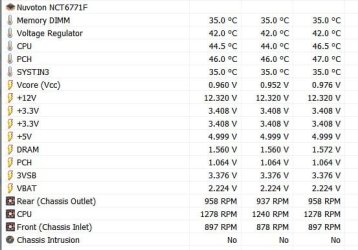
What brand and model of PS? They still seem low.

Here's my numbers from a Seasonic 650W 80+ Gold using HWiNFO64.
 

Attachments

  • Power Supply - Voltage.JPG
    Power Supply - Voltage.JPG
    44.2 KB · Views: 5

My Computer

Computer type
PC/Desktop
Computer Manufacturer/Model Number
Built 2/11/2011
OS
Windows 7 Pro-x64
CPU
i7-2600 3.4GHz - 3.8GHz Turbo
Motherboard
Intel DH67BL-B3
Memory
8Gb - 2x4GB, Muskin 991770 PC3-1333
Graphics Card(s)
Integrated Intel HD 2000
Sound Card
Integrated Intel 10.1 HD, RealTek ALC892
Monitor(s) Displays
Asus LCD VH222H, Haier HL24XSL2a
Screen Resolution
1920x1080, 1920x1080
Hard Drives
Crucial SSD C300-128Gb,
Western Digital WD5002AALX - 500Gb,
Western Digital WD7501AALS - 750Gb
PSU
Seasonic 650W 80+ Gold Modular
Case
Rosewill Defender
Cooling
Stock CPU, Four 120mm case fans, PCH fan added
Keyboard
Logitech EX100 Y-RBH94 Wireless
Mouse
Logitech EX100 M-RCE95 Wireless
Internet Speed
3.0/1.5 Mbs
Antivirus
Microsoft Security Essentials
Browser
Microsoft Internet Explorer 11
Other Info
Antec Veris Premier-Multimedia IR Station,
Cyber Accoustics-3602 Speakers,
AFT XM-5U Card Reader,
Hauppauge TV-HVR-2250,
Sony LX300 USB Turntable
Well apparently not a good unbranded one, still I don't see how it works fine with other people's equipment and not with this computer.

I'll wait until Friday and replace this with Seasonic or Codegen.


Thanks again for your help! :)
 

My Computer

Computer type
PC/Desktop
OS
Windows 7 Ultimate x64
CPU
AMD Sempron 145, 2800 MHz (14 x 200)
Motherboard
ASRock N68-VS3 FX (nVIDIA nForce 7025-630a, AMD K10)
Memory
6 GB Kingston
Graphics Card(s)
NVIDIA GeForce 7025 / NVIDIA nForce 630a (256 MB)
Sound Card
VIA VT1705 @ nVIDIA nForce 7025-630a (MCP68SE)
Monitor(s) Displays
LG E1941 (Analog) [18.5" LCD] (21112731)
Screen Resolution
1366x768
Hard Drives
* SAMSUNG HD161HJ SCSI Disk Device
* Toshiba Canvio 3.0 USB
Keyboard
Microsoft Wireless Desktop 800 keyboard
Mouse
Microsoft Wireless Desktop 800 mouse
Internet Speed
12mbps
Antivirus
avast!
Browser
Google Chrome
So this morning I had the PSU tested. I had it tested at a local store with a voltage tester connected directly to the unit. All numbers were just right.
Just in case, I tested it as well in my old desktop computer (I currently own a laptop). Numbers were okay as well according to HWiNFO.

Before going crazy I gave a call to a technician hoping he would give me advice as I mentioned I would buy something from him. I told him everything I did and he suggested to check the capacitors which might have gone bad, besides other hardware. I followed his advice and couldn't detect anything; not surprised keeping in mind I have an untrained eye on this matter.
He did mention it's not uncommon where I live to have this kind of problems, giving the high rate of humidity we have in this seaside city; and I do recall hearing something like this, somewhere sometime I don't remember.

So I checked several websites and forums, including this: Bad Capacitors: Information and symptoms (maybe you're interested)

To sum up: this might be the cause of these problems.
I really don't feel comfortable dealing with this, so I'll see what I can learn in order to fix it. Otherwise I'll do what I hate the most which is having the unit revised by someone I don't know.


So this might be the end of this thread, I think. I don't know what else to do if it is not this.


I just can't express how thankful I am for your help. Hope I can repay that somewhere along the way.

Regards
 

My Computer

Computer type
PC/Desktop
OS
Windows 7 Ultimate x64
CPU
AMD Sempron 145, 2800 MHz (14 x 200)
Motherboard
ASRock N68-VS3 FX (nVIDIA nForce 7025-630a, AMD K10)
Memory
6 GB Kingston
Graphics Card(s)
NVIDIA GeForce 7025 / NVIDIA nForce 630a (256 MB)
Sound Card
VIA VT1705 @ nVIDIA nForce 7025-630a (MCP68SE)
Monitor(s) Displays
LG E1941 (Analog) [18.5" LCD] (21112731)
Screen Resolution
1366x768
Hard Drives
* SAMSUNG HD161HJ SCSI Disk Device
* Toshiba Canvio 3.0 USB
Keyboard
Microsoft Wireless Desktop 800 keyboard
Mouse
Microsoft Wireless Desktop 800 mouse
Internet Speed
12mbps
Antivirus
avast!
Browser
Google Chrome
Well I had it checked by two people and I was told it is the southbridge that is rising temperature.
Honestly I don't know if I should believe or not, but I think I just ran out of tools to check that myself.

I guess I should find a brand new motherboard with this old socket and replace it.


I want to thank you very much for your help and the time you took to write in this thread.
 

My Computer

Computer type
PC/Desktop
OS
Windows 7 Ultimate x64
CPU
AMD Sempron 145, 2800 MHz (14 x 200)
Motherboard
ASRock N68-VS3 FX (nVIDIA nForce 7025-630a, AMD K10)
Memory
6 GB Kingston
Graphics Card(s)
NVIDIA GeForce 7025 / NVIDIA nForce 630a (256 MB)
Sound Card
VIA VT1705 @ nVIDIA nForce 7025-630a (MCP68SE)
Monitor(s) Displays
LG E1941 (Analog) [18.5" LCD] (21112731)
Screen Resolution
1366x768
Hard Drives
* SAMSUNG HD161HJ SCSI Disk Device
* Toshiba Canvio 3.0 USB
Keyboard
Microsoft Wireless Desktop 800 keyboard
Mouse
Microsoft Wireless Desktop 800 mouse
Internet Speed
12mbps
Antivirus
avast!
Browser
Google Chrome
Back
Top