Drivers for Sony Memory Stick Reader/Writer MSAC-US1A on Windows 7.

Roboticon

New member
Local time
2:29 AM
Messages
5
I am using Windows 7 Home Premium 64-bit. I've been trying to install a Sony Memory Stick Reader/Writer MSAC-US1A but every time I do, it says that it cannot find the drivers. I've attempted to download and install some versions of the drivers meant for older versions of Windows, but those didn't work either.

Is there any way to find a driver that will allow me to use a Sony Memory Stick Reader/Writer MSAC-US1A on Windows 7?
 

My Computer My Computer

At a glance

Windows 7 Home Premium 64bit
Computer Manufacturer/Model Number
HP Pavilion dv6-3020us Entertainment Notebook
OS
Windows 7 Home Premium 64bit
I am using Windows 7 Home Premium 64-bit. I've been trying to install a Sony Memory Stick Reader/Writer MSAC-US1A but every time I do, it says that it cannot find the drivers. I've attempted to download and install some versions of the drivers meant for older versions of Windows, but those didn't work either.

Is there any way to find a driver that will allow me to use a Sony Memory Stick Reader/Writer MSAC-US1A on Windows 7?


Welcome to the forum,

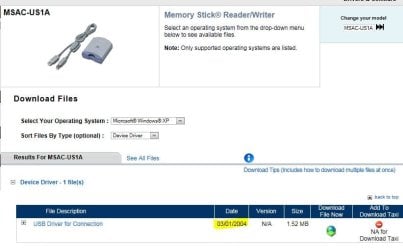
All I see is an XP Driver here,

Sony eSupport - MSAC-US1A - Software Updates & Drivers

You can try installing in http://www.sevenforums.com/tutorials/316-compatibility-mode.html
 

My Computer My Computer

At a glance

Win 10 Pro x64Intel I5-2500K @3.3GHz16GB G.Skill Ripjaws X (4x4GB)EVGA GeForce 750 Ti SC 2GB
Computer type
PC/Desktop
Computer Manufacturer/Model Number
Self Built
OS
Win 10 Pro x64
CPU
Intel I5-2500K @3.3GHz
Motherboard
Asrock P67 Extreme4
Memory
16GB G.Skill Ripjaws X (4x4GB)
Graphics Card(s)
EVGA GeForce 750 Ti SC 2GB
Sound Card
ASUS Xonar DG 5.1 Channels 24-bit 96KHz PCI Interface Sound
Monitor(s) Displays
auria eq2367
Screen Resolution
1920 x 1080
Hard Drives
250GB Samsung 850 EVO SSD
1TB WD Blue
1TB Hitachi
PSU
SeaSonic X 650W 80 Plus Gold
Case
Corsair Obsidian 750D
Cooling
Corsair H60, Three 140mm case fans
Keyboard
Logitech Wireless Keyboard K520
Mouse
Logitech Wireless Mouse M310
Internet Speed
Wave Broadband ~ 100 dn 5 up
Antivirus
Windows Defender, Malwarebytes Premium
Browser
Edge, IE11, Chrome
Other Info
Laptop specs: HP g7-1365dx /
CPU: AMD A6-3420M APU with Radeon(tm) HD Graphics /
RAM: Crucial 8Gb (2x4Gb) /
SSD: Crucial M4-CT128M4SSD2 ATA Device/ FW 000F /
GFX: AMD Radeon HD 6520G /
OS: Windows 10 Pro x64
Thanks for the reply. But that didn't work. I had already tried installing the old Sony Drivers, but those don't seem to work. When I plug in the Memory Stick Reader my computer still doesn't recognize it and says that it can't find the drivers for it.
 

My Computer My Computer

At a glance

Windows 7 Home Premium 64bit
Computer Manufacturer/Model Number
HP Pavilion dv6-3020us Entertainment Notebook
OS
Windows 7 Home Premium 64bit
Thanks for the reply. But that didn't work. I had already tried installing the old Sony Drivers, but those don't seem to work. When I plug in the Memory Stick Reader my computer still doesn't recognize it and says that it can't find the drivers for it.

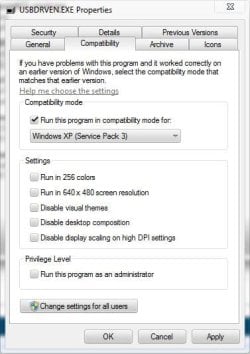
You tried compatibility mode? For XP?
 

Attachments

  • Capture.JPG
    Capture.JPG
    38.9 KB · Views: 42

My Computer My Computer

At a glance

Win 10 Pro x64Intel I5-2500K @3.3GHz16GB G.Skill Ripjaws X (4x4GB)EVGA GeForce 750 Ti SC 2GB
Computer type
PC/Desktop
Computer Manufacturer/Model Number
Self Built
OS
Win 10 Pro x64
CPU
Intel I5-2500K @3.3GHz
Motherboard
Asrock P67 Extreme4
Memory
16GB G.Skill Ripjaws X (4x4GB)
Graphics Card(s)
EVGA GeForce 750 Ti SC 2GB
Sound Card
ASUS Xonar DG 5.1 Channels 24-bit 96KHz PCI Interface Sound
Monitor(s) Displays
auria eq2367
Screen Resolution
1920 x 1080
Hard Drives
250GB Samsung 850 EVO SSD
1TB WD Blue
1TB Hitachi
PSU
SeaSonic X 650W 80 Plus Gold
Case
Corsair Obsidian 750D
Cooling
Corsair H60, Three 140mm case fans
Keyboard
Logitech Wireless Keyboard K520
Mouse
Logitech Wireless Mouse M310
Internet Speed
Wave Broadband ~ 100 dn 5 up
Antivirus
Windows Defender, Malwarebytes Premium
Browser
Edge, IE11, Chrome
Other Info
Laptop specs: HP g7-1365dx /
CPU: AMD A6-3420M APU with Radeon(tm) HD Graphics /
RAM: Crucial 8Gb (2x4Gb) /
SSD: Crucial M4-CT128M4SSD2 ATA Device/ FW 000F /
GFX: AMD Radeon HD 6520G /
OS: Windows 10 Pro x64
Oh yeah, I looked into that, but when I go to the Compatibility Mode thing, it's greyed out, so it seems I can't use it.
 

My Computer My Computer

At a glance

Windows 7 Home Premium 64bit
Computer Manufacturer/Model Number
HP Pavilion dv6-3020us Entertainment Notebook
OS
Windows 7 Home Premium 64bit
Oh yeah, I looked into that, but when I go to the Compatibility Mode thing, it's greyed out, so it seems I can't use it.

Yeah, mine was too till I put a check in the box, give that a try.

I have the same version you do, Home Prem. x64.
 

My Computer My Computer

At a glance

Win 10 Pro x64Intel I5-2500K @3.3GHz16GB G.Skill Ripjaws X (4x4GB)EVGA GeForce 750 Ti SC 2GB
Computer type
PC/Desktop
Computer Manufacturer/Model Number
Self Built
OS
Win 10 Pro x64
CPU
Intel I5-2500K @3.3GHz
Motherboard
Asrock P67 Extreme4
Memory
16GB G.Skill Ripjaws X (4x4GB)
Graphics Card(s)
EVGA GeForce 750 Ti SC 2GB
Sound Card
ASUS Xonar DG 5.1 Channels 24-bit 96KHz PCI Interface Sound
Monitor(s) Displays
auria eq2367
Screen Resolution
1920 x 1080
Hard Drives
250GB Samsung 850 EVO SSD
1TB WD Blue
1TB Hitachi
PSU
SeaSonic X 650W 80 Plus Gold
Case
Corsair Obsidian 750D
Cooling
Corsair H60, Three 140mm case fans
Keyboard
Logitech Wireless Keyboard K520
Mouse
Logitech Wireless Mouse M310
Internet Speed
Wave Broadband ~ 100 dn 5 up
Antivirus
Windows Defender, Malwarebytes Premium
Browser
Edge, IE11, Chrome
Other Info
Laptop specs: HP g7-1365dx /
CPU: AMD A6-3420M APU with Radeon(tm) HD Graphics /
RAM: Crucial 8Gb (2x4Gb) /
SSD: Crucial M4-CT128M4SSD2 ATA Device/ FW 000F /
GFX: AMD Radeon HD 6520G /
OS: Windows 10 Pro x64
By default, the box is already checked, but it's still greyed out. Does that mean I can't use it?
 

My Computer My Computer

At a glance

Windows 7 Home Premium 64bit
Computer Manufacturer/Model Number
HP Pavilion dv6-3020us Entertainment Notebook
OS
Windows 7 Home Premium 64bit
By default, the box is already checked, but it's still greyed out. Does that mean I can't use it?

Can you click apply at the bottom?

You can also just right click and select troubleshoot compatibility and see if that works.
 

Attachments

  • Capture.JPG
    Capture.JPG
    34.2 KB · Views: 11

My Computer My Computer

At a glance

Win 10 Pro x64Intel I5-2500K @3.3GHz16GB G.Skill Ripjaws X (4x4GB)EVGA GeForce 750 Ti SC 2GB
Computer type
PC/Desktop
Computer Manufacturer/Model Number
Self Built
OS
Win 10 Pro x64
CPU
Intel I5-2500K @3.3GHz
Motherboard
Asrock P67 Extreme4
Memory
16GB G.Skill Ripjaws X (4x4GB)
Graphics Card(s)
EVGA GeForce 750 Ti SC 2GB
Sound Card
ASUS Xonar DG 5.1 Channels 24-bit 96KHz PCI Interface Sound
Monitor(s) Displays
auria eq2367
Screen Resolution
1920 x 1080
Hard Drives
250GB Samsung 850 EVO SSD
1TB WD Blue
1TB Hitachi
PSU
SeaSonic X 650W 80 Plus Gold
Case
Corsair Obsidian 750D
Cooling
Corsair H60, Three 140mm case fans
Keyboard
Logitech Wireless Keyboard K520
Mouse
Logitech Wireless Mouse M310
Internet Speed
Wave Broadband ~ 100 dn 5 up
Antivirus
Windows Defender, Malwarebytes Premium
Browser
Edge, IE11, Chrome
Other Info
Laptop specs: HP g7-1365dx /
CPU: AMD A6-3420M APU with Radeon(tm) HD Graphics /
RAM: Crucial 8Gb (2x4Gb) /
SSD: Crucial M4-CT128M4SSD2 ATA Device/ FW 000F /
GFX: AMD Radeon HD 6520G /
OS: Windows 10 Pro x64
I tried those methods and Windows is still unsuccessful at finding or installing drivers for the Memory Stick Reader/Writer. I'm thinking I just have to accept that this Sony Memory Stick Reader/Writer simply can't be used on Windows 7.
 

My Computer My Computer

At a glance

Windows 7 Home Premium 64bit
Computer Manufacturer/Model Number
HP Pavilion dv6-3020us Entertainment Notebook
OS
Windows 7 Home Premium 64bit
I tried those methods and Windows is still unsuccessful at finding or installing drivers for the Memory Stick Reader/Writer. I'm thinking I just have to accept that this Sony Memory Stick Reader/Writer simply can't be used on Windows 7.

Sorry I couldn't be more help, that driver is over 7 years old so maybe it's time to upgrade the reader.
 

Attachments

  • Capture.JPG
    Capture.JPG
    45.1 KB · Views: 38

My Computer My Computer

At a glance

Win 10 Pro x64Intel I5-2500K @3.3GHz16GB G.Skill Ripjaws X (4x4GB)EVGA GeForce 750 Ti SC 2GB
Computer type
PC/Desktop
Computer Manufacturer/Model Number
Self Built
OS
Win 10 Pro x64
CPU
Intel I5-2500K @3.3GHz
Motherboard
Asrock P67 Extreme4
Memory
16GB G.Skill Ripjaws X (4x4GB)
Graphics Card(s)
EVGA GeForce 750 Ti SC 2GB
Sound Card
ASUS Xonar DG 5.1 Channels 24-bit 96KHz PCI Interface Sound
Monitor(s) Displays
auria eq2367
Screen Resolution
1920 x 1080
Hard Drives
250GB Samsung 850 EVO SSD
1TB WD Blue
1TB Hitachi
PSU
SeaSonic X 650W 80 Plus Gold
Case
Corsair Obsidian 750D
Cooling
Corsair H60, Three 140mm case fans
Keyboard
Logitech Wireless Keyboard K520
Mouse
Logitech Wireless Mouse M310
Internet Speed
Wave Broadband ~ 100 dn 5 up
Antivirus
Windows Defender, Malwarebytes Premium
Browser
Edge, IE11, Chrome
Other Info
Laptop specs: HP g7-1365dx /
CPU: AMD A6-3420M APU with Radeon(tm) HD Graphics /
RAM: Crucial 8Gb (2x4Gb) /
SSD: Crucial M4-CT128M4SSD2 ATA Device/ FW 000F /
GFX: AMD Radeon HD 6520G /
OS: Windows 10 Pro x64
I have a Sony PDF-150 Broadcast DV Camcorder that came with the MSAC-US1. I had the same problems in getting Windows 7 to recognize this device until I loaded Virtual PC, XP Mode. Plug in the device when Windows XP mode is running. Try it, it worked for me and the device is up and running again.
 

My Computer My Computer

At a glance

Windows 7 Professional 32biti74GBNVIDIA NVS 3100M
Computer Manufacturer/Model Number
Dell Latitude E6510
OS
Windows 7 Professional 32bit
CPU
i7
Memory
4GB
Graphics Card(s)
NVIDIA NVS 3100M
Back
Top