drivers included??

Razzputin

New member
Member
Local time
10:56 PM
Messages
91
Hi Noobie here,
I want to do a clean install from Vista home premium to 7 ultimate 32 bit.
If I boot from the CD is everything there I need to do the install into my HP laptop?
I tried an upgrade and it said it failed?? so I will attempt a clean install and then reload all my software/applications etc after.
any info appreciated,
regards
Razz.
 

My Computer

Computer Manufacturer/Model Number
hp pavilion dv9700
OS
windows 7 ultimate was Vista home premium
Motherboard
Quanta 30 d1
Memory
3072 MBs
Graphics Card(s)
NVIDIA GeForce 7150M / nForce 630M
Screen Resolution
1140 x 900
PSU
AMD Turion 64 X2 Mobile Technology TL-60 2000 Mhz
Run Windows 7 Upgrade Advisor (link is given in above post)

Or fill in your system specs: http://www.sevenforums.com/profile.php?do=extra (So we can look up it for you)

And also did it just say upgrade is failed or anything else, like why it is failed?
 

My Computer

OS
Windows 7 Ultimate x86 SP1
Hi Noobie here,
I want to do a clean install from Vista home premium to 7 ultimate 32 bit.
If I boot from the CD is everything there I need to do the install into my HP laptop?
I tried an upgrade and it said it failed?? so I will attempt a clean install and then reload all my software/applications etc after.
any info appreciated,
regards
Razz.

This is going to be very easy Go to the microsoft site to download upgrade advisor. After using it for a few minutes, you will know about any incompatibilities or known problems based upon the specs and programs of your personal computer. Once and incompatibilities are straightned out. Go to the Microsoft site, again for Windows Easy Transfer. With this transfer it is very easy to transfer everything, except programs to an external source, flash drive, dvd, hard drive etc, for later transfer back to your new OS. To be safe, I would also make a back up of everything, if things can go wrong they always will. Now you are ready. Go to Bios, by tapping an f key (check your computer manual for which one. With Dell it is f12) repeatedly and quickly, before the splash screen comes up. Once in Bios just change boot order from hard drive to DVD/CD. You are now ready to go. Turn off your machine, put the DVD in the drive and boot up. You are now in the DVD, not your OS. Just follow the screens, but when asked for your key, just ignore the request. When you get to the screen that asks upgrade or custom or advanced, go advanced. click format and change any partition set up that you want. Now go back to the prior instructions and click on custom. Just follow the instrucions. When done, do not give your key. Try it, enjoy it and install your programs. Once you are happy with the setup give your key, it should be done within 30 days, but extensions are possible.

Windows 7 is great most drivers and everything else that you need will be included with the download, make sure you are on the net during the install, but have everything, but mouse, keyboard and monitor disconnected.

Now, just enjoy and OH yes, have a great holiday full of love and happiness. Take care and good luck

 

My Computer

Computer type
PC/Desktop
Computer Manufacturer/Model Number
Dell XPS 420
OS
Windows 10, Home Clean Install
CPU
Intel Core2 processsor Q8200(2.33Ghz 1333FSB) Quad Core Tech
Motherboard
Dell
Memory
6 gb
Graphics Card(s)
ATI Radeon 256MB HD3650
Sound Card
Intergrated 7.1 Channel Audio
Monitor(s) Displays
Dell SP2009W 20"
Hard Drives
640 GB Serial ATA Hard drive
Cooling
Fan
Keyboard
Dell USB Keyboard
Mouse
Dell Premium Optical USB
Internet Speed
DSL 2.85
The Win7 installer is mostly driver-complete, and will add drivers/updates during install if you select "connect to internet during install" and keep ethernet plugged. More will arrive afterwards via Windows Updates.

If any are drivers then missing in Device Manager, look on the Support Downloads page for your computer model, where there should also be any favorite apps. If you are using an upgrade kit, most come with a drivers/apps disk to choose from.

Boot from the Win7 DVD, select Custom install, then used Drive tools to delete, create new Partition(s) as you wish, then format before installing Win7 to first partition.
 
Hi Noobie here,
I want to do a clean install from Vista home premium to 7 ultimate 32 bit.
If I boot from the CD is everything there I need to do the install into my HP laptop?
I tried an upgrade and it said it failed?? so I will attempt a clean install and then reload all my software/applications etc after.
any info appreciated,
regards
Razz.

Are you using a Retail DVD, or an Upgrade Disc?

If its Upgrade, here's a tutorial for you to follow.:
http://www.sevenforums.com/tutorials/31402-clean-install-upgrade-windows-7-version.html

Retail install Tutorial here:
http://www.sevenforums.com/tutorials/1649-clean-install-windows-7-a.html
 

My Computer

Computer Manufacturer/Model Number
Custom Build
OS
W7 RTM Ultimate x64
CPU
Intel Q8400 @ 2.66GHZ
Motherboard
Gigabyte GA-EG45M-UD2H
Memory
4GB DDR2-800
Graphics Card(s)
Gainward GTS 450 GLH 1GB Edition
Sound Card
Integrated 8 Channel
Monitor(s) Displays
AOC 23.6 Inch Widescreen LCD
Screen Resolution
1920x1080
Hard Drives
Seagate 500GB Internal
Western Digital 1TB Internal

Hitachi 1TB External
PSU
Apevia Java Power 500W
Case
Cooler Master HAF 922 Black
Cooling
Stock Intel CPU Fan
Keyboard
HP SK-2960 Multimedia Keyboard
Mouse
Logitech M350 Wireless Gaming Mouse
Internet Speed
1.5MB
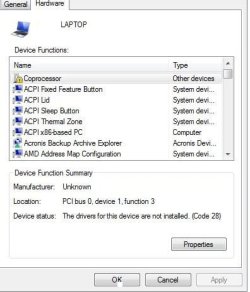
Thanks for all the help. :) I seem to have done it. The only thing is I am unable to install an nvida/geforce driver. I have d/l them but it will not install , so I get a message saying the coprocessor update failed, no driver is installed?? i hate to ask for more help, but .....
 

My Computer

Computer Manufacturer/Model Number
hp pavilion dv9700
OS
windows 7 ultimate was Vista home premium
Motherboard
Quanta 30 d1
Memory
3072 MBs
Graphics Card(s)
NVIDIA GeForce 7150M / nForce 630M
Screen Resolution
1140 x 900
PSU
AMD Turion 64 X2 Mobile Technology TL-60 2000 Mhz
Check Windows Updates. What did the installer give for chipset?

Installer or Updates are normally current as MS paid manufacturers to build Win7 drivers, so they have them first.

Please fill out your System Specs so we can help you. Use link in bottom left of post.
 
MS listed 15.35 nforce7 32 bit international whql
sp45872

neither with finish install or install correctly (code 28)
thanks for the interest.
 

My Computer

Computer Manufacturer/Model Number
hp pavilion dv9700
OS
windows 7 ultimate was Vista home premium
Motherboard
Quanta 30 d1
Memory
3072 MBs
Graphics Card(s)
NVIDIA GeForce 7150M / nForce 630M
Screen Resolution
1140 x 900
PSU
AMD Turion 64 X2 Mobile Technology TL-60 2000 Mhz
Need exact error message.

What drivers are actually missing in Device manager?

Are you using Driver tab on device to Search Automatically (online) for drivers?

The Support Downloads page for dv9700 shows an Intel chipset rather than nForce, so are you only referring to the video driver here?

If so, try the earlier version on the Downloads page here: HP Pavilion dv9700 Entertainment Notebook PC series- Download drivers and software - HP Business Support Center

Get any other missing drivers/apps here too.
 
Have exclamation point on computer in device manager.
run trouble shoot ,says driver missing,
run apply fix, downloads driver,
try to install, pop up says not successful.
No driver Coprocessor installed .
troubleshoot again repeats.
I also got the driver from hp to try and it did not install.

HTH
Razz

Have AMD turion installed if that helps.
 

My Computer

Computer Manufacturer/Model Number
hp pavilion dv9700
OS
windows 7 ultimate was Vista home premium
Motherboard
Quanta 30 d1
Memory
3072 MBs
Graphics Card(s)
NVIDIA GeForce 7150M / nForce 630M
Screen Resolution
1140 x 900
PSU
AMD Turion 64 X2 Mobile Technology TL-60 2000 Mhz
Which exact Device in Device manager is showing the error?

Please give its exact name.

Now click it's Driver tab and select Auto install and report exact wording of results message.

You never replied whether this is an Upgrade Kit from your computer maker. If so there should be a drivers/apps CD which you can put in the drive and browse from Device Manager to find the missing driver.

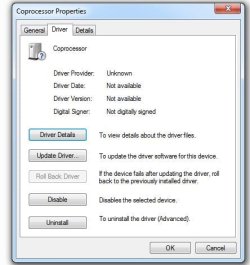
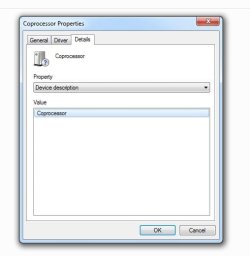
Otherwise we need to know the exact Device name as listed Device's General tab,then go into the Details tab and post the whole Device ID (like example :PCI\VEN_8086&DEV_2940&SUBSYS_00000000 etc.) .
 
will look now.
no i bought this 7 ultimate from the computer shop.
 

My Computer

Computer Manufacturer/Model Number
hp pavilion dv9700
OS
windows 7 ultimate was Vista home premium
Motherboard
Quanta 30 d1
Memory
3072 MBs
Graphics Card(s)
NVIDIA GeForce 7150M / nForce 630M
Screen Resolution
1140 x 900
PSU
AMD Turion 64 X2 Mobile Technology TL-60 2000 Mhz
is this what you need?
 

Attachments

  • hpp.JPG
    hpp.JPG
    34 KB · Views: 10

My Computer

Computer Manufacturer/Model Number
hp pavilion dv9700
OS
windows 7 ultimate was Vista home premium
Motherboard
Quanta 30 d1
Memory
3072 MBs
Graphics Card(s)
NVIDIA GeForce 7150M / nForce 630M
Screen Resolution
1140 x 900
PSU
AMD Turion 64 X2 Mobile Technology TL-60 2000 Mhz
When you look at the Device Manager main windows, there should be a listing for the missing device. When you click on the Device, there should be a hardware name for the Device either on the General (front) tab or the Details tab.

Coprocessor is not enough to go on. There needs to be a hardware name or we need to scan for missing hardware another way.

Did you check Windows Updates for any incoming drivers?
 
here are more
 

Attachments

  • hppp.JPG
    hppp.JPG
    32 KB · Views: 8
  • hpppp.JPG
    hpppp.JPG
    35.1 KB · Views: 6
  • lo.JPG
    lo.JPG
    25.6 KB · Views: 5

My Computer

Computer Manufacturer/Model Number
hp pavilion dv9700
OS
windows 7 ultimate was Vista home premium
Motherboard
Quanta 30 d1
Memory
3072 MBs
Graphics Card(s)
NVIDIA GeForce 7150M / nForce 630M
Screen Resolution
1140 x 900
PSU
AMD Turion 64 X2 Mobile Technology TL-60 2000 Mhz
ms troubleshoots and only suggests the drivers i posted earlier.
 

My Computer

Computer Manufacturer/Model Number
hp pavilion dv9700
OS
windows 7 ultimate was Vista home premium
Motherboard
Quanta 30 d1
Memory
3072 MBs
Graphics Card(s)
NVIDIA GeForce 7150M / nForce 630M
Screen Resolution
1140 x 900
PSU
AMD Turion 64 X2 Mobile Technology TL-60 2000 Mhz
Which troubleshooter are you using?

Did you check Windows Updates?

If the full correct model number of your computer is hp pavilion dv9700 then it shows on its Downloads page that it has Intel chipset.

So why is there an attempt to install an Nvidia driver for the co-processor? Or is this Nvidia driver provided for your Graphics card?

I asked you about this earlier and got no response. I also asked you if you were Clicking the Driver tab on the Co-Processor in Device manager and having it attempt to Update driver automatically?

Also try having Driver tab Update your driver by browsing the full C: drive.
 
windows troubleshooter and yes i checked windows updates.
 

My Computer

Computer Manufacturer/Model Number
hp pavilion dv9700
OS
windows 7 ultimate was Vista home premium
Motherboard
Quanta 30 d1
Memory
3072 MBs
Graphics Card(s)
NVIDIA GeForce 7150M / nForce 630M
Screen Resolution
1140 x 900
PSU
AMD Turion 64 X2 Mobile Technology TL-60 2000 Mhz
thank gregrocker. i went through each step and when i had it search my nvida folder on "c" it appears to have worked as the !! point is gone.
thank you very much and have a good Christmas for you and your family
regards
razz.
 

My Computer

Computer Manufacturer/Model Number
hp pavilion dv9700
OS
windows 7 ultimate was Vista home premium
Motherboard
Quanta 30 d1
Memory
3072 MBs
Graphics Card(s)
NVIDIA GeForce 7150M / nForce 630M
Screen Resolution
1140 x 900
PSU
AMD Turion 64 X2 Mobile Technology TL-60 2000 Mhz
Back
Top