Drivers missing and not available!

stevephoto

New member
Local time
10:24 PM
Messages
3
I have recently upgraded from Vista to Window 7 on my Acer Aspire 5520. The changeover went smoothly, except I can't burn a cd or dvd.

I have opened the device manager and it is reporting 2 devices in "other devices"(base system device-PCI bus 1, device 4, function 3) do not have drivers installed (code 28)

I have tried searching locally and online using driver update, but this only reports that no drivers are available. I have also read info from the Acer, Microsoft sites etc. without any help.

Any guidance would be greatly appreciated.
 

My Computer

OS
windows 7
I have an Acer 7720 that I upgraded from Vista Home 32 bit to Win 7 Home 32 bit. No problems and the CD/DVD burner drive is OK. I did have to uninstall the NTI burning software as Win 7 flagged that as incompatible. But, I installed Nero 9 and no problems.

Uninstall the "other devices" in the Device Manager and also the CD/DVD burner drive then restart the PC and Windows should detect the devices and if you are lucky it will install them.

There are no extra drivers for CD/DVD drives just the default built in Windows (Microsoft) drivers.
 

My Computer

Computer type
PC/Desktop
Computer Manufacturer/Model Number
My Own Build
OS
Windows 10 64 bit
CPU
Intel i7 6700K
Motherboard
ASUS ROG Maximus VIII Hero
Memory
16GB Corsair Dominator
Graphics Card(s)
Intel CPU Graphics
Sound Card
RealTek
Monitor(s) Displays
27" Dell S2719dgf
Screen Resolution
2560X1440
Hard Drives
1 TB Samsung 850 EVO SSD for Win 10 Pro
500GB Samsung 850 EVO SSD for Win 10 Insider
2 TB drive for backup
PSU
EVGA Supernova 750G2
Case
BeQuiet Silent Base 600
Cooling
Deepcool Captain 120EX
Keyboard
Microsoft Wireless 2000
Mouse
Microsoft wireless
Internet Speed
100 MB/sec (Cable)
Antivirus
Microsoft Defender and Malwarebytes
Browser
Edge/Firefox
Other Info
Cakewalk (Sonar) by BandLab and Studio One 4.1 Pro recording studio software. MOTU 896Mk3 Hybrid recording interface, Frontier Tranzport wireless control unit, Behringer X-Touch Control Surface.
Five USB connected optical drives for CD Audio production using Nero BurningROM
I have recently upgraded from Vista to Window 7 on my Acer Aspire 5520. The changeover went smoothly, except I can't burn a cd or dvd.

I have opened the device manager and it is reporting 2 devices in "other devices"(base system device-PCI bus 1, device 4, function 3) do not have drivers installed (code 28)

I have tried searching locally and online using driver update, but this only reports that no drivers are available. I have also read info from the Acer, Microsoft sites etc. without any help.

Any guidance would be greatly appreciated.

Steve

You can use the vista driver if you install them in compatibility mode. To do that download the correct driver (either 32bit or 64) and right click the installer>properties>compatibilty mode>check vista


Hope this helps


Ken J+
 

My Computer

Computer Manufacturer/Model Number
HP Pavillion dv-7 1005 Tx
OS
Win 8 Release candidate 8400
CPU
[email protected]
Memory
4 gigs
Graphics Card(s)
Nvidia 9600M
Sound Card
HD built-in
Monitor(s) Displays
17" Wxga
Screen Resolution
1440x900
Cooling
none
Internet Speed
45Mb down 5Mb up
Still no luck!!!

Thanks for trying folks, but still no joy.

I tried uninstalling and rebooting, but once again windows reported that no driver was available to reinstall.

I would try the Vista compatibility trick, but I have to have the old file to start with, which doesn't seem to exist on any search.

I have already tried contacting Acer, but they just sent me the usual fixed answers on drivers from their site, none of which were any help.
 

My Computer

OS
windows 7
Thanks mate, but i've already been there, nothing of any help to my situation.
 

My Computer

OS
windows 7
Have tried to install the drivers from Acer?
 

My Computer

OS
ME/XP/Vista/Win7
found and solved

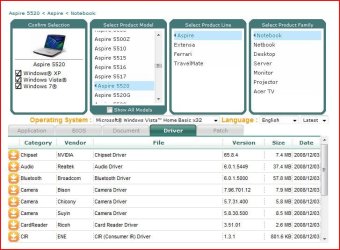
Hey I have the same machine the Acer Aspire 5520. I had this error and have now resolved it. I installed the "CardReader Ricoh Card Reader Driver (R5C833) 6.10.01.03"
located at this site and that has resolved the problem.

Service & Support

Also based on the above screen shot you still had Windows Vista listed as your OS make sure you change that drop down list to reflect the correct OS. That could have been your problem there.
 

My Computer

Computer Manufacturer/Model Number
Acer Aspire 5520
OS
Windows 7 Ultimate 32bit
CPU
Turion 64x2 2.0GHz
Memory
2gb
Graphics Card(s)
nvidia7000m
Monitor(s) Displays
onboard
Back
Top