Drivers not installing correctly

LoneGeek

New member
Local time
7:07 PM
Messages
26
I am downgrading from win 10 to win 7 on this laptop and everything has been fine until I started installing drivers, almost every driver I install doesn't seem to install correctly... this has never happened before to me i'm just baffled! After install, the driver doesn't update like it usually does so it still shows in device manager that it isn't installed. I don't know what to do, I know they are the correct drivers since I used the detection tool from HP.
 

My Computer

Computer type
Laptop
Computer Manufacturer/Model Number
Asus
OS
Windows 7 Pro x64
Hello Lonegeek mate just a little something I do when stuck like that is to download the drivers to a stick and then onto the machine you want them on. You need access to another machine of course to access the machines support site but thats a quick way.

By the by some systems specs would help mate
http://www.sevenforums.com/tutorials/180324-system-info-see-your-system-specs.html if we had them we could link the site for drivers for you.
 

My Computer

Computer type
PC/Desktop
Computer Manufacturer/Model Number
Own build (new) Desk1 / Asus ROG Win 7 / Desk2 1st build
OS
Desk1 7 Home Prem / Desk2 10 Pro / Main lap Asus ROG 10 Pro 2 laptop Toshiba 7 Pro Asus P2520 7 & 10
CPU
Desk1 i5 3750K / Laptop i7 GTX 860M / Desk2 i5 2500
Motherboard
Desk1 Asus P877-V / Desk2 Gigabyte H67 UD3H / Laptop ?
Memory
Desk1 8GB (1866) / Desk2 16GB (1333) / Laptop 8Gb DDR3
Graphics Card(s)
Desk 1& 2NVidia GTX 650 & Laptops on board Intel
Sound Card
Desk 1 & 2 -XONAR DG Realtek High Def audio Laptop
Monitor(s) Displays
Desk 1 Benq HD 2450 / Desk2 Philips 24" / Laptop 17.5"
Screen Resolution
1920x1080 D1 & D2 & Laptop 1
Hard Drives
Desk1 Samsung 120GB 830 SSD
Asus ROG 256GB 850 Pro SSD
Desk2 Samsung 840 256 SSD
Toshiba 120GB EVO
PSU
Desk 1 Corsair HX 1050/ Laptop ? / Desk 2 Corsair HX 650
Case
Desk 1 Cooler HAF XM ? Toshiba laptop / Desk2 Coolermaster
Cooling
Fans on all Desk1 -2 Desk2 - all Coolermasters 5 Laptop ?
Keyboard
Desk 1 MS Sidewinder X6 Desk 2 MS Sidewinder X 4
Mouse
Desk 1&2 - Gigabyte MS 900 gamer - laptop - Logitec wireless
Internet Speed
ADSL2+
Other Info
One other Desktop (tester) and spare Toshba laptop both with SSD's
Running Kaspersky 2016 ISS on all machines config'd identically
Logitec audio stereo systems on each machine (x3)
Canon MG5250MFC
Router/modem TP-Link running WPA2SK
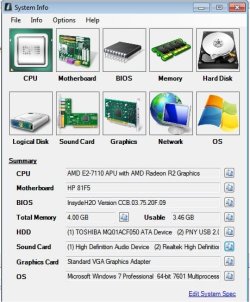
Here's a screenshot of the system info
 

Attachments

  • Image1.jpg
    Image1.jpg
    47.9 KB · Views: 24

My Computer

Computer type
Laptop
Computer Manufacturer/Model Number
Asus
OS
Windows 7 Pro x64
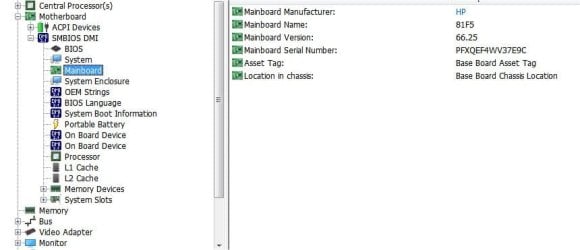
Mate could you just confirm the machine model and make please because the motherboard had HP on it and I just want to make sure that is Asus's motherboard number.

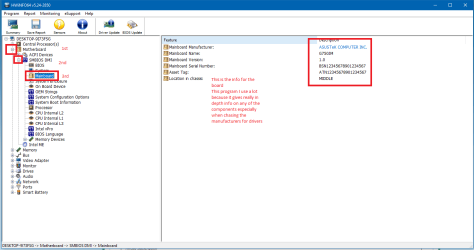
If you run this you can get much more info on the machine see pic of mine
Using HW Info
PART A:
You can test the volts on the PSU with HW Info HWiNFO, HWiNFO32/64 - Download < download the right bit version and close the right hand window select Sensors and scroll down to the power section where you will see what the volts are doing see my pic. In my pic the section (Nuvoton) with VBATT is a dead give away you are in the section for the rail voltages. There are other section titles and one that pops up often is ITE
Now the voltage on the different rails have to be within 5% =+/- of what is required or the machine will not work properly if at all.
IE
12v = 11.4v min to 12.6max
5v = 4.75v min 5.25v max
3.3v = 3.135v min to 3.465v max
See this for the rail voltage info
PSUs 101: A Detailed Look Into Power Supplies (Section 2.)
The original right hand window shows the machine running and is handy for that but for looking at the components in some detail close it and use the main left hand side panel
FOR OTHER COMPONENTS
PART B:
Open each small square with + in it on the section the components are in and then click on the individual component/s (it will highlight in blue) - in the right hand side will appear all sorts of details including brands speeds and other essential info that particular device. See pic for example.

Use PART B: and click on the motherboard where I have

 

Attachments

  • HW MOBO INFO.PNG
    HW MOBO INFO.PNG
    28.5 KB · Views: 3

My Computer

Computer type
PC/Desktop
Computer Manufacturer/Model Number
Own build (new) Desk1 / Asus ROG Win 7 / Desk2 1st build
OS
Desk1 7 Home Prem / Desk2 10 Pro / Main lap Asus ROG 10 Pro 2 laptop Toshiba 7 Pro Asus P2520 7 & 10
CPU
Desk1 i5 3750K / Laptop i7 GTX 860M / Desk2 i5 2500
Motherboard
Desk1 Asus P877-V / Desk2 Gigabyte H67 UD3H / Laptop ?
Memory
Desk1 8GB (1866) / Desk2 16GB (1333) / Laptop 8Gb DDR3
Graphics Card(s)
Desk 1& 2NVidia GTX 650 & Laptops on board Intel
Sound Card
Desk 1 & 2 -XONAR DG Realtek High Def audio Laptop
Monitor(s) Displays
Desk 1 Benq HD 2450 / Desk2 Philips 24" / Laptop 17.5"
Screen Resolution
1920x1080 D1 & D2 & Laptop 1
Hard Drives
Desk1 Samsung 120GB 830 SSD
Asus ROG 256GB 850 Pro SSD
Desk2 Samsung 840 256 SSD
Toshiba 120GB EVO
PSU
Desk 1 Corsair HX 1050/ Laptop ? / Desk 2 Corsair HX 650
Case
Desk 1 Cooler HAF XM ? Toshiba laptop / Desk2 Coolermaster
Cooling
Fans on all Desk1 -2 Desk2 - all Coolermasters 5 Laptop ?
Keyboard
Desk 1 MS Sidewinder X6 Desk 2 MS Sidewinder X 4
Mouse
Desk 1&2 - Gigabyte MS 900 gamer - laptop - Logitec wireless
Internet Speed
ADSL2+
Other Info
One other Desktop (tester) and spare Toshba laptop both with SSD's
Running Kaspersky 2016 ISS on all machines config'd identically
Logitec audio stereo systems on each machine (x3)
Canon MG5250MFC
Router/modem TP-Link running WPA2SK
Here's a screenshot of my mb info
 

Attachments

  • Image1.jpg
    Image1.jpg
    31.2 KB · Views: 1

My Computer

Computer type
Laptop
Computer Manufacturer/Model Number
Asus
OS
Windows 7 Pro x64

My Computer

Computer type
PC/Desktop
Computer Manufacturer/Model Number
Custom Build
OS
Windows 10 Pro x64
CPU
Core2Quad Q9550 @2.83GHz (o/c @3.82GHz)
Motherboard
ASUS P5K Premium WiFi
Memory
8GB (4x2GB DDR2)
Graphics Card(s)
ASUS ROG STRIX GTX1050 Ti O4G Gaming
Sound Card
Creative Soundblaster X-Fi Platinum
Monitor(s) Displays
ACER ED273WIDX 27"
Screen Resolution
1920 x 1080
Hard Drives
SAMSUNG SSD 840 Series 120GB
SAMSUNG 500GB SATA 7200 rpm
2xWD Velociraptor 150GB 10000 rpm
PSU
600W
Case
CoolerMaster Centurion
Cooling
Cooler Master V8
Keyboard
VPRO V700
Mouse
Logitech G602
Antivirus
Norton IS
Browser
Firefox x64
Ah didn't realise the machine was originally an 8 OS I was rather under the impression that you had done the free upgrade to 10 from 7 it and were now reversing that.

Now after reading that link from georgeks it leaves me wondering if it would be worth getting a new drive and a 64bit 7 Pro OEM and clean installing it. One thing you could do is contact HP support and even Microsoft to find out.
 

My Computer

Computer type
PC/Desktop
Computer Manufacturer/Model Number
Own build (new) Desk1 / Asus ROG Win 7 / Desk2 1st build
OS
Desk1 7 Home Prem / Desk2 10 Pro / Main lap Asus ROG 10 Pro 2 laptop Toshiba 7 Pro Asus P2520 7 & 10
CPU
Desk1 i5 3750K / Laptop i7 GTX 860M / Desk2 i5 2500
Motherboard
Desk1 Asus P877-V / Desk2 Gigabyte H67 UD3H / Laptop ?
Memory
Desk1 8GB (1866) / Desk2 16GB (1333) / Laptop 8Gb DDR3
Graphics Card(s)
Desk 1& 2NVidia GTX 650 & Laptops on board Intel
Sound Card
Desk 1 & 2 -XONAR DG Realtek High Def audio Laptop
Monitor(s) Displays
Desk 1 Benq HD 2450 / Desk2 Philips 24" / Laptop 17.5"
Screen Resolution
1920x1080 D1 & D2 & Laptop 1
Hard Drives
Desk1 Samsung 120GB 830 SSD
Asus ROG 256GB 850 Pro SSD
Desk2 Samsung 840 256 SSD
Toshiba 120GB EVO
PSU
Desk 1 Corsair HX 1050/ Laptop ? / Desk 2 Corsair HX 650
Case
Desk 1 Cooler HAF XM ? Toshiba laptop / Desk2 Coolermaster
Cooling
Fans on all Desk1 -2 Desk2 - all Coolermasters 5 Laptop ?
Keyboard
Desk 1 MS Sidewinder X6 Desk 2 MS Sidewinder X 4
Mouse
Desk 1&2 - Gigabyte MS 900 gamer - laptop - Logitec wireless
Internet Speed
ADSL2+
Other Info
One other Desktop (tester) and spare Toshba laptop both with SSD's
Running Kaspersky 2016 ISS on all machines config'd identically
Logitec audio stereo systems on each machine (x3)
Canon MG5250MFC
Router/modem TP-Link running WPA2SK
Ah didn't realise the machine was originally an 8 OS I was rather under the impression that you had done the free upgrade to 10 from 7 it and were now reversing that.

Now after reading that link from georgeks it leaves me wondering if it would be worth getting a new drive and a 64bit 7 Pro OEM and clean installing it. One thing you could do is contact HP support and even Microsoft to find out.

This laptop came with Windows 10 education from my wife's school. What a hassle :mad:
I am going to complain to HP, cause they install an OS on a machine that can't handle it... with 10 installed the fans are always loud and the computer is kinda slow is why I wanted to downgrade.
 

My Computer

Computer type
Laptop
Computer Manufacturer/Model Number
Asus
OS
Windows 7 Pro x64
Hmm well maybe the machine is just manufactured not to support 7 it is entirely possible I know soem Asus machines cannot have 7 installed on them.

Now it is worry that the fans run fast and the machine is slow it indicates to me at least something wrong with some hardware somewhere. The fan running loud and fast almost always due to high temps on the CPU/ graphics chip.

The slowness could be due to anything really from way too many processes running a the the same time to too many programs being loaded up on power up to an OS that is out of whack.

The other thing that occurred to me too is you say the machine came from a school and I am left wondering if it was an Enterprise OS??
 

My Computer

Computer type
PC/Desktop
Computer Manufacturer/Model Number
Own build (new) Desk1 / Asus ROG Win 7 / Desk2 1st build
OS
Desk1 7 Home Prem / Desk2 10 Pro / Main lap Asus ROG 10 Pro 2 laptop Toshiba 7 Pro Asus P2520 7 & 10
CPU
Desk1 i5 3750K / Laptop i7 GTX 860M / Desk2 i5 2500
Motherboard
Desk1 Asus P877-V / Desk2 Gigabyte H67 UD3H / Laptop ?
Memory
Desk1 8GB (1866) / Desk2 16GB (1333) / Laptop 8Gb DDR3
Graphics Card(s)
Desk 1& 2NVidia GTX 650 & Laptops on board Intel
Sound Card
Desk 1 & 2 -XONAR DG Realtek High Def audio Laptop
Monitor(s) Displays
Desk 1 Benq HD 2450 / Desk2 Philips 24" / Laptop 17.5"
Screen Resolution
1920x1080 D1 & D2 & Laptop 1
Hard Drives
Desk1 Samsung 120GB 830 SSD
Asus ROG 256GB 850 Pro SSD
Desk2 Samsung 840 256 SSD
Toshiba 120GB EVO
PSU
Desk 1 Corsair HX 1050/ Laptop ? / Desk 2 Corsair HX 650
Case
Desk 1 Cooler HAF XM ? Toshiba laptop / Desk2 Coolermaster
Cooling
Fans on all Desk1 -2 Desk2 - all Coolermasters 5 Laptop ?
Keyboard
Desk 1 MS Sidewinder X6 Desk 2 MS Sidewinder X 4
Mouse
Desk 1&2 - Gigabyte MS 900 gamer - laptop - Logitec wireless
Internet Speed
ADSL2+
Other Info
One other Desktop (tester) and spare Toshba laptop both with SSD's
Running Kaspersky 2016 ISS on all machines config'd identically
Logitec audio stereo systems on each machine (x3)
Canon MG5250MFC
Router/modem TP-Link running WPA2SK
Hmm well maybe the machine is just manufactured not to support 7 it is entirely possible I know soem Asus machines cannot have 7 installed on them.

Now it is worry that the fans run fast and the machine is slow it indicates to me at least something wrong with some hardware somewhere. The fan running loud and fast almost always due to high temps on the CPU/ graphics chip.

The slowness could be due to anything really from way too many processes running a the the same time to too many programs being loaded up on power up to an OS that is out of whack.

The other thing that occurred to me too is you say the machine came from a school and I am left wondering if it was an Enterprise OS??

It actually came from staples (brand new) with 10 education pre-installed...10 is just a heavy OS compared to 7 imo.
 

My Computer

Computer type
Laptop
Computer Manufacturer/Model Number
Asus
OS
Windows 7 Pro x64
Ok not sure what education was and personally I resisted 10 for a long time and now have it on three of my machines and I did find it faster than 7 plus I modified all my desktops to get rid of the apps - an unnecessary feature in my view.

Now I have Googled all sorts of places including the annoying HP support sites and I think it comes back to what georgek linked re that probably the machine is not back compatible to 7.

I suppose one thing you could do is contact HP and ask. Just out of interest I am assuming you bought a new 7 OEM? hopefully the Pro version??
 

My Computer

Computer type
PC/Desktop
Computer Manufacturer/Model Number
Own build (new) Desk1 / Asus ROG Win 7 / Desk2 1st build
OS
Desk1 7 Home Prem / Desk2 10 Pro / Main lap Asus ROG 10 Pro 2 laptop Toshiba 7 Pro Asus P2520 7 & 10
CPU
Desk1 i5 3750K / Laptop i7 GTX 860M / Desk2 i5 2500
Motherboard
Desk1 Asus P877-V / Desk2 Gigabyte H67 UD3H / Laptop ?
Memory
Desk1 8GB (1866) / Desk2 16GB (1333) / Laptop 8Gb DDR3
Graphics Card(s)
Desk 1& 2NVidia GTX 650 & Laptops on board Intel
Sound Card
Desk 1 & 2 -XONAR DG Realtek High Def audio Laptop
Monitor(s) Displays
Desk 1 Benq HD 2450 / Desk2 Philips 24" / Laptop 17.5"
Screen Resolution
1920x1080 D1 & D2 & Laptop 1
Hard Drives
Desk1 Samsung 120GB 830 SSD
Asus ROG 256GB 850 Pro SSD
Desk2 Samsung 840 256 SSD
Toshiba 120GB EVO
PSU
Desk 1 Corsair HX 1050/ Laptop ? / Desk 2 Corsair HX 650
Case
Desk 1 Cooler HAF XM ? Toshiba laptop / Desk2 Coolermaster
Cooling
Fans on all Desk1 -2 Desk2 - all Coolermasters 5 Laptop ?
Keyboard
Desk 1 MS Sidewinder X6 Desk 2 MS Sidewinder X 4
Mouse
Desk 1&2 - Gigabyte MS 900 gamer - laptop - Logitec wireless
Internet Speed
ADSL2+
Other Info
One other Desktop (tester) and spare Toshba laptop both with SSD's
Running Kaspersky 2016 ISS on all machines config'd identically
Logitec audio stereo systems on each machine (x3)
Canon MG5250MFC
Router/modem TP-Link running WPA2SK
I'm not getting much help at HP, so I guess i'll have to bite the bullet and deal with 10 :mad:
 

My Computer

Computer type
Laptop
Computer Manufacturer/Model Number
Asus
OS
Windows 7 Pro x64
YOU CANNOT BUY a GENUINE EDUCATION version from a retailer.

The only way is via a college, and the product activation key is also only available from them, as part of the Dreamspark initiative

What is DreamSpark?
DreamSpark is a Microsoft Program that supports technical education by providing access to Microsoft software for learning, teaching and research purposes. If you are a student, educator or part of an institution you could be missing out on Microsoft software.
Why would I want DreamSpark?
You can download Microsoft software and development tools for no cost. I.e. if you are a student you can get Microsoft software FOR FREE!
A few examples of DreamSpark software:

  • Developer & Designer Tools - Visual Studio, Kinect for Windows SDK, Kodu Game Lab
  • Servers & Applications - Windows Server 2012, SQL Server 2012
  • Training and Certifications - Microsoft Virtual Academy, Microsoft Certifications
Click here to see see the full DreamSpark Software Catalogue.
To look further into how to get DreamSpark or how it could help you..


Roy
 

My Computer

Computer type
PC/Desktop
Computer Manufacturer/Model Number
medionl/Aspire 6930G/acer x55a
OS
W7 home premium 32bit/W7HP 64bit/w10 tp insider ring
CPU
E5300 dual core
Motherboard
medion MS7366
Memory
3gb
Graphics Card(s)
Nvidia Geforce 7100 Nforce 630i
Monitor(s) Displays
avixc
Internet Speed
n (isp resticted to 72)
Antivirus
mse/pands
Browser
palemoon
Other Info
Belkin Fd7050 n USB using Railink RT2870 drivers, more upto date
Back
Top