DRIVERS problem after format !!!!

husseinhajj

New member
Local time
11:48 PM
Messages
9
Location
beirut
hello guys ...


recently I had windows 8 on my laptop. so I wanted to format my laptop and install windows 7 on it.
what i did is that i backed up drivers using some software, then did the format.
when i tried to run the laptop i needed to restore the drivers back in order to function the network, screen, sound , ...

but the problem .,, MY REAL PROBLEM IS : after the format, DVD/CD are not read anymore, although the drive is functionning well, the driver is installed, and when i insert a CD, i hear it running and sign of CD appear on the cursor but nothing is read on the laptop.

any HELP GUYS ... please It's been two days working on it but got nothing .:confused::confused:
 

My Computer

Computer type
Laptop
Computer Manufacturer/Model Number
samsung
OS
Windows 7 Ultimate x64
CPU
intel core i3
Memory
2 gb
Graphics Card(s)
geforce nVidia
Antivirus
360 internet security
Browser
internet explorer
Hi Welcome to Seven Forums ... Have you tried using the Earthnet Cable to get connected .. Once connected you should run Windows Updates .. Then Post any Drivers which are missing from the Device Manager .. Do you know the exact Model Number of your Laptop ?
 

My Computer

Computer Manufacturer/Model Number
W530-3630QM1
OS
windows 7 home 64bit
CPU
INTEL-CORE I7
Memory
16GB
Hard Drives
750GB
Browser
Chrome
hey .. actually I used Earthnet Cable in order to connect to the internet, and install wirless driver, since the old backed up one didn't worked, I dont know why!!:sarc: same for many drivers .

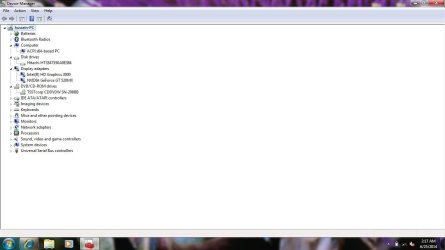
anyway, I almost managed now to acquire all the drivers needed and in device manager there is nothing missing, I included screenshot showing that everything is working fine, Plus I ran windows update but the problem stays on the dvd/cd issue.Untitled.jpg
 

My Computer

Computer type
Laptop
Computer Manufacturer/Model Number
samsung
OS
Windows 7 Ultimate x64
CPU
intel core i3
Memory
2 gb
Graphics Card(s)
geforce nVidia
Antivirus
360 internet security
Browser
internet explorer
Have you tried other DVDs or Cds ?
 

My Computer

Computer Manufacturer/Model Number
W530-3630QM1
OS
windows 7 home 64bit
CPU
INTEL-CORE I7
Memory
16GB
Hard Drives
750GB
Browser
Chrome
ohh I forgot, Laptop brand : 300E5Z-s0BAE
 

My Computer

Computer type
Laptop
Computer Manufacturer/Model Number
samsung
OS
Windows 7 Ultimate x64
CPU
intel core i3
Memory
2 gb
Graphics Card(s)
geforce nVidia
Antivirus
360 internet security
Browser
internet explorer
yeah I tried many dvds to make sure it's not from the dvd media
 

My Computer

Computer type
Laptop
Computer Manufacturer/Model Number
samsung
OS
Windows 7 Ultimate x64
CPU
intel core i3
Memory
2 gb
Graphics Card(s)
geforce nVidia
Antivirus
360 internet security
Browser
internet explorer
Hence, the problem occured just after I finished from installing windows from the CD. I inserted DriverPack dvd but it didn't worked then
 

My Computer

Computer type
Laptop
Computer Manufacturer/Model Number
samsung
OS
Windows 7 Ultimate x64
CPU
intel core i3
Memory
2 gb
Graphics Card(s)
geforce nVidia
Antivirus
360 internet security
Browser
internet explorer
Try a Different Dvd
 

My Computer

Computer Manufacturer/Model Number
W530-3630QM1
OS
windows 7 home 64bit
CPU
INTEL-CORE I7
Memory
16GB
Hard Drives
750GB
Browser
Chrome
you mean DVD Drive ?
 

My Computer

Computer type
Laptop
Computer Manufacturer/Model Number
samsung
OS
Windows 7 Ultimate x64
CPU
intel core i3
Memory
2 gb
Graphics Card(s)
geforce nVidia
Antivirus
360 internet security
Browser
internet explorer
No i mean try some other Media like a CD or Dvd to see if the Drive is working ...
 

My Computer

Computer Manufacturer/Model Number
W530-3630QM1
OS
windows 7 home 64bit
CPU
INTEL-CORE I7
Memory
16GB
Hard Drives
750GB
Browser
Chrome
I already tried that .. same thing, the dvd run and make that sound when it turns in the dvd drive, the cursor gives sign but I have nothing on screen. I dont know what's wrong, the lens or is it a driver not defined or what !!
 

My Computer

Computer type
Laptop
Computer Manufacturer/Model Number
samsung
OS
Windows 7 Ultimate x64
CPU
intel core i3
Memory
2 gb
Graphics Card(s)
geforce nVidia
Antivirus
360 internet security
Browser
internet explorer

My Computer

Computer Manufacturer/Model Number
W530-3630QM1
OS
windows 7 home 64bit
CPU
INTEL-CORE I7
Memory
16GB
Hard Drives
750GB
Browser
Chrome
I checked .. didn't help :(
 

My Computer

Computer type
Laptop
Computer Manufacturer/Model Number
samsung
OS
Windows 7 Ultimate x64
CPU
intel core i3
Memory
2 gb
Graphics Card(s)
geforce nVidia
Antivirus
360 internet security
Browser
internet explorer
Anyone here .. Some help or suggestions ?
 

My Computer

Computer type
Laptop
Computer Manufacturer/Model Number
samsung
OS
Windows 7 Ultimate x64
CPU
intel core i3
Memory
2 gb
Graphics Card(s)
geforce nVidia
Antivirus
360 internet security
Browser
internet explorer
See if you can boot from CD. If not, then the drive is no good
 

My Computer

Computer type
PC/Desktop
Computer Manufacturer/Model Number
Dell Optiplex 360 and Optiplex 755
OS
Desk 1: Win 7 Pro x32; Desk 2: Windows 10 x64
Hard Drives
500GB Crucial SSD in both Desktops
Other Info
Buffalo 6TB NAS, Raid 1
See if you can boot from CD. If not, then the drive is no good

That's not a bad suggestion, but it was working before...

Hence, the problem occured just after I finished from installing windows from the CD. I inserted DriverPack dvd but it didn't worked then

Curious issue nonetheless, and my only suggestion would be to see if he can read/write to other CD's/DVD's, but than again, the OP said he did that....

yeah I tried many dvds to make sure it's not from the dvd media

so... :confused:
 

My Computer

Computer type
PC/Desktop
Computer Manufacturer/Model Number
Custom built by me.
OS
Windows 10 Pro
CPU
Intel Core i7-4770K (3.5Ghz)
Motherboard
Gigabyte G1 Sniper 5 (F10 Bios)
Memory
32 gig Corsair Dominator Platinum (4x8Gig)
Graphics Card(s)
Sapphire Tri-X R9 Fury
Sound Card
Soundblaster ZXR
Monitor(s) Displays
NEC PA242W 24" LCD Monitor
Screen Resolution
1920 x 1200
Hard Drives
Primary - Samsung 850 Pro (512gig), Samsung 840 Pro (256gig), 2TB WD Caviar Black.
PSU
EVGA Supernova 1000 G2
Case
Cooler Master HAF X
Cooling
Corsair H100i with Corsair Air Series SP120 Quiet Fans
Keyboard
Logitech Wireless Wave
Mouse
Logitech Performance MX
Internet Speed
High Speed Cable
Antivirus
Norton Security
Browser
IE11
Other Info
Memory Timings - 1866MHz @ 9-9-9-27-1T @ 1.5 volts
See if you can boot from CD. If not, then the drive is no good

That's not a bad suggestion, but it was working before...
<snip>
Of course, it was working before. ;) When do you mean?

Point is to see if it is STILL working and can boot from a CD.
> If not, the CD died. And OP needs a new one
> If it can, then it's a software issue that occurred during the installation. And no point in buying a new one (yet)
 

My Computer

Computer type
PC/Desktop
Computer Manufacturer/Model Number
Dell Optiplex 360 and Optiplex 755
OS
Desk 1: Win 7 Pro x32; Desk 2: Windows 10 x64
Hard Drives
500GB Crucial SSD in both Desktops
Other Info
Buffalo 6TB NAS, Raid 1
Strange things can happen a few years ago i got a Lenovo g500 .. It worked perfectly one day i tried to play a DVD the drive spun lights flickered but would not play .. Thinking it was the Media tried others to no avail no matter what i tried it would not play any media ... I forgot about the DVD in the Drive when i booted the next day it brought up the list to play when Windows had loaded ... That Drive still works but only from boot ..
 

My Computer

Computer Manufacturer/Model Number
W530-3630QM1
OS
windows 7 home 64bit
CPU
INTEL-CORE I7
Memory
16GB
Hard Drives
750GB
Browser
Chrome
Of course, it was working before. ;) When do you mean?

Well when I read his post I assumed he meant very recently... like the drive suddenly quit working right after the Windows 7 install from the CD.

That said, I can only comment on what's posted. It's not like I'm sitting right there. And its kind of strange the CD/DVD drive would suddenly go dead like that.

That's what I mean ;)
 

My Computer

Computer type
PC/Desktop
Computer Manufacturer/Model Number
Custom built by me.
OS
Windows 10 Pro
CPU
Intel Core i7-4770K (3.5Ghz)
Motherboard
Gigabyte G1 Sniper 5 (F10 Bios)
Memory
32 gig Corsair Dominator Platinum (4x8Gig)
Graphics Card(s)
Sapphire Tri-X R9 Fury
Sound Card
Soundblaster ZXR
Monitor(s) Displays
NEC PA242W 24" LCD Monitor
Screen Resolution
1920 x 1200
Hard Drives
Primary - Samsung 850 Pro (512gig), Samsung 840 Pro (256gig), 2TB WD Caviar Black.
PSU
EVGA Supernova 1000 G2
Case
Cooler Master HAF X
Cooling
Corsair H100i with Corsair Air Series SP120 Quiet Fans
Keyboard
Logitech Wireless Wave
Mouse
Logitech Performance MX
Internet Speed
High Speed Cable
Antivirus
Norton Security
Browser
IE11
Other Info
Memory Timings - 1866MHz @ 9-9-9-27-1T @ 1.5 volts
Just a little note:
The Windows 8 drivers may or man not work in Windows 7.

From post # 1.

recently I had windows 8 on my laptop. so I wanted to format my laptop and install windows 7 on it.
what i did is that i backed up drivers using some software, then did the format.
If your CD/DVD player is working I would do a Clean Install and let Windows 7 install the needed drivers.

I'm no expert on this but I found a couple.
Read this Tutorials by Brink and Greg.

http://www.sevenforums.com/tutorials/1649-clean-install-windows-7-a.html

http://www.sevenforums.com/tutorials/219487-clean-reinstall-factory-oem-windows-7-a.html
 

My Computer

Computer type
PC/Desktop
Computer Manufacturer/Model Number
Home made Desktop
OS
Windows 10 Pro. 64/ version 1709 Windows 7 Pro/64
CPU
Intel i7-6800K @ 4.3
Motherboard
ASUS X-99 Deluxe II
Memory
Corsair Platinum 16 gig @2400
Graphics Card(s)
EVGA GTX 1070 OC
Monitor(s) Displays
Asus 27" LED LCD/VE278Q
Screen Resolution
1920-1080 or 1280-720 HDMI
Hard Drives
INTEL SSD 730-240 Gb Sata 3.0/
PSU
EVGA Platium 1200W
Case
Phanteks Luxe Tempered Glass 8 fans/ one radiator
Cooling
XSPC/ Water Cooled CPU
Keyboard
Das 4 Professional
Mouse
Logitech M705/MX Anywhere 2-S
Internet Speed
100 mbits
Antivirus
Microsoft Security Essentials/ Malwarebytes Premium 3.0/ SAS
Browser
I.E. 11 default/Firefox/ ISP Time Warner Cable/Spectrum
Other Info
LG BluRay Burner/
Sound system-KLipsch-THX/
Icy Dock ssd Hot Swap bays.
Back
Top