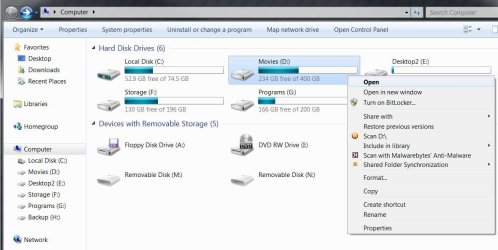
Drives in Computer give a file not associated error

barryzee

New member
Local time
8:08 AM
Messages
4
Not sure if this is the correct spot for this but I have a strange situation.

When using Computer from the start menu, I get the page that you would expect. However, if I double click on any of the drives, I get a "File does not have a program associated with it error". But, the drive links on the left hand side of that page work just fine!

Any thoughts.

Thanks for any help and best regards,
Barryzee
 

My Computer My Computer

OS
Windows 7 Home Premium

Attachments

My Computer My Computer

Computer type
PC/Desktop
Computer Manufacturer/Model Number
Medion Erazer (note to self: insert model number) - with custom additions
OS
Windows 10 Pro x64
CPU
Intel Core i5 7400 @ 3.00GHz
Motherboard
OEM supllied with PC
Memory
8GB 2133Mhz DDR4 (OEM supplied)
Graphics Card(s)
Gygabyte Windforce GTX 1050Ti (Factory Overclocked)
Sound Card
Realtek
Monitor(s) Displays
Acer Al1980 + HKC
Screen Resolution
1360*768(HKC) / 1280*1024(Acer)
Hard Drives
1TB Toshiba
1TB WD Caviar Green
120GB Samsung Evo 840
PSU
OEM supplied (no power rating on case)
Case
OEM Supplied
Cooling
Stock
Keyboard
Logitech Wireless
Mouse
Logitect Wireless
Internet Speed
40Mb/s Down 10Mb/s Up
Antivirus
Defender
Browser
Firefox
Hello barryzee, welcome to Seven Forums!


Maybe I don't understand the question but what happens if you (once) right click a drive?

click image to enlarge
right.JPG
 

My Computer My Computer

Computer Manufacturer/Model Number
* BFK Customs *
OS
W 7 64-bit Ultimate
CPU
Intel Q9550 Yorkfield
Motherboard
ASUS P5Q Pro
Memory
8GB Dominator 8500C5D
Graphics Card(s)
ATI : XFX 5870
Sound Card
Realtek HD Audio 7-1
Monitor(s) Displays
1x 47" LCD HDMI & 3x 26" LCD HDMI
Screen Resolution
1920x1080P & 1920x1200
Hard Drives
1x 80GB Intel X25-M G2 SSD : 1x 500GB & 1x 640GB WD Caviar Black(s)
PSU
Corsair 620HX
Case
Cooler Master RC-690
Cooling
Tuniq Tower 120, 2x 140mm and 3x 120mm case fans
Keyboard
Microsoft 500
Mouse
Razer Diamondback 3G
Internet Speed
14 Mb/s
Other Info
1x Koutech 3Gb/s SATA HDD Hot Swap Rack
This is a long shot, but it may help.

First, turn on the display of ALL hidden files, including system files:
  1. Open Explorer
  2. Click on "Organize"
  3. Click "Folder and search options"
  4. Click the "View" tab
  5. Click to select "Show hidden files, folders, and drives"
  6. Remove the checkmark from "Hide protected operating system files"
  7. Click "OK"
Once you have the display of all hidden files enabled (as shown above), go to the each drive on your computer (use the left hand pane of Explorer if you have to). Do you see a file called "autorun.inf" in the root of the drive? If yes, delete it. Do this for all drives.

If you have found any "autorun.inf" files in your hard drives, do yourself a favor and update your anti-virus, then run a full system scan. You shouldn't have "autorun.inf" files in your hard disk.

It's also possible that you A/V program has removed the viruses, but I've seen it a hundred times where the virus is removed, but the trigger (the "autorun.inf" files) is not, which is likely what is causing the errors on your computer when you double-click a drive icon in Explorer - it's trying to run whatever is being specified by the autorun file, but it no longer exists.
 

My Computer My Computer

Computer type
PC/Desktop
Computer Manufacturer/Model Number
Virtual Machine
OS
Windows 7 Professional 32-bit SP1
CPU
AMD A4/A6
Motherboard
Intel Corporation 440BX Desktop Reference Platform
Memory
3.00GB EDO
Graphics Card(s)
VMware SVGA 3D
Sound Card
High Definition Audio Device
Monitor(s) Displays
Generic Non-PnP Monitor on VMware SVGA 3D
Screen Resolution
1440x900
Hard Drives
1 x 60GB VMware Virtual SATA Hard Drive ATA Device
Antivirus
Kaspersky Total Security
drives in computer

Thanks for the welcome barefoot kid-
Your image is exactly what I am talking about. I CAN right click open the drives on the right side. However if I double click them to open, I have an association error. I can click on the drives down the left window and have them open. spooky
Best regards,
barryzee

Hello barryzee, welcome to Seven Forums!


Maybe I don't understand the question but what happens if you (once) right click a drive?

click image to enlarge
View attachment 78064
 

My Computer My Computer

OS
Windows 7 Home Premium
Hello again.


What happens when you try the instructions offered by Dzomlija above?
 

My Computer My Computer

Computer Manufacturer/Model Number
* BFK Customs *
OS
W 7 64-bit Ultimate
CPU
Intel Q9550 Yorkfield
Motherboard
ASUS P5Q Pro
Memory
8GB Dominator 8500C5D
Graphics Card(s)
ATI : XFX 5870
Sound Card
Realtek HD Audio 7-1
Monitor(s) Displays
1x 47" LCD HDMI & 3x 26" LCD HDMI
Screen Resolution
1920x1080P & 1920x1200
Hard Drives
1x 80GB Intel X25-M G2 SSD : 1x 500GB & 1x 640GB WD Caviar Black(s)
PSU
Corsair 620HX
Case
Cooler Master RC-690
Cooling
Tuniq Tower 120, 2x 140mm and 3x 120mm case fans
Keyboard
Microsoft 500
Mouse
Razer Diamondback 3G
Internet Speed
14 Mb/s
Other Info
1x Koutech 3Gb/s SATA HDD Hot Swap Rack
Great minds think alike 8-)

Thanks Peter-
That's actually where I started. I keep my view options to see everything (Hate when MS tries to help me by hiding things) No autoruns. The regfix above solved the issue.

Thanks for the kind assistance.
barryzee

This is a long shot, but it may help.

First, turn on the display of ALL hidden files, including system files:
  1. Open Explorer
  2. Click on "Organize"
  3. Click "Folder and search options"
  4. Click the "View" tab
  5. Click to select "Show hidden files, folders, and drives"
  6. Remove the checkmark from "Hide protected operating system files"
  7. Click "OK"
Once you have the display of all hidden files enabled (as shown above), go to the each drive on your computer (use the left hand pane of Explorer if you have to). Do you see a file called "autorun.inf" in the root of the drive? If yes, delete it. Do this for all drives.

If you have found any "autorun.inf" files in your hard drives, do yourself a favor and update your anti-virus, then run a full system scan. You shouldn't have "autorun.inf" files in your hard disk.

It's also possible that you A/V program has removed the viruses, but I've seen it a hundred times where the virus is removed, but the trigger (the "autorun.inf" files) is not, which is likely what is causing the errors on your computer when you double-click a drive icon in Explorer - it's trying to run whatever is being specified by the autorun file, but it no longer exists.
 

My Computer My Computer

OS
Windows 7 Home Premium
that is good news :) I'll hang on to that regfix then for future use. Glad you got it sorted Barryzee :)
 

My Computer My Computer

Computer type
PC/Desktop
Computer Manufacturer/Model Number
Medion Erazer (note to self: insert model number) - with custom additions
OS
Windows 10 Pro x64
CPU
Intel Core i5 7400 @ 3.00GHz
Motherboard
OEM supllied with PC
Memory
8GB 2133Mhz DDR4 (OEM supplied)
Graphics Card(s)
Gygabyte Windforce GTX 1050Ti (Factory Overclocked)
Sound Card
Realtek
Monitor(s) Displays
Acer Al1980 + HKC
Screen Resolution
1360*768(HKC) / 1280*1024(Acer)
Hard Drives
1TB Toshiba
1TB WD Caviar Green
120GB Samsung Evo 840
PSU
OEM supplied (no power rating on case)
Case
OEM Supplied
Cooling
Stock
Keyboard
Logitech Wireless
Mouse
Logitect Wireless
Internet Speed
40Mb/s Down 10Mb/s Up
Antivirus
Defender
Browser
Firefox
Hello barryzee, glad you've found a solution that works for you; thanks for the update.
 

My Computer My Computer

Computer Manufacturer/Model Number
* BFK Customs *
OS
W 7 64-bit Ultimate
CPU
Intel Q9550 Yorkfield
Motherboard
ASUS P5Q Pro
Memory
8GB Dominator 8500C5D
Graphics Card(s)
ATI : XFX 5870
Sound Card
Realtek HD Audio 7-1
Monitor(s) Displays
1x 47" LCD HDMI & 3x 26" LCD HDMI
Screen Resolution
1920x1080P & 1920x1200
Hard Drives
1x 80GB Intel X25-M G2 SSD : 1x 500GB & 1x 640GB WD Caviar Black(s)
PSU
Corsair 620HX
Case
Cooler Master RC-690
Cooling
Tuniq Tower 120, 2x 140mm and 3x 120mm case fans
Keyboard
Microsoft 500
Mouse
Razer Diamondback 3G
Internet Speed
14 Mb/s
Other Info
1x Koutech 3Gb/s SATA HDD Hot Swap Rack
Ran the reg fix

Thanks severedsolo-
Looked at the website it came from. Read through the reg file in notepad. Didn't look like it would hurt much. Backed up reg & created restore point.

Decided what the heck, I have an image. Ran it and IT WORKED. Thanks so much for the help.

Best regards,
Barryzee

Hi Barryzee it sounds like your drive associations have been messed up, a quick google found the attached reg fix for you run it then restart your computer.

   Warning
I have no idea how trustworthy this is. Please backup your registry and any files you dont want to lose first just in case: http://www.sevenforums.com/tutorials/4230-registry-backup-restore.html I would also recommend making a system restore point http://www.sevenforums.com/tutorials/697-system-restore-point-create.html
 

My Computer My Computer

OS
Windows 7 Home Premium
Back
Top