
Drop Down Menu Confusion

windowsn0b

New member
Local time
11:19 PM
Messages
3
Hi everyone!

First of all, this ISN'T the problem you probably think it is, form the title. Most of the Windows 7 drop down menu problems are related to it not staying open. This is why I couldn't find my answer online. Mine's just weird, and slightly annoying.
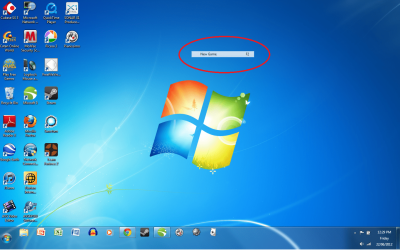
I'm on a laptop, and I've set it to sleep when I close the top. When I turn it on, everything's fine. but when I use any sort of drop down menu, or right click, the first thing I click on stays there until I sleep the computer again...it's almost like dead pixels, but it's an entire option bar...
I've attached a picture that shows what happens. I'd like to know how to stop it from happening, or at least fix it when it does!

Thanks!
 

Attachments
  • Drop Down Menu Problem.png
    Drop Down Menu Problem.png
    384.8 KB · Views: 13

My Computer

OS
Windows 7 Home Premium
Just kill the explorer once from task manager and restart and see whether it stays or goes then we can decide further
 

My Computer

Computer type
Laptop
Computer Manufacturer/Model Number
Sony Vaio VPCEH25EN
OS
Windows 8.1u1 x64
CPU
i3
Memory
DDR3 6GB
Graphics Card(s)
Nvidia 410
Screen Resolution
1366*768
Hard Drives
Toshiba 1TB
Internet Speed
Dial Up 56kbps
No, that didn't do anything. It got rid of everything on the desktop EXCEPT that!
Thanks!
 

My Computer

OS
Windows 7 Home Premium
Is the menu option that is stuck executable? i.e. can you click on it or highlight it?

I have seen this on Taskbar menu's sometimes when i work to fast or try to do to many things at once. F5 key can be used for refresh and clear it from the screen. But if its not dissapearing when you kill explorer, I don't think that will work.


You could try Scannow maybe that will fix the issue....

http://www.sevenforums.com/tutorials/1538-sfc-scannow-command-system-file-checker.html
 

My Computer

Computer type
Laptop
Computer Manufacturer/Model Number
ASUS G60-RBBX05
OS
Win7 Home Premium 64x
CPU
Intel Core 2 Duo P7450 / 2.13 GHz (2.29 with Extreme Turbo)
Memory
4 GB PC-6400 Hyundai (2X2) at 800Mhz
Graphics Card(s)
NVIDIA GeForce GTX 260M 1GB DDR3 VRAM
Monitor(s) Displays
16" LED Backlit
Screen Resolution
1366 x 768 on laptop 1600x1050 max res on 22" external mon
Hard Drives
OCZ Agility 3 60GB SSD / 320 GB - Serial ATA-150 - 7200 rpm
PSU
6-cell Lithium ion { lasts 1.5 hours }
Case
ASUS G60 Laptop
Keyboard
Chicklet type back-lit (white light) keyboard
Mouse
Logitech G9 Laser Mouse 3200dpi and 1000 reports per minute
Internet Speed
Comcast 8.60mb/s up - 3.11mb/s down
Antivirus
MSE
Browser
Firefox
Other Info
General mid-budget gaming Comp. Low batterylife - High FrameRates - currently overheating problems :(

2nd Rig: Case: Rosewill BLACKHAWK Gaming ATX Mid Tower Computer Case

Mobo: GIGABYTE GA-990FXA-UD3
CPU: AMD FX-6200 Zambezi 3.8GHz (4.1GHz Turbo)
Heatsink: COOLER MASTER V8 CPU Cooler
RAM: Patriot Viper 3 8GB (2 x 4GB) 240-Pin DDR3 SDRAM 1866 (PC3 15000)
GPU: SAPPHIRE Radeon HD 6850 1GB 2
Yeah, everything still works on the menus, including the one that's stuck. It directly doesn't affect the functions, but I do lots of music/art editing, at it gets in the way visually, and really impairs what I'm trying to do.
 

My Computer

OS
Windows 7 Home Premium
Back
Top