DropboxUpdate.exe generating UAC requests & update error 0x800040002

whaisler

New member
Local time
10:20 PM
Messages
4
DropboxUpdate.exe generating UAC requests & update error 0x800040002

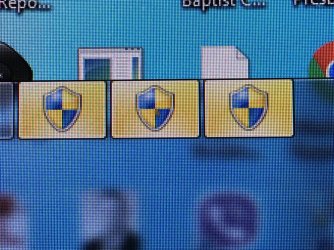
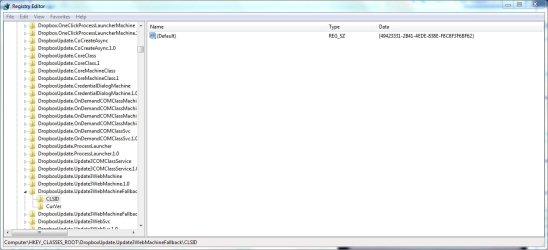
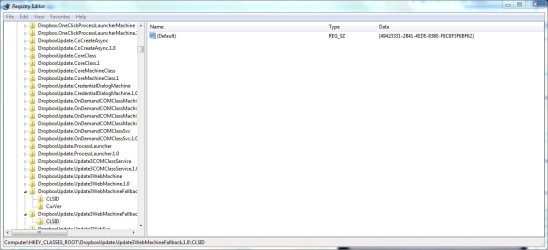
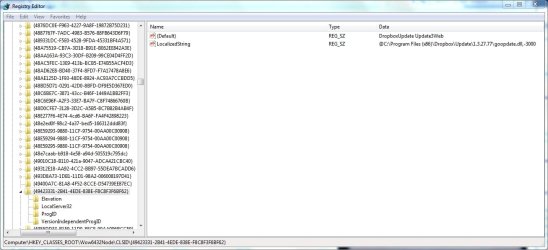
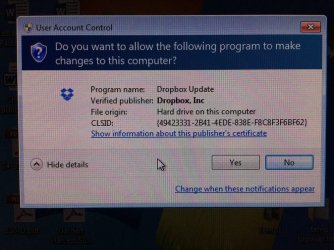
About 2-3 weeks ago, I started receving 5-6 UAC requests per day from DropboxUpdate.exe. See attachment UAC_message1.jpg and UAC_message2.jpg. These messages all point back to registry entries for DropboxUpdate.exe with data {49423331-2B41-4EDE-838E-F8C8F3F6BF62}. See attachments DropboxUpdate_registry_entry1.jpg, DropboxUpdate_registry_entry2.jpg and DropboxUpdate_registry_entry3.jpg.

When this UAC problem started, the Dropbox version I had was 3.14.x, Dropbox would not update itself and I received a waring from Dropbox that syncing would stop because Dropbox could not update itself. I d/l the offline Dropbox installer (3.16.1) but when I ran it, it gave me an error "Dropbox Update installation failed with error 0x800040002." Thinking this updating problem might be a firewall issue, I allowed dropbox.exe and dropboxupdate.exe through firewall, and then I disabled the firewall, but still the same DB error message and no update. Finally, after starting Windows in safe mode, the Dropbox 3.16.1 offline installer did run and the DB version is now 3.16.1. I though that the problem with UAC and DB updating was solved, but about 3 days later, the UAC messages are back. I did a trouble ticket with Dropbox, but their response is that the update error 0x800040002 is an OS problem.

Anyone seen this problem? Any thoughts on how to fix? Is this possibly a corrupt registry entry? I'm grasping for ideas here.
 

Attachments
  • UAC_message1.jpg
    UAC_message1.jpg
    328.5 KB · Views: 0
  • UAC_message2.jpg
    UAC_message2.jpg
    483 KB · Views: 0
  • DropboxUpdate_registry_entry1.jpg
    DropboxUpdate_registry_entry1.jpg
    300.2 KB · Views: 2
  • DropboxUpdate_registry_entry2.jpg
    DropboxUpdate_registry_entry2.jpg
    296.9 KB · Views: 0
  • DropboxUpdate_registry_entry3.jpg
    DropboxUpdate_registry_entry3.jpg
    340.2 KB · Views: 1

My Computer

Computer Manufacturer/Model Number
Dell XPS 8500
OS
Windows 7 Professional x64
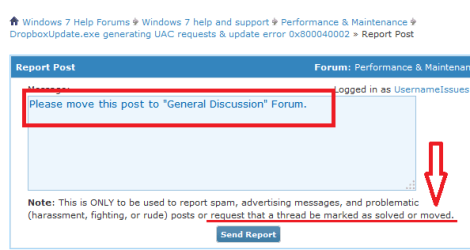
How do I move this post to "General Discussion" Forum?
 

My Computer

Computer Manufacturer/Model Number
Dell XPS 8500
OS
Windows 7 Professional x64

My Computer

Computer type
Laptop
Computer Manufacturer/Model Number
Employer provided Dell Latitude
OS
W7 Pro SP1 64bit
CPU
i7
Memory
8GB
Graphics Card(s)
Intel HD Graphics
Hard Drives
crappy SSD
Antivirus
Employer mandated Symantec Endpoint Protection
Browser
Pale Moon 64bit, IE11 64bit & Chrome 64bit
~~~
Thinking this updating problem might be a firewall issue, I allowed dropbox.exe and dropboxupdate.exe through firewall,
~~~
Please undo those changes.

~~~
...and then I disabled the firewall,
~~~
If you have not already done so, please turn the firewall back on.


What antivirus app are you using?
 

My Computer

Computer type
Laptop
Computer Manufacturer/Model Number
Employer provided Dell Latitude
OS
W7 Pro SP1 64bit
CPU
i7
Memory
8GB
Graphics Card(s)
Intel HD Graphics
Hard Drives
crappy SSD
Antivirus
Employer mandated Symantec Endpoint Protection
Browser
Pale Moon 64bit, IE11 64bit & Chrome 64bit
Turn firewall back on, which firewall app using?

The firewall (McAfee Total Protection) was re-enabled after the successful installation of DB 3.16.1 (from safe mode). Firewall is up and showing that dropbox.exe & dropboxupdate.exe has incoming and outgoing access, but I am not sure which ports are open -> McAfee is set to "Use designated ports (recommended)." UAC prompts for DB still occurring with firewall enabled.
 

My Computer

Computer Manufacturer/Model Number
Dell XPS 8500
OS
Windows 7 Professional x64
You won't find very many active members of this forum that like any software written by McAfee.

As a test, uninstall any McAfee software and temporarily install MSE instead.

Turn on the Windows firewall - if it is off.

See if that stops the prompt from the dropbox update tool.
 

My Computer

Computer type
Laptop
Computer Manufacturer/Model Number
Employer provided Dell Latitude
OS
W7 Pro SP1 64bit
CPU
i7
Memory
8GB
Graphics Card(s)
Intel HD Graphics
Hard Drives
crappy SSD
Antivirus
Employer mandated Symantec Endpoint Protection
Browser
Pale Moon 64bit, IE11 64bit & Chrome 64bit
Dropbox is becoming a bloated mess these days. I uninstalled and stopped using it as the last time it updated, it broke my Windows task scheduler. Couldn't get it to work, kept throwing up an MMC error. I had to restore an earlier image and as soon as DB auto-updated again, it once again broke my Task Scheduler. I had to disable my internet, restore the image AGAIN and uninstalled Dropbox. That was 6 months ago and haven't used it since. No more Task Scheduler issues since.
I know it might sound obvious, but have you tried completely uninstalling DB and then try to reinstall again?
 

My Computer

Computer type
PC/Desktop
Computer Manufacturer/Model Number
Custom Build
OS
Win 7 Ultimate, Win 8.1 Pro, Linux Mint 19 Cinnamon (All 64-Bit)
CPU
Intel i5 4690K
Motherboard
Gigabyte Z97X-UD3H
Memory
Corsair Vengeance LP 32GB DDR3
Graphics Card(s)
MSI GTX 1060 GAMING X 6GB
Sound Card
Onboard
Hard Drives
Samsung 850 EVO 250GB SSD (x2)
Samsung 860 EVO 1TB SSD (x2)
Crucial MX300 525GB SSD
WD Blue 2TB 5400rpm Intellipark Disabled (x2)
PSU
Corsair HX750i
Case
Phanteks Enthoo Pro
Cooling
CM Hyper 212 EVO on CPU, Noctua Redux NF-P14S 1500rpm (x6)
Keyboard
Corsair K70 RGB LUX
Mouse
Corsair Sabre RGB
Antivirus
Avast Free, MalwareBytes, SAS & CryptoPrevent
Browser
Chrome
Other Info
StarTech PEXESAT322I 2 Port PCI-E SATA Card
ASUS PCE-AC56 Dual-band AC1300 Wireless Card
Akasa FC.Six Manual Fan Controller
And a Partridge in a Pear Tree!
Do you find a solution on this? I have the same issue:(
 

My Computer

Computer type
PC/Desktop
Computer Manufacturer/Model Number
costum
OS
windows 10
CPU
intel
Motherboard
asus
Memory
32
Graphics Card(s)
6950
Hard Drives
2 t
Antivirus
avg
Browser
chrome
I never did find a solution; at least not one that I can identify. However, the problem went away at some point in time so I sopped worrying about it. Sorry that I cannot give you any helpful ideas.
 

My Computer

Computer Manufacturer/Model Number
Dell XPS 8500
OS
Windows 7 Professional x64
Do not use dropbox. There's plenty of better alternatives which aren't trojan horses.
 

My Computer

Computer type
PC/Desktop
Computer Manufacturer/Model Number
Custom
OS
Windows 7 x64 Ultimate
CPU
AMD-FX8350 Black Edition
Motherboard
ASUSTeK COMPUTER INC. M5A97 LE R2.0 (Socket 942)
Memory
8,00GB Dual-Channel DDR3 1866mhz
Graphics Card(s)
Sapphire 2048MB ATI AMD Radeon HD 7850 (Pitcairn)E
Antivirus
ESET Internet Security 2015
Back
Top